
Where Flight Simulation Enthusiasts Gather from Around the World!
AVSIM Library - Search Results

| Category: Flight Simulator 2004 - Utilities | |
| Courseplanner 3.D.3, Flight Planner |

|
File Description:
FS2004/FSCOF/FS2002/FS2000 Courseplanner 3.D.3, stand alone flight planner.
Complete flight management on a realistic world map. Over +30000 SID/STAR as well as +60000 waypoints.
Use YOUR own scenery, (airports, Navaids, etc), and all the planes in your hangar.
Monitor your progress, all the AI traffics, (and multiplayer), real time on the internet and intranet, this includes altitude, speed and more.
Great to use when flying with VATSIM or IVAO.
Use Courseplanner over the network, (CP on one machine and FS on another), or both on the same machine.
Runs independently to FS, (you do not even need to have FS running).
Import/Export FS flight plans and/or adventures.
Create printable maps, (en route, departure, airport, ILS etc), as well as the briefing files.
Courseplanner will fly the aircraft for you and even 'pause' the flight near the airport, or any point for that matter.
| Filename: | Courseplanner_3D3_Flight_Planner.zip |
| License: | Shareware, time limited |
| Added: | 23rd December 2005, 12:45:50 |
| Downloads: | 8,062 |
| Author: | MyOddweb.com Team |
| Size: | 26.35 MB |
| Category: Flight Simulator 2004 - Gauges | |
| Douglas DC-3 Three Fuel Tank Automixture Gauge |
|
File Description:
For three-tank operation, this gauge may be of interest to those pilots who like to fly without checking the "Enable automixture" function in the "Aircraft/Realism Settings" pull-down menu, but want more DC-3 realism than can be achieved with FS2004's simulation of mixture control. It requires prior installation of Beaumont and Bitzer's Douglas DC-3 Three Fuel Tank Modification, to be found in DC3_3TK.ZIP. Its purpose is to replicate the auto-rich and auto-lean settings on the mixture controls, including a fully functional mixture control. Its calibrated range of operation is from 3000 to 12000ft. density altitude. In the auto-rich position, it approximates the checked "Enable automixture" setting on the "Aircraft/Realism Settings" menu. In the auto-lean position, the mixture is leaned to increase the exhaust gas temperature about 30 degrees K. from auto-rich, and will increase achieved miles per gallon.
| Filename: | Douglas_DC3_Three_Fuel_Tank_Automixture_Gauge.zip |
| License: | Freeware |
| Added: | 21st January 2004, 00:59:19 |
| Downloads: | 1,225 |
| Author: | Dave Bitzer, Mark Beaumont |
| Size: | 490.53 KB |
| Category: Flight Simulator 2004 - Gauges | |
| Douglas DC-3 Four Fuel Tank Automixture Gauge |
|
File Description:
For four-tank operation, this gauge may be of interest to those pilots who like to fly without checking the "Enable automixture" function in the "Aircraft/Realism Settings" pull-down menu, but want more DC-3 realism than can be achieved with FS2004's simulation of mixture control. It requires prior installation of Beaumont and Bitzer's Douglas DC-3 Four Fuel Tank Conversion Kit, to be found in DC3_4TK.ZIP. Its purpose is to replicate the auto-rich and auto-lean settings on the mixture controls, including a fully functional mixture control. Its calibrated range of operation is from 3000 to 12000ft. density altitude. In the auto-rich position, it approximates the checked "Enable automixture" setting on the "Aircraft/Realism Settings" menu. In the auto-lean position, the mixture is leaned to increase the exhaust gas temperature about 30 degrees K. from auto-rich, and will increase achieved miles per gallon.
| Filename: | Douglas_DC3_Four_Fuel_Tank_Automixture_Gauge.zip |
| License: | Freeware |
| Added: | 21st January 2004, 00:59:44 |
| Downloads: | 1,819 |
| Author: | Dave Bitzer, Mark Beaumont |
| Size: | 501.62 KB |
| Category: Flight Simulator 2004 - Miscellaneous Files | |
| Go To any Airport Version 3 |
|
File Description:
Go To Any Airport Version 3.- Now 3 Airports Included.
Always wanted to return to your favourite local Airport from anywhere in the world? simply - with no fuss? Look no Further.
Start at your Designated Airport, [in this case London Gatwick or Innsbruck or Dublin in a 737], then Goto any Airport! - via the FS9 World menu and return to the Original Designated Airport - every time! - By Just turning the GPS/nav switch to GPS and Flight Director and autothrottle on whilst still on the ground.Click on the Autopilot and Nav Hold switch once above 1000ft - thats it !! . Set Weather and Altitude as required and Speed in autopilot and away you go. Use the FS9 ATC as You Travel, call into designated Airport when close and receive the curent ATIS and Runway approach in use.
HAVE FUN.
(This is different to the great circle direct routes that you can programme into the very good FS9 GPS - each and every time you start from a new airport).
| Filename: | Go_To_any_Airport_Version_3.zip |
| License: | Freeware |
| Added: | 7th March 2004, 17:42:32 |
| Downloads: | 434 |
| Author: | Alan Trussell |
| Size: | 26.95 KB |
| Category: Flight Simulator 2004 - Original Aircraft | |
| Supermarine Spitfire Mk. IX |
|
File Description:
The Spitfire was developed continuously throughout World War II, through some 24 versions. A major revision of the original Spitfire was the Mk IX, a model quickly cobbled together to meet the challenge of the newly emerging Focke-Wulf 190. The high-altitude version Mk IX was essentially a Mk V with a 1,710-hp Merlin 70 engine, capable of more than 400 mph. From 1942 to 1944 5,665 Mk IXs were built, and at war's
end many were still in RAF service. This is the airplane flown by Lt.-Col Robert (Bob) Rogers, commanding officer of Nr. 40 Squadron of the South African Air Force in Italy during 1944.
This model has full animation, full lighting effects and a realistic panel with accurate views in all directions. a Checklist is also provided. The "Aircraft overstressed"-problem that occurs when trying fast maneuvers has also been rectified, so you can throw it about at your hearts content. HAPPY FLYING!!
| Filename: | Supermarine_Spitfire_Mk_IX.zip |
| License: | Freeware |
| Added: | 1st May 2004, 19:46:16 |
| Downloads: | 3,144 |
| Author: | Vasco Ferreira |
| Size: | 1.97 MB |
| Category: Flight Simulator 2004 - Miscellaneous Files | |
| GoTo Any Airport |
|
File Description:
GoTo Any Airport.
Inclued here Heathrow and London Luton. Always wanted to return to your favourite local Airport from anywhere in the world? simply - with no fuss? Look no Further.
Start at these Designated Airports,then Goto any Airport! - via the FS9 World menu and return to the Original Airport - every time! - By Just turning the GPS/nav switch to GPS and Flight Director and autothrottle on whilst still on the ground.Click on the Autopilot, IAS, ALT and Nav Hold switches once above 1000ft - thats it !! . Set Weather and Altitude as required and Speed in autopilot and away you go. Use the FS9 ATC as You Travel, call into Airport when close and receive the curent ATIS and Runway approach in use.
The added circuit flights are on Autopilot and allow you to observe the airport befor landing.They make good moving screen savers - but make sure you have plenty of fuel!compatible with UK2000 Airports & VFR scenery for UK.
| Filename: | GoTo_Any_Airport.zip |
| License: | Freeware |
| Added: | 19th June 2004, 07:12:30 |
| Downloads: | 690 |
| Author: | Alan Trussell |
| Size: | 38.37 KB |
| Category: Flight Simulator 2004 - Panels | |
| Bristol Britannia |
|
File Description:
A highly detailed and comprehensive panel designed for Mike Stone's Bristol
Britannia aircraft. In addition to the standard instrumentation, includes cabin
announcements, traffic radar, fuel management etc.
Also requires a) FSUIPC (the latest version is always available at http://www.schiratti.com/dowson.html and is essential for the operation of some of the gauges in this panel), b) (optional) Flight Deck Sound Effects available here at AVSIM - fdsfxpnl.zip, and c) (optional) GPWS Altitude Call-Out Sounds available here at AVSIM - fpda_a330_callout.zip.
The manual is available in plain text format in this main download, or you can download an illustrated manual separately from the same download site in PDF format (britpanm.zip).
This is the result of over eighteen months of development and has been produced
specifically as a thankyou to all the people that have produced free add-ons that I have benefitted from.
I hope this enhances the pleasure of flying the only British-built long long-range turboprop airliner.
| Filename: | Bristol_Britannia.zip |
| License: | Freeware |
| Added: | 30th November 2004, 01:15:55 |
| Downloads: | 2,436 |
| Author: | John Hinson |
| Size: | 9.41 MB |
| Category: Flight Simulator 2004 - Flight Plans | |
| Leisure International Level D Flightplan |
|
File Description:
Using information gathered and sent to me by a wonderful individual off the LDS forums, I have compiled the flightplan to reenact the famous Leisure Intl trip from EGKK London Gatwick to KMCO Orlando Intl. This file is ready to fly, just need to input the other data such as your ZFW, etc. All waypoints and routes included INCLUDING the departure and arrival speed/altitude constraints as published in the official charts!!!! This is for the FMC of the Level D Simulation aircraft. I also recommend using the OSS Gatwick 2004 scenery and the Simflyers KMCO scenery, along with FSGenesis terrain meshes to give the best effect for this wonderful flight. Of course who would want to fly this without the awesome Leisure International repaint here in the AVSIM library? No readme included. The procedure is simple -- download it, unzip it and place it in your /Level-D Simulations\navdata\Flightplans folder. Enjoy!!!!!
| Filename: | Leisure_International_Level_D_Flightplan.zip |
| License: | Freeware |
| Added: | 28th April 2005, 13:15:58 |
| Downloads: | 2,004 |
| Author: | Christopher N. Dittmar |
| Size: | 3.77 KB |
| Category: Flight Simulator 2004 - Flight Plans | |
| NW Tour Flights |
|
File Description:
NW Tour Flights consists of 7 flights through Northwest Canada and Alaska. The flights begin in Juneau and continue to Fairbanks, Whitehorse, Yellowknife, Edmonton, Vancouver, B.C., Ketchikan and back to Juneau. You can fly them in any order you choose.
The Flight Plans (.PLN files) were developed using the FS2004 default 737-400, with clear weather. They use the autopilot from takeoff to landing. The speed, altitude, weather, radios and various other controls are the pilot’s responsibility. Most landings are IFR and all are under the control of the autopilot. The .FLT & .WX files were created with Real world weather (static) running. As a result, FLT 01 starts out in Juneau with the 737-400 in snowy weather and low clouds. You can take off in the snow OR change the weather to "Clear Skies or Fair Weather" to enjoy a scenic take off and climb out from Juneau. And when you return to Juneau from Ketchikan, your approach down the fiord will be a memorable flight.
| Filename: | NW_Tour_Flights.zip |
| License: | Freeware |
| Added: | 30th March 2004, 04:42:45 |
| Downloads: | 1,596 |
| Author: | John Resch |
| Size: | 1.38 MB |
| Category: Flight Simulator 2004 - Original Aircraft | |
| Ala Littoria, C.R.D.A. Cant.Z.506A / C |
|
Images related to this file:
File Description:
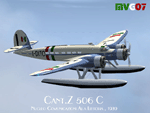
Developed from a design of Ing. Zappata, the first prototype of this entirely wooden construction seaplane, flown by test pilot Stoppani, did its maiden flight, powered by three American made Wright Cyclone, in August 1936 and gained immediately eight world records in speed and two in altitude in the seaplane category. Successive versions, powered by three Alfa Romeo 126 RC10 (later RC34), gained another 16 world records. These airplanes (A or C) were intended for commercial transport of 12/14 passengers, 25 of them were employed by 'Ala Littoria' Company on Mediterranean routes, the Royal Italian Air Force bought another 13 similar aircraft. During WWII all the civilian aircraft, acquired by Regia Aeronautica (Royal Italian Air Force), were used in communication and SAR roles.
Complete aircraft. 3 Different Hi-Res GMax models (3 different versions), features the usual moving parts, such as all flight controls, props pitch and navlights; Six different liveries (for A and C versions); 2D panel only (NO VC). Created by Manuele Villa , July 2007. Installation instructions included.
| Filename: | Ala_Littoria__CRDA_CantZ506A__C.zip |
| License: | Freeware |
| Added: | 10th May 2010, 07:25:44 |
| Downloads: | 3,556 |
| Author: | Manuele Villa |
| Size: | 21.31 MB |


© 2001-2026 AVSIM Online
All Rights Reserved
Privacy Policy |