
Where Flight Simulation Enthusiasts Gather from Around the World!
AVSIM Library - Search Results

| Category: Flight Simulator 2004 - Miscellaneous Files | |
| Shoot 1.6.3' Voice Contro File |

|
File Description:
"Shoot 1.6.3" voice control file for use with FS2004. You will need to download the main "freeware" program from http://clans.gameclubcentral.com/shoot/downloads.php which will allow you to make use of this control file for FS2004. The program is brilliant and allows you to control FS2004 by voice and it's totally free! All I have done is made a config file that works very well with FS2004.
It will allow you to; speak to ATC and instead of fighting with the keyboard or yoke/stick so you can fly more like a real pilot and keep your hands on the yoke more of the time. For example a commercial jet pilot calls out to the co-pilot to get the gear up and simply says "gear up". That's just what you will have to do, just like the real thing; the gear will go up when you make the call. When FS2004 ATC controller tells you to reply you can just say "roger" or "hello" or "ATC" or "air traffic" etc, etc, and the ATC window will pop up. Then all you have to do is call out the command instead of pushing buttons that real pilots don't use. Does a real pilot push a button to look out of the window or use a "mouse" to engage the autopilot?
Similarly you can call out "autopilot engage" or "autopilot master" or "autopilot disengage" and that's just what happens; the autopilot comes on/off. The best part though is when you try looking around the cockpit. If you want to move your head up you just say "move up" and presto you are higher up in your seat. You can move to the left or
Right, back or forward. You can say "zoom in" and that's what happens. You can say "reset zoom" and so on. You can say "next view" and then the view may be outside or another panel. Alternatively, you can say "panel 2" and the radio panel will come up in the 737 so you can tune the radios. If you have FS navigator installed all you have to
do is say "navigator" and the map comes up, and then say navigator again and off it goes. Just for once it is easy and possible to make full use of FS2004. Using this program has afforded me the opportunity of making better use of the views available, (and I have CH products yoke so if was never hard) but now it's even easier.
All the panels can be activated in this way, and control of the autopilot and control of FS2004. It's probably the best kept secret. I've made a file so we can all share in this freebie of a program. I've included a readme and instructions of how to make the best use of the program.
Config file for FS2004 only is provided.
| Filename: | Shoot_163_Voice_Contro_File.zip |
| License: | Freeware |
| Added: | 7th January 2004, 19:52:26 |
| Downloads: | 8,795 |
| Author: | Peter Wilding |
| Size: | 21.83 KB |
| Category: Flight Simulator 2004 - Scenery | |
| Avon STOLPort (KWHR) |
|
File Description:
A recreation of the Avon STOLPort (ident KWHR) for MS Flight Simulator 2004, A Century of Flight. Avon was operated as an exclusive destination for Rocky Mountain Airways between (approximately) 1978 and sometime in the late 80's or early 90's. The 4,000' runway was short for the nearly 7,500' elevation, and surrounded by mountains, some towering over 6,000' above the airport elevation. To allow all weather operation, the airport eventually featured what was reported as the steepest ILS ever constructed, with a seven degree glideslope. RMA had exclusive use of the tiny STOLPort and operated it with 50-passenger De Haviland Dash 7 equipement.
Lacking the original chart, I surveyed in FS and plotted what is hopefully an accurate representation of the ILS approach, using my best understanding of TERPS - the US standard for instrument approaches. I also created an NOS-style IAP chart of this approach for the package. A text Takeoff Minimums & Procedure is also included.
AI ATC & traffic recognition of the approach will hopefully follow, but does not exist yet. In other words, you can fly this approach and see the localizer in the GPS, but AI ATC will not give you vectors to it. You'll need to follow the full procedure included on the chart.
Please see the full Readme.txt in "Flight Simulator 9\Addon Scenery\KWHR\Docs" in this zipfile for information on installation of the scenery, flying the approach, and more on the history of the Avon STOLPort.
| Filename: | Avon_STOLPort_KWHR.zip |
| License: | Freeware, limited distribution |
| Added: | 12th May 2008, 23:14:38 |
| Downloads: | 418 |
| Author: | Stephen Comer |
| Size: | 2.1 MB |
| Category: Flight Simulator 2004 - Utilities | |
| ILS and GPS Approach Creator v1.1 for FS9 and FSX (for non-US/UK users) |
|
File Description:
The original version of this program did not work on computers in countries which use a comma as the decimal separator (apologies for that). Version 1.1 fixes this problem and should work in all countries (including the US and UK) regardless of the format of their decimal numbers. This is the full package, so you do not need to download version 1.0 as well. If the original version is working on your computer, then there is no need for you to download this version instead, as the two versions are functionally identical. This easy-to-use program allows the user to add an ILS and/or a GPS approach to any airport in FS9 or FSX. The user will be able to select the approach in the GPS unit, and request the approach from ATC. The ATC will then vector you to make an ILS or GPS approach. The AI will also be able to use the ILS approach, and you will hear them say so over the radio. The program was designed with the non-expert user in mind, and no familiarity with XML coding is assumed. The program supports up to four FS installations. The program needs to be run in conjunction with AFCAD (or a similar utility for FSX). You will also need the .NET Framework 2.0 and MSXML 4.0 installed on your computer. Tested with XP Home and Pro. Full instructions included.
| Filename: | ILS_and_GPS_Approach_Creator_v11_for_FS9_and_FSX_f.zip |
| License: | Freeware, limited distribution |
| Added: | 23rd December 2007, 15:18:15 |
| Downloads: | 4,045 |
| Author: | Martin Gleeson |
| Size: | 361.81 KB |
| Category: Flight Simulator 2004 - Panels | |
| VFR/Landing View for "Level-D Simulations: The 767" |
|
File Description:
After a lot of hard work, and help and advice from 757/767 captains, I'm proud to release this small add-on for "Level-D Simulations: The 767"! This view has been verified by pilot's to be close to the "real-thing"! I have created two styles of these panels. One with the Radar-Altimeter tape (like AAL and Delta use on their 767-300s) and one without (like UAL). Both were made to work more seemlesly with PIC 767. Landing your 767 will never be the same again... Special thanks to "Jake" at www.airliners.net; without his input and photos, this panel would not exist.
DISCLAIMER: THESE FILES ARE THOROUGHLY TESTED. HOWEVER, THEY ARE TO BE USED AT YOUR OWN RISK!!!
Level-D is not responsible for any modifications to their product. Send an E-Mail to [email protected] with any comments or technical difficulties!
| Filename: | VFRLanding_View_for_LevelD_Simulations_The_767.zip |
| License: | Freeware, limited distribution |
| Added: | 18th October 2005, 10:22:05 |
| Downloads: | 5,291 |
| Author: | Philip A. Geddes |
| Size: | 863.24 KB |
| Category: Flight Simulator 2004 - Scenery | |
| Kerkira Airport Enhancement |
|
File Description:
This is old scenery which has been updated for FS2004 and enhances the visual environment of Ionian sea island airport of Kerkira, also known as Corfu. Its part of my “Greek Airfields” package that currently is not fully compatible with FS2004 since MS decided to move the airports in Greece and elsewhere to adjacent positions and ASD, which I use for placing these objects, is not compatible with FS2004. Here you will find airport & terrain enhancements for Hellenic airport of Kerkira LGKR that make it look closer to the real one; hotels, runway turning bay, perimeter fences, windsocks, radio antennae, new approach radar antenna to the southwest and most importantly, an exclusion of autogen scenery that is wrongfully generated on each side of the runway. A big difference is attributed to Babis Peribolas’s Kerkira mesh terrain that is included in this scenery. Scenery includes the necessary ASD 2.1 textures.
| Filename: | Kerkira_Airport_Enhancement.zip |
| License: | Freeware, limited distribution |
| Added: | 4th September 2003, 02:23:06 |
| Downloads: | 12,173 |
| Author: | Kyprianos Biris |
| Size: | 1.94 MB |
| Category: Flight Simulator 2004 - Aircraft Repaints, Textures and Modifications | |
| "Virgin Blue" Boeing 737-700W |
|
Images related to this file:
File Description:
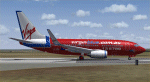
This is a repaint of the "Virgin Blue" livery for the Kitty Hawk 737-700W (FS9). This paint has been fully tested in FS9 (FS2004) ONLY and no guarantee's can be made as to its compatibility with FSX. All repainted textures have been 100% hand painted and formatted in 32 Bit. This is a complete file with the exception of a panel as I use a payware panel and have not included that with this upload (sorry). You can download a suitable panel OR, if you have the Kitty Hawk 737-700 model, copy and paste that panel into this file after installation, OR simply add the textures from this download to your existing Kitty Hawk 737-700 folder. Installation, Distribution Limitations and contact details for me are included in the TC Read Me file as well as a number of screen shots of the aircraft.
| Filename: | Virgin_Blue_Boeing_737700W.zip |
| License: | Freeware, limited distribution |
| Added: | 12th February 2012, 03:44:41 |
| Downloads: | 432 |
| Author: | Tony Cannon and Kitty Hawk |
| Size: | 3.37 MB |
| Category: Flight Simulator 2004 - Flight Plans | |
| Piper Traffic GA_Archer_Europe |
|
Images related to this file:
File Description:
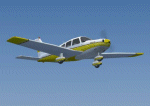
Twelve more "semi-photographic" Piper Archer repaints together with flight plans over Europe. All flights are VFR and take place between stock FS2004 airports with AI capability in Switzerland. The planes should only fly during daylight hours (per approx spring/autumn) and rest one whole day (24+ hrs) per week at a "home" airport. Aircraft fly with local reg for ATC in the following countries: Austria, Belgium, Croatia, Denmark, France, Germany, Greece, Ireland, The Netherlands, Norway, Portugal, Spain, Sweden, Switzerland the United Kingdom. Improved prop textures and animation.
See also AI_Piper_Euro_0.zip for more Archers with flight plans. Textures only; you must have the AI Piper Archer III by Pavel Toman, download details are in the readme.
| Filename: | Piper_Traffic_GA_Archer_Europe.zip |
| License: | Freeware |
| Added: | 20th February 2011, 21:05:55 |
| Downloads: | 753 |
| Author: | David Griffiths |
| Size: | 3.2 MB |
| Category: Flight Simulator 2004 - Flight Plans | |
| Hopping Round The World Adventure - Pack 22 |
|
File Description:
Who said anything about AI planes doing touch and go in FS2004. Cool effect Microsoft! The only newbie to this pack is the MelJet Boeing 747F. The Northern Lights also known as the Aurora Borealis dances across the sky for your pleasure. Hope you find time to enjoy the light show and howl at the full moon also. CFIT – Controlled Flight Into Terrain. This is how real-world pilots meet their end. Don’t let it happen to you. At this time of year the sun hardly makes it past the horizon any time of day. Another zero visibility landing with an unusual request from ATC. Who said IFR was easy? Not me!!
| Filename: | Hopping_Round_The_World_Adventure__Pack_22.zip |
| License: | Freeware |
| Added: | 26th December 2003, 17:37:00 |
| Downloads: | 3,038 |
| Author: | David Dossiere |
| Size: | 2.06 MB |
| Category: Flight Simulator 2004 - Miscellaneous Files | |
| FS2Crew 767 Expanded Flow Chart |
|
File Description:
This flowchart is to be used with Level-D's 767-300ER Simulation and FS2Crew's 767 Edition. It expands on Markus Wichmann's original flow chart in a number of different ways including: Application to any flight (Not just the tutorial), LDN ILS & Category I ILS Approach flows, Category II & III (DH and No DH) Approach flows, FO Takeoff flows, Go Around flows, ATC prompts for online flights (As well as slight modified flows to take clearance information into account), Hints/information about performing certain tasks. It has been designed it to be printed in either colour or grayscale so if your having trouble reading it onscreen, print it out and it should be fine.
| Filename: | FS2Crew_767_Expanded_Flow_Chart.zip |
| License: | Freeware |
| Added: | 16th August 2006, 01:48:18 |
| Downloads: | 1,885 |
| Author: | Jeremy Lio |
| Size: | 136.54 KB |
| Category: Flight Simulator 2004 - Flight Plans | |
| SIDSTARS Buffalo Niagara Intl (KBUF) |
|
File Description:
Procedures based on current cycle (0708 02Aug-30Aug) FAA NACO Digital Aeronautical Information and Terminal Procedures Publications. This is the latest addition to my collection, which now includes a location with no published arrival or departure routes (No SID/STARs). I've provided NOATC routing for all arrivals and departures used by the top ten destinations and all 737 service. There are eight DPs and ten arrivals each connected to three ILS approaches, providing an extensive system of realistic routing for anyone not using an ATC service (such as VATSIM). This is my first location without published SID/STARs but it seems a shame to ignore an otherwise busy airport (ranked 58). For PMDG only.
| Filename: | SIDSTARS_Buffalo_Niagara_Intl_KBUF.zip |
| License: | Freeware, limited distribution |
| Added: | 12th August 2007, 23:59:36 |
| Downloads: | 207 |
| Author: | Dan Downs |
| Size: | 8.93 KB |


© 2001-2026 AVSIM Online
All Rights Reserved
Privacy Policy |