
Where Flight Simulation Enthusiasts Gather from Around the World!
AVSIM Library - Search Results

| Category: Prepar3D V1-4 - Utilities | |
| MultiTool Prepar3D v3.2 |

|
Images related to this file:
File Description:
Multi-Tool Prepar3D v3.2 is a collection of tools, a number of them unique, extending the capabilities of P3D.
New features in v3.2 :
- Adjustable Horizon/Aircraft banking
- Bug fixes/Improvements on previous functions
Previous features include :
- Custom Flybys, user defined camera flyby paths.
- Roaming Flybys, computer generated camera flyby paths.
- Active Observers views placeable by clicking on a top-down view
- Find My Way Home random aircraft positioning.
- 3D Native Stereoscopic Output.
- Head tracking additions: Ordinals, Take off lock, View switching by head movement , Spot up/down tracking.
- Camera Shake + Vibration : Turbulence, G, ground roll, side slip, spoilers.
- Easy 2D & 3D custom cameras definitions.
- XYZ Position (Eyepoint) Mouse Move similar to the Mouse Look pan function, i.e. hold down a key and reposition your eyepoint with your mouse.
- POV conversion to multiple controller buttons.
- Keystroke macros to perform menu functions. - Landing lineup with runway camera.
- Multi screen VC setup. - Save/Recall view setup by aircraft.
- Recallable position autosaving. and more....
Youtube Channel https://www.youtube.com/channel/UCnFQCGMTB7eL-MFTHf8NFbA
| Filename: | MultiTool_Prepar3D_v32.zip |
| License: | Freeware |
| Added: | 22nd December 2016, 07:47:21 |
| Downloads: | 917 |
| Author: | Richard Barry |
| Size: | 3.74 MB |
| Category: Flight Simulator X - Gauges | |
| GPS2020 – V12.0 |
|
Images related to this file:
File Description:
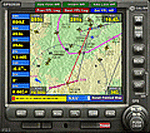
Major upgrade for V10.3, with focus on zooming, Direct-To, inserting waypoints in the flight plan, and User waypoints (waypoints not present in FSX/P3D database).
Key improvements:
- Zooming maps with the mouse wheel now finally like in Google Maps, Google Earth, Bing Maps, Garmin BaseCamp, Little Navmap (FSX utility), etc..
- Direct-To Track Updating: dark red track line continuously follows aircraft movements. For proper operation, the user should install XMLVARS/XMLTools in FSX/P3D (most users will already have done this).
- Visual indication of "Direct-To Active".
- Flight plan: multiple POI's (points clicked on a map) can be inserted in the FPL, they will be named sequentially as TARGET1 to TARGETnnnn.
- Inserting in the flight plan, all sorts of waypoints from all possible sources, can be done with a quicker method with the green buttons alone, without needing to open the Direct-To page.
- Other refinements in code and screen layout since V10.3.
It is recommended to replace V10.3 with this V12.0!
| Filename: | GPS2020__V120.zip |
| License: | Freeware |
| Added: | 29th June 2020, 17:50:18 |
| Downloads: | 562 |
| Author: | Hugo Jansen |
| Size: | 15.7 MB |
| Category: Prepar3D V1-4 - Gauges | |
| GPS2020 – V12.0 |
|
Images related to this file:
File Description:
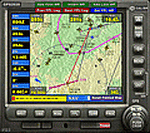
Major upgrade for V10.3, with focus on zooming, Direct-To, inserting waypoints in the flight plan, and User waypoints (waypoints not present in FSX/P3D database).
Key improvements:
- Zooming maps with the mouse wheel now finally like in Google Maps, Google Earth, Bing Maps, Garmin BaseCamp, Little Navmap (FSX utility), etc..
- Direct-To Track Updating: dark red track line continuously follows aircraft movements. For proper operation, the user should install XMLVARS/XMLTools in FSX/P3D (most users will already have done this).
- Visual indication of "Direct-To Active".
- Flight plan: multiple POI's (points clicked on a map) can be inserted in the FPL, they will be named sequentially as TARGET1 to TARGETnnnn.
- Inserting in the flight plan, all sorts of waypoints from all possible sources, can be done with a quicker method with the green buttons alone, without needing to open the Direct-To page.
- Other refinements in code and screen layout since V10.3.
It is recommended to replace V10.3 with this V12.0!
| Filename: | GPS2020__V120.zip |
| License: | Freeware |
| Added: | 29th June 2020, 17:51:55 |
| Downloads: | 302 |
| Author: | Hugo Jansen |
| Size: | 15.7 MB |
| Category: Flight Simulator X - Aircraft Repaints, Textures and Modifications | |
| Freedom Air A321 (Update) |
|
File Description:
This is an updated texture for my orginal Freedom Air release on AVSIM that featured both standard Freedom Air 'Yellow' and 'Movieworld' skins for the default FSX A321. The registration of the Movieworld aircraft is ZK-OJL. Tragically the real world aircraft this repaint is based on crashed with the loss of 7 crew, 5 of them New Zealanders, on November 28th 2008 just prior to being returned to the Air New Zealand fleet. Out of respect for those who have lost their lives and their familes, the registration on this skin has been removed. In memory I have not replaced the registration with another, this aircraft skin is now dedicated to the 7 who were on board ZK-OJL on November 28,2008.
| Filename: | Freedom_Air_A321_Update.zip |
| License: | Freeware |
| Added: | 27th November 2008, 21:51:09 |
| Downloads: | 258 |
| Author: | Jon Murchison |
| Size: | 1.56 MB |
| Category: Flight Simulator X - Gauges | |
| Cessna 172 - analogical engine panel for FIP |
|
Images related to this file:
File Description:
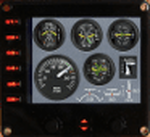
For Saitek Pro Flight Instrument Panel. This is folder contains 2 analogical engine panels for Cessna 172. The two panels are identical except for the upper middle gauge, left side is EGT for Cessna_172_engine_1.xml file and it is manifold pressure instead for Cessna_172_engine_2.xml file. The package includes a serie of colored needles that can be change easily, just replace the default needles by the one of your choice. Default needles are yellow and provide more visibility in small gauges.
The panel provides Fuel quantity for left and right tanks, Exhaust Gas Temperature or Manifold pressure, Fuel flow, Suction, Alternator charge, Rotation Per Minutes, Oil temperature and pressure, Flaps handle and bug, trim bug and numbers for pitch, rudder and aileron.
| Filename: | Cessna_172__analogical_engine_panel_for_FIP.zip |
| License: | Freeware |
| Added: | 28th February 2012, 18:29:10 |
| Downloads: | 498 |
| Author: | Philippe Verhaege |
| Size: | 228.12 KB |
| Category: Flight Simulator X - Aircraft Repaints, Textures and Modifications | |
| North American Navion with Rangemaster Tip Tanks (N8600H) |
|
Images related to this file:
File Description: FSX Real World North American Navion Rangemaster (not a true Rangemaster
cabin model, but a Navion "B"? canopy/cockpit version with tip tanks).
Blue and yellow repaint textures only, based on the real world N8600H,
seen at the Commemorative Air Force Southern California Wing in Camarillo,
California. For the Schwertfeger-Leaming (RFS Design) freeware Navion,
which you must have previously installed in FSX. Your choice of a 4x3 or
widescreen 2D panel (or fly both), includes a simicon to lower the 2D panel
for excellent over the nose visibility (like the default Skyhawk has), and
also includes a VC. Screenshots included. Easy Installation. By Tom Tiedman.
| Filename: | North_American_Navion_with_Rangemaster_Tip_Tanks_N.zip |
| License: | Freeware |
| Added: | 23rd October 2012, 05:58:37 |
| Downloads: | 172 |
| Author: | Tom Tiedman |
| Size: | 2.5 MB |
| Category: Flight Simulator X - AFCAD Files | |
| VTSP - Phuket Intl. Thailand |
|
Images related to this file:
File Description:
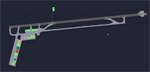
This is an update of the original AFCAD file of A_A Sceneries VTSP. This file is supposed to work perfectly with full AI traffic at all times. I added some new gates and parking spots at the terminals, General Aviation spots and 2 ramp spots at the military hangar for Thai Air Force. All gates feature up to date airline codes and accurate sizes. All taxiways have been realigned to exactly follow the yellow lines. Additionally all approaches have been reworked so aircraft can now choose Rwy 09 to land over the famous Nai Yang Beach! Please note that this file is for the payware scenery for FSX available at Simmarket. It will not work with the freeware scenery for FS9 by Thaiflight.com
| Filename: | VTSP__Phuket_Intl_Thailand.zip |
| License: | Freeware, limited distribution |
| Added: | 17th February 2013, 16:05:32 |
| Downloads: | 1,449 |
| Author: | Oliver Richter, A_A Sceneries |
| Size: | 736.71 KB |
| Category: Flight Simulator X - AI Aircraft | |
| AI Prop Disc Textures |
|
Images related to this file:
File Description:
This file contains 2-blade, 3-blade, and 4-blade generic prop disks for your prop-driven FSX AI aircraft. You can use them with HTAI and most other AI types.
Within each blade-number group, there are textures with yellow, white, and red propeller tips. These make good generic prop disks for most aircraft. The 3-blade and 4-blade textures have de-icing strips/boots; the 2-blade doesn't.
If you don't like the generic textures, then you can also use just the alpha channels, which are included separately.
Note: These textures are provided in 32-bit, because it looks best. This means that they'll take up a bit more room on your drive (each file is around 260k).
| Filename: | AI_Prop_Disc_Textures.zip |
| License: | Freeware |
| Added: | 14th July 2013, 09:12:50 |
| Downloads: | 1,137 |
| Author: | David Atkinson |
| Size: | 799.12 KB |
| Category: Prepar3D V1-4 - Aircraft Repaints, Textures and Modifications | |
| North American P-51D 339th FG (5Q-E) "Beaver Chant" |
|
Images related to this file:
File Description:
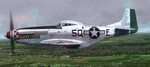
This folder contains a repaint for the A2A WoP3 P-51D Mustang, in the colors of P-51D 44-14372 5Q-E "Beaver Chant" as flown by Capt. Richard C. "Slick" Penrose, of Orland CA, who flew with the 504th Fighter Squadron, 339th Fighter Group, from Fowlmere, UK. The name Beaver Chant was derived from Slick’s university, Oregon State, where the sports teams are known as “Beavers†with the chant being the supporters’ encouragement chant. The colours of the lettering were intended to be in the Beaver’s colours of orange and black but the crew could not obtain orange paint so it ended up more like a yellow on blue. Repaint by Jan Kees Blom, based on the paintkit by A2A.
| Filename: | North_American_P51D_339th_FG_5QE_Beaver_Chant.zip |
| License: | Freeware |
| Added: | 18th November 2018, 05:48:30 |
| Downloads: | 49 |
| Author: | Jan Kees Blom |
| Size: | 13.31 MB |
| Category: Flight Simulator 2002 - Scenery | |
| AAA Anti-Aircraft Effect |
|
File Description:
I can't put a photo up because it won't show the tracers. This is the .fx files and controller for four AAA positions at PHNG airfield in Hawaii. Not a lot of traffic at that field, or in the area online so I used it for my test site. As you fly into the base you will see four sets of tracers protecting the field. Tracers here are organish-yellow, not green. Sorry to disappoint the CNN/Gulf War fans who think they should be green. The BGLs I have included show placements of the guns and should be added to your ADDONSCENERY/SCENERY directory. Put the .fx files in the effects directory, and the .bmp in the effects/texture directory...have fun.
| Filename: | AAA_AntiAircraft_Effect.zip |
| License: | Freeware |
| Added: | 12th December 2002, 12:50:00 |
| Downloads: | 938 |
| Author: | Brian Smith |
| Size: | 4.3 KB |


© 2001-2026 AVSIM Online
All Rights Reserved
Privacy Policy |