
Where Flight Simulation Enthusiasts Gather from Around the World!
AVSIM Library - Search Results

| Category: Flight Simulator X - Aircraft Repaints, Textures and Modifications | |
| Grumman F-14A VF-142 Ghostriders 201 |

|
Images related to this file:
File Description:
IRIS F-14A in VF-142 Ghostriders in Classic Hi Vis Colours
Aircraft #: AG201
Callsign: Dakota 201
Highly detailed repaint including decals and patches as used on jackets and helmets during the 1985 Cruise aboard the Eisenhower.
High resolution repaint in carrier ready Black/Yellow/Grey with clean paint and no weathering/wear and tear effects added. Armaments and stores repainted to live ammunition and unit decals added to the frame and tail.
VF-142 retired their last Tomcat in 200 and served on many carriers and bases during their years of service. Callsign VCPMOD included for EditVoicepack users.
| Filename: | Grumman_F14A_VF142_Ghostriders_201.zip |
| License: | Freeware |
| Added: | 25th June 2010, 01:54:16 |
| Downloads: | 341 |
| Author: | SCott Minty |
| Size: | 2.32 MB |
| Category: Flight Simulator X - Gauges | |
| Beaver DHC 2 engine panel for FIP |
|
Images related to this file:
File Description:
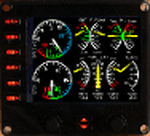
For Saitek Pro Flight Instrument Panel. This is folder contains an engine panel, digital type, for De Haviland Beaver DHC2. The package includes a serie of colored needles that can be changed easily, just replace the default needle by the one of your choice. Default needles are yellow except for RPM which colour doesn't need to be changed and provide more visibility in small gauges.
Beaver engine provides: Manifold pressure, Exhaust Gas Temperature, Fuel flow, Oil temperature, Oil pressure, Propeller RPM, Fuel quantity for the 3 tanks, Flaps position needle and trim for Pitch, Rudder and Aileron.
| Filename: | Beaver_DHC_2_engine_panel_for_FIP.zip |
| License: | Freeware |
| Added: | 11th March 2012, 00:41:07 |
| Downloads: | 312 |
| Author: | Philippe Verhaege |
| Size: | 803.66 KB |
| Category: Flight Simulator 2004 - Aircraft Repaints, Textures and Modifications | |
| Grumman F4F-3 Wildcat Pre-WW2 Texture Package |
|
File Description:
This set contains twelve different repaints with textures that depict all of the section leaders (red, white, blue, black, green and yellow) of each of the two U.S. Navy squadrons (VF-41 and VF-72) that flew the Wildcat before the adoption of camouflage for American Naval aircraft. These are textures only for the FS9 version of the outstanding Grumman F4F-3 / F4F-4 Wildcat / F4F-3S Wildcatfish package by Fighter Design Group v2 (Anthony "Gramps"Sullenger, Mike Wagner, ,David Adams, Lobo da Silva.) The model is donationware and can be found at the Sim Outhouse or Donationware.
| Filename: | Grumman_F4F3_Wildcat_PreWW2_Texture_Package.zip |
| License: | Freeware, limited distribution |
| Added: | 14th August 2005, 12:03:50 |
| Downloads: | 328 |
| Author: | Mick Morrissey |
| Size: | 1.73 MB |
| Category: Combat Flight Simulator 1 and 2 - Aircraft | |
| Grumman F4F-3 Wildcat Pre-WW2 Texture Package for CFS-2 |
|
File Description:
This set contains twelve different repaints with textures that depict all of the section leaders (red, white, blue, black, green and yellow) of each of the two U.S. Navy squadrons (VF-41 and VF-72) that flew the Wildcat before the adoption of camouflage for American Naval aircraft. These are textures only for the CFS-2 version of the outstanding Grumman F4F-3 / F4F-4 Wildcat / F4F-3S Wildcatfish package by Fighter Design Group v2 (Anthony "Gramps"Sullenger, Mike Wagner, ,David Adams, Lobo da Silva.) The model is donationware and can be found at the Sim Outhouse (www.simouthouse.com) or Donationware (www.donationware.net).
| Filename: | Grumman_F4F3_Wildcat_PreWW2_Texture_Package_for_CF.zip |
| License: | Freeware, limited distribution |
| Added: | 15th August 2005, 04:58:18 |
| Downloads: | 206 |
| Author: | Mick Morrissey |
| Size: | 2.03 MB |
| Category: Flight Simulator X - Gauges | |
| FIP - 5 Gauge Display - 2 Engine |
|
Images related to this file:
File Description:
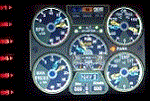
This set of gauges is for use in the Saitek FIP and has been developed specifically for the Baron 58 and variants but should work with other twin prop aircraft. There are 3 options-
option 1. a pair of gauges for displaying on 2 FIPs (layout is similar to the fsx BB58 layout)
option 2. One gauge for displaying only on 1 FIP (left and right eng needle on each of the 5 main instruments )
option 3. a pair of gauges for displaying on 2 FIPs with larger diameter gauges and more user interaction than in 1. above.
1,2, & 3 all have the 5 main engine instrumentation ( RPM, Manifild Pressure, Fuel Flow rate, Oil Temp and Pressure, CHT/EGT Temp.) Additional features are added .e.g Marker Beacon indicators plus indicator of left / right fuel tank selected for each engine, NAV 1 & NAV 2 with DME data.
Option 1 & 3 also has fuel pump switches, alternator switches, starter buttons, cowl flaps and Amps (total load) gauge, and Battery volts gauge.
Option 3 also has additional avionics data and avionics and battery switch buttons. All this enables the aircraft to be started from cold and shut down to cold. The avionics data is useful if you only have one Saitek radio panel. i.e. dont have to keep clicking / rotating switches all the time. This option also gives user ability to alter NAV 1 standby frequency and swap to active.
With the 2 gauges in option 3 above plus my earlier FIP gauge containing a working Auto pilot and fuel levels / flaps and landing gear indicators (refer "FIP-AP Multi Fuel Gauges") there is everything required (not the primary flight display instruments) for flying a single or twin prop aircraft displayed across either 2 or 3 FIPs.
| Filename: | FIP__5_Gauge_Display__2_Engine.zip |
| License: | Freeware |
| Added: | 30th October 2014, 06:24:58 |
| Downloads: | 250 |
| Author: | Robert Budd |
| Size: | 2.4 MB |
| Category: Flight Simulator X - Gauges | |
| Multiple Moving Map Gauge |
|
Images related to this file:
File Description:
This Multiple Moving Map ( MMMap) provides a excellent and generic orientation and navigation gauge for any aircraft in FSX. The gauge will be implemented as a separate window in the panel.cfg ( for installation see pdf doc in this ZIP file).
The gauge allows the user to select different terrain presentations e.g. desert areas on the globe ( north of Africa for example ), or areas in the north of Europe/America .
In addition, the user can select a camera lookalike view. This is a dedicated view which allows the user to have a top view from the aircraft to the real FSX terrain.
Control buttons are available to insert into the map displays for airports, flight plans,VOR etc.. The gauge includes a commercial version ( MMMap_Com) and a military version (MMMap_mil). The difference is the gauge body only.
| Filename: | Multiple_Moving_Map_Gauge.zip |
| License: | Freeware |
| Added: | 18th December 2009, 23:34:50 |
| Downloads: | 2,510 |
| Author: | Dietmar Loleit |
| Size: | 2.36 MB |
| Category: Flight Simulator X - Missions | |
| Flying the 320 |
|
Images related to this file:
File Description:
Learn to fly the next generation aircraft A 320 of Wilco/Feelthere. A guiding copilot will be on your side, going through all procedures with you and giving all important hints during the flight, so that you are able to bring the jet straight into the air and in the end safely back to the ground. The mission based on the real flight of Jet Blue Airlines 241 between Oakland International and Long Beach in Los Angele's. An additional tutorial-document is including, that shows you all gauges, switches and buttons you need for this mission and it shows you all indications of the flight management system appearing on the PFD- and SD-display, sorted by the different phases of the flight. Please notice, that this mission requires the commercial add on of Airbus Volume 1 from Wilco/Feelthere.
| Filename: | Flying_the_320.zip |
| License: | Freeware |
| Added: | 1st May 2010, 00:35:06 |
| Downloads: | 2,454 |
| Author: | Carsten Wanzelius |
| Size: | 24.93 MB |
| Category: Flight Simulator 2002 - Gauges | |
| CPT Toggles/Switches XML Multi-Gauges V1.1 |
|
File Description:
FS2002 CPT Toggles and Switches XML Multi-Gauges V1.1
This update adds a couple of new switches, some which I found out how to do
after the fact, and some which I just plain overlooked.
Check out the new generic CowlFlaps lever!
Also included in this update is the full
extraction syntax for all the switches.
This is a comprehensive set of 13 XML Multi-Gauges
with switches and panel toggle buttons
for panel designers and general users.
It includes the cpt.icons.cab gauge,
which has button toggles for 21 different panel idents,
including all the default idents. 12 gauges
which cover just about every single switch
option available in FS2002. Each gauge
performs all the same functions, but has
a different switch bitmap. Transparent versions
of all the toggles and switches are also included.
Full details and previews are included in the download.
| Filename: | CPT_TogglesSwitches_XML_MultiGauges_V11.zip |
| License: | Check within download |
| Added: | 16th July 2002, 11:43:06 |
| Downloads: | 1,210 |
| Author: | Jorge Salas |
| Size: | 403.74 KB |
| Category: Flight Simulator 2004 - Utilities | |
| KeyMacro |
|
File Description:
KeyMacro general function:
When you press a key or a joystick-button, you can configure KeyMacro to play any key-strokes as you want. Keys and buttons can optionally be different assigned on downstroke and upstroke.
Functions ready to use are:
- Assign Reversing thrust to a yoke-button. Reverse while hold and automatic go to idle when relase.
- Assign flaps-control into an analog lever at your yoke. All flaps-positions available at one lever.
- Assign Parking-break as one yoke-button for set, and an other for relase. And your toe-break will not relase Parking-break.
- Assign the AVC "Push to talk" to a yoke-button. (AVC is Vatsim voice system, see http://www.vatsim.net)
In addision, you can also program your own key-stroke sequences as how you want.
Please read FlightSimUser_ReadMe.rtf or FlightSimUser_ReadMe.txt
| Filename: | KeyMacro.zip |
| License: | Freeware |
| Added: | 29th November 2004, 14:19:21 |
| Downloads: | 1,299 |
| Author: | Lennart Vedin |
| Size: | 584.42 KB |
| Category: Flight Simulator 2004 - Aircraft Repaints, Textures and Modifications | |
| Republic P-47D-22 Thunderbolt "Beetle" Luftwaffe Test Red |
|
Images related to this file:
File Description:
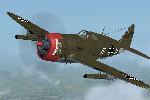
Re-uploaded Republic P-47-D-2-RA,"Beetle". The plane was lost when the pilot, Lt. William e.Roach, thinking he was over southern England, mistakenly landed at Caen, France on 7 November 1943. "Beetle" was examined and tested by the Germans. The camouflage scheme ,nose art and fuselage codes were left intact, but the national markings were replaced by oversized German crosses. The Jug also received a red cowl.
This package only contains the red Luftwaffe test repaint. For the original and yellow Luftwaffe test repaints, search for wopp47bee.zip. Requires prior purchase/installation of Wings of Power P-47 Thunderbolt pack available at www.a2asimulations.com
| Filename: | Republic_P47D22_Thunderbolt_Beetle_Luftwaffe_Test_.zip |
| License: | Freeware |
| Added: | 10th August 2010, 08:15:15 |
| Downloads: | 429 |
| Author: | Stephan Pillon, A2A Simulations |
| Size: | 5.43 MB |


© 2001-2026 AVSIM Online
All Rights Reserved
Privacy Policy |