
Where Flight Simulation Enthusiasts Gather from Around the World!
AVSIM Library - Search Results

| Category: Combat Flight Simulators - Digital Combat Simulator | |
| DCS World - Bin 1 |

|
Images related to this file:
File Description:

Bin 1 file for DCS World installer. Part 3 of 13. Installation:
1- Download the exe setup file and all 12 bin files (all files are stored here as .zip files)
2- Place all files in a single folder and unzip them.
3- Run the exe and follow the on-screen directions.
Support:
http://forums.eagle.ru/index.php
http://support.digitalcombatsimulator.com/en/
Digital Combat Simulator World (DCS World) is a free-to-play digital battlefield game, focusing on a military aircraft simulation. It includes a FREE Su-25T attack aircraft and it is extendible through additional DCS modules as well as user-made add-ons and mods.
DCS World includes:
-A vast mission area of the Caucasus region
-Powerful mission and campaign editors
-Multiplayer
-Massive inventory of air, land and sea combat units and weapons
-Advanced AI
-Fast mission generator
-Dynamic weather and seasons
-Training missions
-Mission replay system
-Pilot log book
DCS is a true "sandbox" simulation that can and will cover multiple time periods covering many types of combat and civilian units. Modules that can plug into DCS World can include aircraft, maps, ground units, campaigns, etc. This includes modules developed internally by Eagle Dynamics, and by certified third party developers.
DCS World video overview.
| Filename: | DCS_World__Bin_1.zip |
| License: | Freeware |
| Added: | 9th March 2013, 20:22:21 |
| Downloads: | 320 |
| Author: | Matt Wagner |
| Size: | 498.11 MB |
| Category: Combat Flight Simulators - Digital Combat Simulator | |
| DCS World - Bin 2 |
|
Images related to this file:
File Description:
Bin 2 file for DCS World installer. Part 4 of 13. Installation:
1- Download the exe setup file and all 12 bin files (all files are stored here as .zip files)
2- Place all files in a single folder and unzip them.
3- Run the exe and follow the on-screen directions.
Support:
http://forums.eagle.ru/index.php
http://support.digitalcombatsimulator.com/en/
Digital Combat Simulator World (DCS World) is a free-to-play digital battlefield game, focusing on a military aircraft simulation. It includes a FREE Su-25T attack aircraft and it is extendible through additional DCS modules as well as user-made add-ons and mods.
DCS World includes:
-A vast mission area of the Caucasus region
-Powerful mission and campaign editors
-Multiplayer
-Massive inventory of air, land and sea combat units and weapons
-Advanced AI
-Fast mission generator
-Dynamic weather and seasons
-Training missions
-Mission replay system
-Pilot log book
DCS is a true "sandbox" simulation that can and will cover multiple time periods covering many types of combat and civilian units. Modules that can plug into DCS World can include aircraft, maps, ground units, campaigns, etc. This includes modules developed internally by Eagle Dynamics, and by certified third party developers.
DCS World video overview.
| Filename: | DCS_World__Bin_2.zip |
| License: | Freeware |
| Added: | 9th March 2013, 20:22:33 |
| Downloads: | 298 |
| Author: | Matt Wagner |
| Size: | 499.97 MB |
| Category: Combat Flight Simulators - Digital Combat Simulator | |
| DCS World - Bin 3 |
|
Images related to this file:
File Description:
Bin 3 file for DCS World installer. Part 5 of 13. Installation:
1- Download the exe setup file and all 12 bin files (all files are stored here as .zip files)
2- Place all files in a single folder and unzip them.
3- Run the exe and follow the on-screen directions.
Support:
http://forums.eagle.ru/index.php
http://support.digitalcombatsimulator.com/en/
Digital Combat Simulator World (DCS World) is a free-to-play digital battlefield game, focusing on a military aircraft simulation. It includes a FREE Su-25T attack aircraft and it is extendible through additional DCS modules as well as user-made add-ons and mods.
DCS World includes:
-A vast mission area of the Caucasus region
-Powerful mission and campaign editors
-Multiplayer
-Massive inventory of air, land and sea combat units and weapons
-Advanced AI
-Fast mission generator
-Dynamic weather and seasons
-Training missions
-Mission replay system
-Pilot log book
DCS is a true "sandbox" simulation that can and will cover multiple time periods covering many types of combat and civilian units. Modules that can plug into DCS World can include aircraft, maps, ground units, campaigns, etc. This includes modules developed internally by Eagle Dynamics, and by certified third party developers.
DCS World video overview.
| Filename: | DCS_World__Bin_3.zip |
| License: | Freeware |
| Added: | 9th March 2013, 20:22:37 |
| Downloads: | 263 |
| Author: | Matt Wagner |
| Size: | 499.88 MB |
| Category: Combat Flight Simulators - Digital Combat Simulator | |
| DCS World - Bin 4 |
|
Images related to this file:
File Description:
Bin 4 file for DCS World installer. Part 6 of 13. Installation:
1- Download the exe setup file and all 12 bin files (all files are stored here as .zip files)
2- Place all files in a single folder and unzip them.
3- Run the exe and follow the on-screen directions.
Support:
http://forums.eagle.ru/index.php
http://support.digitalcombatsimulator.com/en/
Digital Combat Simulator World (DCS World) is a free-to-play digital battlefield game, focusing on a military aircraft simulation. It includes a FREE Su-25T attack aircraft and it is extendible through additional DCS modules as well as user-made add-ons and mods.
DCS World includes:
-A vast mission area of the Caucasus region
-Powerful mission and campaign editors
-Multiplayer
-Massive inventory of air, land and sea combat units and weapons
-Advanced AI
-Fast mission generator
-Dynamic weather and seasons
-Training missions
-Mission replay system
-Pilot log book
DCS is a true "sandbox" simulation that can and will cover multiple time periods covering many types of combat and civilian units. Modules that can plug into DCS World can include aircraft, maps, ground units, campaigns, etc. This includes modules developed internally by Eagle Dynamics, and by certified third party developers.
DCS World video overview.
| Filename: | DCS_World__Bin_4.zip |
| License: | Freeware |
| Added: | 9th March 2013, 20:22:40 |
| Downloads: | 305 |
| Author: | Matt Wagner |
| Size: | 499.69 MB |
| Category: Combat Flight Simulators - Digital Combat Simulator | |
| DCS World - Bin 5 |
|
Images related to this file:
File Description:
Bin 5 file for DCS World installer. Part 7 of 13. Installation:
1- Download the exe setup file and all 12 bin files (all files are stored here as .zip files)
2- Place all files in a single folder and unzip them.
3- Run the exe and follow the on-screen directions.
Support:
http://forums.eagle.ru/index.php
http://support.digitalcombatsimulator.com/en/
Digital Combat Simulator World (DCS World) is a free-to-play digital battlefield game, focusing on a military aircraft simulation. It includes a FREE Su-25T attack aircraft and it is extendible through additional DCS modules as well as user-made add-ons and mods.
DCS World includes:
-A vast mission area of the Caucasus region
-Powerful mission and campaign editors
-Multiplayer
-Massive inventory of air, land and sea combat units and weapons
-Advanced AI
-Fast mission generator
-Dynamic weather and seasons
-Training missions
-Mission replay system
-Pilot log book
DCS is a true "sandbox" simulation that can and will cover multiple time periods covering many types of combat and civilian units. Modules that can plug into DCS World can include aircraft, maps, ground units, campaigns, etc. This includes modules developed internally by Eagle Dynamics, and by certified third party developers.
DCS World video overview.
| Filename: | DCS_World__Bin_5.zip |
| License: | Freeware |
| Added: | 9th March 2013, 20:22:46 |
| Downloads: | 259 |
| Author: | Matt Wagner |
| Size: | 499.7 MB |
| Category: Combat Flight Simulators - Digital Combat Simulator | |
| DCS World - Bin 6 |
|
Images related to this file:
File Description:

Bin 6 file for DCS World installer. Part 8 of 13. Installation:
1- Download the exe setup file and all 12 bin files (all files are stored here as .zip files)
2- Place all files in a single folder and unzip them.
3- Run the exe and follow the on-screen directions.
Support:
http://forums.eagle.ru/index.php
http://support.digitalcombatsimulator.com/en/
Digital Combat Simulator World (DCS World) is a free-to-play digital battlefield game, focusing on a military aircraft simulation. It includes a FREE Su-25T attack aircraft and it is extendible through additional DCS modules as well as user-made add-ons and mods.
DCS World includes:
-A vast mission area of the Caucasus region
-Powerful mission and campaign editors
-Multiplayer
-Massive inventory of air, land and sea combat units and weapons
-Advanced AI
-Fast mission generator
-Dynamic weather and seasons
-Training missions
-Mission replay system
-Pilot log book
DCS is a true "sandbox" simulation that can and will cover multiple time periods covering many types of combat and civilian units. Modules that can plug into DCS World can include aircraft, maps, ground units, campaigns, etc. This includes modules developed internally by Eagle Dynamics, and by certified third party developers.
DCS World video overview.
| Filename: | DCS_World__Bin_6.zip |
| License: | Freeware |
| Added: | 9th March 2013, 20:22:49 |
| Downloads: | 207 |
| Author: | Matt Wagner |
| Size: | 499.8 MB |
| Category: Flight Simulator 2004 - Scenery | |
| Gjoa Haven CYHK, on King William Island, Nunavut, Canada, |
|
Images related to this file:
File Description:
Gjoa Haven is a village of 1,200 or so inhabitants at N 68 38 W 95 51 on the southeast corner of King William Island, around 155 miles north of the Arctic Circle. It's Inuit name is Uqsuqtuuq; the Gjoa Haven name was given by the Norwegian explorer Roald Amundsen when he spent two years there from 1903 to 1905 during his exploration of the northwest passage from east to west. His boat was called Gjoa and the cove was named Gjoa Harbour, in Norwegian. The village has been added in this scenery with approximately the right shape; though the coastline with Ultimate Terrain does have the small cove that serves as a harbor the coast shape is wrong. The airfield runway is 4,400 feet of gravel 100 feet wide at 154 feet above sea level. There is no LL100 available, only JetA1, delivered once a year by ship along with all the other requirements of the town. There is also a nearby CAM-B remotely operated defence radar station with its three protective domes. The old terminal building is still there, albeit repainted and spruced up, along with the far larger and newer one alongside it.
One of the screen shots shows Gjoa Haven as it appears for at least 8 months of the year, with snow on the ground and sea ice all around. If you want the ice then download my recent post of All Canada frozen lakes, rivers, and the northern seas, reversible with an untick in the FS scenery library.
| Filename: | Gjoa_Haven_CYHK_on_King_William_Island_Nunavut_Can.zip |
| License: | Freeware, limited distribution |
| Added: | 19th February 2011, 15:42:51 |
| Downloads: | 551 |
| Author: | Roger Wensley |
| Size: | 2.68 MB |
| Category: Miscellaneous Files - Demos from Commercial Vendors | |
| Virtual Sailor 6.5 |
|
File Description:
Virtual Sailor simulates the whole sailing experience, it's main features are:
Accurate wave dynamics above sea and below.
Accurate sailboat and motorboat dynamics.
Accurate and dynamic sailing sounds.
Fully adjustable weather and sea conditions by day and night.
Photorealistic land and sea based on real topographic data.
Diverse and adjustable marine life.
Global land and sea area allows global navigation and sailing.
Simulates saileboat racing including wind shadow effects.
Multiplayer online sailing and racing over the net.
Uses the latest DirectX8 technology in 3D graphics, sound and multiplay.
Advanced and simple to use virtual environment.
Fully interactive 3D instrument panel for boats.
Advanced and simple to use program.
Built to expand, allowing third party sceneries and boats.
Full documentation for making all files of scenery and boats.
New features in version 6.5
Deep ocean waves model added, based upon measured sea spectrum.
Sea graphics is more advanced and containes more options.
Fully functional GPS based upon an actual instrument.
Fully functional RADAR screen based upon a simple radar.
Fully functional EchoSounder which detects land, animals and objects.
New contour map added, shows depth contours and navigation aids in scenery.
Submarines have better dive model and also a true flight model.
Autopilot improved for better handling of sailboats and navigation.
Support for hydrofoil boats added.
Support for smoke sources on boats added.
Support for multiple types of navigation aids in scenery added.
Improved user inteface with more panels and options.
Improved panel activation, and boat changing during play.
Improved joystick input supports additional joystick types.
| Filename: | Virtual_Sailor_65.zip |
| License: | Commercial demo |
| Added: | 23rd May 2003, 10:34:37 |
| Downloads: | 1,095 |
| Author: | Ilan Papini |
| Size: | 5.82 MB |
| Category: Flight Simulator 2004 - Miscellaneous Files | |
| GoTo any Airport Version 4 |
|
File Description:
Go To Any Airport.- Now 4 Airports Included.
Always wanted to return to your favourite local Airport from anywhere in the world? simply - with no fuss? Look no Further.
Start at your Designated Airport, [in this case London Gatwick,Innsbruck,Dublin or Edinburgh in a 737], then Goto any Airport! - via the FS9 World menu and return to the Original Designated Airport - every time! - By Just turning the GPS/nav switch to GPS and Flight Director and autothrottle on whilst still on the ground.Click on the Autopilot and Nav Hold switch once above 1000ft - thats it !! . Set Weather as required and dont forget Altitude and Speed in autopilot and away you go. Use the FS9 ATC as You Travel, call into designated Airport when close and receive the curent ATIS and Runway approach in use.
HAVE FUN.
(This is different to the great circle direct routes that you can programme into the very good FS9 GPS - each and every time you start from a new airport).
As A bonus you can also use the designated flight files provided to take of and circle your Airport,using autopilot again with GPS/nav switch on gps setting and nav hold switch on. This is a good way to observe the airfield and your aircraft especially from tower view - set tower position using map window and pointing and dragging tower icon also set the tower altitude.Some Example flights worded "AJT Circuit of......." are also enclosed.- these particular flights can make good moving screen savers!
| Filename: | GoTo_any_Airport_Version_4.zip |
| License: | Freeware |
| Added: | 7th March 2004, 18:21:48 |
| Downloads: | 1,001 |
| Author: | Alan Trussell |
| Size: | 54.91 KB |
| Category: Flight Simulator X - Original Aircraft | |
| UFO - A51 |
|
Images related to this file:
File Description:
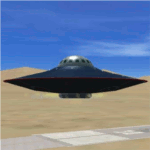
You can fly this UFO model in all directions e.g. vertical up/down lateral right/left, forward/backward, and can stay in a static position on any altitude level. The UFO provides a maximum speed of Mach 4.3 on all altitude levels and the altitude level is unlimited.
The overall radius of the model is 170 feet. The overall height is 100 feet. Be aware of this size if you are landing on standard airports. The model includes a animated gear system which is a big gray ring. The red disk on the outside of the model is the rotating UFO engine. In addition the model contains 3 guns which are moving out of the body if they are armed by activating a switch on the weapon control control panel. Important to say, the UFO is not a traditional aircraft. It reacts different and you need to handle it differently too! For more information and how to fly the model, read the documentation carefully and read the documentation first, before you go to fly it !!!!
The model and the gauges have been developed for FSX Flight Simulator SP2 or SP1. It has also been tested with Microsoft Acceleration but compatibility is not guaranteed by the author. The format for the panel and gauges is developed for a 4/3 monitor. Use the Wide Screen Panel.cfg if you have a 16/9 Monitor. For installation instructions see the documentation inside the zip file.
Credit goes out to: Bob Familton and Geoffrey Bogeaus for improvement, recommendations, testing and review, and to Doug Dawson for his XML IPC interface.
Enjoy a new way to fly.
Dietmar Loleit
| Filename: | UFO__A51.zip |
| License: | Freeware, limited distribution |
| Added: | 21st January 2014, 15:43:13 |
| Downloads: | 725 |
| Author: | Dietmar Loleit |
| Size: | 19.67 MB |


© 2001-2026 AVSIM Online
All Rights Reserved
Privacy Policy |