
Where Flight Simulation Enthusiasts Gather from Around the World!
AVSIM Library - Search Results

| Category: Flight Simulator 2004 - Utilities | |
| AIRound v1.0 |

|
File Description:
FS2004 AIRound v1.0. This utility displays AI aircraft around user plane in AI map or AI list forms, enables AI aircraft forward, fly by or spot plane views and has its own built-in traffic alert system. In forward view eyepoint is tied to AI aircraft in front of virtual cockpit with ability to change look direction. Fly by view has adjustable parameters and random options. Departure and arrival airports and time, total about 40 ATC, state, control surfaces, radio, etc. AI aircraft parameters are available. AI map has set of scales and can be placed everywhere within 160nm AI aircraft zone around user plane. You can customize AI aircraft appearance on the map by changing mark colors, shapes, sizes and data tag types. Utility has mini panel with small scalable AI map for quick in-flight AI aircraft related analysis. Traffic alert panel helps to avoid collision with AI aircraft. Also it may be used as a navigation gauge in escort missions assisting to find, get closer and follow accompanied AI aircraft. Utility works both in FS windowed and full screen modes and doesn't require any other add-on modules or programs. You have 10 FS sessions for free.
| Filename: | AIRound_v10.zip |
| License: | Shareware, time limited |
| Added: | 12th February 2006, 22:02:49 |
| Downloads: | 5,267 |
| Author: | Valery Stenin |
| Size: | 612.81 KB |
| Category: Flight Simulator 2004 - Utilities | |
| AI_TrafficList |
|
File Description: AI_TrafficList is a clone of Pete Dowson's TrafficLook.exe All AI (Artificial Intelligent) aircraft on the ground and in those the air are presented in tabular list that is updated as information becomes available. AI_TrafficList duplicates Traffic Look in large measure and adds these items. The column alignments and sorting can be specified. Individual columns can be removed or included. Like TrafficLook, the columns can be moved. Both air and ground aircraft are presented simultaneously in a split screen that's adjustable. A print button produces a tab or comma delimited text file including the column headings and all data from air and ground AI craft. Finally, the update interval is adjustable. This program (written in C# .NET) requires that your computer have Microsoft's .NET Common Language Runtime installed. This comes with XP but available for ME at the MS update site. Obviously you need FS2004 installed on a computer and Pete Dowson's FSUIPC.dll in the modules folder. AI_TrafficList is designed to be run on a networked computer connected to your FS2004 machine by Pete Dowson's WideFS. For that reason, you will have to obtain and install FSUIPC and WideFS from Pete (http://www.schiratti.com/dowson.html). Direct connection to the "freeware" version of FSUIPC.dll is not supported
| Filename: | AI_TrafficList.zip |
| License: | Freeware, limited distribution |
| Added: | 31st January 2004, 19:37:48 |
| Downloads: | 5,256 |
| Author: | Larry Jones |
| Size: | 86.16 KB |
| Category: Flight Simulator X - Original Aircraft | |
| Boeing 787-942 VIP-BBJ |
|
Images related to this file:
File Description:
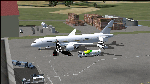
Boeing 787-942 Boeing Business Jet (VIP), AKA "DreamJet", is the Corporate version of this aircraft, modified for individual client specs. The range is extended beyond the normal 787-9 due to additional fuel tanks, a lot less payload weight, and more powerful and efficient engines. The Cabin Pressure is decreased to 6,000 ft, allowing for higher Flight Levels than normal. The tail number on this model can be changed to match the user's preference, since it is not apparent on the exterior (No Airline Call used on Private Aircraft).
This is a huge aircraft and normally seats about 300 passengers, but there are only 48 (including Pilots/Attendants) on this plane. A lot of space remains for luxuries that are well beyond any Business Jet of any kind other than the 747 or A380. Some of these luxuries include automated beds that are hidden in the floorboard and activated by the attendants when requested, and each of these includes a privacy barrier. There is one Large Screen TV with stereo surround sound with theater seating in the fore section, and separate small screen monitors located at every assigned seat (including flight data relay of all positioning and aircraft data viewable). The kitchen is fully equipped with 935 lbs of various food and drinks, with one attendant being a Master Chef. There is a automated Dance Floor that can be activated in the theater area, after the seating chairs are automatically stored below deck. The crew also experiences luxury as the pilots have a twin-bed sleeping area with a private kitchen (2 sleep while 2 fly), as do the attendants (fore and aft upper deck) with twin beds and private kitchens. The aircraft is also more luxurious in that it has 6.000 ft of pressure continuous to 47,000 ft, and has a very low interior noise level. There are also many added safety features that provide for survival in the event of a mishap, making it possible to survive a water crash for several days through the use of 6 inflatable skiff-rafts with engines, radios, and supplies. All attendants are trained and certified Registered Nurses, and they have 25 lbs of medications and supplies stored in the aft. Some of these features add to the empty weight, so the MTOW is the same as a normal aircraft of this design for commercial use (the gear are also modified for these accommodations).
This aircraft is designed for educational use protected under the Fair Use Doctrine:
(http://www.expertlaw.com/library/intellectual_property/fair_use.html)
It cannot be sold or bundled for sale, and such will never be approved by me or the original authors. FREEWARE DISTRIBUTION ONLY!!!
Model design and paint by: Camil Valiquette;
Sound by: Emil Serafino;
Engine/Aerodynamics and Details by: Douglas E. Trapp, ([email protected]) May 2018
| Filename: | Boeing_787942_VIPBBJ.zip |
| License: | Freeware |
| Added: | 20th May 2018, 16:58:42 |
| Downloads: | 883 |
| Author: | Douglas E Trapp |
| Size: | 77.99 MB |
| Category: Flight Simulator X - Miscellaneous Files | |
| Metal GUI V.1.2 |
|
Images related to this file:
File Description:
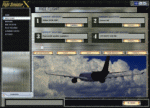
I designed this for myself to darken the default User Interface for 2 reasons. I have bad eyes that are sensitive to bright objects on the screen, and I like to fly the simulator in the evening hours with the lights turned off in the room. I hope you like my end result. I also added 2 bonus features. Instead of hearing the Windows/Internet Explorer click sound when you mouse click on a menu item, you now will hear the "Fasten Seatbelts" sound effect. Be sure to back up the original sound "checkc" in case you find the new sound annoying. Secondly, I have included 4 optional Aircraft Viewer images that give the selected aircraft a more airborne look. I will make switching these simple by adding them to the Generic Mod Enabler(JSGME) that I will include in the download. The look is created using Diamond Plate and Polished Aluminum textures, and modifying the buttons with some more color. This is Freeware, and I am giving permission to anyone that wants to create their own and upload to any site they wish. I do not wish that you have to mention my name in any credits.
Generic Mod Enabler(JSGME) can be found at JoneSoft http://www.users.on.net/~jscones/software/
This utility is freeware created by JoneSoft (Copyright© 1998-2010 JÃsen Jones)
| Filename: | Metal_GUI_V12.zip |
| License: | Freeware |
| Added: | 20th November 2011, 04:39:38 |
| Downloads: | 413 |
| Author: | Todd McCuistion |
| Size: | 7.63 MB |
| Category: Flight Simulator 2004 - Aircraft Repaints, Textures and Modifications | |
| AeroSur Boeing 767-284/ER "Sharko" (CP-2659) |
|
Images related to this file:
File Description:

I am quite proud to present this very detailed and accurate repaint of Aerosur's Boeing 767-284/ER logojet named "Sharko", in the Project Opensky B762 V4 model. This logojet of Aerosur of Bolivia turns heads wherever she goes. She joins a rather large group of other AeroSur logojets, forming a total complement of 8. This aircraft flies into Miami (KMIA) and Dulles (KIAD) in the USA.
This repaint is almost 100% hand painted. All artwork is hand rendered except the AeroSur Eagle logo. Custom textures included in this repaint are; hand-painted realistic 3D windows with window shades, custom tires, custom night textures (and alpha), custom fuselage shading, tug with AeroSur logo, stewardess is a an actual AeroSur stewardess in AeroSur uniform, interior exit signs in Spanish (SALIDA), custom fuselage shading and many others. The screen shots included with this package showcase this detailed repaint and the outstanding Miami International Airport (KMIA) scenery recently released by LatinVFR. Fuselage, engine, wing and tail textures are 32-bit with no mips for best clarity and quality. As this has been one of the most enjoyable and challenging repaints for me, I hope you enjoy flying this wonderful aircraft as much as I did creating it. This is a complete install and contains all Project Opensky provided files current to Version 2004.8.0. The sound is from the default B737.
| Filename: | AeroSur_Boeing_767284ER__Sharko_CP2659.zip |
| License: | Freeware, limited distribution |
| Added: | 4th March 2012, 06:52:06 |
| Downloads: | 679 |
| Author: | Jeffrey S. Bryner, Project Opensky |
| Size: | 13.9 MB |
| Category: Flight Simulator X - Utilities | |
| FSRemote |
|
File Description:
It does what the title says FSRemote controls FSX remotely through FSUIPC.
Just take a look at the (word) document that is contained in the zip file and look at some screen shots.
It can view and control the following items in FSX through FSUIPC:
1. Environment - view Date Time and Position
2. Date Time - view and set Date and Time in FSX
3. Aircraft - view and set various aircraft items like Door, Lights, Push back and De-Ice
4. Attitude - view attitude and speed in feet, meter, knots, mp/h and km/h
5. Auto Pilot - view and set various Auto Pilot items
6. Radio - view and set almost all the radio items like in the radio stack
7. Engines - auto stop and start engines, not much jet
8. Message - view and send messages to FSX
9. Weather - not implemented jet
10. FPS - view chart and check the Frames per Second in FSX
11. About box with various version information.
What do you need run use FSRemote
1. .NET 2.0 installed on the comupter where you want to run FSRemote
2. FSUIPC4 on the computer where you run FSX
3. WideClient (FSUIPC remote) if you want to run FSRemote on a remote computer
The zip file includes:
1. .NET 2.0 FSRemote executable
2. Configuration file for FSRemote
3. Document file in MSWord
Hope you like it.
| Filename: | FSRemote.zip |
| License: | Freeware |
| Added: | 4th September 2007, 11:52:19 |
| Downloads: | 1,481 |
| Author: | Hans Elzer |
| Size: | 311.67 KB |
| Category: Flight Simulator 2004 - Utilities | |
| FsPassengers (ver 05 september) |
|
File Description:
FsPassengers 2004 is an add-on for Flight Simulator 2004 that will completely revolutionize the way you fly in Fs2004. Here
are just some of the features of FsPassengers 2004: Add passengers to your flights! Finally, you're not alone in the sky.
Passengers react to how you fly your plane. Hear them scream if you make drastic mistakes, and get their opinion of your
flight in real time. Provide in-flight passenger services such as movies, music, and drinks. Make money for successful
flights; be fined if you do something wrong. Manage an airline (make money, manage aircraft fleets, etc). Maintain your
aircraft in good condition, otherwise you may experience unique and suprising failures. Create and maintain pilot careers.
Keep detailed logs and statistics for every flight you make (great for virtual airlines). Fly through dangerous parts of the
world, and risk the safety of your plane, crew, or passengers! Export your flight to your Virtual Airline. This add-on
includes more than 200 in-flight sounds to immerse you in the ambiance of flight. Hear feedback from your co-pilot, flight
attendants, passengers; listen to ATC chatter, music, GPWS, and more. All screens and reports work in full screen. No need to
quit FS. - This demo is fully functional apart that you can only start a flight from San-Francisco area (but you can land
anywhere)
| Filename: | FsPassengers_ver_05_september.zip |
| License: | Shareware, limited functionality |
| Added: | 5th September 2005, 17:01:18 |
| Downloads: | 9,753 |
| Author: | Daniel Polli |
| Size: | 26.19 MB |
| Category: Flight Simulator 2004 - Scenery | |
| Chennai International Airport , India ( VOMM ) |
|
Images related to this file:
File Description:
Chennai scenery has been in demand for long time and here it is ,the file also includes " the ACTIVE RNAV�1 (GNSS or DME/DME/IRU) SIDs and STARs. It also has the extended runway and the extended taxiway M3. Definitely the screen shots will help you decide if its worth downloading.T his will also work in FSX. Inside you will find a zip file that reads-"Asia.zip" if you are FSX user you will have to add this addition folder to database (FSX) 2-3 buildings used are default FS2004 object which are not in FSX . This additional will enable that thing previously if you have downloaded Chatrapatti shivaji International Scenery that I uploaded for everyone made the FSX users unhappy , because they must have found few objects hanging in air or something's missing. This asia folder included in the scenery will solve the trouble. Airport Features include- NEW models of taxiway edge fixtures, Parkable Hanger for General aviation light aircrafts. Just roll in and out sticking to the ctr guide line. You can even begin simulation parked inside the hanger .Don't worry , you won't be disappointed .. check out the pics. Oh! you'll also find surfaces painted " paraphernalia " kind of stuff at all taxiway- runway intersection and surface painting for stands numbers at one of the apron. stands 1-7 .
| Filename: | Chennai_International_Airport__India__VOMM_.zip |
| License: | Freeware |
| Added: | 10th July 2010, 02:54:43 |
| Downloads: | 6,698 |
| Author: | Ashish Singh |
| Size: | 70.84 MB |
| Category: Flight Simulator 2004 - Aircraft Repaints, Textures and Modifications | |
| JetBlue 'Circles' Airbus A320 |
|
Images related to this file:
File Description:
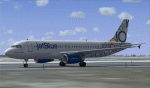
This repaint is of the very unusual but striking "JetBlue - Circles" livery for the Project Airbus A320 model (included in zip). This is a complete file and for FS9 (FS2004). While it may work in FSX, I cannot and will not confirm that as these textures have only been tested in FS9. All repainted textures, which were completely hand painted (other than the JetBlue text) have been saved and formatted in 32 bit. This model comes with all of the standard PA animations. New Alpha channels have been created to highlight the detail which has also been highlighted in terms of the doors and windows to resemble the actual aircraft. This has been an intense repaint to do due to the very nature of the livery so please PLEASE DO NOT count the circles and email me to say I missed one. If I have (which I haven't I don't think) pretend it is due to excessive weathering :) While there are some screen shots here, there are more in the Read Me file so if you have any doubts, please take a look at all of them. Installation, Distribution and Contact Details for me can be found in the enclosed PA TC Read Me File. Enjoy this paint and download it lots just so I know the work, frustration, a bottle and half of Capt Morgan and lots of Asprin were worth it :) Cheers and safe flying!
| Filename: | JetBlue_Circles_Airbus_A320.zip |
| License: | Freeware, limited distribution |
| Added: | 11th March 2012, 19:40:09 |
| Downloads: | 594 |
| Author: | Tony Cannon, Project Airbus |
| Size: | 13.54 MB |
| Category: Combat Flight Simulators - Digital Combat Simulator | |
| DCS World - Installation Directions |
|
Images related to this file:
File Description:
DCS World Installation Directions. Part 2 of 13. Installation:
1- Download the exe setup file and all 12 bin files (all files are stored here as .zip files)
2- Place all files in a single folder and unzip them.
3- Run the exe and follow the on-screen directions.
Support:
http://forums.eagle.ru/index.php
http://support.digitalcombatsimulator.com/en/
Digital Combat Simulator World (DCS World) is a free-to-play digital battlefield game, focusing on a military aircraft simulation. It includes a FREE Su-25T attack aircraft and it is extendible through additional DCS modules as well as user-made add-ons and mods.
DCS World includes:
-A vast mission area of the Caucasus region
-Powerful mission and campaign editors
-Multiplayer
-Massive inventory of air, land and sea combat units and weapons
-Advanced AI
-Fast mission generator
-Dynamic weather and seasons
-Training missions
-Mission replay system
-Pilot log book
DCS is a true "sandbox" simulation that can and will cover multiple time periods covering many types of combat and civilian units. Modules that can plug into DCS World can include aircraft, maps, ground units, campaigns, etc. This includes modules developed internally by Eagle Dynamics, and by certified third party developers.
DCS World video overview.
| Filename: | DCS_World__Installation_Directions.zip |
| License: | Freeware |
| Added: | 9th March 2013, 20:22:17 |
| Downloads: | 332 |
| Author: | Matt Wagner |
| Size: | 741 B |


© 2001-2026 AVSIM Online
All Rights Reserved
Privacy Policy |