
Where Flight Simulation Enthusiasts Gather from Around the World!
AVSIM Library - Search Results

| Category: Flight Simulator 2004 - Panels | |
| F16 |

|
File Description:
FS2004 Panel, F16 Air Show Tour. The panel of this jet fighter has been designed for cross country flying to events worldwide. The 2D cockpit is packed with new gauges that complement this high performance, yet docile aircraft. All gauges, lights, etc. are functional, easy to read, and are panel installed except GPS 500. For long distance flights, the panel contains on-demand refueling capabilities for both ground and air operations. A few of the new gauges are; 180-degree scan navigational radar, triple mode interceptor-refueling-terrain radar, refueling gauge with command screen, fuel center with time/distance remaining computer, new Descentometer for Mach-plus aircraft, analog engine gauges including thrust and fuel efficiency, plus a hangar full of warning and indicator lights. The intercept mode of the ai-radar feeds info to the autopilot to assist in the rendezvous with tanker to allow all-weather, day or night air refueling. Digital data for AP, radio, altimeter, timer, and Descentometer is input via a central keypad. Acknowledge ATC instructions using joystick. Designed for use with Kirk Olsson's F16 Viper. Includes 15 page illustrated instructions plus Intercept and Refueling tutorial. By Glenn Copeland
| Filename: | F16.zip |
| License: | Freeware |
| Added: | 12th January 2007, 03:00:43 |
| Downloads: | 5,781 |
| Author: | Glenn Copeland |
| Size: | 1.83 MB |
| Category: Flight Simulator X - Gauges | |
| Flypad Gauge V2.0 |
|
Images related to this file:
File Description:
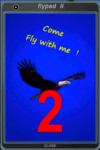
FSX, Flypad Gauge Version 2.0
This gauge has been developed on Win7 for FSX Flight Simulator SP2 or SP1.It should also work with Acceleration, but this is not guaranteed by the author. The gauge is a little extra addon based on the design of a smart phone and provides 9 different displays which are different from all of the standard gauge displays on a regular aircraft panel. It is mainly helpful for the user flying small propeller aircraft, and old timer aircraft.
However, the displays are as well attractive for sim pilots flying modern jet aircraft. Use it as if you just grabbed to your smart phone during a flight and check on the status of your aircraft, or how the terrain awareness situation looks like, how the AI traffic on the radar is, while you proceed with your flight plan. Enjoy the new design of a simple aircraft attitude display during an ILS approach. A new screen for LAT/LON coordination control and distance/bearing calculation has been added to this version in addition with a number of improvements.For credits look at the pdf documentation inside the zip file. By Dietmar Loleit
| Filename: | Flypad_Gauge_V20.zip |
| License: | Freeware |
| Added: | 2nd August 2014, 17:50:45 |
| Downloads: | 779 |
| Author: | Dietmar Loleit |
| Size: | 4 MB |
| Category: Flight Simulator X - Utilities | |
| FSX/FS2004 Flight Calculator Ver 1.6.5 |
|
Images related to this file:
File Description:
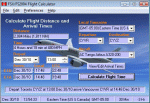
FS Flight Calculator will calculate distance and arrival times for both FSX and FS2004. The program has four input components, Local TimeZone, Departing Airport, Destination Airport and the Aircraft to be used for the flight. The program calculates the distance in nautical miles between two FlightSim Airports. It determines the flight length in hours based on the aircraft's speed and then calculates the Arrival time. If the flight time passes midnight the arrival day is incremented by a day. In addition this version takes into account the timezones of both departing and destination airports and calculates the timezone offset between them allowing display of the arrival in local time at the destination airport. The distances and times are based on point to point calculations and do not allow for taxi out, taxi in, start-up times etc. To compensate for this you can input a time period in minutes which is automatically added to the flight time to give a more accurate estimate of arrival times. This version also adds a Flight Summary Window to the main screen, the ability to create multi leg routes and a utility to create a new Aircraft.txt file. Freeware By Dave Westbury
| Filename: | FSXFS2004_Flight_Calculator_Ver_165.zip |
| License: | Freeware, limited distribution |
| Added: | 29th September 2011, 01:10:39 |
| Downloads: | 3,482 |
| Author: | Dave Westbury |
| Size: | 4.29 MB |
| Category: Flight Simulator X - Miscellaneous Files | |
| FSX Metal GUI |
|
Images related to this file:
File Description:
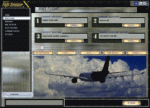
I designed this for myself to darken the default User Interface for 2 reasons. I have bad eyes that are sensitive to bright objects on the screen, and I like to fly the simulator in the evening hours with the lights turned off in the room. I hope you like my end result.
I also added 2 bonus features. Instead of hearing the Windows/Internet Explorer click sound when you mouse click on a menu item, you now will hear the "Fasten Seatbelts" sound effect. Be sure to back up the original sound "checkc" in case you find the new sound annoying. Secondly, I have included 4 optional Aircraft Viewer images that give the selected aircraft a more airborne look. I will make switching these simple by adding them to the Generic Mod Enabler(JSGME) that I will include in the download.
The look is created using Diamond Plate and Polished Aluminum textures, and modifying the buttons with some more color.
This is Freeware, and I am giving permission to anyone that wants to create their own and upload to any site they wish. I do not wish that you have to mention my name in any credits.
| Filename: | FSX_Metal_GUI.zip |
| License: | Freeware |
| Added: | 20th November 2011, 00:12:46 |
| Downloads: | 462 |
| Author: | Todd McCuistion |
| Size: | 7.83 MB |
| Category: Flight Simulator 2004 - Panels | |
| Installation of functional yokes to 2D Panels |
|
File Description:
Movable yokes for 2D panels (primarily for use at add-on aircraft). Noted that many aircraft 2D panels are missing the functional yokes. These yokes can be easily installed to aircraft panels, and opened with the button (marked 'Yoke' in yellow - installed to the panel}.
The yoke opens in the middle of the screen but can then be dragged to any most realistic panel location preferable not obscuring the essential instruments. The flight can then be saved with the yoke in this position. To see the instruments behind, the yoke can always be closed by pressing the yellow button.
The 18 included yokes are intended for the cockpits of: B-17, B-24, B-29, B-52, B707, B737, B747-777, B757-767, Beachcraft, Cessna, Concorde, DC8-9, Douglas props, Embraer, Learjet, MD11, Piper and VC10.
Note that the actual yokes could be different, custom made for the different airlines and different aircraft types, therefore some of these might just partially resemble the authentic yokes used in these types. All included yokes can also be used for any other aircraft panels as deemed appropriate. Finally Many Thanks to all the 'free download' aircraft panel designers, great jobs!
| Filename: | Installation_of_functional_yokes_to_2D_Panels.zip |
| License: | Freeware |
| Added: | 11th May 2022, 04:05:27 |
| Downloads: | 163 |
| Author: | Peter Bendl |
| Size: | 8.9 MB |
| Category: Flight Simulator 2004 - Aircraft Repaints, Textures and Modifications | |
| King Air C90 |
|
Images related to this file:
File Description:
Beechcraft King Air C90 for FS9
This is a series of repaints for Dee Waldron's King Air C90. I have recently revised the textures, adding details and shadowing thanks to Henry Tomkiewicz' AI paint kits. There are 8 repaints in this file. Screen shots are enclosed. I have also included a paint kit. The visual model, aircraft configuration file and air files are included.
This aircraft, and other members of the King Air family are projects Dee and I worked together on some years ago. The textures are newly refeshed. I have many hours happily flying these aircraft. Dee's model is very sparing of resources. This aircraft may be used as an AI aircraft or a fully flyable aircraft.
As far as panels and sounds, I've left this to the user. The stock Microsoft King Air is an obvious starting point. Pierre Fasseux has designed three alternatives to the default panel, which represent a better choice. Leon Medado has created a very good freeware alternative to the default sounds. These are all available in the Flightsim.com library.
These files are provided on an as-is basis. I have tested them and have found them to work as intended.
Michael Verlin
January 29, 2015
| Filename: | King_Air_C90.zip |
| License: | Freeware, limited distribution |
| Added: | 30th January 2015, 07:13:08 |
| Downloads: | 200 |
| Author: | Michael Verlin, Dee Waldron |
| Size: | 4.75 MB |
| Category: Flight Simulator 2004 - Aircraft Repaints, Textures and Modifications | |
| Beech King Air F90 |
|
Images related to this file:
File Description:
Beechcraft King Air F90 for FS9
This is a series of repaints for Dee Waldron's King Air F90. I have recently revised the textures, adding details and shadowing thanks to Henry Tomkiewicz' AI paint kits. There are 7 repaints in this file. Screen shots are enclosed. I have also included a paint kit. The visual model, aircraft configuration file and air files are included.
This aircraft, and other members of the King Air family are projects Dee and I worked together on some years ago. The textures are newly refeshed. I have many hours happily flying these aircraft. Dee's model is very sparing of resources. This aircraft may be used as an AI aircraft or a fully flyable aircraft.
As far as panels and sounds, I've left this to the user. The stock Microsoft King Air is an obvious starting point. Pierre Fasseux has designed three alternatives to the default panel, which represent a better choice. Leon Medado has created a very good freeware alternative to the default sounds. These are all available in the Flightsim.com library.
These files are provided on an as-is basis. I have tested them and have found them to work as intended.
Michael Verlin
January 29, 2015
| Filename: | Beech_King_Air_F90.zip |
| License: | Freeware |
| Added: | 30th January 2015, 07:14:50 |
| Downloads: | 189 |
| Author: | Michael Verlin, Dee Waldron |
| Size: | 4.38 MB |
| Category: Flight Simulator 2004 - Aircraft Repaints, Textures and Modifications | |
| Beech King Air F90-1 |
|
Images related to this file:
File Description:
Beechcraft King Air F90-1 for FS9
This is a series of repaints for Dee Waldron's King Air F90-1. I have recently revised the textures, adding details and shadowing thanks to Henry Tomkiewicz' AI paint kits. There are 6 repaints in this file. Screen shots are enclosed. I have also included a paint kit. The visual model, aircraft configuration file and air files are included.
This aircraft, and other members of the King Air family are projects Dee and I worked together on some years ago. The textures are newly refreshed. I have many hours happily flying these aircraft. Dee's model is very sparing of resources. This aircraft may be used as an AI aircraft or a fully flyable aircraft.
As far as panels and sounds, I've left this to the user. The stock Microsoft King Air is an obvious starting point. Pierre Fasseux has designed three alternatives to the default panel, which represent a better choice. Leon Medado has created a very good freeware alternative to the default sounds. These are all available in the Flightsim.com library.
These files are provided on an as-is basis. I have tested them and have found them to work as intended.
Michael Verlin
January 29, 2015
| Filename: | Beech_King_Air_F901.zip |
| License: | Freeware |
| Added: | 30th January 2015, 07:16:27 |
| Downloads: | 182 |
| Author: | Michael Verlin, Dee Waldron |
| Size: | 3.84 MB |
| Category: Flight Simulator 2004 - Panels | |
| DC3 Photo-real Modern, Re-built Panel |
|
File Description:
This panel is made from a photograph of a modern day DC3. It features a unique 1950's-1960's style radio array mounted on top of the panel. The default King Air Radio gauge has been modified to work with it. The full version includes all working gauges, including VOR, ILS, the compact King Air autopilot, a repostioned GPS, and the default DC3 pop up windows for electrical, engine, and other controls. This shareware version, for evaluation purposes, is limited in gauge functions, color blending, and visibilty. It also includes the Right and Forward-Right cockpit views for evaluation of the full set of 7 inside views. The full set includes cargo and passenger options, from two different DC3 aircraft in use today (see screen shots). Also included as freeware, is the modified DC3 MDL file by Clive Ryan (dc3_mdl.zip), with permission. This will switch off the default virtual cockpit, so it does not conflict with the internal views. Or, if you know how to hex-edit, you can modify your own default MDL file, by following Clive's tutorial, which is included (only recommended for advanced users). You can also install only the panel, without using the modified mdl file. Includes choice of 1024x768 or 800x600 image resolution sets. By Will Fisher
| Filename: | DC3_Photoreal_Modern_Rebuilt_Panel.zip |
| License: | Shareware, limited functionality |
| Added: | 3rd December 2004, 22:21:38 |
| Downloads: | 2,523 |
| Author: | Will Fisher |
| Size: | 3.36 MB |
| Category: Miscellaneous Files - Miscellaneous Files | |
| FSMMoving Map v1.1.0 |
|
File Description:
FSMMovingMap 1.1.0 - Compatible with both FS2002 and FS2004
FSM Moving Map is a Freeware software with some neat features. With proper road maps, you will be able to find your road (or lack of) in FS environment, or fly at ease using Sectional or terminal charts. The concept is very simple: you, the user define all the maps... once you are flying, FSMMM will try to locate the best map available, and display it on screen. This can be very useful during VFR Flights.
One of our beta user has described it as "flying like the rich people with fancy GPS units sporting colour map displays" - 'nuff said.
On local PC, this map can be used with FS2004 Kneeboard, or with "MovingMap Launcher". This software can also integrate with FlightSim Manager (v2.8 and above), and work over the network using FSM Lanview (so you can fly on one machine while the map runs on a different PC).
You can find the latest version from: http://www.ranainside.com/
Programmer
Rana Hossain
[email protected]
24 February 2005
| Filename: | FSMMoving_Map_v110.zip |
| License: | Freeware, limited distribution |
| Added: | 24th February 2005, 05:00:56 |
| Downloads: | 12,058 |
| Author: | Rana Hossain |
| Size: | 798.33 KB |


© 2001-2026 AVSIM Online
All Rights Reserved
Privacy Policy |