
Where Flight Simulation Enthusiasts Gather from Around the World!
AVSIM Library - Search Results

| Category: Prepar3D V1-4 - Aircraft Repaints, Textures and Modifications | |
| Cessna 421 advanced physics |

|
File Description:
C421C advanced physics
Modification for the Alabeo C421 C Golden Eagle
Version: tested for P3DV4; should work also with P3DV5 (and probably FSX)
1. Why I developed the advanced physics version
I was asked via this forum, via PMs and also by e-mails to provide a modified version of the Alabeo C421C which can be used for serious multi-engine training. It should have accurate type specific performance for both AEO (all engine operative) and OEI (one engine inoperative), the latter for either a windmilling prop at various speeds and for a feathered engine. Feathering should work as realistic as possible.
Thus, I developed an advanced physics version of the Alabeo C421C. It shows realistic physics for negative thrust (prop drives engine). This is necessary for OEI training and more realistic idle power simulation.
2. Modified files
Modification includes “c421.air†and “aircraft.cfg†files. Data is based on real world Cessna 421C, N100L, 421C-0313.
Aircraft data, equipment list, checklist and other documents for N100L,
as well as some images of C421C, registration N100L, can be found here, too.
Unfortunately, due to copyrights, I can’t upload the full files and can’t provide the AFM and other copyright protected documents.
3. How to install
To update “c421.airâ€:
- Copy the original Alabeo C421 to another aircraft folder, e.g. “C421C advanced physicsâ€.
- Use AirEd (freeware) and open the original “c421.airâ€.
Open AirEd a second time and open “modifications advanced physics c421.airâ€.
Copy the modified tables 511 and 512 to the original .air file
(right click in modification file -> copy -> right click on original file -> replace from clipboard)
To update “aircraft.cfgâ€:
Just copy the modifications to the corresponding position in the original file.
4. Legend of modifications
Modifications in aircraft.cfg:
- Basic Empty Mass (actual mass for N100L 5,154 lbs inserted; most C421C are more heavy, ours is on diet)
- correct basic data for engines + props
- engine friction included (necessary for all negative thrust scenarios)
- flaps lift + drag scalar adjusted (split flaps)
- 2 vacuum pumps
- VMO = 151 KIAS; VNE= 240 KIAS
- cabin: max. differential pressure: 5.0 psi
Modifications in c421.air:
- implemented negative thrust scenarios in prop thrust and efficiency curves (tables 511 + 512); adjusted thrust curves for high TAS at high ALT
5. Side effects of modifications:
- more realistic engine starting:
starting the engine needs the throttle to be 2 cm above idle (see checklist) for the first 15 seconds
- if you start the engine and don’t retard the prop to medium RPMs immediately, you will overstress engine and prop. So be careful when doing an air start, you might lose the prop and the aircraft. (In the real aircraft, these effects are less severe, but you have to avoid high RPMs until the engine is warmed up and have to avoid rapid change of RPM.)
6. Additional Notes:
- Basic aircraft data as published by the manufacturer, like range and service ceilings, especially OEI, are based on MTOM.
- The use of high payloads close to MTOM and higher ambient temperatures are making for a more challenging OEI training.
- In the sim, climb power is too low compared to full power (about 65 % instead of 75 %). I have to find a way to adjust that.
- I have buttons for engine failure under the mixture (see images)
- Seat Position is, like in many Aircraft, higher than as per Default by the sim. For the C421C and me being 5 ft 7 in, that's about 7 clicks arrow up.
| Filename: | Cessna_421_advanced_physics.zip |
| License: | Freeware |
| Added: | 20th March 2021, 01:09:34 |
| Downloads: | 191 |
| Author: | Andreas Kunzi |
| Size: | 18.06 KB |
| Category: Flight Simulator X - Scenery | |
| RAF Elvington |
|
File Description:
The station was originally a grass airfield within No. 4 Group. In the early 1940s the airfield was entirely reconstructed with three hardened runways replacing the grass. It re-opened in October 1942 as a station for 77 Squadron RAF and along with RAF Melbourne and RAF Pocklington was known as No "42 Base". The squadron had a strength of approximately 20 aircraft and initially used the twin engined Armstrong Whitworth Whitley medium bomber although this was quickly replaced by the Handley Page Halifax four engined heavy bomber which was being introduced. No 77 Squadron suffered heavy losses during its time at Elvington with over 500 aircrew killed, missing or taken prisoner and almost 80 Halifaxes lost as it played a major part in the Battle of the Ruhr and the bombing of Berlin.
In May 1944 No 77 Squadron posted to the newly opened nearby RAF Full Sutton and was replaced at Elvington by two French squadrons, numbers 346 "Guyenne" and 347 "Tunisie" who both played a leading part in the bombing of Germany. Elvington was the only airfield in the United Kingdom used by the remainder of the Free French Forces, they also flew Handley Page Halifax heavy bombers until they moved to Bordeaux in October 1945 where they became the basis for the new air force of liberated France. In September 1957 a memorial was unveiled in Elvington village dedicated to the two French squadrons. While they were at RAF Elvington nearly half of the squadrons' members were killed.
After the war the 400-acre (1.6 km2) airfield was transferred to No 40 Group under the control of Maintenance Command until 1952 when it was greatly enlarged and extended for use by the United States Air Force.
United States Air Force use
The United States Air Force (USAF) built a new 3,094 m (10,151 ft) runway, which was the longest in the north of England, and a huge 19.8 hectares (49 acres) rectangular hardstanding apron as well as a new control tower to turn Elvington into a "Basic Operation Platform" which would have operated as a Strategic Air Command (SAC) dispersal airfield. After spending £4 million the airfield never became operational as a SAC base and was abandoned by the US Air Force in 1958.
Other uses
In the early 1960s the Blackburn Aircraft Company, now part of British Aerospace used the runway for test flights of the Blackburn Buccaneer. Elvington retained its status as an RAF relief landing ground and was used by the RAF flying training schools at RAF Church Fenton and RAF Linton-on-Ouse until the airfield was finally closed in March 1992.
Present day
The airfield is now owned by Elvington Park Ltd. The adjacent buildings and control tower have been restored, and serve as the Yorkshire Air Museum which has many varied and rare aircraft and exhibits, including a complete Halifax bomber. Elvington is also a popular motorsports venue for motorcycle racing.
Source:Wikipedia
| Filename: | RAF_Elvington.zip |
| License: | Freeware |
| Added: | 10th April 2017, 22:08:13 |
| Downloads: | 167 |
| Author: | Terry Boissel |
| Size: | 220.79 KB |
| Category: Flight Simulator X - Original Aircraft | |
| Boeing 787-942 VIP-BBJ |
|
Images related to this file:
File Description:

Boeing 787-942 Boeing Business Jet (VIP), AKA "DreamJet", is the Corporate version of this aircraft, modified for individual client specs. The range is extended beyond the normal 787-9 due to additional fuel tanks, a lot less payload weight, and more powerful and efficient engines. The Cabin Pressure is decreased to 6,000 ft, allowing for higher Flight Levels than normal. The tail number on this model can be changed to match the user's preference, since it is not apparent on the exterior (No Airline Call used on Private Aircraft).
This is a huge aircraft and normally seats about 300 passengers, but there are only 48 (including Pilots/Attendants) on this plane. A lot of space remains for luxuries that are well beyond any Business Jet of any kind other than the 747 or A380. Some of these luxuries include automated beds that are hidden in the floorboard and activated by the attendants when requested, and each of these includes a privacy barrier. There is one Large Screen TV with stereo surround sound with theater seating in the fore section, and separate small screen monitors located at every assigned seat (including flight data relay of all positioning and aircraft data viewable). The kitchen is fully equipped with 935 lbs of various food and drinks, with one attendant being a Master Chef. There is a automated Dance Floor that can be activated in the theater area, after the seating chairs are automatically stored below deck. The crew also experiences luxury as the pilots have a twin-bed sleeping area with a private kitchen (2 sleep while 2 fly), as do the attendants (fore and aft upper deck) with twin beds and private kitchens. The aircraft is also more luxurious in that it has 6.000 ft of pressure continuous to 47,000 ft, and has a very low interior noise level. There are also many added safety features that provide for survival in the event of a mishap, making it possible to survive a water crash for several days through the use of 6 inflatable skiff-rafts with engines, radios, and supplies. All attendants are trained and certified Registered Nurses, and they have 25 lbs of medications and supplies stored in the aft. Some of these features add to the empty weight, so the MTOW is the same as a normal aircraft of this design for commercial use (the gear are also modified for these accommodations).
This aircraft is designed for educational use protected under the Fair Use Doctrine:
(http://www.expertlaw.com/library/intellectual_property/fair_use.html)
It cannot be sold or bundled for sale, and such will never be approved by me or the original authors. FREEWARE DISTRIBUTION ONLY!!!
Model design and paint by: Camil Valiquette;
Sound by: Emil Serafino;
Engine/Aerodynamics and Details by: Douglas E. Trapp, ([email protected]) May 2018
| Filename: | Boeing_787942_VIPBBJ.zip |
| License: | Freeware |
| Added: | 20th May 2018, 16:58:42 |
| Downloads: | 879 |
| Author: | Douglas E Trapp |
| Size: | 77.99 MB |
| Category: Microsoft Flight Simulator (2020) - Utilities | |
| Flightplan Visualizer 1.22 |
|
Images related to this file:
File Description:
Flightplan Visualizer (FV) version 1.22. Copyright 2018-2022 by Pelle F. S. Liljendal ([email protected]), all rights reserved.
FV comes with 1599 pre-imported AI flightplans (of which +726 are BizJet flightplans, the rest are commercial, government and military). However you are able to import additional (AI) flightplans yourself. Once imported these (AI) flightplans can be visualized on a map-view, and the user will be able to search accross all these. Hence you can use the program as inspiration as to which routes to fly. E.g. you can search across all imported flightplans to find all flights in an A321 flying into/out from LDDU, or simply to look for all flights in a Boeing 747-8F.
Simply run the included installer to install the software. The program will be installed into "C:\Program Files (x86)\Flightplan Visualizer" and all datafiles will be installed into: "C:\Users\[UserName]\AppData\Roaming\FlightplanVisualizer". The program comes with a full manual explaining everything, and a 3 page quick manual to get you started. The first 3 times you run the program the quick manual will automatically open. The forum is hosted here: https://forum.aerosoft.com/index.php?/forum/919-flightplan-visualizer/
Version 1.22 Contains the following changes:
- I had initially added a feature to download AIG airline-logos, however a later change in AIG's server setup rendered this feature useless. In stead you can now specify the local folder holding AIG's airline logo's (if/when you are using AIG AIM on your computer for AI-traffic). If specified, airline-logo's will be obtained from this folder.
- On the same note, I had to remove the menu-item to download AIG flightplans, as this program no longer have directly access to the AIG servers. For the same reason the menu-item to access the index with flightplans (up to summer 2021) was re-enabled.
- In the past when opening the Airport-Info form it defaulted to show in-/out-going traffic for the selected flightplan or active leg-search only. Now there is a new setting where you can set it up to in stead default to showing all traffic in/out of the airport (the Airport-info form still contains a combobox where you maually can choose what to see).
- "Owned aircraft" was renamed into "Simulator-aircraft", as these are the (flyable) aircraft you have available within your simulator of choise.
- When choosing to use calculated flight-times in a leg-search, you can now specify a percentage-difference (between leg-time and calculated-time). Only when the difference between leg-time and calculated-time exceeds this specified value will the calculated time be used during leg-search (e.g. "only use calc-times if diff. exceeds 50%, otherwise use leg-times").
- Began using (aircraft) short-names many places where the program in the past used IATA/ICAO-code (e.g. when hovering the mouse over a route, or list of aircraft servicing specific airports when editing flightplans). Also added short-name columns to aircraft browser and when choosing favorites (these stil contains columns for IATA/ICAO-codes).
- Pressing the "Usage" button when editing/viewing an aircraft-type or right-clicking an aircraft-type in the browser and choosing "View usage-report..." from the context menu, you will be shown a report that inform you how that aircraft-type is used: which simulator-aircraft are based on that type, which owned aircraft that have been marked as substitute for that type, which airlines are using that type (as carrier/operator), and finally in which (active) flightplans that type is used.
- Items in airline-browser are now by default sorted by (airline) name, and the usage-column shows the size of the airline if its in use. If available a logo for the selected airline is displayed in the upper/right corner.
- Improved performance when searching for ICAO-codes in the airport-browser. Also improved priority of the default selected item, in cases when an airport had a 3 letter ICAO-code, and another was using the same 3 leters for its IATA code.
- When searching for ICAO/IATA-codes in the airline-browser, it will now prioritize non-defunct airlines, if multiple airlines share the same ICAO/IATA-code.
- When enabling/disabling flightplans, you can now select all BizJet flightplans (those prefixed with "Bz_"), all Military (prefixed with "Ml_") or all Goverment (prefixed with "Gv_").
- Individual FP sub-folders can now be setup to leave (not move) defunct- and/or obsolete FP, even if the settings to automatic move these to the disabled folder is set.
- Performing "Search legs" you can now filter on aircrafts you are allowed to fly via type-ratings ("Must be type-rated").
- Performing a substitute of a user-airline, that airline will remain selected (previously the list scrolled to the top, and selected the 1st item).
- Added new check-box to "Search legs" that can exclude round-trips (legs taking-off and landing at same airport).
- Airline/Aircraft-repaint -filter can now filter on size of airline (e.g. "size=major"). Size is determined from usage as carrier/operator in active flightplans. Airlines not in use by active flightplans are listed with a size of "unknown").
- Added GPS-conversion (deg deg,min,sec) to the conversion-form, as requested by a colleague. You can either manually enter lat/lon or look-up an airport to get it. There is both a primary lat/lon and a secondary, and the form will show the (GC)distance between these and the initial/final course.
- Added new "Max airport-distance" for airport-redirections. At the same time added new feature when importing/editing airports to permanent change an airport. If used, it is not saved/handled as a redirection (can't be restored) but rather as a perpament change.
- Reordered- and renamed some of the tab-pages in the Airport-info form.
- Reordered the length/distance-fields in the unit-conversion form.
- The Wind-calculator have been removed from the main-menu, in stead wind-calcuations can now be performed using the unit-conversion form. Also now the speed of the wind is always displayed as a positive value, and in stead the label will either say "Head-wind" or "Tail-wind".
- Added new "Country list" menu-item in the misc-menu. Will list all countries twice (sorted by names, and sorted by ISO3-codes).
- Showing airport-marker tool-tips on the main-map is now prioritized over showing route tool-tips.
- Added "Min take-off fuel ("MTFL") field to user-aircraft weight-fields. As of now its not set for any aircraft in the database, however it can be estimated as 60 minutes of flight at cruise.
- Moved several group-boxes of the settings-form to the 2nd tab-page, and added new fields for defalt simulator/logging-environment based on the File-prefix used when starting the program.
- Also now the header-names that was previous fixed to "Rank" and "Traffic-density" can be changed, so the selectable 6 values can be used for something entirely different, if anyone have the need for this. If/when changed, these new names are shown when editing an airport, or when performing a leg-search (as the leg-search can filter on these fields).
- MakeRunways (MkRwy) by Pete Dowson is challenged handling unicode in the scenery it scans/writes to XML. E.g. the Icelandic airport (BIFL) "Flúðir Airport" is exported by MkRwy as "Flúðir Airport". In this version FV will try to identify when this happens, and then it will fall back using the airport/city-names from the databases bundled with FV. This is not a perfect solution, but at least it improves the result.
- Various minor changes and tweaks to multiple forms (e.g. Unit conversion form can now be closed with ESC, renamed log-archives and so on).
- Fixed: If the main-form had an active flightplan filter when using the search-legs feature the flightplan combo-box still only contained the filtered context. Pressing the Clear button did not resolve the issue.
- Fixed: Since adding support for the AIGFP file-format, there could be flights departing from- and arriving at the same airport (e.g. helicopter flights). In previous versions the calculated flights-time would only consist of taxi-out/in times. In this version the flightplan leg-time will now also be uses for the calculated time, when the same airport is used both for departure and destination.
- Fixed: In some cases re-processing flightplans (resetting and performing redirection) could corrupt the flightplans and remove airport-data from the flightplans. This version will also try to add any missing airport-data to flightplans when re-processing them.
- Fixed: Selecting "only show favorites" in the Search aircraft-type form would filter out all aircraft (including those marked as favories).
- Fixed: In the leg-info form the fields to show times (Out, Off, On, In) were too narrow for multi-week flights, when showing the week-number (e.g. "TH7/14:37").
- Fixed: Issues when estimating cruise/taxi fuel-burn for user-aircraft, where in some cases some fields were not saved, and wrong calcuation if setup to show weight in Kg.
- Fixed: In some cases wrong TimeZone was used when calculating local time for OUT, OFF, ON, IN-times.
- Data: The airport redirection file ("UserAirportRedirect.xml") in the UserData folder have been updated to match the latest MSFS world update. However this new file is only installed by the installer if it does not already exists (in case you made your own changes), hence you need to delete this file manually prior to running the version 1.22 installer.
- Data: Quite a few airports in the airport-database were updated (had wrong names due to issues with unicode-letters). Also some additional airports were added.
- Data: The installer comes bundled with +300 airline-logos (optional install), and a separat package of +1400 airline-logos are avilable for download from AVSIM (in both cases these are encoded into a propriotary format using the ".CAL" extension).
- Data: Added the P2F (Passenger-to-Freighter) versions of the Airbus A320, A321 and A330. Also added the package freighter versions of CRJ100 and CRJ200.
- Data: Improved detection of Boeing 737-700/800 BCF/BDSF when importing flightplans utilizing these (passenger aircraft converted into freighters). Also improved a few other freighter detections.
- Data: Changed a few (aircraft) short-names to either shorten them a bit, or make them "more readable".
- Flightplans: All new/updated flightplans have been added to the installer, and all obsolete/defunct have been marked/removed. A total of 1599 active flightplans are bundled with the installer.
| Filename: | Flightplan_Visualizer_122.zip |
| License: | Freeware, limited distribution |
| Added: | 18th October 2022, 23:31:28 |
| Downloads: | 395 |
| Author: | Pelle Liljendal |
| Size: | 45.57 MB |
| Category: Prepar3D V1-4 - Utilities | |
| Flightplan Visualizer 1.10 |
|
Images related to this file:
File Description:
Flightplan Visualizer (FV) version 1.10.0. Copyright 2018-2019 by Pelle F. S. Liljendal ([email protected]), all rights reserved.
FV comes with 300 Commercial-, and +380 BizJet AI pre-imported flightplans which the creators of those flightplans have gracefully allowed me to include with the installer, however you are able to import additional (AI) flightplans if you want to. Once imported these (AI) flightplans can be visualized on a map-view, and the user will be able to search accross all these. Hence you can use the program as inspiration as to which routes to fly. E.g. you can search across all imported flightplans to find all flights in an A321 flying into/out from LDDU, or simply to look for all flights in a Boeing 747-8F.
Simply run the included installer to install the software. The program will be installed into "C:\Program Files (x86)\Flightplan Visualizer" and all datafiles will be installed into: "C:\Users\[UserName]\AppData\Roaming\FlightplanVisualizer". The program comes with a full manual explaining everything, and a 3 page quick manual to get you started. The first 3 times you run the program the quick manual will automatically open. The forum is hosted here: https://forum.aerosoft.com/index.php?/forum/919-flightplan-visualizer/
Version 1.10 Contains the following changes: In the flightplan combo-box at the bottom of the main-form, "Active Search" have been renamed into "Last Search". Picking "Last Search" from the flightplan combo-box, will re-execute the last performed search, and populate the map accordingly. A new entry called "None", have been added flightplan combo-box (at the top of the list). Chosing this item will "deselect" the otherwise current search or selected flightplan, and clear the map of routes. A form have been added to assist enabling/disabling flightplans. Gate-letters/numbers are now by default written using a (5x7) Matrix-"font". If you want to revert to the segment-"font", used in previous versions, simply set the value of the "UseMatrixGateChars" tag in the settings-file to false. changed how the Gate-letters/numbers are written in the round gate-markers on the map. Previously all "chars" had the same width. Now the width is dependant on which sub-elements are in use by each "char" (e.g. a "1" is not as wide as an "8"), as a result the gate letter/number are more easy to read. Zulu- and local-time added to the "Selected airport" group-box in the upper/right corner of the main form. If no airport is selected, or no time-zone is registred for the selected airport, only zulu-time will be displayed. Selections of favorite aircraft can now be saved and loaded.⦠This selection of aircraft can be loaded as a selection of aircraft in the "Search leg" form. Video tutorials can now be accessed from the "Help" menu. These are simply "links" to the actual videos on YouTube, hence will launch the default browser. If you hold SHIFT the url will in stead be copied to the clipboard (e.g. in case you want to upen the link in another browser). In the same manner the "Help" menu now contains a link to the forum. The form with decoded METAR/TAF-messages now shows: name, city, and country/state for the selected station in the caption. This text will also be embedded when copying the content to the clipboard. Likewise UTC/Local-time is also embedded when copying the content to the clipboard as it can be used to show the "age" of the report and convert between UTC and Local -times (based on the difference of UTC- and local-time). The info presented when pressing the "Show Scenery Gates" button on the Airport Info form, can now be copied to the clipboard. Various minor "behind the scenes" changes and optimizations. Added support for additional aircraft: Airbus A220-100 (CS100), Airbus A220-300 (CS300), Boeing 777-8 and Boeing 777-9. Listviews containing both (aircraft) IATA and ICAO-codes now all list them in the following order: IATA, ICAO (both individual sortable). Hovering the mouse over gate-markers the hint window will no show the radius both in meters and feet. Editing gate-info you will now see more info for the gate being edited: Type, Size (meters and feet) and if applicable: airlines. Fixed: Minor bug in relation to how the airport size was calculated. Fixed: IATA/ICAO columns were swapped when choosing Favorite Aircraft. Fixed: Typo on the METAR/TAF-decoder form.
| Filename: | Flightplan_Visualizer_110.zip |
| License: | Freeware, limited distribution |
| Added: | 5th June 2019, 21:20:51 |
| Downloads: | 319 |
| Author: | Pelle Liljendal |
| Size: | 24.81 MB |
| Category: Flight Simulator X - Scenery Design | |
| (Version 2.0) KEFD -Ellington 2025 Refresh FSX (Circa 2006-2010)- Johnson Space Center Houston |
|
Images related to this file:
File Description:
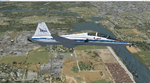
Version 2.0 covers landclass across the entire greater Houston area, with a large increase in LOD. This version significantly tightens up and improves the landclass from version 1.0, and adds a vast amount of scenery objects that brings the Bay Area-KEFD area into the modern era. This improves and adds a highly accurate runway 17 approach with accurate placement of buildings and scenery around the year 2011-modern day. In addition, includes several new files including a new airport/helipad via Houston Clear lake regional airport, T41 La Porte Municipal and surrounding shipping ports, Kemah Boardwalk, and a giant improvement to Johnson Space Center Houston. Rundway 35 and Runway 22 landclass is significantly increased, and more accurate as well. You can fly an accurate VFR approach or set up an ILS for any one of KEFD's runways with ease with this improvement.List of Version 2.0 additions and changes: - I added a ton of scenery objects and tightened up the landclass at Johnson Space Center Houston- NASA Control Center--- Added Talon Park with T38s (via static objects)--- Added Gemeni V rocket and 747 for the shuttle transporter--- And a whole bunch of vegetation, new buildings, and tour buses.- Added Kemah boardwalk and several boat docks- Removed a TON of highrise textures and replaced with medium and large city suburb landclass.- Added Clear Lake regional Hospital with helipad and surrounding scenery by Walter Reed Park- Added El Jardin or "Bayport Container port" with several scenery objects and significantly tightened up landclass.-- Looks great when setting up ILS approach for RWY 22- Tightened up Bay Area BLVD landclass, "adding" University of Houston Clear Lake"-- UHCL was semi already present, just made it more pronounced.- Made Red Bluff road landclass super recognizable!-- Red Bluff road is used to set up VFR approach and or field break for RWY 22 and RWY 17 R.----- Its common to see private jets and the USAF doing a break along Red Bluff road.- Added First Baptist Church, and water tower to Pasadena Convention center- Made Fairmont Parkway pronounced with landclass- Added Houston Port Authority at Morgan's Point--- Another Landmark for the RWY 22 ILS approach, NASA religiously uses this to line up the 10 mile ILS.- Tightened up landclass at Village Grove East and along Fairmont Parkway- Added a TON of scenery objects and landclass corrections for approach of RWY 17 L and 17 R.---- Added Home Depot, Lowes, Walmart Super center, Guitar center etc.---- added South Main Baptist Church--- Bondy Jr High, Turner Elementary, and Pasadena Memorial High School--- Added Saint Luke's Hospital--- Added Hampton Inn Suites and HCA rehab hospital--- Added a ton to the container facility behind best buy and storage facility--- Added smaller churches on RWY 17 approach--- Added a ton of scenery at the base of RWY 17 R, i.e., concrete plant, containers, trucks-- Added gas stations on the corner of beltway 8 and genoa red bluff-- Significantly changed and tightened up landclass at the base of RWY 22 and RWY 17 L and 17 R-- Made several roads and Beltway pronounced------ This decision looks AWESOME at night, really adds demarcation to the roads.**All of this makes the RWY 17 approach super recognizable** RWY 22 approach landclass is much more accurate.- Significantly changed and tightened up landclass near southbelt ellington and interstate 45.- Added Grace Church-- I wanted to do San Jacinto College south, but seemed over kill at that point.- SIGNIFICANTLY tightened up landclass for RWY 35 approach and near baybrook mall.-- Along I45- Added TDECU stadium at the University of Houston Main Campus---- So you can practice flybys for Cougar games!- Added the Battleship at San Jacinto Monument- I also "borrowed" T41 La Porte Municipal's tower camera to make a SWEET view of KEFD.- I included landclass for Sealy Texas this time, as well as my significant enhancements of Austin, Texas greater area as well (optional, but recommended!)---------------------------------------------------------------------------Version 1.0 originally added:- Added the Johnson Space Center Houston, which is now greatly enhanced and blended.- San Jacinto Community College-Central- Pasadena Convention Center- Pasadena Water Treatment Facility- NASA Bouncy Lab- Pasadena Shopping center, now greatly enhanced and blended.- Baybrook Mall and other shopping spots.- Significant Landclass improvements across the entire greater Houston Area File also includes landclass and scenery improvements for the greater Austin, Texas Area (optional), KIAH, KDWH, and Sealy, Texas. Each of these projects combined covers roughly 15,000 square miles of landclass improvement. Allowing you to fly entirely from Houston to Austin, or Houston to San Antonio in accurate landclass. -Enjoy!DJN
| Filename: | Version_20_KEFD_Ellington_2025_Refresh_FSX_Circa_2.zip |
| License: | Freeware |
| Added: | 12th October 2025, 16:15:47 |
| Downloads: | 68 |
| Author: | Dan Nelson |
| Size: | 277.28 MB |
| Category: Prepar3D V1-4 - Utilities | |
| Flightplan Visualizer 1.14 |
|
Images related to this file:
File Description:
Flightplan Visualizer (FV) version 1.14.0. Copyright 2018-2019 by Pelle F. S. Liljendal ([email protected]), all rights reserved.
FV comes with 629 pre-imported Commercial AI flightplans (+380 BizJet flightplans are available as a separate download). However you are able to import additional (AI) flightplans yourself. Once imported these (AI) flightplans can be visualized on a map-view, and the user will be able to search accross all these. Hence you can use the program as inspiration as to which routes to fly. E.g. you can search across all imported flightplans to find all flights in an A321 flying into/out from LDDU, or simply to look for all flights in a Boeing 747-8F.
Simply run the included installer to install the software. The program will be installed into "C:\Program Files (x86)\Flightplan Visualizer" and all datafiles will be installed into: "C:\Users\[UserName]\AppData\Roaming\FlightplanVisualizer". The program comes with a full manual explaining everything, and a 3 page quick manual to get you started. The first 3 times you run the program the quick manual will automatically open. The forum is hosted here: https://forum.aerosoft.com/index.php?/forum/919-flightplan-visualizer/
Version 1.14 Contains the following changes:
- Flightplan file-format was changed, to accommodate changes to the airline-data. In previous versions the airline ICAO-code had to be unique, hence not allowing old defunct airlines still remaining in the data-file when a new airline would be issued the same ICAO-code (now they can both exists, and many of the defunct have been marked as defunct).
- On start-up old flightplans in enabled folders will automatically be updated to the new format. If you have sub-folders containing additional flightplans, you should make sure these are enabled, in order to have these updated as well. Once they have been updated you can go ahead and disable these sub-folders again as you please.
- Its now possible to add user defined airlines, in case you want to add you own fictitious airlines (e.g. VA's) or you want to add airlines missing in the official data-files that I supply with the program (if this is the case, please notify me, so I can add these in the next release of the program).
- "Favorite aircraft" have been renamed into "Favorite aircraft-types", as it is the "types" of aircraft you mark. You don't mark a particular aircraft/cofiguration (like the PMDG B737-800 NGXu) as your favorite, but rather the "type" (B737-800). The file containing the (active) favorite aircraft-type selection was renamed as well (you don't have to do anything, the file is automatically renamed on start-up).
- Added a new Unit-Conversion form, letting the user convert units of: Speed, Lenght/Distance, Weight/Volume, Pressure and Temperature. The Weight/Volumne conversions is a bit special as it lets the user convert between weight (kg/lbs) and volume (liter/gal), thanks to a Fuel Density that defaults to 0.785, but can be changed by the user.
- All search-forms (seaching for airport, aircraft and airline) was changed to ignore whitespeaces (e.g. "airBaltic" vs. "air Baltic"), and ignore diacritics (e.g. "AerolÃnea" vs. "Aerolinea"), making it more easy to find what you are searching for in one go.
- The airline search-form will by default exclude airlines that have been marked as defunct. However a new "Include defunct" check-box have been added to the form, allowing you to include these (who am I to say you can not still use "Air Berlin", "Monarch" or "Thomas Cook" flightplans if you want to).
- Added 3 new columns to the airline search form showing commence/cease-date, and wheter or not the airline is "in use" (as carrier/operator by any of the active fligthplans).
- State is now by default excluded when using the airport search form, which make it a lot more convenient to find airports in the city of "New York". State can still be included in the search by choosing a different search-type using the combo-box in the upper/right corner.
- When Flightplan Visualizer needs for perform potentially lengthy operations it will spread the workload over the available cores of the CPU. However if you want to limit which cores it uses you can now set the affinity-mask in the settings form.
- The splash-screen shown when the program starts, and when reloading active flightplans was prevoiusly always shown on top (top-most), but if you find this anoying it can now be disabled in settings.
- Fixed: Warnings/errors regarding loading flightplans were only displayed at start-up. Now they are shown whenever all active flightplans are loaded (e.g. after having enabled a sub-folder).
- Data: The airline-data got a major update, and a bunch of new airlines were added, and the data for MANY others were updated. It is a manual process to update these, almost as funny to do as to watch paint dry ;-)
- Data: A few countries had a wrong- or no sub-region code, so these were fixed/updated. As usual, if any of you spot any erros, or missing data, please use the forum to notify me.
- Data: Additional info added to the aircraft-data (in preparation for some future plans).
- Flightplans: All flightplans bundled with the installer have been updated to the new file-format.
- Flightplans: Thanks to Ryan Carson (RCAI) for allowing me to bundle the installer with a few of his flightplans, so the installer comes with the very first winter 2019-2020 flightplan.
- Flightplans: The good people over at AIG (Alpha India Group) have been VERY busy since the last release, hence the installer comes with +130 new pre-imported flightplans, bringing the total to 629. This update concludes Summer 2019, and AIG already have the first Winter 2019/2020 flight-plans in beta-test.
Pelle
| Filename: | Flightplan_Visualizer_114.zip |
| License: | Freeware, limited distribution |
| Added: | 10th December 2019, 06:59:46 |
| Downloads: | 370 |
| Author: | Pelle Liljendal |
| Size: | 31.01 MB |
| Category: Microsoft Flight Simulator (2020) - Utilities | |
| Flightplan Visualizer 1.18 |
|
Images related to this file:
File Description:
Flightplan Visualizer (FV) version 1.18.0. Copyright 2018-2020 by Pelle F. S. Liljendal ([email protected]), all rights reserved.
FV comes with 787 pre-imported Commercial AI flightplans (+380 BizJet flightplans are available as a separate download). However you are able to import additional (AI) flightplans yourself. Once imported these (AI) flightplans can be visualized on a map-view, and the user will be able to search accross all these. Hence you can use the program as inspiration as to which routes to fly. E.g. you can search across all imported flightplans to find all flights in an A321 flying into/out from LDDU, or simply to look for all flights in a Boeing 747-8F.
Simply run the included installer to install the software. The program will be installed into "C:\Program Files (x86)\Flightplan Visualizer" and all datafiles will be installed into: "C:\Users\[UserName]\AppData\Roaming\FlightplanVisualizer". The program comes with a full manual explaining everything, and a 3 page quick manual to get you started. The first 3 times you run the program the quick manual will automatically open. The forum is hosted here: https://forum.aerosoft.com/index.php?/forum/919-flightplan-visualizer/
Version 1.18 Contains the following changes:
- GREATLY improved the search-legs feature (by a factor of +50).
- In the past the application was forced to 32 bit. This is no longer the case, hence if needed its able to allocate more memory than before. I have never heard of anyone getting an "out of memory" exception, buy anyway.
- In the settings form, the field for entering the path to where to look for the Make Runways -files, have been replaced with a (MRU) combo-box, remembering the last 5 paths entered. So now you don't need to remember these paths each time you want to change it (e.g. if you switch between a set of files generated for P3D and another generated for MSFS). Remark that when this path is changed, FV will automatically restart when saving the settings, as the MkRwy-data are only loaded at startup.
- Added new command-line argument /MkRwy="G:\FS\MakeRunways". If this argument is set, FV will try to locate the files generated by Pete Dowson's MakeRunway in the specified folder, no matter the value of the MkRwy-path set in the settings-form.
- Added new command-line argument /FilePrefix=XXX. If this prefix is set (in the short-cut starting FV) it will look for files in the UserData-folder using this prefix and an underscore (e.g. open "XXX_UserAirportInfo.xml" in stead of "UserAirportInfo.xml"). If FV is started with this argument it will be displayed in the caption of the main-form to notify the user "which prefix is in use".
- Added new command-line argument /ForceReprocessFlightplans which forces all flightplans to be reprocessed on startup (e.g. process all airport redirections according to loaded redirection file).
- Added new command-line argument /? or /help. Using either of these, or having specified a wrong command-line argument will show a small example of the correct way to use these arguments.
- Added a new "Auto-activation prefixes" entry field to the "Edit owned aircraft" form where you can now enter a comma separated list of prefixes for which each aircraft should set to active. If entered, the aircraft will automatically be set active when FV have been started with the /FilePrefix argument set to the entered value (e.g. P3D). If one or more prefixes have been entered into this field, and FV have been started with another prefix, those aircraft will be set to not-active.
- Added new setting to reprocess all loaded flightplans on startup if FV was started with another /FilePrefix argument than used the previous time FV was started (e.g. if you switch between two different simulators).
- Improved how pseudo-airports tries to look-up airport data from the bundled airport-database. So there is now a higher chance that: name, country/state, and time-zone will be populated with useful data for the pseudo airports.
- In previous versions when opening the airport-info form, the checkbox "Exclude small/grass/dirt" (runways) was always checked, meaning you had to uncheck this checkbox before being able to see any runway-information for small airports. In this version a new setting have been added where you can chose if this checkbox should default to being: Checked, Unchecked or (default) Automatic. if choosing "Automatic", this checkbox will default to un-checked for airports only having few/small runways.
- Redesigned the settings-form so things are less "cluttered", and it will be more easy for me to add additional items in the future.
- The Search Airport form now contains fields that lets you specify min/max criteria for rwy-length and airport elevation, and min/max distance to a specified airport (e.g. find all airports within 20-50 Nm of XXXX). Also you can specify required rwy-type (e.g. "All Hard", "Have Soft" ...).
- Added an "Edit" menu-item to the context menu in the Search Airport form, which opens the Airport Info form, and returns back to the Search Airport form (e.g. see details for a few found airports before chooing one of them).
- If Transition Altitude (TA) is not known for a particular airport, the program will now try to estimate TA based on nearby airports in the same country, where those nearby are weighted more than those further away (its not perfect, but "better" than 0). An estimated TA will be postfixed by a asterisk to mark that it is estimated.
- Minor (internal) changes to the automatic version-check.
- Fixed: Issue importing some AigFP flightplans where airports were being redirected (e.g. "AIG_AviaTrafficCompany_Winter_2019-2020v2").
- Fixed: Using the context menu in the list-view showing all owned aircraft, the changes were sometimes not saved.
- Fixed: In the conversion-form when converting weight/volume into US-Gal, the calcuation was wrong (converting from US-Gal was not an issue).
- Fixed: In the leg-info report the value of Transition Altitude was in some cases used in stead of the length of the longest runway.
- Fixed: Leg-info report only contained taxi-out time for all airports. Now it only contains the taxi-out time for the departure airport, but both departure- and destination airports contains a taxi-in time.
- Fixed: In some cases an airport that was currently being edited, could be edited in another window at the same time (opening multiple Airport Info forms).
- Data: The bundled airport-database had a MAJOR face-lift. Various data were corrected, and it have more than doubled in number of airports/helipads contained within the database.
- Data: Improved detection of aircraft-type "IAI 1126 Galaxy" (as "Gulfstream G200"). Thanks to Bruce Nicholson for notifying me of the issue when importing a particular AIG flight-plan.
- Flightplans: All new/updated flightplans have been added to the installer, and all obsolete/defunct have been marked/removed. A total of 787 active flightplans are bundled with the installer.
Pelle
| Filename: | Flightplan_Visualizer_118.zip |
| License: | Freeware, limited distribution |
| Added: | 9th November 2020, 20:09:24 |
| Downloads: | 479 |
| Author: | Pelle Liljendal |
| Size: | 34.48 MB |
| Category: Microsoft Flight Simulator (2020) - Utilities | |
| Flightplan Visualizer 1.21.1 |
|
Images related to this file:
File Description:
Flightplan Visualizer (FV) version 1.21.1. Copyright 2018-2021 by Pelle F. S. Liljendal ([email protected]), all rights reserved.
FV comes with 1482 pre-imported AI flightplans (of which +690 are BizJet flightplans, the rest are commercial). However you are able to import additional (AI) flightplans yourself. Once imported these (AI) flightplans can be visualized on a map-view, and the user will be able to search accross all these. Hence you can use the program as inspiration as to which routes to fly. E.g. you can search across all imported flightplans to find all flights in an A321 flying into/out from LDDU, or simply to look for all flights in a Boeing 747-8F.
Simply run the included installer to install the software. The program will be installed into "C:\Program Files (x86)\Flightplan Visualizer" and all datafiles will be installed into: "C:\Users\[UserName]\AppData\Roaming\FlightplanVisualizer". The program comes with a full manual explaining everything, and a 3 page quick manual to get you started. The first 3 times you run the program the quick manual will automatically open. The forum is hosted here: https://forum.aerosoft.com/index.php?/forum/919-flightplan-visualizer/
Version 1.21.1 Contains the following changes:
- Due to a bug introduced in version 1.19 regrading the (automatic/manual) version-check, version 1.20 was skipped and this version was released as 1.21.1 (in stead of 1.21.0).
- Beside the season based commercial flightplans, the "Download AIG flightplans" menu-item (found in the "Flightplan" menu) is now able to download (AIG) GA- and Military-flightplans. A big thank you to AIG for granting access to these.
- Reorded the download-folders (in the combo-box), so the season-based AIG commercial folders are displayed in chronological order (e.g. "SUMMER_2020" is before "WINTER_2020-2021").
- When scanning for/loading flightplans the program will now automatic look for flightplans marked as defunct or obsolete, and if found these will be move to the "Disabled" sub-folder. Two new settings have been added, so you can disable this feature if you want to.
- Aircraft-types can now be grouped in families of similar aircraft (e.g. a group containing all the Airbus A318, A319, A320 and A321). These families can be managed via the "User Aircraft" menu-item.
- Removed menu-item "Index of AIG flightplans" in the "Flightplan" menu, as its not needed since the "Download AIG flightplans" was added in version 1.16 (May 2020).
- Minor changes to the flightplan-name grooming algoritm (e.g. spaces are inserted before/after ampersand, if not already present) and prefix can be added to indicate the type of flightplan (e.g. for biz-jet, government or military flights). Detection of this prefix can be disable in settings.
- Dropped support for the old ".FPL" flightplan file-format. Since version 1.11 (july 2019) FV have been using the binary ".BFP" file-format in stead.
- Based on active flightplans, the program will try to detect primary- and secondary-hubs for each airline. An airport must have flights to atleast 10 different airports for that airline, in order to be considdered being either a primary/secondary hub for that airline. This information is displayed both in the airline edit-form and the airline usage-report.
- The airline usage-report will also list all destinations served by the airline (ordered by which airports are flying to most different airports).
- The airline usage-report will now also contain a list of the routes served by that airline (as carrier or operator). This list is sorted so the routes that are most flown (per week) comes first.
- Added an extra tab-page to the Airport-info form that shows which airlines have routes to/from the airport, and which airlines are using the airport as a primary or secondary hub.
- Added (right-click) context-menu to many aircraft/airline list-views, that lets you lookup aircraft-/airline -information.
- Added power-conversion to the unit-conversion form, to convert between HP (Horse-Power) and kW (kilo watt).
- Also added context-menu to the carrier/operator labels in the Leg-info form to show more details for the airline. Likewise the aircraft-labels have a context-menu for showing aircraft-details
- Removed a few columns from the form choosing favorite aircraft-types, as this info can now be obtained via the new context-menu.
- Added a column with engine-type/count in the aircraft browser.
- Minor changes to the airport redirection report (to align some values in columns, making it more easy to read the report).
- Added a few hard-coded names to the author-name grooming-method, to unify differnt spellings of the "same names". Also added flightplan/author-count to the "Flightplan per author" report.
- Swapped the operator/carrier-count showed next to size-category in the user-airline edit form (now first value is operator and 2nd is carrier).
- Minor change to the airline-criteria in the leg-search to simplify selection (removed options: "Carrier only" and "Operator only").
- Fixed: The "Download AIG flightplans" form was not able to download flightplans with an ampersand ("&") in the name.
- Fixed: Once again improved importing of AIGFP flightplans where airport data is using different ICAO-codes (observed with 15 or so of the new BizJet flightplans, e.g. "ESAI_Aero-TechServices(GA-C)_Winter_2020-2021").
- Fixed: Issued with the program version-check (both automatic and manual) introduced in version 1.19. Resulting in this version being released as 1.21.1.
- Fixed: Sometimes closing (without saving) the form for editing user-aircraft it would sometime report there were unsaved changes, even though it was not the case.
- Fixed: Only the active sub fp-folders were scanned for backup files. Now the main fp-folder is scanned for backups as well.
- Data: Some of the aircraft-types sharing the same IATA/ICAO-codes have been split into multiple new types (e.g. the Beechcrafts, Cessnas, Pipers and Learjets). This was done to better detect the specific aircraft-types in use (all bundled flightplans have been reprocessed to re-detect the specific types).
- Data: A few aircraft can now be detected (during flightplan import) using their millitary designation (e.g. Boeing C-22, C-32, C-40, and Gulfstream C-20 and C-37).
- Data: Improved detection of a few "De Havilland" aircraft.
- Data: Added a couple of new aircraft-types (Lockheed C-141 Starlifter, Transall C-160 and a few aircraft without official IATA/ICAO-codes, hence using "---" as the IATA-code for these).
- Flightplans: Thanks to the new feature to download (AIG) GA/Military-flightplans a LOT of new flightplans have been bundled with the installer (a few government and military flightplans, but mostly BizJet). The previous installer came bunled with 385 Bizjet flightplans, however in this version many of these have been updated and a lot more have been added, bringing the total count of BizJet flightplans to +690. All BizJet are prefixed by "Bz_", all Government are prefixed by "Gv_" and all military are prefixed by "Ml_", in case you want to move these to differnt sub-folders using the "enable/disable flightplans" menu-item.
- Flightplans: All new/updated flightplans have been added to the installer, and all obsolete/defunct have been marked/removed. A total of 1481 active flightplans are bundled with the installer (incl. all of the previous mentioned BizJet's).
Pelle
| Filename: | Flightplan_Visualizer_1211.zip |
| License: | Freeware, limited distribution |
| Added: | 20th June 2021, 19:45:19 |
| Downloads: | 791 |
| Author: | Pelle Liljendal |
| Size: | 36.74 MB |
| Category: Prepar3D V1-4 - Utilities | |
| Flightplan Visualizer 1.12 |
|
Images related to this file:
File Description:
Flightplan Visualizer (FV) version 1.12.0. Copyright 2018-2019 by Pelle F. S. Liljendal ([email protected]), all rights reserved.
FV comes with 540 pre-imported Commercial AI flightplans (+380 BizJet flightplans are available as a separate download). However you are able to import additional (AI) flightplans yourself. Once imported these (AI) flightplans can be visualized on a map-view, and the user will be able to search accross all these. Hence you can use the program as inspiration as to which routes to fly. E.g. you can search across all imported flightplans to find all flights in an A321 flying into/out from LDDU, or simply to look for all flights in a Boeing 747-8F.
Simply run the included installer to install the software. The program will be installed into "C:\Program Files (x86)\Flightplan Visualizer" and all datafiles will be installed into: "C:\Users\[UserName]\AppData\Roaming\FlightplanVisualizer". The program comes with a full manual explaining everything, and a 3 page quick manual to get you started. The first 3 times you run the program the quick manual will automatically open. The forum is hosted here: https://forum.aerosoft.com/index.php?/forum/919-flightplan-visualizer/
Version 1.12 Contains the following changes: ⦠Ability to automatically check for available program-updates. The actual download of the new installer is still a manual process, but the program will at least list the download-URL. However You cannot see this feature in action until the next version will be released ;-) Updated the flightplan file-format to accommodate changes in the latest versions of (AI) flightplans. The program remains backward compatible and can still read older flightplans, however these might “miss†some (at this time) non-essential information. As a result all “Wi18-19†and “Su19†(and a few “Su18) flightplans have been re-imported and have been bundled with the version 1.12 installer, using the new file-format. Added new "Generate redirection report" button to the redirection edit form. Pressing this button will generate- and display a report of all active pseudo airports and redirections per flightplan. Added new menu-item to re-process all flightplans, according to specified airport-redirections. The "UserAirportRedirect.xml" file bundled with the installer have been updated, based on output from the new "Generate redirection report". These updated airport-redirections have been used to re-process/update all flightplans bundled with the installer. Buttons have been added to the "Leg Info" which allows you to transfer data for a particular leg/flight from FV to SimBrief in order to kick-start your "paper work" for a flight to fly. The "Leg Info" form also got buttons to show decoded METAR/TAF, and the raw METAR/TAF is also embedded in the text copied to the clipboard (when pressing the appropriate button). In settings you can now speficy the path of the folder holding the files that MakeRunway generates (if not specified it will use the UserData folder). Once set to the folder where MakeRunway generates its files (e.g. the P3D folder), you only have to run MakeRunway, you no longer have to copy the 3 files to the UserData folder. A few new traffic-charts were added to the "Airport Info" form (traffic per: region, sub-region and country), and a combo-box was added to switch between inbound- and outbound-traffic. The "Nearby Airport" form that can be opened from the "Flightplan Import" form now have an extra comment-column with information about the non-pseudo/pseudo airports. The comment column on the airport tab-sheet of the "Flightplan Import" form now also contains more info about non-pseudo/pseudo airports. The Generic Randomizer form got a new button called "Pick random flight", which will display info for a flight, randomly picked from all flights for the selected flightplan, or last search. In the "Search legs" form, you can now enter multiple ICAO-codes (separated by comma) to search for flights to/from these (e.g. search for all flights to/from EBLG or ELLX, by entering "EBLG,ELLX"). If you press SHIFT while clicking the airport browser button, the selected airport will be added to the comma separated list. If you do not hold SHIFT, the list will only contain the newly selected airport. Added support for using FS Global Real Weather (FSGRW) as a Weather provider for METAR-messages (FSGRW does not support TAF-messages). To use FSGRW you must go to settings and specify a full path (including filename) of the file generated by FSGRW. When editing a flightplan the user will be warned if trying to close the form, if changes were made. The menu-item to generate report with all defuct-/obsolete flightplans have been removed from the main-menu, but can now be generated using a button on the "Enable/disable flightplans" form. Now all applicable authors are shown when hoovering the mouse over the flightplan combo-box when a search is active. In previous versions the "Edit" buttons next the flightplan combo-box (on the main form) was only active when a flightplan was selected. Now its also active when "[Last Search]" is selected. However it will instead launch the "Search Legs" form, where you can then edit the criteria of the search. A few airports and airlines have been added/updated in the data-files bundled with the updated installer to accommodate the additional bundled flightplans. The Beluga XL Freighter was added as well as many of the other aircraft were updated with various changes. Added support for a bunch of military aircraft: A6/AE6, A10, C5, C17, E2, E3, EF2000, F14, F15, F16, F18, F22, F35, F111, F117, JAS39, KC10, KC135, MiG 21/23/25/27/29/31, Mirage III/5/2000, Rafale, SU 17/20/22/24/25/27/30/32/34, V22. New "Exclude military aircraft" setting have been added (defaults to true). When true military aircraft will not be shown (can be changed in the settings form). Added new menu-item to load/display current log-file. FV tend to be somewhat memory-hungry while (re)loading all active flightplans, and you might see a peek in memory consumption. But from this release and forward it will try to free up most of the memory once all flightplans have been loaded. Minor changes to the "Enable/disable flightplans" form, to make it more responsive, and added a progressbar that is visible while flightplans are being moved, copied or deleted. Fixed: issue when trying to import a flightplan zip-file containing multiple "Flightplan_XXX" files. If the same zip contains multiple sets of matching files (Flightplan, Aircraft and Airport) the user will now be presented with a combo-box from where the user can pick which set of files to import (only the flightplan-file will be shown). Fixed: The file "f5.csv" was missing from previous installers. Fixed: issue with pseudo-airports when using the "Nearby airports" tab-sheet in the Airport Info form. Fixed: Saving a flightplan that was edited, it would try to save it in the (flightplan) [ROOT] folder even if it was loaded from a sub-folder. Now it will always try to save it in the same location with the same filename. If you want it saved elsewhere/with another filename use the "Save As" button in stead. Imported flightplans will still be saved to the [ROOT] flightplan folder. Fixed: Pressing ENTER in the Flightplan import/edit-form while the comments-field had focus, would close the form (saving the flightplan). Fixed: Result-viewer will no longer display with all text selected. Fixed: METAR/TAF decoder will no longer display with raw-message selected. Fixed: In some cases the program needed to be restarted if changes were made to the weather-provided data in the settings-form. Installer: Comes with +30 new pre-imported (Summer 2019) flightplans of which some are replacements of obsolete flightplans (from previous installers), and 2 of the "old" flightplans have been marked as defunct.
Pelle
| Filename: | Flightplan_Visualizer_112.zip |
| License: | Freeware, limited distribution |
| Added: | 23rd August 2019, 17:15:13 |
| Downloads: | 195 |
| Author: | Pelle Liljendal |
| Size: | 30 MB |


© 2001-2026 AVSIM Online
All Rights Reserved
Privacy Policy |