
Where Flight Simulation Enthusiasts Gather from Around the World!
AVSIM Library - Search Results

| Category: Flight Simulator 2004 - Original Aircraft | |
| Piaggio P-166 Collection |

|
Images related to this file:
File Description:
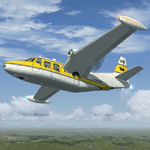
This package contains an updated re-release of all my original Piaggio P-166 models developed for FS-2002/2004. All versions are included in a single package: P-166A, P-166BL-2, P-166CL-2, P-166M, P-166S, P-166DL-3 and P-166DP-1. The 3D models are the same, so these are fairly simple models. Yet they come with a VC (no 2D panel this time!). With respect to the original releases, they come with very much improved panels, in two flavors: Piston and Turboprop. Gauges developed by Milton Shupe & Scott Thomas for the Aero Commander / Turbo Commander Aircraft series, and Edgar Guinart López of Aeroproyecto for the Embraer 110. Other Gauges from my own Piaggio P-180 & PD-808. Also Included is a brand-new flight model redeveloped from scratch. Please refer to the Reference and Checklist pages provided via the FS Kneeboard for flying and operating instructions.
The Piaggio P-166 is a light small twin. An Exotic twin-engine prop that sold all over the world including America, UK, and Australia. Its origin is traced Back to the Piaggio P-136, a light amphibian, which the P-166 keeps the wings, the engines and the tail planes. The first P-166A flew in November 1957. The aircraft was still in production in the early 21st century in an improved turboprop version, the P-166DP-1.
| Filename: | Piaggio_P166_Collection.zip |
| License: | Freeware |
| Added: | 2nd April 2020, 17:50:35 |
| Downloads: | 510 |
| Author: | Mario Noriega |
| Size: | 40.89 MB |
| Category: Flight Simulator X - Scenery | |
| Santa Cruz de la Sierra - Bolivia |
|
File Description:
Scenery Photoreal: Santa Cruz de la Sierra, Bolivia
Santa Cruz de la Sierra: (English: Holy Cross of the Mountain Range), commonly known as Santa Cruz, is the
capital of the Santa Cruz department in eastern Bolivia (17 45', South, 63 14', West)at 416 m above sea level.
The city of Santa Cruz is located not far from the easternmost extent of the Andes Mountains and they are
visible from some parts of the city its Situated too on the Pirai River.
The city of Santa Cruz and its metropolitan area are home to over 70% of the population of the department and
it is one of the fastest-growing cities in the world.
Airports: (NOT included in this package, just Scenery Photoreal of the city)
Viru Viru International Airport (IATA: VVI, ICAO: SLVR) in Santa Cruz de la Sierra, Bolivia is Bolivia's largest
international airport. Viru Viru handles domestic, regional, and international flights from Bolivia to
North America, South America and Europe and is the hub for Bolivia's biggest airline Boliviana de Aviacion (BoA).
The airport is able to handle the largest commercial jets.
El Trompillo Airport (IATA: SRZ, ICAO: SLET) is located in the south part of Santa Cruz, Bolivia, about 2 km
(1.25 miles) away from the central plaza. Airport type:(Public / Military).
Compatible with both FSX and P3D.
| Filename: | Santa_Cruz_de_la_Sierra__Bolivia.zip |
| License: | Freeware |
| Added: | 23rd June 2015, 17:09:33 |
| Downloads: | 1,713 |
| Author: | Marcos A. Rivas Torrez |
| Size: | 69.85 MB |
| Category: Flight Simulator 2004 - Flight Plans | |
| Military Base Tour - South Asia |
|
File Description:
“Military Base Tour – South Asia” (MFSA) continues the MILITARY FLIGHTS SERIES which includes “Military Flight Plans” (MF), “Military Flight Plans – Europe” (MFE) and “Military Base Tour – West Asia” (MFWA). In this segment there are 20 new flight plans in South Asia, starting in Kuwait, and moving on through India, Sri Lanka, Diego Garcia, Bangladesh, Bhutan, Myanmar, Thailand, Vietnam, Cambodia and ending in Singapore. The landing and takeoff at Paro, Bhutan is particularly memorable. A complete Flight Briefing is provided for each flight. Also included are a MFSA ITINERARY and a “Military Flights Master Itinerary” which lists each flight in all four segments of the Series to date. There are a total of 87 flight plans, starting in the US, going down through Cuba & Central America, back to the US and Canada, and then over to Europe, West Asia and now this South Asia segment. The final segment, “Military Base Tour – Pacific Rim” is under construction and will return the series to Andrews in Washington D.C. and make the SERIES a “Round the World” trip. It is suggested that the pilot set up a new file Folder (or file in an existing Folder) to unzip the file “mfsa_flights.zip” to and store the .PLN and Flight Briefing files. The .PLN file can then be copied to the “Flight Simulator Files” to set up the flight, and the briefings printed and available for quick reference during the flight.
| Filename: | Military_Base_Tour__South_Asia.zip |
| License: | Freeware |
| Added: | 20th November 2004, 00:07:13 |
| Downloads: | 1,747 |
| Author: | John Resch |
| Size: | 232.89 KB |
| Category: Microsoft Flight Simulator (2020) - Scenery Design | |
| MSFS 2020 object library with 200+ models ranging from towers hangars to cones (v10 12 extra models) |
|
Images related to this file:
File Description:
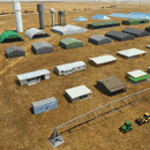
Object libraries for scenery developers (version 10 - improvements on curved surfaces + 10 lights(improved) + 3 windsocks + 3 animals + 5 animated people + 10 fuel_area +stable +fire_tower + 28 new fences + church + sheds). All objects in these libraries will be used in my own sceneries and the result of 100s hrs of effort. All objects from the real world. All objects use LOD (Level Of Detail) to keep frame rates high. Final long distance models have a large triangle added below ground to stop them disappearing in the distance. PBR materials used extensively. Included are 2 PDF files with photos of every object to make selection easy. Republish these files in any freeware scenery if required. READ "read me library instructions" before using.
---------------library1v10-cbj
Cones x4 Gables x3
Church x1
Fences (10 types farm chainlink x4 mesh x2 horse hand-rail paling cattle_grid) x94
Flag pole x1
Fuel_Signs_ x6
Fuel_area_pipes x2
Gas (petrol) station x3
Gliders x4
Glider trailers x4
Grain storage hoppers silos x 4
Power poles x2
Rail platforms station x5
Rail locomotive passenger_carriage grain_hoppers x5
Tower_forest_observation
Towers_radio x6
Weather station small x4
Windsock x3 Windsock-light x1
-------------library2v10-cbj
Animals - Cows x2 Sheep
Grain bunkers - large piles of grain covered with canvas x5
Hangars small airfield x15
Medical transfer station (building) x2
Obstacle-light x10
People x5 Men Women
Pivot irrigator x3
Sheds x10
Shelters x2
Terminals - small airfield x12
Water tanks x3
Towers water x4
Tractors farm x3
Water tanks x3
| Filename: | MSFS_2020_object_library_with_200_models_ranging_f.zip |
| License: | Freeware |
| Added: | 6th March 2022, 19:34:52 |
| Downloads: | 395 |
| Author: | COLIN JEFFERY |
| Size: | 198.25 MB |
| Category: Flight Simulator 2004 - Aircraft Repaints, Textures and Modifications | |
| US Airways "Pittsburgh Steelers" Airbus A319-112 (N733UW) |
|
Images related to this file:
File Description:

US Airways is a major U.S. airline owned by the US Airways Group, headquartered in Tempe, Arizona. It operates an extensive international and domestic network, with 198 destinations throughout North America, South America, Europe, and the Middle East. The airline is a member of the Star Alliance Network and utilizes a fleet of 346 mainline jet aircraft and 285 regional jet and turbo-prop aircraft. The carrier operates the US Airways Shuttle, a US Airways brand which provides hourly service between Boston, New York and Washington, D.C. Regional airline service is branded as US Airways Express, operated by contract and subsidiary airline companies. American Airlines and US Airways announced plans to merge, creating the largest airline in the world.
US Airways P.S. livery is painted on Project Airbus's Airbus A319-112 model (included). The textures are saved in 32bit format for quality graphics. Textures are also characterized by HD (High Definition). Its features are idle-reverser animation, animated pack vents and pressurisation outflow valve, detailed textures, accurate paint, dynamic shine & effects, dynamic flexing wings that respond to turbulence, fully independent suspension, trim animation, gear steering, accurate flight dynamics, spoiler animation, reflective cockpit windows, improved wingflex code with input from several new parameters including ground spoilers, fuel load, and angle of attack, transparent navigation light lenses and many more. Visit my facebook page "Aviation Art Paintings by Giacomo Tomasini" for news, updates and previews on my future repaint projects: https://www.facebook.com/AviationArtPaintings . Thanks for downloading & Happy flying.
| Filename: | US_Airways_Pittsburgh_Steelers_Airbus_A319112_N733.zip |
| License: | Freeware |
| Added: | 24th October 2013, 19:29:25 |
| Downloads: | 690 |
| Author: | Giacomo Tomasini | Aviation Art Paintings |
| Size: | 21.54 MB |
| Category: Flight Simulator 2004 - Scenery | |
| Fort Nelson CYYE in British Columbia, Canada |
|
Images related to this file:
File Description:
Fort Nelson is close to the Peace River in the northeast corner of British Columbia, around 70 miles from the northern border, 90 from the eastern border, and 80 miles east of the Rockies. The wartime construction of the Alaska Highway actually started from Fort Nelson, as there was already a road from Fort St John (which is close to Dawson Creek) north to Fort Nelson. The airfield was part of this construction effort and after the wartime ferrying of planes to Russia it was used by the US Army Air Force and then by the Canadian Air Force. Fort Nelson flourished with the oil and gas exploration of the 1950's and the following years, and this continued to grow until the collapse of the oil price in 2014.
The town of Fort Nelson became the capital of the Northern Rockies Regional District when it was founded in 2009, and as a result the official name of the Fort Nelson airport is the Northern Rockies Regional Airport. The date for this scenery is around 2016, by which time the economic fortunes of the town were in decline. Five times per day flights by Central Mountain Air were starting to be reduced in number to the current (in 2022) one per day and none on Sunday; in the AI included here there are two flights per day. The main resident users of the airport are four helicopter companies, the helicopters presumably used for maintenance trips to whatever parts of the oil and gas fields that are still in use in the surrounding area.
There are two runways, the main one is aligned 03-21, 6,400 feet long and 200 feet wide, with ILS at the southern end and PAPI at the northern. The second runway (a narrower rebuild on a previously existing runway) is aligned 07-25 and 77 feet wide, and is without any lights. These are the alignments as per the original build of FS9 and not as per the approximate 2016 date of the buildings; I had a problem at a very late stage in making this scenery which prevented me from continuing with some final details.
On YouTube there is a series of posts by Angle of Attack showing the preparation and then the flight of an old Cessna 172 from Homer to Oshkosh for the installation of modern instruments. Interesting for me as they visit or fly over airfields I have made (Homer, Merrill, Tok Junction, Burwash, Silver City, Haines Junction, Watson Lake, Fort Nelson, and Grande Prairie) but in the winter so it all looks very different.
| Filename: | Fort_Nelson_CYYE_in_British_Columbia_Canada.zip |
| License: | Freeware, limited distribution |
| Added: | 23rd January 2022, 20:11:18 |
| Downloads: | 187 |
| Author: | Roger Wensley |
| Size: | 28.35 MB |
| Category: Flight Simulator 2004 - Flight Plans | |
| Military Base Tour - Pacific Rim |
|
File Description:
Military Base Tour – Pacific Rim (MFPR) contains 21 Flight Plans (.PLN) for flights to various military air bases along the Pacific Rim, across the Pacific to CONUS and ending at Andrews AFB/NAF where the Military Flights Series began. It is the continuation of Military Flight Plans (MF) (mf_flights.zip) published in Avsim on 29th March 2004, Military Flight Plans – Europe (MFE) (mfe_flights.zip) published in Avsim on 17th June 2004 and Military Base Tour – West Asia (MFWA) (mfwa_flights.zip) published in Avsim on 6th August 2004 and Military Base Tour – South Asia (MFSA) (mfsa_flights.zip) published in Avsim on 20th November 2004. There are a total of 128 flight plans in this Military Flight Series - Round the World Tour of Military Bases. (See Military Flights Master Itinerary– included in this .zip.) The itinerary contains a list of all the plans in the five uploaded files.) There are Briefing documents for each flight in Microsoft Word (.doc) and Text (.txt). The Flight Plans use the autopilot from takeoff to landing. The speed, altitude, weather, radios and various other controls are the pilot’s responsibility. Many landings are IFR and all are under the control of the autopilot. It is suggested that the pilot set up a separate Folder (“MFPR Flights” for example) and unzip this file there to store the .PLN and Briefing files. The .PLN can then be copied to the “Flight Simulator Files” and used to set up the flight and the Briefings printed and available for quick reference during the flight.
| Filename: | Military_Base_Tour__Pacific_Rim.zip |
| License: | Freeware |
| Added: | 9th April 2005, 04:39:05 |
| Downloads: | 1,382 |
| Author: | John Resch |
| Size: | 282.22 KB |
| Category: Flight Simulator 2004 - Utilities | |
| FlightSim Manager 2.4.0 |
|
File Description:
Compatible with both FS2002 and FS2004
Please ensure you are downloading the very latest version by doing a search on my name first.
FlightSim Manager is a great tool for managing add-ons to Microsoft Flight Simulator. Using easy to Wizard - FSM can install aircraft, panels, textures and scenery directly from distribution ZIP files you may have downloaded, with proper uninstallation of add-ons. From an easy to use Aircraft editor to add or remove aircraft variants, to an comprehensive Hangar management allows you to manage and configure your add-ons off your live FS installation.
Using FSM, you can create Texture Sets - i.e.. different Tree Sets, and you can install the texture with a single click, capture screenshots from Flight Simulator, and launch it with random Splash Screens, and fly from anywhere in the world using an map view.
You can also control Flight Simulator with speech commands using FSM. Other features include Benchmark Flight Simulator, Repository support and set of diagnostics tools.
Version 2.4 also enhaces the Pilot-mode, with auto-saving flight, warning sytem, and voice recognition.
Installation -
Please use the setup.exe file. If you wish to uninstall the software, you can do so from Control Panel - Uninstall software.
You can find the latest version from -
http://www.ranainside.com/
To request any new feature, or to submit bugs, please visit our forum at
http://softwares.ranainside.com/
| Filename: | FlightSim_Manager_240.zip |
| License: | Freeware |
| Added: | 4th August 2004, 20:55:28 |
| Downloads: | 2,978 |
| Author: | Rana Hossain |
| Size: | 3.77 MB |
| Category: Flight Simulator 2004 - Aircraft Repaints, Textures and Modifications | |
| "Tampa Bay Rays" Beechcraft Twin Bonanza" |
|
File Description:
Simmers,and Baseball fans.
These 1951 D Model Beechcraft Twin Bonanzas are pristine,no dirt,grease or oil leaks on these babies!Just fresh out of the paint booth, these are the 14th set of repaints of my in progress MLB collection.All repaints are of "Eric Dantes" Beachcraft Twin Bonanza. All MLB teams will be represented.These repaints are not layered so each one has to be redrawn in its offical colors.All repaints will have two liveries,one with team logos and one without logos.
All MLB team names were put in two hats, American League and National League they are drawn one from each hat at random.The next repaint will be the 2008 World Series Champion Philadelphia Phillies.Look for it soon. :)I hope you have as much fun collecting all 30 liveries as I will have painting them!
This file also includes a new folder: DXT3 Format. For those of you that require friendlier frame rates just replace the 32 bit 888-8 extended bitmap textures with the DXT3 textures in the DXT3 Format folder.Backup the 32 bit 888-8 extended bitmap textures,then just let the DXT3 files overwrite.
This file includes the Texture.Rays"(Tampa Bay Rays Edition)",Texture.MLB Tampa Bay,"(The MLB Tampa Bay Edition)NO..LOGOS,Panel.Rays and Panel.MLB Tampa Bay folders.
The following additional file is required.-------twinstar__twin__bonanza_v2.zip----------IMPORTANT NOTE:The-------twinstar__twin__bonanza_v2.zip---------- has a corrupt aircraft.cfg file!Please download my updated aircraft.cfg file to insure all aircraft are available.
These files can be downloaded @ http://www.avsim.com/
Again I THANK each of you for your downloads.
| Filename: | Tampa_Bay_Rays_Beechcraft_Twin_Bonanza.zip |
| License: | Freeware |
| Added: | 3rd November 2008, 22:56:32 |
| Downloads: | 255 |
| Author: | Chris Tuinstra |
| Size: | 8.06 MB |
| Category: Flight Simulator 2004 - Utilities | |
| FlightSim Manager 2.4.0 |
|
File Description:
FlightSim Manager 2.4.0
Compatible with both FS2002 and FS2004
FlightSim Manager is a great tool for managing add-ons to Microsoft Flight Simulator. Using easy to Wizard - FSM can install aircraft, panels, textures and scenery directly from distribution ZIP files you may have downloaded, with proper uninstallation of add-ons. From an easy to use Aircraft editor to add or remove aircraft variants, to an comprehensive Hangar management allows you to manage and configure your add-ons off your live FS installation.
Using FSM, you can create Texture Sets - i.e.. different Tree Sets, and you can install the texture with a single click, capture screenshots from Flight Simulator, and launch it with random Splash Screens, and fly from anywhere in the world using an map view.
You can also control Flight Simulator with speech commands using FSM. Other features include Benchmark Flight Simulator, Repository support and set of diagnostics tools.
Version 2.4 also enhaces the Pilot-mode, with auto-saving flight, warning sytem, and voice recognition.
Installation -
Please use the setup.exe file. If you wish to uninstall the software, you can do so from Control Panel - Uninstall software.
You can find the latest version from -
http://www.ranainside.com/
To request any new feature, or to submit bugs, please visit our forum at
http://softwares.ranainside.com/
Programmer
Rana Hossain
[email protected]
| Filename: | FlightSim_Manager_240.zip |
| License: | Freeware |
| Added: | 4th August 2004, 20:49:50 |
| Downloads: | 11,171 |
| Author: | Rana Hossain |
| Size: | 3.77 MB |


© 2001-2026 AVSIM Online
All Rights Reserved
Privacy Policy |