
Where Flight Simulation Enthusiasts Gather from Around the World!
AVSIM Library - Search Results

| Category: Flight Simulator 2004 - Utilities | |
| Navigation Data 2005 v2.1.0 |

|
File Description:
FS2004/FS2002/FS2000 Navigation Data - Version 2.1.0 - Navigation Database utility
for panels based on the RealCRT Gauge Series.
Needed for RealCRT.ND Map and Route modes.
(Alternative approach generation added)
| Filename: | Navigation_Data_2005_v210.zip |
| License: | Shareware, time limited |
| Added: | 17th November 2005, 05:14:13 |
| Downloads: | 6,762 |
| Author: | Tony D'Ambrosio |
| Size: | 6.58 MB |
| Category: Flight Simulator 2002 - Panels | |
| CRJ Panel Update v 2a |
|
File Description:
Bombardier CRJ Panel Version 2a (Optimized for POSKY's CRJ-200)
This panel update was created using portions of Chris Alevritis' CRJ bitmap with revisions and new additions to better compliment and maintain compatibility with the POSKY CRJ VC. Included are Eric Marciano's TCAS/radar gauge, Jorge Salas' collection of switches and toggles, a few files and the pushback gauge from the folks at FPDA, the signs2k gauge by Christian Koegler, Bill Morad's ATC panel, and an assembly of HUD gauges from Paul Golding. This panel also uses default gauges and requires Pete Dowson's FSUIPC version 2.83 or later. Significant updates include an expanded overhead panel, a working HUD, revised windshield center post perspective, and 'clicks' added to switches - other refinements accomplished as well.
| Filename: | CRJ_Panel_Update_v_2a.zip |
| License: | Freeware, limited distribution |
| Added: | 23rd November 2002, 17:42:26 |
| Downloads: | 9,944 |
| Author: | Leon Seale |
| Size: | 1.76 MB |
| Category: Flight Simulator 2004 - Miscellaneous Files | |
| Guide to Installing Lee Hetherington's TCAS II 7.0 to Any Aircraft Panel |
|
File Description:
This is a guide on how to install Lee Hetherington's great TCAS II 7.0 gauge to any aircraft panel of your choosing. It requires editing the panel.cfg file of the aircraft you wish to install it to. I tried to make the guide as easy to follow as I could for people that have never edited a panel.cfg file before. According to Lee's documentation the TCAS II 7.0 gauge mimics the real world counterpart in a full-fledged implementation as is possible. Making this gauge 'As Real As It Gets' beyond the shadow of a doubt. I hope that this guide will enable as many people that are interested in using the best TCAS available for MS Flight Simulator to be able to enjoy Lee's excellent work.
| Filename: | Guide_to_Installing_Lee_Hetheringtons_TCAS_II_70_t.zip |
| License: | Freeware |
| Added: | 19th June 2004, 07:27:41 |
| Downloads: | 6,851 |
| Author: | Jimmy Richards, Lee Hetherington |
| Size: | 3.68 KB |
| Category: Flight Simulator X - Gauges | |
| Beachcraft Baron 58 AP-Alt-VS-Fuel Gauge v1 |
|
Images related to this file:
File Description:
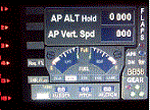
This gauge is for use in the Saitek FIP and has been developed specifically for the Baron 58 (FSX default) but also works fully with the E55. The gauge looks nothing like what you will find in the BB58 but I have incorporated the components that are found at the lower right side of the control yoke. It has been designed to complement the Saitek AP / Multi panel and to fit between the yoke and the multi panel.
The gauge is primarily to show the selected AP Altitude and Vert Spd whilst the AP / multi panel is displaying HDG. Placing it to the left of the AP / multi panel and at lower right side of the yoke puts all the elements of this gauge in roughly the position they would be found in a BB58. The 5 light indicators are just an addition I thought would be handy to have. The landing light indicator is right next to the
landing gear warning lights and acts as a reminder to have them on by the time the gear goes down.
| Filename: | Beachcraft_Baron_58_APAltVSFuel_Gauge_v1.zip |
| License: | Freeware |
| Added: | 6th July 2014, 14:12:53 |
| Downloads: | 191 |
| Author: | Robert Budd |
| Size: | 283.4 KB |
| Category: Flight Simulator 2004 - Gauges | |
| Radio Range System - Version 3 Adaptation for MAAM-SIM R4D-6/DC-3A/C-47 |
|
File Description:
Complements the Radio Range System (rr_03.zip) developed by By Dave Bitzer, Alex Nicolson, Norman Hancock, Allan Greene and Charles Wood, which must be installed first. This simple gauge enables the Radio Range System to be used with the Mid Atlantic Air Museum Simulations' R4D-6/DC-3A/C-47 aircraft, by enabling the relevant switches on the Audio Panel. MAAM-SIM aircraft are available from www.maam.org/maam_sim.html.
This gauge supersedes the previous uploads RR_MAAM.zip and RR_MAAM2.zip, both of which included errors. If you have previously installed either or both of these, don't worry; just overwrite the previously supplied gauge file with the one included here and check that your gauge entries are correct as shown in the README included in this package.
Library managers: please discard my files RR_MAAM.zip and RR_MAAM2.zip from your archives, as both are flawed. Many users must have been flying in total confusion as a number of the signals were reversed. Perhaps, they thought it was their error not mine and were too embarrassed to highlight problems! Anyway, hopefully I have it right this time!
| Filename: | Radio_Range_System__Version_3_Adaptation_for_MAAMS.zip |
| License: | Freeware |
| Added: | 28th March 2006, 03:38:24 |
| Downloads: | 867 |
| Author: | Mark Beaumont |
| Size: | 145.01 KB |
| Category: Flight Simulator 2004 - Gauges | |
| TerraVue: Moving Map, Ground Proximity, Information pages |
|
File Description:
FS2004 Gauge: TerraVue. This gauge contains a moving map display with a terrain elevation legend color-keyed to the FS9 map. The legend allows the elevation of terrain lying ahead of the aircraft to be taken into account. TerraVue can display the FS map in seven ranges from 4 NM to 160 NM. The Map mode also employs animation to show the proximity between the aircraft and ground in a graphical and digital display with indicators showing whether the distance is increasing or decreasing. The gauge can be switched to the Information mode which will display up to four individual pages of data that is created by you. These scrollable pages may contain checklists, airport diagrams, approach plates, strip charts, etc. Fully functional, free software to help quickly construct these pages is included along with an illustrated tutorial that demonstrates the simple copy/paste process that tailors these pages to include whatever data you wish. For panel or separate window installation with TerraVue Icon gauge. By Glenn Copeland
| Filename: | TerraVue_Moving_Map_Ground_Proximity_Information_p.zip |
| License: | Freeware |
| Added: | 24th June 2006, 15:13:12 |
| Downloads: | 5,078 |
| Author: | Glenn Copeland |
| Size: | 1.92 MB |
| Category: Flight Simulator 2002 - Original Aircraft | |
| Frontier Airlines Convair 340 |
|
File Description:
Convair CV-340 in Frontier Airlines colors (experimental paint). All new aircraft including virtual cockpit, reflective and night textures, working air stairs/door, and feathering props. Comes complete with sound and new panel. Built in GMAX and painted by Greg Pepper. Panel bitmap by Alan Jennings and Greg Pepper, gauge bitmaps by Greg Pepper, Alan Jennings, and Francois Ouellette. Gauge programming by Tom Gibson, Francois Ouellette and Greg Pepper. True and accurate FS2002 flight dynamics by FSAviator.
| Filename: | Frontier_Airlines_Convair_340.zip |
| License: | Freeware, limited distribution |
| Added: | 4th March 2003, 00:20:49 |
| Downloads: | 5,261 |
| Author: | Greg Pepper, Tom Gibson, Alan Jennings, FSAviator, Steve Mathis |
| Size: | 11.52 MB |
| Category: Flight Simulator 2004 - Gauges | |
| Fuel Flow/Cutoff Lever |
|
File Description:
FS2004 Gauge- Fuel Flow On/Cutoff. This lever allows the starting procedure for some jets to be more realistic. When the lever is moved to ON, that replaces keypress CTRL+SHIFT+F4 (mixture rich). Moving the lever to OFF replaces keypress CTRL+SHIFT+F1 (mixture cutoff). For safety, one mouse clicks moves the lever to ON, but two mouse clicks are required to move it to OFF. Includes new Lear 45 panel modified for this gauge. By Glenn Copeland.
| Filename: | Fuel_FlowCutoff_Lever.zip |
| License: | Freeware |
| Added: | 27th February 2006, 00:54:50 |
| Downloads: | 1,283 |
| Author: | Glenn Copeland |
| Size: | 400.19 KB |
| Category: Flight Simulator 2004 - Gauges | |
| Radi |
|
File Description:
FS2004 Radio Altimeter/Drift Instrument (RADI).
This mechanical gauge shows low altitude and wind
drift information in an analog display. It presents
this important landing data in a precise and readable
manner. Altitude range: 0-1000 ft. Below 100-feet,
the altitude needle is accurate to within one-foot.
Drift angles: 0 - 30 degrees left/right. This gauge
will assist with landing all types of aircraft,
but in helicopters it also facilitates hovering
and taxiing. By Glenn Copeland.
| Filename: | Radi.zip |
| License: | Freeware |
| Added: | 10th August 2005, 17:46:41 |
| Downloads: | 2,081 |
| Author: | Glenn Copeland |
| Size: | 15.21 KB |
| Category: Flight Simulator 2004 - Gauges | |
| Autopilot Input Pad |
|
File Description:
This input/storage pad allows both altitude and heading values to be entered into the autopilot in an accurate and convenient fashion by simply pressing keys on the gauge. The gauge contains two memories for storing heading or altitude values. Numeric pad, Enter keys, Clear and Backspace buttons work in similar way as pocket calculators. Can be installed on panel or inside separate window. Makes IFR easy as pie by reducing stress-induced errors during hectic approaches.
| Filename: | Autopilot_Input_Pad.zip |
| License: | Freeware |
| Added: | 11th February 2006, 01:00:47 |
| Downloads: | 3,606 |
| Author: | Glenn Copeland |
| Size: | 306.31 KB |


© 2001-2026 AVSIM Online
All Rights Reserved
Privacy Policy |