
Where Flight Simulation Enthusiasts Gather from Around the World!
AVSIM Library - Search Results

| Category: Flight Simulator 2002 - Miscellaneous Files | |
| Reality XP GPS Navigation Tutorial |

|
File Description:
This is a higly illustrated 40 pages GPS Navigation Tutorial that will take you from Meigs Parking 8 to Oshkosh! With this guide, you will be able to understand and master all the rich features presented in the Reality XP's Flight Line Avionics GPS and Radios!
Flight Line Avionics v1.2 is the latest edition of our Flight Simulator 2002 add-on, with 29 new features added to the other 25 new of v1.10, an extended User’s Manual, an improved Navigation Database tool and the support for third party developers through a new SDK. Our customers will welcome the addition of our EZConfig tool to add Flight Line Avionics to any aircraft with a simple point-and-click!
Reality XP Flight Line Avionics gives you a fully interactive avionics stack featuring the UPS-AT advanced GPS GX 50 with moving map, SL30 next-generation Nav/Comm, SL70 Mode A/C transponder with altitude alerting feature and a full audio panel. With Flight Line Avionics you'll be flying a simulated avionics package capable of providing the same features and benefits as the real avionics package. The Reality XP Flight Line Avionics package is so realistic that pilots can use it as a training tool to familiarize themselves with the workings of the actual equipment. Each button and knob is fully functional and performs identically to its real-world counterpart. The system even creates audio and visual alerts, like the actual avionics. For more information, fly direct to www.reality-xp.com.
| Filename: | Reality_XP_GPS_Navigation_Tutorial.zip |
| License: | Freeware, limited distribution |
| Added: | 26th June 2002, 18:01:06 |
| Downloads: | 1,446 |
| Author: | Reality XP |
| Size: | 1.91 MB |
| Category: Flight Simulator X - Utilities | |
| PJEZFSX |
|
File Description:
PETER JAMES' EZCAM .CAM FILES AS OF 3-25-10. I have made some great cams to share based on the new
Flight1 EZDOK software. Installation is a snap. Just copy these into your EZDOK root directory and you're
ready to go! As a real commercial pilot with over 7500 hours flying time, I can assure you these cams
give you the most realistic virtual cockpit views possible. I base this on proper seat position, as
well as a zoom level I have been fiddling with since the beginning of FSX.
I have here cams for the A319 by Project Airbus, the Default A321, default Beaver, the 739 by Ariane, the LDS 767-300ER,
and the great free biplane (Tigermoth) by ORBIX ...Whether you own the two payware products or not
does not matter. These cams will work well on any similar aircraft. Just use the EZDOK interface to import these cams,
and then you can edit them for any plane you want. The real thing I did was take the default cams that came with EZDOK and dampen
out the touchdown head wobble...but that's about it. I am still learning all the tweaks available
with vibrational effects, but have gotten good at setting up 9 viewpoints for each virtual cockpit
included... when you run the EZDOK interface you'll see the titles and number key for each position.
Enjoy!
Peter James / [email protected]
| Filename: | PJEZFSX.zip |
| License: | Freeware |
| Added: | 25th March 2010, 06:23:33 |
| Downloads: | 2,533 |
| Author: | Peter James |
| Size: | 16.85 KB |
| Category: Flight Simulator 2004 - Aircraft Repaints, Textures and Modifications | |
| JetBlue 'Circles' Airbus A320 |
|
Images related to this file:
File Description:
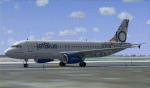
This repaint is of the very unusual but striking "JetBlue - Circles" livery for the Project Airbus A320 model (included in zip). This is a complete file and for FS9 (FS2004). While it may work in FSX, I cannot and will not confirm that as these textures have only been tested in FS9. All repainted textures, which were completely hand painted (other than the JetBlue text) have been saved and formatted in 32 bit. This model comes with all of the standard PA animations. New Alpha channels have been created to highlight the detail which has also been highlighted in terms of the doors and windows to resemble the actual aircraft. This has been an intense repaint to do due to the very nature of the livery so please PLEASE DO NOT count the circles and email me to say I missed one. If I have (which I haven't I don't think) pretend it is due to excessive weathering :) While there are some screen shots here, there are more in the Read Me file so if you have any doubts, please take a look at all of them. Installation, Distribution and Contact Details for me can be found in the enclosed PA TC Read Me File. Enjoy this paint and download it lots just so I know the work, frustration, a bottle and half of Capt Morgan and lots of Asprin were worth it :) Cheers and safe flying!
| Filename: | JetBlue_Circles_Airbus_A320.zip |
| License: | Freeware, limited distribution |
| Added: | 11th March 2012, 19:40:09 |
| Downloads: | 593 |
| Author: | Tony Cannon, Project Airbus |
| Size: | 13.54 MB |
| Category: Flight Simulator X - Scenery | |
| Middle East Carrier Operations (MECOPS) |
|
Images related to this file:
File Description: This scenery has been developed for FSX Flight Simulator SP1 or SP2. It
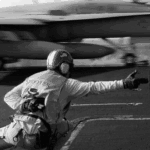
has also been tested with Microsoft Acceleration , but compatibility is not
guaranteed by the author.
The scenery includes: Two carrier groups CVN68 and CVN69, ( carrier models from
Javier Fernandez ), two AI KC-135 tanker aircraft, AI F-18A aircraft approaching
the carrier, Navy destroyer and a Navy Cruiser as escort ships for the carrier,
a number of oil platforms and the ARS4 radar gauge which displays air targets
and boat targets.
The ARS4 radar gauge provides also a auto landing function for the carrier and a
auto tracking function for aircraft in order to support a A2A re-fueling. The
scenery package includes as well the program Arrcab, developed by Richard Hogan,
and the RCBCO gauge developed by Rob Barendregt. Arrcab or RCBCO are required to
support a catapult start from a carrier and the cable arrestor function for a
carrier landing.
This is not a load and fly package. Please take your time to read the included
documentation for the ARS4 gauge and the MECOPS scenery carefully. Do not skip
chapters because you may think, they are not important for you.
Do not start the installation of the scenery before you have finished the
reading of the documents.
For copyrights and credits please look at the documentation for this scenery.
| Filename: | Middle_East_Carrier_Operations_MECOPS.zip |
| License: | Freeware, limited distribution |
| Added: | 4th March 2013, 18:03:32 |
| Downloads: | 1,892 |
| Author: | Dietmar Loleit |
| Size: | 62.04 MB |
| Category: Flight Simulator X - Original Aircraft | |
| Boeing 737-800 Starter Package v1.0.0 |
|
File Description:
This is an upgrade package for the default Boeing 737-800. I compiled this package with new simmers in mind. This package has an advanced virtual cockpit that includes switches for LCD, EICAS, PFD, MFT, autobrake, pilot windows, cabin lights and GPWS. It also includes working windshield wipers with rain effects, upgraded virtual cockpit textures, a realistic Flight Management Computer and custom GPWS and cabin announcement sounds. I've included 11 high-quality liveries for Air Berlin, Air France, AirTran Airways, American Airlines, British Airways, Delta Airlines, Lufthansa, Pan American World Airways, Quantas, United Airlines and US Airways. I'll add more in future releases. I haven't asked permission from any of the original developers of these add-ons to include their work in this package. If I've used your work and you're upset about it, please reach out to me and I'll take care of it promptly. This package uses Advanced 737-800 VC by Alejandro Rojas Lucena, Upgraded 737-800 VC Textures by Enrique Cornejo, Honeywell FMC by Garrett Smith, Boeing Callouts by Jimmy Foong and EDO Sounds by Edoardo Ammannati. I collected the liveries from multiple different packages. I'm not sure who the original authors are. If you're the author of one of these liveries, let me know so that I can give you credit. All of the copyrights for these add-ons belong to their rightful developer(s). I've just compiled the best that I could find.
| Filename: | Boeing_737800_Starter_Package_v100.zip |
| License: | Freeware |
| Added: | 11th June 2018, 17:18:45 |
| Downloads: | 6,072 |
| Author: | Austin Melton |
| Size: | 90.53 MB |
| Category: Flight Simulator 2004 - Scenery | |
| Maurice Bishop TGPY on Grenada in the Caribbean |
|
Images related to this file:
File Description:
Grenada island is 17 miles south of the southernmost island of the Grenadines, Carriacou; there are some smaller islands between the two. Grenada is 18 miles long and around 8 miles wide, has an estimated population of 110,000, and produces a very large part of the world's annual nutmeg harvest. The capital, St Georges, is by far the largest town and is at the southern end of the island, with the airport close by.
The airport is now called Maurice Bishop, but for some years was called Point Salines. The runway is just over 9,000 feet long and oriented 10/28. Point Salines replaced Pearl Airport, which is on the east coast 12 miles northeast of St Georges and was difficult to expand as the runway had mountains at one end and the sea at the other. Pearl is now closed; it is included here but only as a visual landmark with "closed" markings. There are regular international flights from North America and Europe, some of which are seasonal only (Air Canada for instance) and local connecting flights by LIAT and SVG. I retained the default control tower as it is some distance away. In real life it is also some distance away and on a hill northwest of the terminal. Which is why I did not take photos from which I would have made the real one. The hill does not feature in FS9.
| Filename: | Maurice_Bishop_TGPY_on_Grenada_in_the_Caribbean.zip |
| License: | Freeware, limited distribution |
| Added: | 11th June 2013, 23:28:17 |
| Downloads: | 825 |
| Author: | Roger Wensley |
| Size: | 7.38 MB |
| Category: Flight Simulator X - Scenery | |
| VTSM - Koh Samui |
|
File Description:
Today, after almost half a year of construction, I am presenting my new airport to
youVTSM- Samui Airport in front of .......
since I was already there myself and again no decent freeware scenerywas to be
found for the FSX,
so building it yourself was once again the trend
I tested the airport on another computer - everything works fine
Traffic works, Ai traffic as well as road traffic and ILS approach works. So
have fun in Koh Samui at the airport and the surrounding area .......
The best way to go on a voyage of discovery is with a small plane or helicopter so
that you can do the same
see many details .........
lands at the airport VTSM with an A319 or a Boing 737 larger planes are not there
then allowed to take a helicopter or a small plane and fly over the island
explores the many details ...............
Installation:
Put the folder VTSM - Samui in the folder FSX Addon Scenery and activate
Him......... !
The steps listed below only if you don't have these add-ons yet! !
to be able to see people unzip the supplied folder 3dpeoble_Lib and put
the unzipped folder in your FSX Addon Scenery and activate it
Support:
If you have any problems or questions, please send an email to
[email protected]
now have fun and good luck on your flight LG Jamaica
Demo video at https://youtu.be/dcIkSi03sfg?t=7
| Filename: | VTSM__Koh_Samui.zip |
| License: | Freeware |
| Added: | 5th February 2021, 19:28:51 |
| Downloads: | 777 |
| Author: | Ewald Wagner |
| Size: | 52.16 MB |
| Category: Flight Simulator 2004 - Miscellaneous Files | |
| Shoot 1.6.3' Voice Contro File |
|
File Description:
"Shoot 1.6.3" voice control file for use with FS2004. You will need to download the main "freeware" program from http://clans.gameclubcentral.com/shoot/downloads.php which will allow you to make use of this control file for FS2004. The program is brilliant and allows you to control FS2004 by voice and it's totally free! All I have done is made a config file that works very well with FS2004.
It will allow you to; speak to ATC and instead of fighting with the keyboard or yoke/stick so you can fly more like a real pilot and keep your hands on the yoke more of the time. For example a commercial jet pilot calls out to the co-pilot to get the gear up and simply says "gear up". That's just what you will have to do, just like the real thing; the gear will go up when you make the call. When FS2004 ATC controller tells you to reply you can just say "roger" or "hello" or "ATC" or "air traffic" etc, etc, and the ATC window will pop up. Then all you have to do is call out the command instead of pushing buttons that real pilots don't use. Does a real pilot push a button to look out of the window or use a "mouse" to engage the autopilot?
Similarly you can call out "autopilot engage" or "autopilot master" or "autopilot disengage" and that's just what happens; the autopilot comes on/off. The best part though is when you try looking around the cockpit. If you want to move your head up you just say "move up" and presto you are higher up in your seat. You can move to the left or
Right, back or forward. You can say "zoom in" and that's what happens. You can say "reset zoom" and so on. You can say "next view" and then the view may be outside or another panel. Alternatively, you can say "panel 2" and the radio panel will come up in the 737 so you can tune the radios. If you have FS navigator installed all you have to
do is say "navigator" and the map comes up, and then say navigator again and off it goes. Just for once it is easy and possible to make full use of FS2004. Using this program has afforded me the opportunity of making better use of the views available, (and I have CH products yoke so if was never hard) but now it's even easier.
All the panels can be activated in this way, and control of the autopilot and control of FS2004. It's probably the best kept secret. I've made a file so we can all share in this freebie of a program. I've included a readme and instructions of how to make the best use of the program.
Config file for FS2004 only is provided.
| Filename: | Shoot_163_Voice_Contro_File.zip |
| License: | Freeware |
| Added: | 7th January 2004, 19:52:26 |
| Downloads: | 8,795 |
| Author: | Peter Wilding |
| Size: | 21.83 KB |
| Category: Flight Simulator X - Aircraft Repaints, Textures and Modifications | |
| Douglas C-47 (X-1) Dutch Air Force |
|
Images related to this file:
File Description:
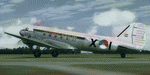
This folder contains a repaint for version 3.14 of the Douglas C-47 by Manfred Jahn and colleagues in the colors of X-1 of the Dutch Air Force. The Dutch Air Force received her first Dakota's in 1952, although they owned one in 1946, but that crashed near Katwijk the same year and was destroyed. That one carried the registration X-1, but that is not the subject of my paint... The Air Force later leased one C-47 from the KLM, gave it the military registration X-2, but it kept its civil registration, PH-TBV, on the tail. Later they leased a few more, and clearly they liked them, because they bought a few more in 1952. The first one was taken on charge in 1952 and was numbered X-1 as depicted in this repaint. The makers badge with its construction number was missing however, and nobody seems to know where this aircraft came from. The logbook mentions the aircraft was 'found'. There was a rumour that the aircraft had been used by refugees from the east and landed at Valkenburg airfield without registration. About a year later, in
the aircraft made an emergency landing near Valkenburg after taking off for a relief flight for the flooded areas in the south of the Netherlands on 6 februari 1953 and was written off.Repaint by Jan Kees Blom for Manfred Jahn's C-47 version 3.14, based on the paintkit by Gman5250.
| Filename: | Douglas_C47_X1_Dutch_Air_Force.zip |
| License: | Freeware |
| Added: | 15th August 2018, 11:31:34 |
| Downloads: | 198 |
| Author: | Jan Kees Blom |
| Size: | 10.57 MB |
| Category: Flight Simulator 2004 - Aircraft Repaints, Textures and Modifications | |
| Olympic Airlines Airbus A340-300 'Olympia' |
|
File Description:
This is a Project Opensky Airbus A340-300 painted in Olympic Airlines livery. The aircraft is named Olympia Registration: SX-DFA, cn235. It is painted by the use of real photos, the official paint kit and hand painted with dirt effects, photorealistic windows, light/shade effects. Features (in depth): Fully animated control surfaces, Fully independent suspension, Dynamic flexing wings that respond to turbulence (Thanks to Fraser Turner) Thrust reversers that open fully on idle reverser thrust. (Thanks to Fraser Turner), Drooping ailerons on elevators when engines are shut off (Thanks to Bill Leaming), fully reflective textures (each part has different degree of reflection based on material), Accurate flight dynamics (accurate FDE with full profiles for wheels, tires, struts, leading/trailing struts, engine types). Tested by real pilots) Detailed textures, Interchanging 2D and 3D engine fans, Full night lighting, Visible landing lights from the cockpit, Reflective cockpit windows, Crash effects, Transparent nav light lenses Virtual Cockpit with clickable buttons. Optimized for FS2004 (VC version only) Rain effects on windshield (VC mode), Wingview (Wingview version only), Dynamic Shine, Opening Passenger and Cargo Doors (fully independent) Shift+E = left door Shift+T = right door, Shift+E+2 = Cargo doors, More detail to landing gear and flaps, more textures to add realism (landing gear, leading edge flaps, fan blades), Animated vent scoops under belly ( Shift+W), New lighting and condensation effects, Even more 3D parts added to this A340 over the A330.
| Filename: | Olympic_Airlines_Airbus_A340300_Olympia.zip |
| License: | Freeware |
| Added: | 1st May 2005, 21:08:16 |
| Downloads: | 4,961 |
| Author: | Kotsios Stamatis |
| Size: | 12.12 MB |


© 2001-2026 AVSIM Online
All Rights Reserved
Privacy Policy |