
Where Flight Simulation Enthusiasts Gather from Around the World!
AVSIM Library - Search Results

| Category: Flight Simulator 2004 - Gauges | |
| Pattern Gauge V2 |

|
File Description:
FS2004 only. This is a gauge in two parts. The display screen and the control bar can be installed in separate places on a panel and each sized to suit your needs. The gauge calculates the heading for all five pattern legs around an airport for both left and right turns. After the pilot enters the two-digit runway data, heading information will be displayed for any desired leg by pressing an appropriate button.
| Filename: | Pattern_Gauge_V2.zip |
| License: | Freeware |
| Added: | 6th October 2005, 15:44:18 |
| Downloads: | 1,952 |
| Author: | Glenn Copeland |
| Size: | 119.58 KB |
| Category: Flight Simulator 2004 - Gauges | |
| ATC Interactive Gauge |
|
File Description:
This file will add an interactive ATC gauge to the cockpit of any aircraft, default or 3rd. party. It enables the pilot to respond to ATC using a mouse (er, "as real as it gets", you see!), instead of reaching across to the keyboard all the time in order to press number keys.
| Filename: | ATC_Interactive_Gauge.zip |
| License: | Freeware |
| Added: | 30th December 2005, 04:37:20 |
| Downloads: | 3,271 |
| Author: | Martin Stebbing |
| Size: | 94.55 KB |
| Category: Flight Simulator 2004 - Gauges | |
| Clear View Gauge |
|
File Description:
FS2004 Gauge: ClearVu1. This gauge will toggle on/off all obstructions from your aircraft that block your view when looking outside the cockpit. It does this for all views except forward where the instrument panel will remain visible. The gauge works when changing views with either the joy stick or keyboard. Small size allows mounting on any panel. By Glenn Copeland
| Filename: | Clear_View_Gauge.zip |
| License: | Freeware |
| Added: | 23rd January 2006, 17:59:21 |
| Downloads: | 1,769 |
| Author: | Glenn Copeland |
| Size: | 161.61 KB |
| Category: Flight Simulator 2004 - Gauges | |
| Digital Checklist Gauge |
|
File Description:
FS2004 Gauge, Digital Checklist. This gauge is designed for the F16 Air Show Tour panel, file f16ast_1. It fits seamlessly with the F16 radio without requiring a separate panel installation or popup window. Seven pages of checklist items cover all phases of this F16's flight procedures. Most items on each page are monitored and when a check has been accomplished, the gauge changes that item's display color from green to grey. Also included in this D/L are enhancements for six of the original F16AST gauges. Installation requires only a Copy/Paste. By Glenn Copeland
| Filename: | Digital_Checklist_Gauge.zip |
| License: | Freeware |
| Added: | 20th January 2007, 02:30:07 |
| Downloads: | 1,684 |
| Author: | Glenn Copeland |
| Size: | 510.72 KB |
| Category: Flight Simulator 2004 - Gauges | |
| Display_Smoke_ Cntrl_ Gauge |
|
File Description:
This simple gauge is for the Alphasim T6 Harvard/Texan airplane (airplane package required), design to stop the 3 display smoke effects from coming on when the lights are first turned on from the spot view mode.
Since both the Harvard or Texan are not using the Taxi lights, this gauge works based on the state of the Taxi light bool. When you first turn on all lights via the "L" key from the keyboard, the on state of the Taxi lights in turn, turns off the 3 Display Smoke Switches, then after a 2 second delay the Taxi lights are reset to the off state again, ready for the next cycle of the keyboard "L" key.
Just want to reiterate, this is not a auto display smoke gauge in the sense, this is an invisible gauge (no visual references) that just stops the 3 display smoke switches from being turned on with the lights, so you don't get that big ball of colored smoke around the airplane when in "spot view" mode, and you turn the lights on via the "L" key on the keyboard.
Note: Has not been verified in FSX, but should work though!
| Filename: | Display_Smoke__Cntrl__Gauge.zip |
| License: | Freeware |
| Added: | 15th March 2007, 13:16:45 |
| Downloads: | 537 |
| Author: | Greg Spellmen |
| Size: | 2.33 KB |
| Category: Flight Simulator 2004 - Gauges | |
| Random Number Gauge |
|
File Description:
A gauge to generate quasi-random numbers for use in XML gauges.
| Filename: | Random_Number_Gauge.zip |
| License: | Freeware |
| Added: | 23rd July 2007, 02:42:14 |
| Downloads: | 395 |
| Author: | Doug Dawson |
| Size: | 25.57 KB |
| Category: Flight Simulator 2004 - Gauges | |
| Autoland gauge v2.1 |
|
File Description:
FS2004 Autoland gauge Version 2.1. Provides full hands-off autoland capability for all airliners. Simple installation. By Martyn Becker, adapted and amended from original XML programming by Nick Pike. File size - 198kB
| Filename: | Autoland_gauge_v21.zip |
| License: | Freeware |
| Added: | 19th April 2008, 13:36:39 |
| Downloads: | 6,655 |
| Author: | Martyn Becker |
| Size: | 197.56 KB |
| Category: Flight Simulator X - Gauges | |
| Helicopter Trim Gauge |
|
File Description:
This gauge allows trimming of any helicopter in FSX in the same way fixed wing aircraft are trimmed, using the same keystrokes or axis assignment (the latter for elevator only). It also adds a little 2D panel to show current trims positions and allows separate configuration for different rotocraft. It is designed for FSX and is totally incompatible with previous versions of Flight Simulator.
| Filename: | Helicopter_Trim_Gauge.zip |
| License: | Freeware, limited distribution |
| Added: | 25th September 2008, 15:45:57 |
| Downloads: | 5,906 |
| Author: | Mike Krawczyk |
| Size: | 86.02 KB |
| Category: Flight Simulator 2004 - Gauges | |
| FS2004 Pressure Gauge |
|
Images related to this file:
File Description:
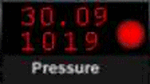
The gauge indicates - via a red LED - when air pressure differs from altimeter pressure. Most useful when flying below the Transition Altitude and using programs such as Radar Contact.
Written for FS2002 but will work with FS2004 and possibly FSX. Full instructions supplied on adding to a panel.cfg.
Not to be uploaded to any site that charges for downloads.
| Filename: | FS2004_Pressure_Gauge.zip |
| License: | Freeware, limited distribution |
| Added: | 15th January 2011, 02:39:12 |
| Downloads: | 536 |
| Author: | Ray Proudfoot |
| Size: | 72.79 KB |
| Category: Flight Simulator 2004 - Gauges | |
| Airport ID Gauge |
|
Images related to this file:
File Description:
Do you ever wonder what airports you are flying over and do not wish to consult a Map or the GPS (if your aircraft has one)?
This little gauge, which can be easily added to virtually any panel, will display the ICAO code, the Airport Name and the Airport's location as you pass nearby. The display can be fixed on a panel or can be installed as a pop-up window called by a panel icon. Complete instructions and sample setups using the default Cessna 172 are included. This gauge is designed to be used in the 2D cockpit environment has been tested in FS2004 but may work in FSX also. XML script by the late Roelof Kruijer - packaged by David "Opa" Marshall for your flying enjoyment. Please unzip to a temporary folder and follow the instructions which are in .Doc and .PDF formats.
| Filename: | Airport_ID_Gauge.zip |
| License: | Freeware |
| Added: | 2nd February 2011, 01:53:40 |
| Downloads: | 2,077 |
| Author: | Roelof Kruijer and David "Opa" Marshall |
| Size: | 400.69 KB |


© 2001-2026 AVSIM Online
All Rights Reserved
Privacy Policy |