
Where Flight Simulation Enthusiasts Gather from Around the World!
AVSIM Library - Search Results

| Category: Fly! II - Aircraft | |
| New MiniPanels For The Hawker And Flyhawk! |

|
File Description:
Updated Minipanels for the Flyhawk and Hawker. In addition to flying using the heading bug, adjusting the VOR's, etc., I've added buttons to activate the autopilot (for the Flyhawk and Hawker only) from the minipanel!
These panels are for those who enjoy the scenery yet still want the major gauge controls while flying!
| Filename: | New_MiniPanels_For_The_Hawker_And_Flyhawk.zip |
| License: | Freeware, limited distribution |
| Added: | 4th January 2003, 19:06:10 |
| Downloads: | 329 |
| Author: | Jeff Burke |
| Size: | 115.57 KB |
| Category: Flight Simulator 2004 - Gauges | |
| Nav-Info |
|
File Description:
This is not REAL thing!!
This was my playground for the last months!
This XLM-Gauge offers you a list of nearby VOR's, NDB's, Intersections and Airports by
clicking into the menu linie. Then you can select frequencies and send them to your
equipment. Works only with gauges using standard K-events.
| Filename: | NavInfo.zip |
| License: | Freeware |
| Added: | 28th February 2007, 17:10:46 |
| Downloads: | 1,180 |
| Author: | Edi Hirsch |
| Size: | 32.15 KB |
| Category: Flight Simulator 2002 - Gauges | |
| MFS-M6 Windshield Information Management System |
|
File Description:
This gauge will simulate the management of the aircraft windshield functions (Repellant,heat,wipers) with sound. Note: By virtue of Mr. Morad's untimely death, there will not be any technical support offered for this file.
| Filename: | MFSM6_Windshield_Information_Management_System.zip |
| License: | Freeware, limited distribution |
| Added: | 24th June 2002, 02:17:44 |
| Downloads: | 1,580 |
| Author: | Bill Morad |
| Size: | 931.44 KB |
| Category: Flight Simulator X - Gauges | |
| Reworked ECAMS for default Airbus A321 |
|
Images related to this file:
File Description:
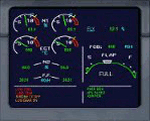
This is the complete gauge. This is a reworked ecams for the default A321, however it can be used on any Airbus aircraft especially on the Project Airbus planes. Read the readme inside the folder.
| Filename: | Reworked_ECAMS_for_default_Airbus_A321.zip |
| License: | Freeware |
| Added: | 8th March 2010, 11:39:40 |
| Downloads: | 2,311 |
| Author: | Gary Galea |
| Size: | 30.64 KB |
| Category: Flight Simulator X - Aircraft Repaints, Textures and Modifications | |
| Finncomm Airlines ATR 72-500 OH-ATN - PATCH |
|
Images related to this file:
File Description:

Patch for carenado_at75_finncomm_oh-atn.zip. This patch correct the registration in front landing gear doors (only in P3D) and registration in cockpit (FSX and P3D).
| Filename: | Finncomm_Airlines_ATR_72500_OHATN__PATCH.zip |
| License: | Freeware |
| Added: | 14th July 2019, 16:13:35 |
| Downloads: | 89 |
| Author: | Gustavo Aguiar |
| Size: | 4.29 MB |
| Category: Flight Simulator 2004 - Flight Plans | |
| NW Tour Flights |
|
File Description:
NW Tour Flights consists of 7 flights through Northwest Canada and Alaska. The flights begin in Juneau and continue to Fairbanks, Whitehorse, Yellowknife, Edmonton, Vancouver, B.C., Ketchikan and back to Juneau. You can fly them in any order you choose.
The Flight Plans (.PLN files) were developed using the FS2004 default 737-400, with clear weather. They use the autopilot from takeoff to landing. The speed, altitude, weather, radios and various other controls are the pilot’s responsibility. Most landings are IFR and all are under the control of the autopilot. The .FLT & .WX files were created with Real world weather (static) running. As a result, FLT 01 starts out in Juneau with the 737-400 in snowy weather and low clouds. You can take off in the snow OR change the weather to "Clear Skies or Fair Weather" to enjoy a scenic take off and climb out from Juneau. And when you return to Juneau from Ketchikan, your approach down the fiord will be a memorable flight.
| Filename: | NW_Tour_Flights.zip |
| License: | Freeware |
| Added: | 30th March 2004, 04:42:45 |
| Downloads: | 1,594 |
| Author: | John Resch |
| Size: | 1.38 MB |
| Category: Flight Simulator 2004 - Original Aircraft | |
| Convair 580 Base Pack (For FS2004/FSX/FS2002) |
|
File Description:
Convair CV-580 in Sierra Pacific Airlines colors, including virtual cockpit, reflective and night textures, operating airstairs/door, and feathering props. Comes complete with sound and panel.
Built in GMAX and painted by Greg Pepper and Tom Gibson. Panel bitmap by Alan Jennings and Greg Pepper, gauge bitmaps by Alan Jennings, Greg Pepper, and Tom Gibson. From CalClassic Propliners.
| Filename: | Convair_580_Base_Pack_For_FS2004FSXFS2002.zip |
| License: | Freeware, limited distribution |
| Added: | 23rd January 2013, 22:51:59 |
| Downloads: | 1,870 |
| Author: | Tom Gibson and Greg Pepper |
| Size: | 16.22 MB |
| Category: Flight Simulator X - Panels | |
| Defaultimate747 |
|
Images related to this file:
File Description:
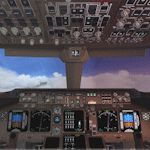
The ultimate virtual cockpit enhancement for Microsoft Flight Simulator X 747-400.
This package brings Gavin Munro's outstanding 747-400 2D panel into the default virtual cockpit, while also incorporating Jimmy Foong's callouts and Doug Dawson's XML sound gauge, all used with permission.
The cockpit lighting system is improved. Cabin lighting now includes a dome light with selectable bright and dim modes. Panel lighting and night textures have been upgraded with emissive lighting. The display units (MFDs) feature adjustable brightness controls and are switchable.
The autopilot panel has been reworked, the map display features a TCAS and the following items are now functional: Autopilot disengage bar, overhead panel, EFIS, EICAS, autobrakes and max autopilot bank bezel.
The left and right wipers are independently animated and the landing, taxi and navigation lights on the default exterior model are decoupled and work independently of each other.
| Filename: | Defaultimate747.zip |
| License: | Freeware |
| Added: | 24th September 2026, 17:53:07 |
| Downloads: | 99 |
| Author: | Trent Bennett |
| Size: | 21.14 MB |
| Category: Prepar3D V1-4 - Aircraft Repaints, Textures and Modifications | |
| TUIfly Germany Boeing 737-800 D-ATYC |
|
Images related to this file:
File Description:

This is the TUIfly Germany D-ATYC repaint for the PMDG 737-800 NGXu SSW. Enjoy flying, and always good landing.
| Filename: | TUIfly_Germany_Boeing_737800_DATYC.zip |
| License: | Freeware |
| Added: | 2nd December 2019, 14:27:17 |
| Downloads: | 883 |
| Author: | Robert Laible |
| Size: | 26.23 MB |
| Category: Flight Simulator 2004 - Miscellaneous Files | |
| VC Design Tutorial ammendment |
|
File Description:
After consulting with a number of people it has been discovered that there are some
unfortunate short-comings in the Polygon seperation technique. This new paper will
outline these short-comings and also indicate some areas where this technique can at
least improve gauge performance. By D. Ranieri
| Filename: | VC_Design_Tutorial_ammendment.zip |
| License: | Freeware |
| Added: | 13th December 2005, 13:40:42 |
| Downloads: | 454 |
| Author: | D. Ranieri |
| Size: | 196.37 KB |


© 2001-2026 AVSIM Online
All Rights Reserved
Privacy Policy |