
Where Flight Simulation Enthusiasts Gather from Around the World!
AVSIM Library - Search Results

| Category: Flight Simulator 2004 - Scenery | |
| RealityPack 1.2: Comprehensive Enhancement Package - Part 2 |

|
File Description:
RealityPack 1.2 is a major enhancement of FS2004. New forests, meadows, cliffs, runways, taxiways, roads with traffic, rails with trains, trees, airport lighting, complete texture set for Europe and more. More than 600 high-definition, highly detailed realistic textures reengineered by hand from aerial photographs for unprecedented detail.
Subtle 3D-effects, real sunlight emulation, careful colour blending, contrast and definition and seasonal variety combined with no frame rate impact will create a new level of realism and immersion. Real macrostructures with recognisable ground detail blend into a realistic landscape. Works well for both low level and high altitude flights. Summer, fall and soft winter seasons included (hard winter forests only for Europe at the moment). For a full list of contents check out the posts in the avsim screenshot forum or the included readme file.
| Filename: | RealityPack_12_Comprehensive_Enhancement_Package__.zip |
| License: | Freeware, limited distribution |
| Added: | 29th January 2006, 01:22:35 |
| Downloads: | 85,723 |
| Author: | Sascha Rieger |
| Size: | 10.48 MB |
| Category: Miscellaneous Files - General Utilities | |
| My Destination Chooser V4 - DEMO weather & charts part (v1.00) |
|
Images related to this file:
File Description:

Following delays over the initial My Destination Chooser v4 schedule, we have decided to make this small demonstration.
The aim is to show you some functions that will be included in MDCv4: the Weather and Charts part.
Weather Feature: Seach by ICAO code (METAR/TAF) ; Integrated METAR decoder ; Advanced Weather Chart display (Available sources : JEPPESEN, Eurocockpit, IVAO)
Charts Feature : Charts page (See the aiports charts of various airport spread all over the world!)
The Weather function available on MDCv4 is one of the most complete and integrated one available on any free pre flight planner tool. You can also easily find the most airport chart in the world thanks to this software.
Please, remember that is only a part of the futur addon: My Destination Chooser V4
This soft can be used for all you flight, and add a step forward for you flight preparation.
WARNING: Framework 4 required (link in the manuel).
Made by AirTimSimulation Team
| Filename: | My_Destination_Chooser_V4__DEMO_weather__charts_pa.zip |
| License: | Freeware, limited distribution |
| Added: | 13th November 2010, 14:58:44 |
| Downloads: | 569 |
| Author: | "AirTimSimulation" |
| Size: | 1.72 MB |
| Category: Flight Simulator 2002 - Miscellaneous Files | |
| Las Vegas Sectional Chart |
|
File Description:
If you plan a virtual flight to some of the States´ most beautiful National Parks, this chart is for you. The 5300*4200 pixel chart merges the front and back of the Las Vegas sectional and covers Las Vegas, the Grand Canyon, Bryce Canyon, Death Valley, Lake Mead, Marble Canyon... The desert states have a lot to offer! Take off from Richard "Georender" Goldstein´s Escalante and aim for Hurricane, at Bryce Canyon (KBCE) you may have a soft drink and practice high altitude take-offs and landings. While it can be used "as is" without any other software, it will develop its full potential if used as moving map with SimSystem´s FSFlightMax or FSGarmin. It wouldn´t have been possible to offer this chart without Richard Harvey and his love to flightsimming, so please consider this file to be "donationware" and make a however small contribution to the Richard Harvey Endowed Scholarship.
| Filename: | Las_Vegas_Sectional_Chart.zip |
| License: | Check within download |
| Added: | 24th March 2003, 13:41:22 |
| Downloads: | 2,031 |
| Author: | Uwe Rademacher |
| Size: | 15.23 MB |
| Category: Flight Simulator 2004 - Scenery | |
| LGSR - Santorini Big Scenery - Santorini, Greece ** TEXTURE UPDATE ** |
|
Images related to this file:
File Description:
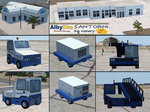
This FS2004 package is a free texture update for our previous greek "Santorini big scenery". The original project contain the "Santorini Thira Int. Airport" (Iata: JTR - Icao: LGSR)scenery and the "Santorini island" scenery (lanclasses, landmarks, autogen and more).
With this texture update (over 50 new files) you'll become new textures for some ground service veihcles (better quality and updated fuel companies), new textures for some airport buildings (updated to summer 2015, better resolution and quality), new "soft edge transition" on the apron textures, reduced texture size for the far away scenery objects (the result is a frame rate improvement) and other minor texture updates. This package contains textures only so the original "Santorini big scenery 2012" demo/free or full version is required.
Watch the screenshot and the demo video on the Albysim youtube chanel and check all scenery features reserved to the Premiun User (3D papi lights, 3D taxi lights, new vehicles, new autogen greek houses, new volumetric grass, new cablecar, other new details and objects).
| Filename: | LGSR__Santorini_Big_Scenery___Santorini_Greece___T.zip |
| License: | Freeware |
| Added: | 30th September 2015, 17:29:55 |
| Downloads: | 1,232 |
| Author: | Albysim Scenery Design |
| Size: | 17.63 MB |
| Category: Flight Simulator 2004 - Utilities | |
| Destination Finder for FS9 v1.1 |
|
File Description:
In this program, you enter the ICAO code of your start airport, the distance you wish to fly, and the heading on which you wish to fly. The program will search through all the stock airports in FS9, and will compile a list of airports nearest to your desired destination. For extra flexibility, you can also leave the heading and/or the distance unspecified. Alternatively, the program can now read your aircraft’s position in all versions of FS, and use that as the starting point of the search. You can optionally specify a maximum and/or minimum length for the runway, whether the runway must have an ILS, a maximum elevation for the destination airport, the runway surface (hard or soft or water) and whether the airport should be civil or military or either. The program can be useful for planning your own flight or for drawing up AI flightplans. It is a standalone program, and uses FS9 airport and runway data, but, with that limitation in mind, it can equally be used with other versions of FS. Version 1.1 has a much improved formula for calculating longitude and latitude over longer distances, and is now very accurate over all distances. Version 1.1 also incorporates a number of new features suggested by user feedback. The upgrade is recommended for all users. Needs the .NET Framework 2.0.
| Filename: | Destination_Finder_for_FS9_v11.zip |
| License: | Freeware |
| Added: | 24th January 2008, 00:17:07 |
| Downloads: | 4,880 |
| Author: | Martin Gleeson |
| Size: | 1.69 MB |
| Category: Flight Simulator X - Aircraft Repaints, Textures and Modifications | |
| Airbus A318 FD Special Version V2 |
|
Images related to this file:
File Description:
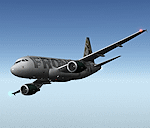
After my initial work on the Project airbus A318 (V1.2) and on the project Airbus A319 (A319 Special Version V2), I present my special version of the Project Airbus A318 Version 2, which includes many improvements and new features.
The instrument panel has been adapted of the Stefan Liebe work, on which I have added many changes. I created a vertical navigation gauge (VNAV gauge) which manages automatically the climb of the aircraft like a FMC (it can be work in several stage), with pre-programmed data according the weight of the aircraft and the altitude. The autopilot is constant MACH, with a transition altitude of 25000ft, thus avoiding the risk of overspeed. The ND will display information page in real time on the flight plan, an information page on the destination airport and display the radar map of the terrain, with AI traffic in real time.
All instruments are active in the VC and 2D panel. The instruments were completed by a multitude of small details. I have improved the autolanding function, with a soft landing (rounded). There is a complete operating manual in PDF format, in English and in French. Of course, TOGA mode and Autobrake mode works. Only compatible with FSX SP2 or Acceleration. See the readme file and the user manual for information and copyright. This version is also a big upgrade on the A318 special version 1.0 and 1.2. This is not an update, but a new aircraft. Francois Dore.
| Filename: | Airbus_A318_FD_Special_Version_V2.zip |
| License: | Freeware, limited distribution |
| Added: | 6th April 2012, 19:59:27 |
| Downloads: | 11,992 |
| Author: | Francois Dore, Project Airbus, Stefan Liebe |
| Size: | 134.71 MB |
| Category: Microsoft Flight Simulator (2020) - Utilities | |
| Flightplan Visualizer 1.18 |
|
Images related to this file:
File Description:
Flightplan Visualizer (FV) version 1.18.0. Copyright 2018-2020 by Pelle F. S. Liljendal ([email protected]), all rights reserved.
FV comes with 787 pre-imported Commercial AI flightplans (+380 BizJet flightplans are available as a separate download). However you are able to import additional (AI) flightplans yourself. Once imported these (AI) flightplans can be visualized on a map-view, and the user will be able to search accross all these. Hence you can use the program as inspiration as to which routes to fly. E.g. you can search across all imported flightplans to find all flights in an A321 flying into/out from LDDU, or simply to look for all flights in a Boeing 747-8F.
Simply run the included installer to install the software. The program will be installed into "C:\Program Files (x86)\Flightplan Visualizer" and all datafiles will be installed into: "C:\Users\[UserName]\AppData\Roaming\FlightplanVisualizer". The program comes with a full manual explaining everything, and a 3 page quick manual to get you started. The first 3 times you run the program the quick manual will automatically open. The forum is hosted here: https://forum.aerosoft.com/index.php?/forum/919-flightplan-visualizer/
Version 1.18 Contains the following changes:
- GREATLY improved the search-legs feature (by a factor of +50).
- In the past the application was forced to 32 bit. This is no longer the case, hence if needed its able to allocate more memory than before. I have never heard of anyone getting an "out of memory" exception, buy anyway.
- In the settings form, the field for entering the path to where to look for the Make Runways -files, have been replaced with a (MRU) combo-box, remembering the last 5 paths entered. So now you don't need to remember these paths each time you want to change it (e.g. if you switch between a set of files generated for P3D and another generated for MSFS). Remark that when this path is changed, FV will automatically restart when saving the settings, as the MkRwy-data are only loaded at startup.
- Added new command-line argument /MkRwy="G:\FS\MakeRunways". If this argument is set, FV will try to locate the files generated by Pete Dowson's MakeRunway in the specified folder, no matter the value of the MkRwy-path set in the settings-form.
- Added new command-line argument /FilePrefix=XXX. If this prefix is set (in the short-cut starting FV) it will look for files in the UserData-folder using this prefix and an underscore (e.g. open "XXX_UserAirportInfo.xml" in stead of "UserAirportInfo.xml"). If FV is started with this argument it will be displayed in the caption of the main-form to notify the user "which prefix is in use".
- Added new command-line argument /ForceReprocessFlightplans which forces all flightplans to be reprocessed on startup (e.g. process all airport redirections according to loaded redirection file).
- Added new command-line argument /? or /help. Using either of these, or having specified a wrong command-line argument will show a small example of the correct way to use these arguments.
- Added a new "Auto-activation prefixes" entry field to the "Edit owned aircraft" form where you can now enter a comma separated list of prefixes for which each aircraft should set to active. If entered, the aircraft will automatically be set active when FV have been started with the /FilePrefix argument set to the entered value (e.g. P3D). If one or more prefixes have been entered into this field, and FV have been started with another prefix, those aircraft will be set to not-active.
- Added new setting to reprocess all loaded flightplans on startup if FV was started with another /FilePrefix argument than used the previous time FV was started (e.g. if you switch between two different simulators).
- Improved how pseudo-airports tries to look-up airport data from the bundled airport-database. So there is now a higher chance that: name, country/state, and time-zone will be populated with useful data for the pseudo airports.
- In previous versions when opening the airport-info form, the checkbox "Exclude small/grass/dirt" (runways) was always checked, meaning you had to uncheck this checkbox before being able to see any runway-information for small airports. In this version a new setting have been added where you can chose if this checkbox should default to being: Checked, Unchecked or (default) Automatic. if choosing "Automatic", this checkbox will default to un-checked for airports only having few/small runways.
- Redesigned the settings-form so things are less "cluttered", and it will be more easy for me to add additional items in the future.
- The Search Airport form now contains fields that lets you specify min/max criteria for rwy-length and airport elevation, and min/max distance to a specified airport (e.g. find all airports within 20-50 Nm of XXXX). Also you can specify required rwy-type (e.g. "All Hard", "Have Soft" ...).
- Added an "Edit" menu-item to the context menu in the Search Airport form, which opens the Airport Info form, and returns back to the Search Airport form (e.g. see details for a few found airports before chooing one of them).
- If Transition Altitude (TA) is not known for a particular airport, the program will now try to estimate TA based on nearby airports in the same country, where those nearby are weighted more than those further away (its not perfect, but "better" than 0). An estimated TA will be postfixed by a asterisk to mark that it is estimated.
- Minor (internal) changes to the automatic version-check.
- Fixed: Issue importing some AigFP flightplans where airports were being redirected (e.g. "AIG_AviaTrafficCompany_Winter_2019-2020v2").
- Fixed: Using the context menu in the list-view showing all owned aircraft, the changes were sometimes not saved.
- Fixed: In the conversion-form when converting weight/volume into US-Gal, the calcuation was wrong (converting from US-Gal was not an issue).
- Fixed: In the leg-info report the value of Transition Altitude was in some cases used in stead of the length of the longest runway.
- Fixed: Leg-info report only contained taxi-out time for all airports. Now it only contains the taxi-out time for the departure airport, but both departure- and destination airports contains a taxi-in time.
- Fixed: In some cases an airport that was currently being edited, could be edited in another window at the same time (opening multiple Airport Info forms).
- Data: The bundled airport-database had a MAJOR face-lift. Various data were corrected, and it have more than doubled in number of airports/helipads contained within the database.
- Data: Improved detection of aircraft-type "IAI 1126 Galaxy" (as "Gulfstream G200"). Thanks to Bruce Nicholson for notifying me of the issue when importing a particular AIG flight-plan.
- Flightplans: All new/updated flightplans have been added to the installer, and all obsolete/defunct have been marked/removed. A total of 787 active flightplans are bundled with the installer.
Pelle
| Filename: | Flightplan_Visualizer_118.zip |
| License: | Freeware, limited distribution |
| Added: | 9th November 2020, 20:09:24 |
| Downloads: | 479 |
| Author: | Pelle Liljendal |
| Size: | 34.48 MB |


© 2001-2026 AVSIM Online
All Rights Reserved
Privacy Policy |