
Where Flight Simulation Enthusiasts Gather from Around the World!
AVSIM Library - Search Results

| Category: Flight Simulator 2004 - Scenery | |
| MBJ - Sangster Int'l Airport |

|
File Description:
Long awaited custom scenery for Montego Bay's Sangster International Airport. Thanks to Anthony Scott of the Kingston Virtual FIR for providing the needed pictures of the airport.
| Filename: | MBJ__Sangster_Intl_Airport.zip |
| License: | Freeware, limited distribution |
| Added: | 9th November 2008, 22:31:55 |
| Downloads: | 5,474 |
| Author: | Mach-1 Design Group |
| Size: | 3.06 MB |
| Category: Prepar3D V1-4 - AFCAD Files | |
| Taipei Taoyuan Airport, Taiwan (RCTP) |
|
Images related to this file:
File Description:
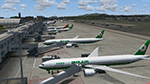
Updated AFCAD for PacSim's Taipei Taoyuan RCTP Scenery. Optimized gates with correct radius, and airline parking codes for each concourse. Default moving jetways placed at each gate.
| Filename: | Taipei_Taoyuan_Airport_Taiwan_RCTP.zip |
| License: | Freeware |
| Added: | 15th July 2017, 07:21:58 |
| Downloads: | 1,176 |
| Author: | PacSim, Kevin Boydston |
| Size: | 23.16 KB |
| Category: Flight Simulator X - AFCAD Files | |
| Parker Airport (70NJ), NJ |
|
File Description:
Located 02 miles S of Asbury, New Jersey on 13 acres of land, Parker Airport is a private turf strip located on residential property. This airport is challenging in many ways. For one, when approaching from the southeast the airport is located immediately after a tall ridge, so when topping this ridge at altitude you may not even see the airport over the nose of your aircraft before you overfly it. The runway for this airport is 1600' feet long but it is curved and slightly sloped perpendicular to your roll, so significant rudder will be needed to stay aligned - be careful when operating with any crosswind component! It is highly recommended that you only depart via Runway 25 and arrive via Runway 07 to avoid having to clear significant obstacles prior to landing or after taking off. This airport has no hard-surfaced runway and there is a very noticeable "bump" in the terrain halfway down the runway that will literally bounce your aircraft into the air - I tried my best to smooth it over but could not get rid of it entirely. When taking off make sure you have back pressure applied so your main gear only bounce you high enough to remain within ground effect - hitting your nose wheel can cause an extreme pitch up leading to a stall. Trees close in tight to the runway at the end of Runway 07 or the start of Runway 25, however collision has been disabled with the trees nearest the runway so you can scrape some branches if needed on the takeoff/landing rolls. The author has successfully departed and arrived on both runways in the default Cessna 172 under moderate crosswind from the northeast. This field may definitely require some practice but it is usable!! This airport has no edge lighting, so daytime VFR operations only are recommended.
Scenery constructed with use of satellite images/streetview/aerial photos - the author has not been there in person.
This scenery is meant to be used in conjunction with MegaScenery Earth New York 007. It is not required, but apron use is minimized to allow satellite scenery to show through as much as possible, and objects are placed based on the MSE textures - lack of it may make scenery look out of place.
| Filename: | Parker_Airport_70NJ_NJ.zip |
| License: | Freeware |
| Added: | 10th February 2011, 05:04:30 |
| Downloads: | 215 |
| Author: | Drew Sikora |
| Size: | 559.02 KB |
| Category: Flight Simulator X - AFCAD Files | |
| Essex County Airport (KCDW), NJ |
|
File Description:
Located 02 miles N of Caldwell, New Jersey on 275 acres of land, Essex County Airport is a public airport with two asphalt runways, the longest of which is 4552'. Major changes include Runway 9/27 updated to the current 10/28; Runway 4/22 markings are custom made to match the real world, with threshold stripes on Runway 22 only; the beacon has been relocated to its real world location atop the control tower. Additionally, 221 parking locations have been accurately placed around the airport, broken up into 6 sections. See the included airport diagram that labels the various parking areas. 89 of these parking spaces are labeled RAMP_GA and these spaces are occupied by static aircraft. Collision with all static aircraft is disabled but still, if you do not want to start occupying the same space as another airplane, do not choose parking spots labeled RAMP_GA. Instead, all user aircraft should choose either RAMP_GA_SMALL (for wingspans up to 40') or RAMP_GA_MEDIUM (for wingspans up to 60' and only available in East Parking). Also, only 86 of these parking spaces are available for AI aircraft to spawn in. There are hangars available to transient aircraft: the two in South and Southeast parking are able to accommodate small craft with wingspans up to 40'; the one in Northeast parking is able to accommodate larger aircraft with wingspans up to 54'. Helicopters can start either on Taxiway P (South helipad), Taxiway N (North helipad) or in front of the main terminal (East helipad). Fuel is available in both the East and South parking areas by stopping anywhere on the concrete next to the fuel tank/pump. Take note that the runway patterns are both Left and Right and the pattern altitude varies for aircraft type. There are known issues with the AI for this airport, see the ReadMe for more details.
Scenery constructed with use of satellite images/streetview/aerial photos - the author has not been there in person.
This scenery is meant to be used in conjunction with MegaScenery Earth New York 005. It is not required, but apron use is minimized to allow satellite scenery to show through as much as possible, and objects are placed based on the MSE textures - lack of it may make scenery look out of place.
| Filename: | Essex_County_Airport_KCDW_NJ.zip |
| License: | Freeware |
| Added: | 14th April 2011, 01:50:13 |
| Downloads: | 416 |
| Author: | Drew Sikora |
| Size: | 2.4 MB |
| Category: Flight Simulator X - Scenery | |
| Lelystad airport_EHLE_FSX_new_layout |
|
File Description:
Because the Netherlands 2000 Scenery Design Team no longer releases a new version for the FSX,
this version has been compiled based on nl2k_v4_EHLE_5 with the permission of the the Netherlands 2000 Scenery Design Team.
- Various buildings have been modelled and items from various sources have been added to the airport.
- The EHLElib.BGL file contains all the items that have been used and the textures are complete.
As a result, the airport can be installed without the use of the installation of the Netherlands 2000 Scenery Design Team.
- The airport is surrounded by more trees than the version nl2k_v4_EHLE_5.
- Lampposts have been added to the highway of the approach path of Runway 23 and parking places.
- By means of Airport Design Editor the airport can be changed.
- In the Effects folder, there are effects that should be added to the FSX (SE) folder.
- In the selection folder you will find two options. One is the choice where the new section is active and two where it is inactive.
By placing a copy of one of these in the scenery folder and deleting it already in the scenery.
It will become active after you restart the flight sim.
Enjoy and Happy flying
Jan Zijlstra from the Netherlands
| Filename: | Lelystad_airport_EHLE_FSX_new_layout.zip |
| License: | Freeware |
| Added: | 20th March 2024, 23:09:06 |
| Downloads: | 167 |
| Author: | Jan Zijlstra |
| Size: | 255.22 MB |
| Category: Flight Simulator X - AFCAD Files | |
| CYWG - Winnipeg James Armstrong Richardson International Airport / Winnipeg, Manitoba, Canada |
|
Images related to this file:
File Description:
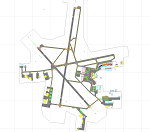
CYWG - Winnipeg James Armstrong Richardson International Airport / Winnipeg, Manitoba, Canada
This airport update was made with the latest version of ADE (Airport Design Editor) and made for FSX as a replacement for the stock (default) airport. I found that most stock airports in FSX lack a decent amount of character and realism and this area in particular was dreadful! The stock airport was rather inaccurate. I've made several additions to the airport which are listed below. All these enchancements are as close to the real airport as I can get with stock library objects. I've used satellite images, terminal photos and maps throughout the whole process so building locations are as accurate as possible. Happy landings in the beautiful Canada!
Features:
*Greatly expanded parking apron
*Brand new main terminal building with its 11 jetways and regional airline parking and parking garage
*Old terminal (soon to be demolished) with construction vehicles
*Hangar and other airport buildings added
*Cargo terminal with parking
*Military cargo area
*Airport vehicles and objects throughout the airport
*Main road in front of airport added with static vehicles
*Airport fire station with fire trucks
*Static de-icing area with vehicles
*Old runway 7/25 which was demolished in the 1990s and FSX inexplicably included has been removed
| Filename: | CYWG__Winnipeg_James_Armstrong_Richardson_Internat.zip |
| License: | Freeware |
| Added: | 24th July 2012, 08:12:46 |
| Downloads: | 2,960 |
| Author: | Jaison Diaz |
| Size: | 163.14 KB |
| Category: Flight Simulator X - AFCAD Files | |
| MTPP - Toussaint Louverture International Airport / Port-au-Prince, Haiti |
|
Images related to this file:
File Description:
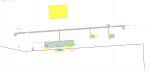
MTPP - Toussaint Louverture International Airport / Port-au-Prince, Haiti
This airport update was made with the latest version of ADE (Airport Design Editor) and made for FSX as a replacement for the stock (default) airport. I found that most stock airports in FSX lack a decent amount of character and realism and this area in particular was dreadful! The stock airport was rather inaccurate. I've made several additions to the airport which are listed below. All these enchancements are as close to the real airport as I can get with stock library objects. I've used satellite images, terminal photos and maps throughout the whole process so building locations are as accurate as possible. Happy landings in Haiti!
Features:
*Expanded parking apron
*Seperate parking aprons for GA traffic
*Main terminal building with its 3 jetways
*Cargo area
*Hangars and other airport buildings added
*Airport vehicles and objects throughout the airport
*Corrected runway length and numbering
*Corrected taxiway signs
*Birds near the airport
*More ships and smaller fishing vessels added to the Port-au-Prince bay
*Fishing marina added in the bay
*Main road in front of airport added with static vehicles
*Parking lots with static vehicles
*Vegetation in front of airport
| Filename: | MTPP__Toussaint_Louverture_International_Airport__.zip |
| License: | Freeware |
| Added: | 15th July 2012, 06:44:51 |
| Downloads: | 1,164 |
| Author: | Jaison Diaz |
| Size: | 10.19 KB |
| Category: Flight Simulator X - Scenery | |
| FSX-DTTJ-Djerba |
|
File Description:
Well it starts like always, I can't find a usable freeware airport in this
case for the DTTJ Djerba-Zarzis so I'll build it myself again.........
well what can I say here it is built as real as possible with many details
with the standard scenery after a lot of work ..........
So fly to Tunisia to the island of Djerba, of course with an Airbus A321 or
a Boeing 737. There you change to a helicopter or a smaller plane and
look around the area...Tip: Zarzis is near the port a helipad......
Installation:
copy the folder DTTJ Djerba Scenery into the addon folder of the FSX,
start the FSX go to settings, scenery library, add area, press OK, then
you can already start.............
Extras: to be able to see people, I deliver the file 3DPeoble_Lib, copy it
into the Addon Scenery folder and activate it in FSX as described during
the installation and you can already see people......
the same applies to all files that are supplied to see more details in the
FSX folder Addon Scenery copy individually and activate in FSX you
should have already activated one of these files! You don't need to install
it again! EZ-Scenery-Object Files ( for extra buildings and accessories )
...... RCJ-Neoplan............( Buses ). airport_restaurants_ss_fsx..........
( extra building ) Parking lots_large_ss_Fsx.Bgl........( vehicles and
parking lots) Lightobj.bgl......lights and light poles......... more about it on
my youtube channel https://www.youtube.com
/channel/UC7vHXQMa3hhU2iGtODXlkHw/videos
Support:Questions and help on my YouTube channel or by email to
[email protected] And now have fun In Djerba Jamaica
| Filename: | FSXDTTJDjerba.zip |
| License: | Freeware |
| Added: | 18th September 2023, 14:53:38 |
| Downloads: | 398 |
| Author: | Wagner Ewald alias Jamaika |
| Size: | 84.97 MB |
| Category: Flight Simulator X - Scenery | |
| Tandragee airfield patch for UK2000 users |
|
Images related to this file:
File Description:

Patch for Tandragee/Kernan airfield for UK2000 scenery users. The code EGTA I have used for the strip although not in FSX actually exists and is depicted in the UK2000 airports scenery. If you have these airports installed apply this patch and you will be able to find Tandragee unfer the name "Kernan", city "Tandragee" and code "EG1". If you do not have UK2000 installed you do not need to apply this patch.
| Filename: | Tandragee_airfield_patch_for_UK2000_users.zip |
| License: | Freeware |
| Added: | 9th October 2014, 14:12:38 |
| Downloads: | 303 |
| Author: | Vassilios Dimoulas |
| Size: | 2.46 KB |
| Category: Flight Simulator 2004 - Scenery | |
| Warsaw Airport (EPWA) 2010, Poland (v1.1) |
|
Images related to this file:
File Description:

Warsaw Frederic Chopin Airport (Polish: Port Lotniczy im. Fryderyka Chopina) (IATA: WAW, ICAO: EPWA) is an international airport located in the Okecie district of Warsaw, Poland. Formerly Okecie International Airport, it is named after the famous Polish composer and former Warsaw resident, Frederic Chopin. It is Poland's busiest airport, handling just under 50% of the country's air passenger traffic. High detailed airport scenery by MK-Studios.com.pl
Updated version 1.1 of Warsaw scenery
| Filename: | Warsaw_Airport_EPWA_2010_Poland_v11.zip |
| License: | Freeware, limited distribution |
| Added: | 5th May 2010, 21:35:20 |
| Downloads: | 10,088 |
| Author: | Mateusz Stabryla, MK Studios |
| Size: | 33.16 MB |


© 2001-2026 AVSIM Online
All Rights Reserved
Privacy Policy |