
Where Flight Simulation Enthusiasts Gather from Around the World!
AVSIM Library - Search Results

| Category: Flight Simulator X - Original Aircraft | |
| Aerion AS2 |

|
Images related to this file:
File Description:

Here's a supersonic bizjet for you to fly around in. The Aerion AS2. Cruises at mach 1.4! Good for getting somewhere a little quicker than other commercial and private jets. Dietmar Loleit's awesome FLTInfo gauge is included with his permission. Also included with their permission is the TGS (Taxi Guidance System) gauge from PF3 ATC, which is a great ATC program (I use it almost daily). Includes a 3D VC panel only, no 2d panel. This AS2 is Freeware.
| Filename: | Aerion_AS2.zip |
| License: | Freeware |
| Added: | 4th December 2019, 17:25:13 |
| Downloads: | 798 |
| Author: | Dan Cowan |
| Size: | 19.74 MB |
| Category: Flight Simulator 2004 - Gauges | |
| Install of Aircraft Info Window |
|
Images related to this file:
File Description:
Aircraft information display in 2D panel, primarily for communication with ATC. The small window containing the airline, aircraft registration and flight ID can be opened by the small ATC button in any 2D panel. The window can then be resized and moved to any free panel space.
Many actual cockpits have the aircraft registration on a small tag in view of the tech crew (In FS, this info is typed in aircraft.cfg behind 'atc_id=' (example N557UA). The flight number is typed in aircraft.cfg behind 'atc_flight_number='(example 376). The operating airline is typed in aircraft.cfg behind 'atc_airline='(example United).
By installing this gauge, all this info is compiled in a small window and is readily viewed by FS pilot.
| Filename: | Install_of_Aircraft_Info_Window.zip |
| License: | Freeware |
| Added: | 19th January 2023, 00:09:47 |
| Downloads: | 65 |
| Author: | Peter Bendl |
| Size: | 63.48 KB |
| Category: Flight Simulator X - Gauges | |
| Beachcraft Baron 58 AP-Alt-VS-Fuel Gauge v1 |
|
Images related to this file:
File Description:
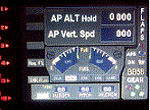
This gauge is for use in the Saitek FIP and has been developed specifically for the Baron 58 (FSX default) but also works fully with the E55. The gauge looks nothing like what you will find in the BB58 but I have incorporated the components that are found at the lower right side of the control yoke. It has been designed to complement the Saitek AP / Multi panel and to fit between the yoke and the multi panel.
The gauge is primarily to show the selected AP Altitude and Vert Spd whilst the AP / multi panel is displaying HDG. Placing it to the left of the AP / multi panel and at lower right side of the yoke puts all the elements of this gauge in roughly the position they would be found in a BB58. The 5 light indicators are just an addition I thought would be handy to have. The landing light indicator is right next to the
landing gear warning lights and acts as a reminder to have them on by the time the gear goes down.
| Filename: | Beachcraft_Baron_58_APAltVSFuel_Gauge_v1.zip |
| License: | Freeware |
| Added: | 6th July 2014, 14:12:53 |
| Downloads: | 191 |
| Author: | Robert Budd |
| Size: | 283.4 KB |
| Category: Flight Simulator 2004 - Gauges | |
| TerraVue: Moving Map, Ground Proximity, Information pages |
|
File Description:
FS2004 Gauge: TerraVue. This gauge contains a moving map display with a terrain elevation legend color-keyed to the FS9 map. The legend allows the elevation of terrain lying ahead of the aircraft to be taken into account. TerraVue can display the FS map in seven ranges from 4 NM to 160 NM. The Map mode also employs animation to show the proximity between the aircraft and ground in a graphical and digital display with indicators showing whether the distance is increasing or decreasing. The gauge can be switched to the Information mode which will display up to four individual pages of data that is created by you. These scrollable pages may contain checklists, airport diagrams, approach plates, strip charts, etc. Fully functional, free software to help quickly construct these pages is included along with an illustrated tutorial that demonstrates the simple copy/paste process that tailors these pages to include whatever data you wish. For panel or separate window installation with TerraVue Icon gauge. By Glenn Copeland
| Filename: | TerraVue_Moving_Map_Ground_Proximity_Information_p.zip |
| License: | Freeware |
| Added: | 24th June 2006, 15:13:12 |
| Downloads: | 5,081 |
| Author: | Glenn Copeland |
| Size: | 1.92 MB |
| Category: Flight Simulator X - Gauges | |
| Bombardier CRJ-700 Gauge Fixes and Improvements |
|
File Description:
This package fixes numerous bugs in the gauges of the default Bombardier CRJ-700 and adds some new features.
Highlights:
New min/max speed bar in ASI, added wind vector to PFD, added track line in MFD,
added VORs and Airports in MFD map mode, new mouse click spots in PFD and MFD.
| Filename: | Bombardier_CRJ700_Gauge_Fixes_and_Improvements.zip |
| License: | Check within download |
| Added: | 31st March 2007, 13:35:52 |
| Downloads: | 7,903 |
| Author: | Alexander Barthel |
| Size: | 2.75 MB |
| Category: Flight Simulator X - Gauges | |
| Update-A for FW190 Cannon Effect gauge |
|
File Description:
Solves a problem in rcbfw-20.zip, where tracer ammo might not be visible because of a wrong bitmap reference.
Requires prior installation of file rcbfw-20.zip.
By Rob Barendregt
| Filename: | UpdateA_for_FW190_Cannon_Effect_gauge.zip |
| License: | Freeware, limited distribution |
| Added: | 16th March 2009, 11:11:03 |
| Downloads: | 674 |
| Author: | Rob Barendregt |
| Size: | 15.1 KB |
| Category: Flight Simulator X - Gauges | |
| X-Gauge 2-D Panel Toggle Icon |
|
File Description:
2-D panel toggle icon for XGauge. Read the install.txt !!
Placement is for the default Boeing 737-800 panel but can be changed and used in any panel.
This can also be used in FS9.
| Filename: | XGauge_2D_Panel_Toggle_Icon.zip |
| License: | Freeware |
| Added: | 23rd July 2012, 16:15:21 |
| Downloads: | 464 |
| Author: | Dave Opper |
| Size: | 2.56 KB |
| Category: Flight Simulator X - Gauges | |
| Bombardier CRJ-200 V Speeds Card Gauge |
|
Images related to this file:
File Description:
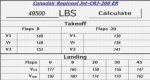
FSX gauge simulating the V Speeds card used by CRJ200 crews. A simple "Calculate" button is used to run the equations (no FPS hit) and store the data. Simply hit "Calculate" again to clear. This is the fully functional BETA version, please see read-me for more information. More features forthcoming in final release. Thank you for your support.
| Filename: | Bombardier_CRJ200_V_Speeds_Card_Gauge.zip |
| License: | Freeware |
| Added: | 10th November 2013, 23:56:58 |
| Downloads: | 297 |
| Author: | Aaron Cook |
| Size: | 623.94 KB |
| Category: Flight Simulator 2004 - Miscellaneous Files | |
| DHC-2 Beaver Smoke With Control Gauge |
|
File Description:
This xml gauge and effect package automatically controls the light smoke effect in the DHC-2 Beaver by simply accelerating the throttle. The DHC-2 Beaver will automatically emit a very light smoke effect at a Manifold Pressure reading of 32(+) or greater, depicting a hard running engine. Reducing the throttle level for cruising (MP30-32) or less for descents deactivates the smoke effect.
Even though this xml gauge and effect file works perfectly well by itself, when used in conjunction with my dhc2_fx.zip, all the bases are covered. Smoke automatically engages for cold air temps and with this xml gauge, smoke engages as a result of high manifold pressure (eg. when taking off or climbing). The two work together very nicely without any conflict.
Designed for the FS2004 DHC-2 wheeled Beaver by Steven Grant, Fred Choate, and Aaron Swindle. In the AVSIM library-- dhc2_04w.zip --
Also works with the DHC-2 De Havilland Beaver Amphibian v2 that was made for FS2002, but works equally well in FS2004. In the AVSIM library-- dhc2ampv2.zip --
The README file includes complete instructions.
| Filename: | DHC2_Beaver_Smoke_With_Control_Gauge.zip |
| License: | Freeware |
| Added: | 7th October 2003, 16:34:19 |
| Downloads: | 1,767 |
| Author: | Brent Hricziscse |
| Size: | 5.31 KB |
| Category: Flight Simulator 2004 - Miscellaneous Files | |
| Nick's AI Jet Exhaust With Control Gauge |
|
File Description:
Hanging around the airport watching the A-I traffic and chasing A-I jet aircraft just got a little more interesting. Enjoy watching your entire A-I jet fleet as they display engine heat shimmer effects -after- push-back from the terminal and during taxi to the active runway. All the A-I traffic take off displaying a lite, expanding, frame-rate friendly and nicely scaled high throttle heat/exhaust trail FX which remain with the A-I aircraft during its entire flight. To top off the show, the A-I aircraft that are throttled down and landing display no exhaust from the engines! This package also comes with a gauge that allows pilot throttle control of the taxi heat shimmer/full-throttle exhaust FX for the jet aircraft being flown in the sim by the user. This package does NOT interfere with the logo, taxi or wing lights of any aircraft and comes with 5 all new exhaust effects files which can be applied to just about any size private, commercial or military jet. It requires editing/adding lines in the aircraft.cfg and panel.cfg files. The README files include very complete and comprehensive instructions including a quick and easy copy/paste file for all the Microsoft jet aircraft and tutorial on making custom gauges from the one provided. This package completely replaces my original *Nick's Jet Smoke* package and any/all updates for it.
By Nick Needham
| Filename: | Nicks_AI_Jet_Exhaust_With_Control_Gauge.zip |
| License: | Freeware, limited distribution |
| Added: | 22nd December 2003, 21:16:01 |
| Downloads: | 29,959 |
| Author: | Nick Needham |
| Size: | 894.61 KB |


© 2001-2026 AVSIM Online
All Rights Reserved
Privacy Policy |