
Where Flight Simulation Enthusiasts Gather from Around the World!
AVSIM Library - Search Results

| Category: Flight Simulator 2004 - Miscellaneous Files | |
| Tutorial: Gauge Graphics, Part 4 |

|
File Description:
FS2004 Tutorial: Gauge graphics, Part 4. This comprehensive article describes methods for simulating gauge bodies, data windows, controls, and panel cutouts. Shadows, transparencies, text, beveling, feathering, contouring, textures, illumination, plus a host of other techniques are detailed. Over 300 illustrations were used to show how the graphics for an example FS gauge were created. That gauge is fully functional and available separately for D/L, file PatGauV1.zip. By Glenn Copeland
| Filename: | Tutorial_Gauge_Graphics_Part_4.zip |
| License: | Freeware |
| Added: | 2nd October 2005, 17:21:35 |
| Downloads: | 1,294 |
| Author: | Glenn Copeland |
| Size: | 2.37 MB |
| Category: Flight Simulator 2004 - Utilities | |
| WETTER V.2.0 - Random Weather Generator |
|
File Description:
Random Weather Generator for FS 2004 Version 2.0, creates world weather or weather for smaller areas.
According to new features of FS 2004, different weather areas can be seen from the distance. Weather includes fog, rain, thunderstorms, high and low pressure areas, realistic winds, temperatures, turbulence, dewpoints, visibility and different cloud layers.
You may print weather reports for each airport and look for fog, rain and thunderstorm areas on a map.
Important new feature: Weather files can be written to desired flight file.
Free for registered users of WETTER 2002, V. 2.0 and WETTER 2004, V. 1.0. Shareware with all features working, but some limitations in the demo-version . Written by Klaus Prichatz ([email protected])
| Filename: | WETTER_V20__Random_Weather_Generator.zip |
| License: | Shareware, limited functionality |
| Added: | 1st April 2005, 00:48:30 |
| Downloads: | 2,217 |
| Author: | Klaus Prichatz |
| Size: | 1.86 MB |
| Category: Flight Simulator 2004 - Utilities | |
| Random Weather Generator WETTER 2004 Update |
|
File Description:
Update for Random Weather Generator WETTER 2004 Version 2.0 (Shareware).
You must have wett2k42.zip to use this update. Download latest version on:
http://www.prichatz.homepage.t-online.de/wetter.htm.
Important new feature: Use old weather files generated by WETTER for new flights.
| Filename: | Random_Weather_Generator_WETTER_2004_Update.zip |
| License: | Check within download |
| Added: | 5th June 2005, 21:21:20 |
| Downloads: | 686 |
| Author: | Klaus Prichatz |
| Size: | 230.24 KB |
| Category: Miscellaneous Files - Miscellaneous Files | |
| World Airports Spreadsheet - Random Routes v1.0 |
|
Images related to this file:
File Description:
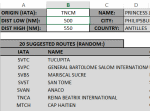
Excel spreadsheet that allows user to input origin airport (IATA code,) desired distance range, and the spreadsheet displays airports in that range. Created and tested in Excel 2010. No macros used. Tested in Excel 2010/2013. v1.0
| Filename: | World_Airports_Spreadsheet__Random_Routes_v10.zip |
| License: | Freeware |
| Added: | 24th March 2013, 06:53:23 |
| Downloads: | 415 |
| Author: | AJ Cook |
| Size: | 2.02 MB |
| Category: Flight Simulator 2004 - Scenery | |
| Teniente Benjamin Matienzo, Tucumán, Argentina (SANT/TUC) |
|
File Description:
PHOTOREALIST! Includes: Night textures of the terminal, New lighting effects on the platform (more realistic), AFCAD modified and improved, Landclass, Animation vehicles on the route, and effect of random field burnings.
| Filename: | Teniente_Benjamin_Matienzo_Tucumn_Argentina_SANTTU.zip |
| License: | Freeware |
| Added: | 13th April 2008, 05:34:16 |
| Downloads: | 1,876 |
| Author: | Roberto G. Waters |
| Size: | 7.97 MB |
| Category: Flight Simulator 2004 - Scenery | |
| Pellston Regional Airport - Patch |
|
File Description:
This patch for Pellston Regional Airport eliminates the random building crashes some users experienced. Furthermore, the height of the trees in the approach paths for RWYs 14 and 23 was reduced.
| Filename: | Pellston_Regional_Airport__Patch.zip |
| License: | Freeware |
| Added: | 29th May 2007, 14:43:52 |
| Downloads: | 2,060 |
| Author: | Matthias Rauh |
| Size: | 47.46 KB |
| Category: Flight Simulator 2004 - Gauges | |
| Check Gear Gauge |
|
File Description:
FS2004 Gauge- Check Gear Lamp. This is a generic gauge for all types of aircraft. It will issue two alerts; the first is a orange Caution to CHECK GEAR. If wheels are not extended and the aircraft continues with the landing approach, the second alert will then activate. It is a red Warning to CHECK GEAR. Lamps have Push-To-Test function. After takeoff, gauge will automatically enter a Standby mode and will signal that the gear position will be monitored during the next approach and landing.
| Filename: | Check_Gear_Gauge.zip |
| License: | Freeware |
| Added: | 19th February 2006, 06:10:42 |
| Downloads: | 2,326 |
| Author: | Glenn Copeland |
| Size: | 123.78 KB |
| Category: Flight Simulator 2004 - Gauges | |
| Digital Checklist Gauge |
|
File Description:
FS2004 Gauge, Digital Checklist. This gauge is designed for the F16 Air Show Tour panel, file f16ast_1. It fits seamlessly with the F16 radio without requiring a separate panel installation or popup window. Seven pages of checklist items cover all phases of this F16's flight procedures. Most items on each page are monitored and when a check has been accomplished, the gauge changes that item's display color from green to grey. Also included in this D/L are enhancements for six of the original F16AST gauges. Installation requires only a Copy/Paste. By Glenn Copeland
| Filename: | Digital_Checklist_Gauge.zip |
| License: | Freeware |
| Added: | 20th January 2007, 02:30:07 |
| Downloads: | 1,684 |
| Author: | Glenn Copeland |
| Size: | 510.72 KB |
| Category: Flight Simulator 2004 - Gauges | |
| Landing Speed Gauge |
|
File Description:
This XML gauge installs as a pull-down, activated by shift+num where num depends on how many such pull-downs you have in the aircraft. You activate it during the flight before landing. You can move it or make it dissappear after activation. During flight it shows these speeds continuously in digital form. When you land the aircraft, it will show the indicated airspeed at landing and the vertical speed (when you make it appear). The values are frozen so you can jot them down. Pause the aircraft during roll-out and jot down the values. They may go to zero if the aircraft stops. It resets automatically when you take off. It also has been used by people with FSX with no problems.
| Filename: | Landing_Speed_Gauge.zip |
| License: | Freeware |
| Added: | 11th March 2007, 11:37:53 |
| Downloads: | 1,622 |
| Author: | Tom Goodrick |
| Size: | 3.57 KB |
| Category: Flight Simulator 2004 - Gauges | |
| Display_Smoke_ Cntrl_ Gauge |
|
File Description:
This simple gauge is for the Alphasim T6 Harvard/Texan airplane (airplane package required), design to stop the 3 display smoke effects from coming on when the lights are first turned on from the spot view mode.
Since both the Harvard or Texan are not using the Taxi lights, this gauge works based on the state of the Taxi light bool. When you first turn on all lights via the "L" key from the keyboard, the on state of the Taxi lights in turn, turns off the 3 Display Smoke Switches, then after a 2 second delay the Taxi lights are reset to the off state again, ready for the next cycle of the keyboard "L" key.
Just want to reiterate, this is not a auto display smoke gauge in the sense, this is an invisible gauge (no visual references) that just stops the 3 display smoke switches from being turned on with the lights, so you don't get that big ball of colored smoke around the airplane when in "spot view" mode, and you turn the lights on via the "L" key on the keyboard.
Note: Has not been verified in FSX, but should work though!
| Filename: | Display_Smoke__Cntrl__Gauge.zip |
| License: | Freeware |
| Added: | 15th March 2007, 13:16:45 |
| Downloads: | 537 |
| Author: | Greg Spellmen |
| Size: | 2.33 KB |


© 2001-2026 AVSIM Online
All Rights Reserved
Privacy Policy |