
Where Flight Simulation Enthusiasts Gather from Around the World!
AVSIM Library - Search Results

| Category: Flight Simulator 2004 - Scenery | |
| RAF Chivenor 1979-1992 |

|
Images related to this file:
File Description:

Originally a civil airfield opened in the 1930s, the site was taken over by the Royal Air Force in May 1940 for use as a Coastal Command Station, and was known as RAF Chivenor. After the Second World War, the station was largely used for training, particularly weapons training. During the 1960s, one of the RAF's Tactical Weapons Units (TWU) used Hawker Hunter aircraft for training. In 1974 the station was left on "care and maintenance", though No. 624 Volunteer Gliding Squadron continued to fly from there. The TWU returned, flying BAE Hawks, in 1979 and 1981. In 1994, the TWU left Chivenor, merging with No. 4 Flying Training School at RAF Valley, and the airfield was handed over to the Royal Marines.
This scenery includes all the Hawk aircraft of 2 TWU in both camouflage and air defence grey schemes, depending on your preferred choice. There are flightplans included, which are representative only, but enables the aircraft to fly to bases and checkpoints around the country.
The scenery has been constructed using objects mainly from MAIW sceneries, which will need to be installed in order to gain the full visual experience. With BIG thanks to Nick Black for the use of his superb AI Hawk, and to Chris A. Brown for paintin' 'em!
| Filename: | RAF_Chivenor_19791992.zip |
| License: | Freeware, limited distribution |
| Added: | 21st June 2013, 21:28:56 |
| Downloads: | 1,178 |
| Author: | Brian Clarke, Stewart Pearson, Daryl Payne, Chris A. Brown |
| Size: | 22.67 MB |
| Category: Flight Simulator 2004 - Original Aircraft | |
| TAA Trans Australian Airline Airbus A300-B4-200 |
|
File Description:
Trans Australian Airlines or Nationally known as TAA, was established in 1946 by the Commonwealth Government, which called the airline Australian National Airlines Commission which operated as TAA. Qantas assigned TAA to perfome its domestic routes in Australia as at that stage Qantas was flying Internation sectors. Taa began with Convair Cv-240 and then ended with the Airbus a300 which was purchaced in the Mid 1970's. TAA ceased opperations in 1989. Then Australian Airlines was born. This aircraft works for both fs2002/fs2004. Features ( in depth ): Fully animated control surfaces Fully independent suspension Dynamic flexing wings Animated tilting bogies Rolling main wheels Animated thrust reversers Fully reflective textures ( each part has different degree of reflection based on material ) Flaperons Detailed textures Interchanging 2D and 3D engine fans Full night lighting Visible landing lights from the cockpit Reflective cockpit windows Crash affects Transparent Nav light lenses Dynamic Shine Opening Passenger and Cargo Doors ( fully independent ) Shift+E = left door Shift+T = right door, Shift+E+2 = Cargo doors Park Mode ( Shift+F, Ailerons and elevators droop to simulate airplane in parked position ) More detail to landing gear and flaps More textures to add realism ( landing gear, leading edge flaps , fan blades ) Improved nose shape and belly Animated vent scoops under belly ( Shift+W) New lighting and condensation effects. Enjoy Flying.
| Filename: | TAA_Trans_Australian_Airline_Airbus_A300B4200.zip |
| License: | Freeware |
| Added: | 2nd April 2004, 15:38:22 |
| Downloads: | 10,132 |
| Author: | Jacob Kubique/ SGA |
| Size: | 1.7 MB |
| Category: Flight Simulator X - Scenery | |
| 179 AI Ships and AI Ship Traffic |
|
Images related to this file:
File Description:
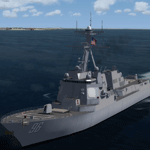
This package contains 179 AI ships and AI Ship Traffic for FSX and P3D covering almost all regions of the world. For full benefit of the files in this package you should install the previous packages in the project. New areas covered are Australia, New Zealand, Africa, India, Hawaii, the Black Sea, the South American West Coast, islands in the Indian and Pacific Oceans as well as Ireland, Scotland, Iceland, and the Faroe Islands - and more. Further, this package updates previous routes released for Brazil and adds traffic and diversity on shipping routes across Europe and Asia. New ship models include destroyers, frigates, cruise ships, oil tankers, container ships, fishing vessels, coasters, river boats, and more. Ships visit among other places Sydney, Perth, Auckland, Wellington, Tahiti, Samoa, Fiji, Honolulu, Panama, Lima, Ushuaia, Buenos Aires, Rio de Janeiro, Salvador, Fortaleza, Belem, Manaus, Incheon, Ho Chi Minh, Manila, Bangkok, Koh Samui, Phuket, Singapore, Kuala Lumpur, Jakarta, Mumbai, Seychelles, Maldives, Mauritius, Dubai, Doha, Mogadishu, Durban, Cape Town, Lagos, Abidjan, Dakar, Las Palmas, Istanbul, Odessa, Burgas, Trabzon, St Petersburg, Helsinki, Stockholm, Kiel, Copenhagen, Stavanger, Liverpool, Glasgow, Reykjavik, and many more. Models and textures by Jean-Pierre Fillion, Knud Kristoffersen, Erwin Welker, Alberto Garcia, Antonio Diaz, Sebastien Viale, and Henrik Nielsen.
Video available here: https://www.youtube.com/watch?v=Cma0PVfrFac&list=UUKFYbDe0mheZ-llBTVQnHrA
| Filename: | 179_AI_Ships_and_AI_Ship_Traffic.zip |
| License: | Freeware |
| Added: | 2nd January 2015, 18:40:21 |
| Downloads: | 11,060 |
| Author: | Henrik Nielsen |
| Size: | 116.03 MB |
| Category: Flight Simulator 2004 - Scenery | |
| Scenery Objects - Rwy 12 scenery Level 2 |
|
File Description:
[File re-uploaded at request of AVSIM] This pack contains the standard scenery objects for the Rwy12 scenery generation program by Israel Roth and Seev Kahn and is specifically issued for the benefit of the end users of my add-on scenery series, although there is no reason why it will not work equally well with any other sceneries designed using this software. Most other designers have stated that the end user MUST download the massive 45 MB full program but this is not only pointless and unnecessary, it is not in accordance with the recommendations of Israel and Seev. Furthermore, the obligatory automatic installation programme is flawed and only works correctly if you have Flight Simulator 2004 installed to the default directory.
This pack of scenery objects addresses all of these issues, and all of my scenery sets will work with or without it - with three possible levels of scenery detail:
Level 1 - the airport scenery will only use Microsoft's default scenery objects (no extras require to be installed).
Level 2 - the airport scenery will additionally display all standard Rwy 12 scenery objects (Fedex vehicles, static GA aircraft, people and trees.
Level 3 - the airport scenery will additionally display third-party Rwy 12 objects.
The latter will require separate download and installation will be detailed in my scenery sets.
| Filename: | Scenery_Objects__Rwy_12_scenery_Level_2.zip |
| License: | Freeware |
| Added: | 20th June 2010, 10:35:15 |
| Downloads: | 12,950 |
| Author: | Israel Roth, Seev Kahn; compiled by John Hinson |
| Size: | 2.83 MB |
| Category: Flight Simulator X - Scenery | |
| POLISH AIRPORTS VOL. 2 X V4 DEMO |
|
Images related to this file:
File Description:
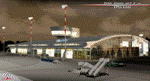
POLISH AIRPORTS VOL. 2 X V4 DEMO is a package of detailed sceneries of EPSC Szczecin, EPLL Lodz, EPZG Zielona Gora and EPRA Radom airports in Poland, fully compatible with FSX/FSX:SE/P3Dv1/P3Dv2/P3Dv3/P3Dv4 and FSW by Dovetail.
This product is a fully functional DEMO version of the commercial payware product. It features same airports layout as in the full version but with limited 3D objects and low resolution textures. Using this free demo ensures no problems with online (VATSIM, IVAO, multiplayer etc.) flying in case some users use the payware scenery and some don't.
Szczecin-Goleniow "Solidarnosc" (SZZ/EPSC) is the main domestic and international airport serving the city of Szczecin in Poland. Lodz Wladyslaw Reymont (LCJ/EPLL), formerly known as Lodz-Lublinek Airport, is a regional airport in central Poland. Zielona Gora-Babimost (IEG/EPZG) is a regional post-military airport located within the greater Zielona Gora agglomeration. Radom Airport (RDO/EPRA), also known as Radom-Sadków Airport is a civil and military airport in central Poland
The product is equipped with an automatic installer, which means that the scenery will be automatically added to the Flight Simulator Scenery Library. Please uninstall all previous versions of this airport you may have installed before. Please make also sure that no duplicated AFCAD files are installed.
Enjoy your virtual flying with Drzewiecki Design!
| Filename: | POLISH_AIRPORTS_VOL_2_X_V4_DEMO.zip |
| License: | Freeware, limited distribution |
| Added: | 23rd August 2017, 01:43:20 |
| Downloads: | 2,328 |
| Author: | Drzewiecki Design |
| Size: | 23.79 MB |
| Category: Flight Simulator X - Aircraft Repaints, Textures and Modifications | |
| United Airlines Boeing 757-33N |
|
Images related to this file:
File Description:
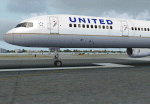
FS2004/FSX United Airlines Boeing 757-33N.
This is a repaint on the TDS (Tenkuu Developers Studio) Boeing 757-300 RR model, in current United Airlines livery, registration N78866. Textures only. The textures are saved in 32 bit format for quality graphics. Includes custom United Cabin and Ground Support Equipment and personnel. Subtle weathering and other new details including photo real refuel station under right wing as well as the refueling access panel and new wing textures. A special thanks to Luis Castro for the winglet night lighting and the photoreal wing tops and flaps and Nick Chinn for the refueling station photos from a real Delta 757 that helped me enhance these textures even more....
Model developed by Tenkuu Developers Studio, features high resolution textures, dynamic flexing wings, nose gear steering, rudder lock, ground spoilers, low speed aileron locks at high speed, fully animated control surfaces, fully independent suspension, trim animation, opening passenger doors, rolling wheels, animated thrust reverse with reverser block doors, detailed textures, full night lighting, ground service vehicles and more. Model design by Hiroshi Igami. Flight dynamics design by Nate Rosenstrauch and Joe DeGregorio. Paint kit and master textures by Carlos Eduardo Salas. TDS members: Hiroshi Igami,Nick Wilkinson,Carlos Eduardo Salas,Yosuke Ube,Stian Svensen,David Biggar, Luiz Antonio Perina,Nate Rosenstrauch, Joe DeGregorio and Joe DeGregorio. By Joe DeGregorio.
| Filename: | United_Airlines_Boeing_75733N.zip |
| License: | Freeware |
| Added: | 25th September 2018, 19:36:40 |
| Downloads: | 775 |
| Author: | Joe DeGregorio - TDS |
| Size: | 13.81 MB |
| Category: Flight Simulator X - Aircraft Repaints, Textures and Modifications | |
| Delta Airlines Boeing 757-200 (N672DL) |
|
Images related to this file:
File Description:
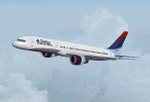
TDS (Tenkuu Developers Studio) Boeing 757-200 PW 2040 model, in the Delta Wavy Gravy livery, registration N672DL. Includes custom Cabin and Ground Support Equipment and personnel textures and both winglet textures for those that want to use winglets. Lots of mild weathering and other new details including photo real refuel station under right wing as well as the refueling access panel and new wing textures. New photoreal Landing and taxi light lenses on the nose gear and wings. A special thanks to Luis Castro for the winglet night lighting and the photoreal wing tops and flaps and Nick Chinn for the refueling station photos from a real Delta 757 that helped me enhance these textures even more....
Model developed by Tenkuu Developers Studio, features high resolution textures, dynamic flexing wings, nose gear steering, rudder lock, ground spoilers, low speed aileron locks at high speed, fully animated control surfaces, fully independent suspension, trim animation, opening passenger doors, rolling wheels, animated thrust reverse with reverser block doors, detailed textures, full night lighting, ground service vehicles and more. Model design by Hiroshi Igami. Flight dynamics design by Nate Rosenstrauch and Joe DeGregorio. Paint kit and master textures by Carlos Eduardo Salas. TDS members: Hiroshi Igami,Nick Wilkinson,Carlos Eduardo Salas,Yosuke Ube,Stian Svensen,David Biggar, Luiz Antonio Perina,Nate Rosenstrauch, Joe DeGregorio. By Joe DeGregorio. Enjoy!!
| Filename: | Delta_Airlines_Boeing_757200_N672DL.zip |
| License: | Freeware |
| Added: | 16th October 2018, 16:26:56 |
| Downloads: | 498 |
| Author: | Joe DeGregorio - TDS |
| Size: | 12.79 MB |
| Category: Flight Simulator 2004 - Scenery | |
| LFRD2004 Dinard/St-Malo VFR Scenery |
|
Images related to this file:
File Description:
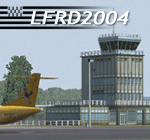
LFRD is a regional airport in Brittany, France. This scenery was created entirely with GMax and the latest Microsoft compilers. Everything was made to ensure maximum framerate while giving maximum visual impact, even on humbler machines. This scenery will run just as fast as the default one (which is very bare) with your current settings, even though there are literally thousands of houses, buildings, trees and a detailed airport.
This is a complete package:
-SRTM local mesh with custom coast trimming
-Custom phototexture (200sq km), with seamless blending into FS9 standard landclass
-Full autogen with custom local texture
-Custom landclass and waterclass
-AFCAD2 file with parking codes
-Custom Hi-res photographic textures at airport.
-Gmax buildings and xml librairy objects.
It was made by a real life pilot and is totally aimed at recreating the feeling of being there, not so much on the ground (after all, this is a FLIGHT simulator), but at circuit altitudes. This is not about recreating an airport in all its glorious details at the cost of framerate, but instead an exercise in balancing visual cues and details as viewed from up there to make it 'as real as it gets' within the limits of FS9. Scenery made by Vauchez (http://mapage.noos.fr/euro_vauchez/)
| Filename: | LFRD2004_DinardStMalo_VFR_Scenery.zip |
| License: | Freeware, limited distribution |
| Added: | 28th April 2010, 18:06:05 |
| Downloads: | 46,567 |
| Author: | Etienne Vauchez |
| Size: | 10.55 MB |
| Category: Prepar3D V1-4 - Scenery | |
| KILE, Killeen Texas airport |
|
Images related to this file:
File Description: Instructions: There are 3 folders in this package; effects, scenery and texture.
Create a subfolder under the C:\Program Files (x86)\Lockheed Martin\Prepar3D v3\Scenery folder and call this new folder KILE.
Place the scenery and texture folders (with their associated contents) under this newly created KILE subfolder.
Place only the contents (not the folder) of the effects folder in the P3D effects folder often located at C:\Program Files (x86)\Lockheed Martin\Prepar3D v3\Effects.
Now start up P3D.
On the menu at the top of the P3D screen click on World > Scenery Library > Add Area. This will bring up the Add Scenery Area dialog box. Click the Browse button and browse to find the newly created KILE folder. It should be located at C:\Program Files (x86)\Lockheed Martin\Prepar3D v3\Scenery. Once you select the KILE folder, click the OK button. This will place that folder in the P3D scenery library. You will notice that the library is organized by priority starting at 1. I have my KILE scenery set as #4 priority but I am not sure if it needs to be that high. I did notice during design that sometimes my ground texture at the airport would act strange and I found that by setting KILE to a higher priority, it fixed that. As a last step make sure the checkbox to enable the scenery is checked and click OK.
You should now have the new KILE scenery available to use.
This package covers KILE, Killeen Texas airport. It is a city owned public use airport located 3 miles east of Killeen Texas. It has one runway that is 5,495 x 100 feet.
Almost 100 custom objects are included in this package. They include:
All hangers and buildings on the airport grounds made from on site photos.
Several buildings surrounding the airport grounds.
All taxiway and runway signs.
All taxiway, runway and approach lighting.
ILS antenna, localizer, etc.
Fuel tanks and parking T's.
Night lighting where appropriate.
Currently I am using the default land class instead of photo real because I couldn't find any photo real that suited my needs.
I welcome your feedback good or bad. Currently this airport is only for P3D. I may create an FSX version if I have enough requests. I started learning to make 3d objects and airports last year and I am learning something new every day. I hope you enjoy!
I plan on improving the night lighting for the runway lights, runway end lights, taxiway lights, etc. to make them more visible from a distance at night. I also want to replace the stock P3D vehicles with my own design and a few other things to come in an updated version down the road.
| Filename: | KILE_Killeen_Texas_airport.zip |
| License: | Freeware |
| Added: | 11th May 2017, 19:54:19 |
| Downloads: | 492 |
| Author: | Shannan Landreth |
| Size: | 23.83 MB |
| Category: Flight Simulator 2004 - Aircraft Repaints, Textures and Modifications | |
| US Airways OC Airbus A320-214 (N124US) with Lighting Effects and Updated FDE |
|
File Description:
I am proud to present this highly detailed repaint of US Airways A320-214, registration N124US, in their old livery. US Airways was founded in my home state of Pennsylvania by the DuPont family in 1939 as a mail courier service, and became a passenger carrier in 1949. US Airways has changed its name 4 times until taking the current name. This airframe was delivered to US Airways from Airbus in November of 2000 and is the last CFM equipped 214 model purchased by US Airways. Subsequent to this, US Airways has been purchasing the IAE equipped 231 and 232 models. US Airways operates 66 A320's, using them to provide domestic service throughout the US and international service to the Caribbean, Canada and Mexico. I paid attention to detail and realism as much as possible. I added some dirt and grime to the airframe in parts where it showed in photos of this aircraft. I also distressed the Vstab lines as this part of these aircraft from US Airways always look the worst. I think these details have added a realistic touch without being overdone. This full installation package includes the Project Airbus A320 CFM V2 model and air files, a modified FDE (with permission from Peter Binamira of Project Airbus), A320 lighting enhancements and 32-bit textures. Uses default 737-400 panel and sounds. Please see Install.txt for installation details.
| Filename: | US_Airways_OC_Airbus_A320214_N124US_with_Lighting_.zip |
| License: | Freeware, limited distribution |
| Added: | 21st August 2007, 21:44:34 |
| Downloads: | 2,247 |
| Author: | Project Airbus, Jeffrey S. Bryner, Grayson Ottaway |
| Size: | 6.68 MB |


© 2001-2026 AVSIM Online
All Rights Reserved
Privacy Policy |