
Where Flight Simulation Enthusiasts Gather from Around the World!
AVSIM Library - Search Results

| Category: Flight Simulator X - Scenery | |
| WashDCX 1.0 |

|
Images related to this file:
File Description:
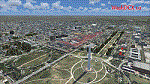
After more than 2000 downloads, I am pleased to announce a much anticipated UPDATE to WashDCX Beta. WashDCX 1.0 contains even more D.C. models and buildings, all of which have both Transparent and Night textures added. I have also expanded the Satellite Photo scenery around the National Mall area; added support for scenery complexity; added trees and more traffic; and corrected the destination bug within the installer program. You will also find many tourist among the more popular tourist destinations in Washington D.C. I hope that this addon will greatly enhance your flying experience around the D.C. Metro area. Be sure to check out both the Screen Shots and Video area on my website for a look at what is included in WashDCX 1.0. I encourage your comments either by email or on the forum for all others to see. Have fun and Happy Flying !!
www.myflightsimblog.com
| Filename: | WashDCX_10.zip |
| License: | Freeware |
| Added: | 5th February 2011, 03:14:09 |
| Downloads: | 3,607 |
| Author: | Larry Robbins |
| Size: | 86.69 MB |
| Category: Flight Simulator 2004 - AI Aircraft | |
| Royal Jordanian Air Force Lockheed F-104A/B Starfighter |
|
Images related to this file:
File Description:

Lockheed F-104A/B Starfighter (Royal Jordanian Air Force), aka the Zipper, Coffin Nail, Flying Coffin, or Missile with a Man in It (in untrained hands it resembles a lawn dart). I present a comprehensive AI traffic model package for this hotrod of military jet history. Going into production in 1955, this aircraft was manufactured, directly or by license, by 6 countries, and served the air forces of 17 countries. Late examples served until 2004, nearly fifty years after its introduction. An original 7-LOD model brings this historic aircraft to the flightsim world. This package represents the F-104A/B in the service of the Royal Jordanian Air Force; with a total of 6 models and 22 repaints. I am also including some optional variants with manual install instructions, on a separate document in the zip file. Original aircraft model and textures by Michael Pearson, flight dynamics by Michael MacIntyre.
| Filename: | Royal_Jordanian_Air_Force_Lockheed_F104AB_Starfigh.zip |
| License: | Freeware |
| Added: | 16th February 2013, 18:12:12 |
| Downloads: | 282 |
| Author: | Michael Pearson |
| Size: | 8.82 MB |
| Category: Prepar3D V1-4 - Scenery | |
| Square Kilometre Array (MeerKAT) – South Africa |
|
Images related to this file:
File Description:

This scenery is of the MeerKAT radio telescope site (originally the Karoo Array Telescope – KAT but was changed to MeerKAT, meer=more) when the project was expanded to 64 dishes. It forms part of an international Square Kilometre Array (SKA) project. It is situated in the Karoo near the town of Carnarvon. The scenery includes the landing strip just North East of the biggest concentration of dishes. I could not find a code for this strip and called it FAKA (MeerKAT SKA), or take off from Carnarvon (FACN) and fly a heading of 320 degrees for 73 km. The scenery was designed and tested for P3D V5 to work with the ORBX Africa LC and Pilots NG2020 mesh products. I am not sure what the actual site would look like at night, but I included some night lighting to make the array visible after dark.
| Filename: | Square_Kilometre_Array_MeerKAT__South_Africa.zip |
| License: | Freeware |
| Added: | 14th August 2020, 22:53:38 |
| Downloads: | 101 |
| Author: | Johan Pienaar |
| Size: | 20.33 MB |
| Category: Miscellaneous Files - General Utilities | |
| Random Airport Generator |
|
Images related to this file:
File Description:
I can be contacted at [email protected] for any help required or different drive versions needed.
[ABOUT THE PROGRAM]
This program will read a text file from the route of your hard drive depending on the version you run, and select a random line and display that line. The file must be a text file named "Airports.txt". This program was designed with ease of use in mind for selecting a random airport for the Flight Sim community, though can be used for any purpose with any text file called "Airports.txt". The program will display the airport ICAO code then co-ordinates.
[ABOUT ME]
I am a 16 year old aviation enthusiast that loves flying and ATC, but hate having to choose an airport to depart from and arrive at, or to controll. This program has now removed this to make my flight more random with less decisions to make. I also like to explore areas I haven't been before, again this selects a random airport, from thousands of different ones, so exploring is inevitable.
[INSTALLATION]
The only installation required is to copy the Airports.txt file to the route of your hard drive C: or D: (for more drives e-mail me as above), then run the respective program for that drive from any folder you wish.
[ABOUT THE AIRPORTS.TXT FILE]
This file was collected from my FS2004 and contains every airport in it. Currently the program selects a line at random and displays it, whether a large international airport or small grass field. You could edit the file just to contain your favourite airports and it will NOT affect the running of the program as long as the file remains as Airports.txt. I am hoping in future versions to allow you to select a type of airfield, i.e. large, medium or small or select from runway length, though this will take a while to produce, if ever.
For now i hope everyone enjoys the program and happy flying :)
| Filename: | Random_Airport_Generator.zip |
| License: | Freeware |
| Added: | 9th June 2010, 02:41:14 |
| Downloads: | 211 |
| Author: | Alexander Aschacher |
| Size: | 254.45 KB |
| Category: Flight Simulator 2004 - Scenery | |
| Alaska South Slope 7; Kobuk OBU & Dahl Creek DCK |
|
Images related to this file:
File Description:
There are four main northwestern Alaska towns which are serviced by Alaska Airlines, and from which local flights spread out. The northernmost is Barrow. Southwest of Barrow is Kotzebue, then Nome, and the furthest south is Bethel (not yet made). This is a continuation of the series for the flights from Kotzebue, 170 miles to the east where Kobuk is on the bank of the Kobuk River, and Dahl Creek is 2 miles to the north. Kobuk is a small village on the Kobuk River, like Ambler and Shungnak, but with a population of only around 150. The river is the reason for the existance of the villages as it served (and still does) as both a source of food and a transport route. The airfield is just beside the village, with a runway around 4,500 feet of lit gravel and aligned 09-27, with PAPI on both ends. There are scheduled flights by Era (now renamed Ravn) and by Bering Air, both of them originating in Kotzebue and routing east to Ambler, Shungnak, Kobuk, and then back again. The AI includes these flights along with Everts Air and GA. The FS9 airfield has been relocated by approximately a mile to the correct position, and the elevation accordingly adjusted. The Dahl Creek strip is publicly owned, with no maintenance and a deteriorating gravel runway that has not long to survive. This probably does not work properly without Ultimate Terrain Alaska Canada as the village is now on the river bank. I am presuming that you have downloaded and installed Nome PAOM, along with the instructions on how to adjust Ultimate Terrain Alaska Canada to get the most realistic results. If you are not making the UT adjustments then you may be seeing duplicated roads, as I am including new local dirt or gravel roads to connect village to airfield etc to get the best overall result; I will not be making alternate versions.
| Filename: | Alaska_South_Slope_7_Kobuk_OBU__Dahl_Creek_DCK.zip |
| License: | Freeware, limited distribution |
| Added: | 13th October 2016, 18:10:08 |
| Downloads: | 233 |
| Author: | Roger Wensley |
| Size: | 2.94 MB |
| Category: Flight Simulator 2004 - Utilities | |
| F1 View Module |
|
File Description:
The F1_View module is a very basic tool that implements mouse-based zooming, panning, and eyepoint adjustments, including the ability to move your eyepoint beyond the limits imposed by Flight Simulator (this feature is good to stroll about virtual cabins of larger aircraft).
This module requires a wheel-mouse (a center wheel that also acts as a center mouse button).
/QUOTE
This application is provided for free by Flight1 and can even be placed on your own website for download providing you follow the guide lines set down in the agreement.
For those who are interested, you can find it HERE http://atr.flight1.net/ , look under:
Quick Links to our ATR Project Areas...
• Accessory Downloads
which can be found about half way down the page you are initially viewing.
and a bit more info from the readme:
Modes of Operation:
Rolling the mouse wheel forward means rolling the wheel away from the user.
Rolling the mouse wheel backward means rolling the wheel towards the user.
Virtual-cockpit:
Wheel forward moves you forward and wheel backward moves you back.
CTRL+forward moves right and CTRL+backward moves left.
SHIFT+forward moves up and SHIFT+backward moves down.
CTRL+SHIFT+forward zooms out and CTRL+SHIFT+backward zooms in.
While in Pan Mode (when mouse wheel is pressed and held down) inside the Virtual Cockpit:
Moving the mouse to the left rotates the view to the left.
Moving the mouse to the right rotates the view to the right.
Moving the mouse forward, away from the user, rotates the view up.
Moving the mouse backward, towards the user, rotates the view down.
Cockpit view:
CTRL+SHIFT+forward zooms the exterior view out and CTRL+SHIFT+backward zooms it in.
Tower view:
CTRL+SHIFT+forward zooms the view out and CTRL+SHIFT+backward zooms it in.
Spot view:
Wheel forward moves the view distance forward, and wheel backward moves the distance back.
CTRL+forward rotates the eyepoint right, and CTRL+backward rotates the eyepoint left.
SHIFT+forward moves the eyepoint down, and SHIFT+backward moves the eyepoint up.
CTRL+SHIFT+forward zooms out and CTRL+SHIFT+backward zooms in.
Note: View distance is different from view zoom.
While in Pan Mode (when mouse wheel is pressed and held down) in spot view:
Mouse left/right rotates the eyepoint right/left.
Mouse up/down moves the eyepoint up/down.
Top-down view:
CTRL+SHIFT+forward moves the view distance out and CTRL+SHIFT+backward moves it in.
Note: In this mode you can move your view all the way to outer space and back in.
| Filename: | F1_View_Module.zip |
| License: | Freeware |
| Added: | 8th May 2005, 04:27:45 |
| Downloads: | 15,464 |
| Author: | Flight1 |
| Size: | 725.3 KB |
| Category: Prepar3D V1-4 - Aircraft Repaints, Textures and Modifications | |
| Desert Skies *Fictional* JF HS-748 v2 |
|
Images related to this file:
File Description:
This is a repaint of the Just Flight HS 748 v2 in a fictional carrier livery using an airframe previously registered to Cascade Airways. The paint layout was inspired by the old Dan Air livery.
This version is updated to deal with the v2 changes done by Just Flight rendering the previous version unusable. There are some anomalies with the mapping that create issues I can not fix, so you may notice them as do I. Included are also .cfg registry entries to allow for weight and balance entries based upon values from an HS-748 Flight Operations Manual and a better flight profile during various phases of flight. These entries will significantly enhance the correct flight behavior when operating the aircraft. This livery has only been tested in Prepar3D v4.1 but there should be no issues in FSX or earlier versions of Prepar3D. After years of enjoying others efforts I am now honored to be doing the same in kind. Cheers
| Filename: | Desert_Skies_Fictional_JF_HS748_v2.zip |
| License: | Freeware |
| Added: | 12th November 2017, 20:42:18 |
| Downloads: | 208 |
| Author: | Thad Wheeler |
| Size: | 19.39 MB |
| Category: Flight Simulator X - Aircraft Repaints, Textures and Modifications | |
| South African Airways Boeing 747-400 (ZS-SBS) |
|
Images related to this file:
File Description:
This is a repaint of the South African Airways B747-400 which was unnamed for the PMDG 747 QOTSII product. It reflects B747-400 ZS-SBS in the new South African Airways livery before her retirement. South African Airways operated six Rolls Royce RB211-powered B747-400's and two General Electric powered variants, coming to a total of eight B747-400's. This is not a fictional repaint. You will require the PMDG 747-400 QOTSII to be able to use this livery. Please note, I am not a professional repainter, and as such there maybe some inaccuracies here and there, but I enjoy creating these repaints for others to use and to enjoy if they so please. Please note that the thumbnail contains the PMDG logo to denote that it is to be used with the PMDG 747 QOTSII product line. No copyright infringement is intended or should be inferred - PMDG owns all rights to their logo.
| Filename: | South_African_Airways_Boeing_747400_ZSSBS.zip |
| License: | Freeware |
| Added: | 9th September 2017, 18:44:08 |
| Downloads: | 225 |
| Author: | Werner Gillespie |
| Size: | 17.94 MB |
| Category: Flight Simulator 2004 - Aircraft Repaints, Textures and Modifications | |
| Ural Airlines NC Airbus A321-211 (VQ-BCX) |
|
Images related to this file:
File Description:
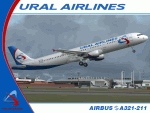
I am very proud to present this detailed repaint of the iFDG Airbus A321-211, registration VQ-BCX, of Ural Airlines. Ural Airlines is based in Yekaterinburg, Russia with its main operations base is Koltsovo International Airport (USSS). It operates scheduled, charter, domestic and international flights. Ural had exclusively flown Russian aircraft (Antonov, Ilyushin and Tupolev) until introducing the Airbus A320-211 in November 2006. Continuing with the Airbus brand, Ural Airlines added 2 A321-211's, equipped with CFM engines like their A320s. I paid attention to detail and realism as much as possible in this repaint. All windows are hand-painted, 3D with window shades. The night windows textures are custom as well. Custom engine textures and custom fuselage shading. The repainted textures in this package are 32-bit with no mipmaps for best clarity and quality. This is a full installation package, model and air files current to iFDG A32x Service Pack 1.4.
| Filename: | Ural_Airlines_NC_Airbus_A321211_VQBCX.zip |
| License: | Freeware, limited distribution |
| Added: | 4th July 2010, 03:49:31 |
| Downloads: | 598 |
| Author: | Jeffrey S. Bryner, iFDG |
| Size: | 5.89 MB |
| Category: Flight Simulator 2004 - Aircraft Repaints, Textures and Modifications | |
| Air Canada Express / Air Georgian Beechcraft B1900D (C-GORA) |
|
Images related to this file:
File Description:

I am proud to present this repaint of the PMDG Beechcraft B1900D in the livery of the newly formed Air Canada Express. Air Canada Express is a brand name under which four regional airlines operate feeder flights for Air Canada. Those airlines are; EVAS, Sky Regional, Jazz Air and Air Georgian. This repaint is one of Air Georgian's 17 B1900D's recently repainted to reflect the Air Canada Express branding. Air Georgian has another livery which has the engine cowlings the same color as the fuselage and the Air Canada logo further aft. Prior to being a member of Air Canada Express, Air Georgian operated under the Air Canada Alliance brand. The member airlines of Air Canada Express operate to connect smaller cities in the US and Canada with Air Canada's domestic hub airports. All repainted textures in this package are 32-bit with no mipmaps. This is a textures only package. You must own the PMDG Express B1900D to enjoy this repaint. See readme.txt file for details.
| Filename: | Air_Canada_Express__Air_Georgian_Beechcraft_B1900D.zip |
| License: | Freeware, limited distribution |
| Added: | 8th January 2012, 07:52:23 |
| Downloads: | 949 |
| Author: | Jeffrey S. Bryner, PMDG |
| Size: | 9.05 MB |


© 2001-2026 AVSIM Online
All Rights Reserved
Privacy Policy |