
Where Flight Simulation Enthusiasts Gather from Around the World!
AVSIM Library - Search Results

| Category: Flight Simulator 2004 - AFCAD Files | |
| ZGBH - Beihai Fucheng airport - Guangxi, China |

|
File Description:
A basic version of ZGBH, Beihai Fucheng airport.
Made with some basic info found online and Google Earth screenshots from 2015.
About 8NM to the east there's a VOR/DME, BHY (117.100). I've added that to the scenery.
I have no info on ILS or comms., so there are none.
Tested in FS9, should work in FSX as well.
Don't know about P3D.
Made with ADE.
| Filename: | ZGBH__Beihai_Fucheng_airport__Guangxi_China.zip |
| License: | Freeware |
| Added: | 2nd September 2016, 21:17:22 |
| Downloads: | 164 |
| Author: | Dirk Pelsemaeker |
| Size: | 5.02 KB |
| Category: Microsoft Flight Simulator (2020) - Scenery | |
| YBSS airfield |
|
Images related to this file:
File Description:
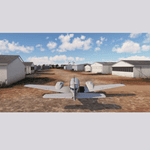
This is a re-work of the MS default airport near Melbourne, Australia. It contains generic buildings and objects from asobo libraries more like the real ones than was used in the default version so as to give a more realistic look to the place. I added a NDB, and a lighted rwy 09-27 (both not in the real or default version). Some stationaey aircraft also inserted.
| Filename: | YBSS_airfield.zip |
| License: | Freeware |
| Added: | 23rd May 2026, 13:32:15 |
| Downloads: | 9 |
| Author: | Robert Budd |
| Size: | 2.39 MB |
| Category: Prepar3D V1-4 - Utilities | |
| Flightplan Visualizer 1.11 |
|
Images related to this file:
File Description:
Flightplan Visualizer (FV) version 1.11.0. Copyright 2018-2019 by Pelle F. S. Liljendal ([email protected]), all rights reserved.
FV comes with 540 pre-imported Commercial AI flightplans (+380 BizJet flightplans are available as a separate download). However you are able to import additional (AI) flightplans yourself. Once imported these (AI) flightplans can be visualized on a map-view, and the user will be able to search accross all these. Hence you can use the program as inspiration as to which routes to fly. E.g. you can search across all imported flightplans to find all flights in an A321 flying into/out from LDDU, or simply to look for all flights in a Boeing 747-8F.
Simply run the included installer to install the software. The program will be installed into "C:\Program Files (x86)\Flightplan Visualizer" and all datafiles will be installed into: "C:\Users\[UserName]\AppData\Roaming\FlightplanVisualizer". The program comes with a full manual explaining everything, and a 3 page quick manual to get you started. The first 3 times you run the program the quick manual will automatically open. The forum is hosted here: https://forum.aerosoft.com/index.php?/forum/919-flightplan-visualizer/
Version 1.11 Contains the following changes: The file-format of the Flightplan-files was changed to accommodate some planed changes. The program remains backward compatible, so "old" flightplans can still be loaded. I wanted to implement these changes BEFORE I began importing new flightplans, to ensure these new/updated flightplans are all utilizing the new format. On startup the old flightplans will automatically be converted to the new format. The new installer now comes bundled with 540 commercial flightplans (schedules:22291, legs:699158) whereas the old one "only" contained 300 commercial flighplans (schedules:16786, legs:536198). All BizJet flightplans were removed from the installer and are now available as a separate download. A new settings-form have been added to eliminate the need to manually edit the settings-file using a text-editor. A new menu-item have been added which opens an explore window browsing the content of the UserData folder. Individual (disabled) flightplan-files can now be permanently deleted via the "Enable/disable flightplans" form. Flightplan sub-folders (with exception of "Disabled") can now be marked as "enabled" (using a check-box). Meaning that the flightplans in these will be also loaded on startup (along with the files in the root-folder). Using the "Enable/disable flightplans" form you can now both move and copy flightplans (based on the value of the radio-buttons). A creator-field have been added to flightplans, which can be entered when you import/edit a flightplan. The name of the creator is displayed as a tool tip when hoovering the mouse over the combo-box in the bottom of the main-form. When importing new Flightplans the program will try to grab creator and provider from the files bundled with the flightplan. Likewise a button is added to the import-form which list the content of the text-files (e.g. "ReadMe.txt"), in case you need to manually grab the creators name from this file. Both when importing- and editing flightplans a new column have been added to the airport list-view containing comments regarding airports that have been redirected (from one ICAO to another), or airports classified as pseudo-airports (in case the airport does not exists in the flightsim). The elevation-column from previous versions was removed to make more room for the comment-column. Added a new form to edit airport-redirections (redirect from one ICAO to another on import). In the airport-info form you can now switch between showing flights for the selected flightplan/last search and all flights to/from the airport being displayed. Added a new "Nearby Airports" tab-sheet to the Airport-info form, which shows a distance-sorted list of nearby airports. In the previous versions all new aircraft were automatically added to the selection of favorite aircraft. From version 1.11 you must manually choose which are your favorites (upgrading from a previous version, your current selection of favorites will NOT be changed). First letter of decoded-metar is now changed to uppercase, and a checkbox lets you decide if you want to perserve line-breaks in the decoded text copied to the clipboard. Switched position of "Save" and "Cancel" buttons in airport-info form, to match layout of other forms. Like elsewhere in the program, the airport search-browser now lists the icao-codes with an asterisk (*) for each airport that is a pseudo airport. Greatly improved the responsiveness/performance of the browser-forms, when searching for : Airports, Airlines and Aircraft. Managed to shave off a few 10th of a second loading/processing data at startup. Added support for additional Aircraft. Many of the Airports in the supplied data-files were updated likewise some new Airlines were added as well. Made the importer stronger to import flightplans where aircraft names are not in quotes, and multiweek days are written as "1/3" in stead of "10". Fixed: When manually redirecting an airport during import, the flightplan was not visualized corretly until re-loading the flightplan (e.g. restarting the program). Fixed: Closing the Enable/Disable-flightplan using other means than the close-button would not make the program re-load active flightplans afterwards. Fixed: Several of the combo-boxes on the airport-info form allowed text being entered into them. Fixed: Corrected an issue with map-caching.
Pelle
| Filename: | Flightplan_Visualizer_111.zip |
| License: | Freeware, limited distribution |
| Added: | 7th July 2019, 18:15:30 |
| Downloads: | 227 |
| Author: | Pelle Liljendal |
| Size: | 29.95 MB |
| Category: Flight Simulator X - AFCAD Files | |
| MRLB - Daniel Oduber Quiros International Airport / Liberia, Guanacaste, Costa Rica |
|
Images related to this file:
File Description:
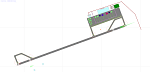
MRLB - Daniel Oduber Quiros International Airport / Liberia, Guanacaste, Costa Rica.
This airport update was made with the latest version of ADE (Airport Design Editor) and made for FSX as a replacement for the stock (default) airport. I found that most stock airports in FSX lack a decent amount of character and realism and I've tried to fix that a little bit. The stock airport file for the Liberia airport was sub par to say the least. There were absolutely no parking spots for commercial aircraft and no terminal buildings.
I've done major reworking to this airport and added the brand new terminal, which opened several months ago, I hope you enjoy. Below is a list of changes/additions. All these enhancements are as close to the real airport as I can get with stock library objects. I've used satellite images, terminal photos and maps throughout the whole process so building locations are as accurate as possible. Happy landings in Costa Rica!
Features:
*Greatly expanded parking apron
*Old terminal building added with GA parking area
*Brand new terminal building added with its 4 jetways and 3 additional ramp parking spots
*Parking lots with static vehicles
*Small current construction area
*Road that connects the airport to the main highway w/ static vehicles
*Hilton Garden Inn hotel south of runway 25
*Static vehicles and GA aircraft on the ramp
*Fire station
*Birds in the vicinity of the airport
| Filename: | MRLB__Daniel_Oduber_Quiros_International_Airport__.zip |
| License: | Freeware |
| Added: | 12th July 2012, 16:35:27 |
| Downloads: | 879 |
| Author: | Jaison Diaz |
| Size: | 7.63 KB |
| Category: Microsoft Flight Simulator (2020) - Scenery | |
| EGAE Eglinton 2021, City of Derry Airport, Northern Ireland (UK) for MSFS |
|
Images related to this file:
File Description:
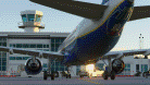
This is an upgraded release of my previous version of Eglinton for FSX, making use of MS Flight Simulator 2020's excellent rendering capabilities. It uses the default MSFS ground layout, although I have added a few gates for airport services in MSFS dev mode. All custom models and textures created by me, Jerome Logue.
This scenery is being released as freeware.
Installation: unzip the contained folder and place it in your MSFS community folder.
| Filename: | EGAE_Eglinton_2021_City_of_Derry_Airport_Northern_.zip |
| License: | Freeware |
| Added: | 19th February 2021, 16:27:28 |
| Downloads: | 170 |
| Author: | Jerome Logue |
| Size: | 1.41 MB |
| Category: Flight Simulator 2004 - Aircraft Repaints, Textures and Modifications | |
| US Airways Boeing 757-2B7 (ETOPS) |
|
File Description:
This repaint depicts a US Airways 757-2B7 (ETOPS). This repaint requires the payware product by Captain Sim "757 Captain" and is 100% ACE compliant. The repaint has been tested on FSX. ***Please note that this is a visual 757-2B7 variant only. Animation is as CS stock aircraft*** All instructions included. This is a remake of my earlier US Airways repaint. It has corrected winglet textures and added details and an 8 door variant.
| Filename: | US_Airways_Boeing_7572B7_ETOPS.zip |
| License: | Freeware |
| Added: | 13th April 2008, 22:33:12 |
| Downloads: | 3,309 |
| Author: | David (Dax) Sweetman & Captain Sim |
| Size: | 2.77 MB |
| Category: Flight Simulator 2004 - AI Flight Plans | |
| Atlantic Airways Winter 2011/2012 |
|
Images related to this file:
File Description:

This flightplan has been revised in that the "@" sign has been added to the Flightplan.txt file for those who prefer to install our flightplans via TTools. This is part of our flightplans for the Winter 2011/2012 season. The team aims to provide high quality flightplans for the FS community. Each flightplan has been tested using many resources, and our goal is to make a realistic representation of each airline's route network.
| Filename: | Atlantic_Airways_Winter_20112012.zip |
| License: | Freeware, limited distribution |
| Added: | 10th March 2012, 22:14:12 |
| Downloads: | 508 |
| Author: | Dennis Lyng Desezar & Alpha India Group |
| Size: | 13.69 KB |
| Category: Flight Simulator X - Scenery | |
| AFX file & Scenery for EGNM (UK - Leeds Bradford) |
|
File Description:
AFCAD file for EGNM will eliminate the now unused runway 09-27 and alter the taxiways to a more realistic representation of Leeds Bradford airport. Additional parking with the new ramp constructed to the south of the terminal building is included. Users will require installation of Runway12 Objects Library (freeware available on most FS download sites) for full functionality - light poles and hanger have been added from this library. Blends well with VFR Scenery.
| Filename: | AFX_file__Scenery_for_EGNM_UK__Leeds_Bradford.zip |
| License: | Freeware |
| Added: | 25th February 2008, 13:10:49 |
| Downloads: | 1,723 |
| Author: | David Diggory |
| Size: | 8.77 KB |
| Category: Flight Simulator X - Scenery | |
| Scenery And Landclass For Molokai (HI) Hawaii |
|
Images related to this file:
File Description:
This is a detailed landclass and scenery redesign for all of the Island of Molokai. Because Molokai has so many farms and country houses almost every house and building had to be added by hand. The houses and buildings and other objects are in their exact locations for most of the this island making VFR flying more enjoyable. The airports have been corrected for errors and reflect the real look of Molokai airports.
| Filename: | Scenery_And_Landclass_For_Molokai_HI_Hawaii.zip |
| License: | Freeware |
| Added: | 9th November 2011, 00:20:31 |
| Downloads: | 2,724 |
| Author: | Charles Reid |
| Size: | 8.48 MB |
| Category: Prepar3D V1-4 - Scenery | |
| Dutse Intl. Airport FSXP3D |
|
File Description:
Dutse International Airport (ICAO: DNDS) is a newly constructed airport serving the city of Dutse in the Jigawa State of northern Nigeria.
The airport is 10 kilometres (6.2 mi) northwest of the city, and was commissioned in 2014 by Nigerian President Goodluck Jonathan.
The Dutse VOR-DME (Ident: DUT) and non-directional beacon (Ident: DU) are located on the field
Photoreal Background, Corrected Parkings, Added more buildings, Ramp Lights(Dyanmic Lights only for P3D v4).
| Filename: | Dutse_Intl_Airport_FSXP3D.zip |
| License: | Freeware, limited distribution |
| Added: | 20th December 2019, 02:53:17 |
| Downloads: | 232 |
| Author: | Raheem Adeleke |
| Size: | 23.39 MB |


© 2001-2026 AVSIM Online
All Rights Reserved
Privacy Policy |