
Where Flight Simulation Enthusiasts Gather from Around the World!
AVSIM Library - Search Results

| Category: Flight Simulator X - Aircraft Repaints, Textures and Modifications | |
| DeHavilland DHC-2 Beaver (PH-VTH) |

|
Images related to this file:
File Description:

FSX/P3D PH-VTH DHC-2 Beaver
This is a highly detailed repaint for the payware Milviz DHC-2
The PH-VTH was used between 1958 and 1990 for research by the TH (later TU) Delft.
By Richard Wisman
| Filename: | DeHavilland_DHC2_Beaver_PHVTH.zip |
| License: | Freeware |
| Added: | 26th December 2017, 19:26:21 |
| Downloads: | 230 |
| Author: | Richard Wisman |
| Size: | 10.42 MB |
| Category: Flight Simulator X - Utilities | |
| FSTramp v8.84 for MSFS, FSX(-SE), Prepart3D, X-Plane (Win) |
|
Images related to this file:
File Description:
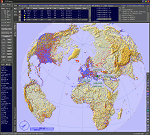
This add-on is an EXE application for Microsoft Flight Simulator and a DLL module for all other simulators. The DLL variant is activated via hotkeys or the simulator menu add-ons or plugins. Window size and layout are configurable for one or more screens. To avoid dazzling, the brightness of the entire application is customizable. Primarily it is a flight management system (FMS) with automatic control from start to landing. This also includes the observance of SID, STAR and Approaches in unmatched quality. The flight plan required for the FMS can be created manually or automatically, interactive changes and additions during the flight are possible. The basis of the flight planner is the 3D world map and the search function for airfields and navigation aids. The FMS by FSTramp relies on the autopilot of the aircraft. In case of incompatibility, the autopilot integrated in FSTramp will be used. This allows FSTramp to control almost all aircraft from airport to airport. The altitude profile of the flight plan, SID, STAR and approach is taken into account. This means that FSTramp extends the often incomplete airport procedures to and from the runway so that they can be flown completely automatically. During the fully automatic flight, the autopilot values ​​for HDG, ALT, VSPEED, SPD and MACH can be manually overridden. This is e.g. useful for being able to react to the instructions of the tower in the final approach without completely stopping the automatic flight. The rotating or north pointing 3D world map with numeric display of the terrain elevation under the mouse arrow is another special feature. It does not need an internet but is synthesized from included height profiles of the globe. The Data of continents, mountains and rivers are included in the setup. Airspaces, Airways, Waypoints and SID, STAR and Approaches are also included in the setup, but can be updated by installing additional AIRAC cycles. Airfields and navigation stations are taken from the simulator. NVIDIA: If the frame rate of the simulator drops sharply about 20 seconds after FSTramp's visibility, the power management of the GPU slows down prematurely. In the NVIDIA Control Panel, change the 'Manage 3D settings - Power management mode' option to 'Adaptive'.
| Filename: | FSTramp_v884_for_MSFS_FSXSE_Prepart3D_XPlane_Win.zip |
| License: | Shareware, time limited |
| Added: | 7th July 2023, 04:35:43 |
| Downloads: | 130 |
| Author: | Helge Schroeder |
| Size: | 358.21 MB |
| Category: Prepar3D V5 - Utilities | |
| FSTramp v8.84 for Prepart3D 2-6, MSFS, FSX(-SE), X-Plane (Win) |
|
Images related to this file:
File Description:
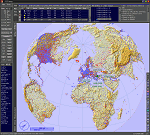
This add-on is an EXE application for Microsoft Flight Simulator and a DLL module for all other simulators. The DLL variant is activated via hotkeys or the simulator menu add-ons or plugins. Window size and layout are configurable for one or more screens. To avoid dazzling, the brightness of the entire application is customizable. Primarily it is a flight management system (FMS) with automatic control from start to landing. This also includes the observance of SID, STAR and Approaches in unmatched quality. The flight plan required for the FMS can be created manually or automatically, interactive changes and additions during the flight are possible. The basis of the flight planner is the 3D world map and the search function for airfields and navigation aids. The FMS by FSTramp relies on the autopilot of the aircraft. In case of incompatibility, the autopilot integrated in FSTramp will be used. This allows FSTramp to control almost all aircraft from airport to airport. The altitude profile of the flight plan, SID, STAR and approach is taken into account. This means that FSTramp extends the often incomplete airport procedures to and from the runway so that they can be flown completely automatically. During the fully automatic flight, the autopilot values ​​for HDG, ALT, VSPEED, SPD and MACH can be manually overridden. This is e.g. useful for being able to react to the instructions of the tower in the final approach without completely stopping the automatic flight. The rotating or north pointing 3D world map with numeric display of the terrain elevation under the mouse arrow is another special feature. It does not need an internet but is synthesized from included height profiles of the globe. The Data of continents, mountains and rivers are included in the setup. Airspaces, Airways, Waypoints and SID, STAR and Approaches are also included in the setup, but can be updated by installing additional AIRAC cycles. Airfields and navigation stations are taken from the simulator. NVIDIA: If the frame rate of the simulator drops sharply about 20 seconds after FSTramp's visibility, the power management of the GPU slows down prematurely. In the NVIDIA Control Panel, change the 'Manage 3D settings - Power management mode' option to 'Adaptive'.
| Filename: | FSTramp_v884_for_Prepart3D_26_MSFS_FSXSE_XPlane_Wi.zip |
| License: | Shareware, time limited |
| Added: | 7th July 2023, 04:35:26 |
| Downloads: | 42 |
| Author: | Helge Schroeder |
| Size: | 358.21 MB |
| Category: Microsoft Flight Simulator (2020) - Utilities | |
| FSTramp v8.84 for MSFS, FSX(-SE), Prepart3D, X-Plane (Win) |
|
Images related to this file:
File Description:

This add-on is an EXE application for Microsoft Flight Simulator and a DLL module for all other simulators. The DLL variant is activated via hotkeys or the simulator menu add-ons or plugins. Window size and layout are configurable for one or more screens. To avoid dazzling, the brightness of the entire application is customizable. Primarily it is a flight management system (FMS) with automatic control from start to landing. This also includes the observance of SID, STAR and Approaches in unmatched quality. The flight plan required for the FMS can be created manually or automatically, interactive changes and additions during the flight are possible. The basis of the flight planner is the 3D world map and the search function for airfields and navigation aids. The FMS by FSTramp relies on the autopilot of the aircraft. In case of incompatibility, the autopilot integrated in FSTramp will be used. This allows FSTramp to control almost all aircraft from airport to airport. The altitude profile of the flight plan, SID, STAR and approach is taken into account. This means that FSTramp extends the often incomplete airport procedures to and from the runway so that they can be flown completely automatically. During the fully automatic flight, the autopilot values ​​for HDG, ALT, VSPEED, SPD and MACH can be manually overridden. This is e.g. useful for being able to react to the instructions of the tower in the final approach without completely stopping the automatic flight. The rotating or north pointing 3D world map with numeric display of the terrain elevation under the mouse arrow is another special feature. It does not need an internet but is synthesized from included height profiles of the globe. The Data of continents, mountains and rivers are included in the setup. Airspaces, Airways, Waypoints and SID, STAR and Approaches are also included in the setup, but can be updated by installing additional AIRAC cycles. Airfields and navigation stations are taken from the simulator. NVIDIA: If the frame rate of the simulator drops sharply about 20 seconds after FSTramp's visibility, the power management of the GPU slows down prematurely. In the NVIDIA Control Panel, change the 'Manage 3D settings - Power management mode' option to 'Adaptive'.
| Filename: | FSTramp_v884_for_MSFS_FSXSE_Prepart3D_XPlane_Win.zip |
| License: | Shareware, time limited |
| Added: | 7th July 2023, 04:35:12 |
| Downloads: | 111 |
| Author: | Helge Schroeder |
| Size: | 358.21 MB |
| Category: X-Plane - Sounds | |
| FMOD Experience: The Very DC-3 V1.1.0 |
|
Images related to this file:
File Description:
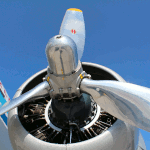
This is a scratch built full 3D sound package for the Aeroworx DC-3 and (since V1.1.0) VSKYLABS C-47 Skytrain. The package contains much more than just engine sounds, it is a complete sound environment and contains several novelty features "never heard before". This set utilizes source material from 4 real life C-47As and the power of FMOD to create the most accurate R-1830 sound simulation to date. All samples are 44,1KHz high quality audio and there are A LOT. Note that X-Plane 11.30 or newer is required to use this set with the VSKYLABS model! Have fun and turn up those speakers :)
| Filename: | FMOD_Experience_The_Very_DC3_V110.zip |
| License: | Freeware, limited distribution |
| Added: | 9th February 2019, 19:39:31 |
| Downloads: | 178 |
| Author: | Mike Maarse (SimAcoustics) |
| Size: | 67.2 MB |
| Category: Flight Simulator 2004 - Aircraft Repaints, Textures and Modifications | |
| Iran Air Boeing 757-200 |
|
File Description:
Iran Air Boeing 757-200 repaint of POSKY's long awaited 757-200 series aircraft, below are just some of the features included! Features - Dynamic shine - Wingview or Virtual Cockpit - Opening Doors & cargo doors - 3d Flight Attendants in the cabine - All normal animations - realistic FDE - accurate dimensions - accurate specifications - accurate flight performance based on performance charts - accurate flight performance based on certified pilot input - full damage profiles for major body locations, flaps, struts, tires and engines - different engine variants - different engine performance, thrust maps, and fuel burn per different engine type - default and alternate gear points for aircraft look vs. performance feel - new detailed lighting effects for FS2004.
| Filename: | Iran_Air_Boeing_757200.zip |
| License: | Shareware, limited functionality |
| Added: | 21st November 2003, 18:54:45 |
| Downloads: | 1,110 |
| Author: | Amir Alemohammed |
| Size: | 4.43 MB |
| Category: Flight Simulator 2004 - Aircraft Repaints, Textures and Modifications | |
| Delta Airlines Boeing 757-200 Winglets |
|
File Description:
Presenting Delta Airlines' 1st 757-200 with winglets--N702TW! Features - Dynamic shine - Wingview or Virtual Cockpit - Opening Doors & cargo doors - 3d Flight Attendants in the cabine - All normal animations - realistic FDE - accurate dimensions - accurate specifications - accurate flight performance based on performance charts - accurate flight performance based on certified pilot input - full damage profiles for major body locations, flaps, struts, tires and engines - different engine variants - different engine performance, thrust maps, and fuel burn per different engine type - default and alternate gear points for aircraft look vs. performance feel - new detailed lighting effects for FS2004. Repaint By Brandon D. Henry. NOT TO BE UPLOADED ANYWHERE ELSE W/O MY PERMISSION!
| Filename: | Delta_Airlines_Boeing_757200_Winglets.zip |
| License: | Freeware, limited distribution |
| Added: | 20th November 2007, 21:24:19 |
| Downloads: | 1,198 |
| Author: | Brandon D. Henry |
| Size: | 3.7 MB |
| Category: Flight Simulator X - Miscellaneous Files | |
| Views for the Agusta Westland EH101 from Acceleration Pack |
|
Images related to this file:
File Description:

Original views reworked and additional views ( defined by camera definitions in the aircraft.cfg file ) for
the beautiful Agusta Westland EH101 by Microsoft available only in the Acceleration expansion Pack.
13 + 1 ( 10 + 1 ) cameras pointing at the aircraft and a total of 8 ( 7 ) views in the 3D cockpit.
See Read me.txt file for very easy installation procedures.
Also included "For Flying - camera definitions" and "For missions - camera definitions".
And finally two more files - Available.pdf and Top 20.pdf for information
about my "camera definitions" packages.
I suggest the installation of an update for the EH101 by M. Bob Chicilo. Apply it
BEFORE installing the camera definitions.
| Filename: | Views_for_the_Agusta_Westland_EH101_from_Accelerat.zip |
| License: | Freeware |
| Added: | 25th November 2011, 09:21:30 |
| Downloads: | 220 |
| Author: | Marc Renaud |
| Size: | 138.01 KB |
| Category: Flight Simulator 2004 - Aircraft Repaints, Textures and Modifications | |
| Cessna 172SP 2IDv01 |
|
File Description:
This is a repaint/mod of the default Cessna 172. Features: 1)improved reflextions 2)fully repainted int/ext.3)GPS/flightmap/kneeboard/radio stack Icons in VC 4)HSI instrument in 2d and 3d view 5)slight yaw "deadening". 7)IMPORTANT!Greatly "deadened" response to taxi steering. If you have already solved this FS9 issue then c172sp2ID.zip would be the correct download. C172sp2ID.zip uses default steering. Finally you should read the read me file, I suggest a great sound package download for the 172. This is my first try at a repaint/mod and I'm sure there are some mistakes. Hopefully they are small enough they can be overlooked.
| Filename: | Cessna_172SP_2IDv01.zip |
| License: | Freeware |
| Added: | 20th May 2004, 18:27:09 |
| Downloads: | 839 |
| Author: | P. Parker |
| Size: | 2.06 MB |
| Category: Prepar3D V1-4 - Utilities | |
| FSTrampFree v7.26 for Prepart3D, FSX(-SE), X-Plane 11 (Win) |
|
Images related to this file:
File Description:
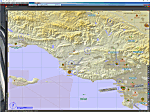
The FSTrampFree addon is a decoupling from the commercial product FSTramp. It shows a 3D world map and the real time moving AI or online aircraft. Due to the integration in the simulator, the map can also be used very well with just one display. Via the context menu of the world map, the aircraft can be moved to any runways or gates. With pressed Ctrl key even to every point on the ground or on the water. During the flight, jumps to other points in the air or on the ground are possible. The AIRAC data can be updated via an additional purchase from Navigraph.
| Filename: | FSTrampFree_v726_for_Prepart3D_FSXSE_XPlane_11_Win.zip |
| License: | Freeware |
| Added: | 27th June 2019, 04:11:25 |
| Downloads: | 1,967 |
| Author: | Helge Schroeder |
| Size: | 347.67 MB |


© 2001-2026 AVSIM Online
All Rights Reserved
Privacy Policy |