
Where Flight Simulation Enthusiasts Gather from Around the World!
AVSIM Library - Search Results

| Category: Flight Simulator 2004 - Scenery | |
| Glacier Bay - Alaska/Canada, Version 2, Part 1 of 2 |

|
Images related to this file:
File Description:
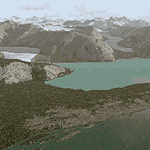
Glacier Bay v2 is a complete replacement of the default FS2004 landscape and scenery of more than 90,000 square kilometers (36,000 sq miles) of Southeast Alaska and adjacent areas of Yukon and British Columbia. File 1 of 2 (also requires glbayv2b.zip)
Landscape enhancements include high-resolution terrain mesh, detailed shorelines, rivers, lakes, and glaciers, and accurate land cover data with custom seasonal ground textures. Inland water bodies can be made to "freeze over" via an on/off switch. Other landmarks include the settlements of Juneau, Haines, Skagway, Yakutat, Atlin, and Carcross as well as road and railroad networks, cabins, lodges, and lighthouses. We modeled or enhanced 16 main airfields (plus one fictitious airstrip), 20 unlisted airstrips, 16 seaplane bases, and seven heliports. We've also included AI ship traffic in various locations as well as optional flightplans for GA and floatplane AI traffic.
Glacier Bay v2 is fully compatible with other third-party add-ons, including terrain mesh (FSGlobal, FS Genesis, etc.), ground textures (Ground Environment, BEV, FScene, etc.), and landscape enhancements (Ultimate Terrain Canada/Alaska, Misty Fjords, Tongass Fjords, Freight Dogs). A configurator panel (requires .Net Framework!) allows users to set compatibility options and to choose levels of scenery detail. We provide an autoinstaller and detailed documentation with a sectional map of the coverage area and a list of weblinks to real-world information.
For feedback and questions, please visit the Glacier Bay v2 support forum at http://forums.fsaddon.eu/viewforum.php?f=10. This project is a collaboration of nine FS developers from Germany, Austria, USA, and Canada, logging more than 1000 hours of work over the past 14 months. We acknowledge the kind support of FSAddon.com. However, this project is independent of any commercial company or product. Enjoy!
| Filename: | Glacier_Bay__AlaskaCanada_Version_2_Part_1_of_2.zip |
| License: | Freeware, limited distribution |
| Added: | 28th May 2010, 19:34:54 |
| Downloads: | 41,282 |
| Author: | Holger Sandmann, Rainer Duda, Michael Eder, Scot Fraser, Manfred Herz, Jay Langham, Jon Patch, Larry Silsbee, and Jim Vile |
| Size: | 56.46 MB |
| Category: Flight Simulator 2004 - Scenery | |
| Glacier Bay - Alaska/Canada, Version 2, Part 2 of 2 |
|
Images related to this file:
File Description:

Glacier Bay v2 is a complete replacement of the default FS2004 landscape and scenery of more than 90,000 square kilometers (36,000 sq miles) of Southeast Alaska and adjacent areas of Yukon and British Columbia. File 2 of 2 (also requires glbayv2a.zip)
Landscape enhancements include high-resolution terrain mesh, detailed shorelines, rivers, lakes, and glaciers, and accurate land cover data with custom seasonal ground textures. Inland water bodies can be made to "freeze over" via an on/off switch. Other landmarks include the settlements of Juneau, Haines, Skagway, Yakutat, Atlin, and Carcross as well as road and railroad networks, cabins, lodges, and lighthouses. We modeled or enhanced 16 main airfields (plus one fictitious airstrip), 20 unlisted airstrips, 16 seaplane bases, and seven heliports. We've also included AI ship traffic in various locations as well as optional flightplans for GA and floatplane AI traffic.
Glacier Bay v2 is fully compatible with other third-party add-ons, including terrain mesh (FSGlobal, FS Genesis, etc.), ground textures (Ground Environment, BEV, FScene, etc.), and landscape enhancements (Ultimate Terrain Canada/Alaska, Misty Fjords, Tongass Fjords, Freight Dogs). A configurator panel (requires .Net Framework!) allows users to set compatibility options and to choose levels of scenery detail. We provide an autoinstaller and detailed documentation with a sectional map of the coverage area and a list of weblinks to real-world information.
For feedback and questions, please visit the Glacier Bay v2 support forum at http://forums.fsaddon.eu/viewforum.php?f=10. This project is a collaboration of nine FS developers from Germany, Austria, USA, and Canada, logging more than 1000 hours of work over the past 14 months. We acknowledge the kind support of FSAddon.com. However, this project is independent of any commercial company or product. Enjoy!
| Filename: | Glacier_Bay__AlaskaCanada_Version_2_Part_2_of_2.zip |
| License: | Freeware, limited distribution |
| Added: | 28th May 2010, 19:36:31 |
| Downloads: | 40,554 |
| Author: | Holger Sandmann, Rainer Duda, Michael Eder, Scot Fraser, Manfred Herz, Jay Langham, Jon Patch, Larry Silsbee, and Jim Vile |
| Size: | 85.99 MB |
| Category: Flight Simulator X - Original Aircraft | |
| "Janet Airways" Boeing 737-600 BBJ-ER |
|
Images related to this file:
File Description:
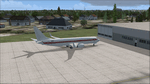
A highly classified small fleet of passenger aircraft known as "Janet" is operated for the United States Air Force to transport military and contractor employees. It mainly serves the Nevada National Security Site (most notably Area 51 (AR51) and Tonopah Test Range (TNX), from their terminal at Las Vegas' McCarran International Airport (KLAS). The planes are also used to fly to/from Air Force Plant 42 (KPMD), Naval Air Weapons Station China Lake (KNID), Hill Air Force Base (KHIF), and Edwards Air Force Base (KEDW). I encourage you to locate, download, and install the AFCAD files or scenery add-ons associated to these airports from any source you desire, but make sure they are designed for FSX. The fleet's "Janet" call sign, from which its de facto name comes, is said to stand for "Just Another Non-Existent Terminal", or more likely "Joint Air Network". Everything is realistic in this model, now, and most simmers know how inaccurate the original FSX 737-800 was. However, this aircraft simulates the accuracy of a 737-600 BBJ-ER, if there ever was one built. I modified everything to fit that aspect, except for the visual model. The engine characteristics are correct as well as all weight/balance and MOI. I even fixed the wheels to be accurate in base, track and pressure size. Everything I've done here is for educational purposes without any expectation of any monetary gain, and offered publicly for free. Read the Readme.txt file for installation and details. All persons involved with this and the original design are credited, unless they are unknown and have offered no credit details. Sounds by: Christoffer Petersen, Panel by: Pasquale Rinaldi, Redirected Texture by: Microsoft (Unknown Staff Member Names), Real World Engine/Aerodynamics by: Douglas E. Trapp, FS Flight Dynamics Engineer [email protected] July 2017
| Filename: | Janet_Airways_Boeing_737600_BBJER.zip |
| License: | Freeware |
| Added: | 8th July 2017, 20:04:30 |
| Downloads: | 1,918 |
| Author: | Douglas E. Trapp |
| Size: | 39.16 MB |
| Category: Flight Simulator 2004 - Utilities | |
| FlightSim Manager 2.7.2 |
|
File Description:
Compatible with both FS2002 and FS2004
FlightSim Manager is a great tool for managing add-ons to Microsoft Flight Simulator. Using easy to Wizard - FSM can install various addins from distribution ZIP files that you may have downloaded, with easy uninstaller. FSM has lots of feature to offer, from an easy to use Aircraft editor to add/edit aircraft variants, to an comprehensive Hangar management that allows you to manage and configure your add-ons off your live FS installation. You can create Virtual Fleets, and enable/disable the complete fleet with ease. For serious pilots, there is also a complete Logbook.
If you have access to networked PCs, you can use FSM Lan View feature to create virtual cockpits with as many different views as you like. FSM also make it very easy to control Flight Simulator with speech commands, with additional support for auto-saving flight, warning system, and your own custom event sounds.
Using a powerful Editor, you can now edit your AI Flight Plans - plans can be saved as sets, which then in turn can be enabled in Flight Simulator. With FSM, you can create Texture Sets ( your own custom texture installer ) - capture screenshots, complete Benchmark with log, launching Flight Simulator with Random Screens, and fly from anywhere in the world using an map view.
Finally with a comprehensive Diagnostic Tools and Repository feature, FSM keeps your FS installation clean. Apart from the usual Missing and unused gauges, FSM can also locate Aircraft problems, Missing and unused effects, and Scenery Problems with a LandClass File relocate feature - say bye-bye to all the memory leaks.
There are still a lot more features that you will need to discover by yourself.
You can find the latest version from: http://www.ranainside.com/
| Filename: | FlightSim_Manager_272.zip |
| License: | Freeware |
| Added: | 18th December 2004, 21:56:49 |
| Downloads: | 20,538 |
| Author: | Rana Hossain |
| Size: | 5.45 MB |
| Category: Microsoft Flight Simulator (2020) - Utilities | |
| Random Flight Database 3.5.2 |
|
File Description:
Random Flight Database is a simple and easy to use application.
​
It will allow you to randomly choose one or more VFR, IFR flights according to your criteria (type of plane, flight time, company, distance, departure airport, .....).
​
These flights are chosen at random from a default database, a user base created by yourself or according to the world aviation POIs.
​
A default database is already included, but also the possibility for each user to create his own database.
​
But that's not all, you can also extract the flights of the day for an airport, or extract the flights for a whole week.
Why Use RFD ?
The advantage of RANDOM FLIGHT DATABASE:
Extracted from FlightRadar but also from other databases, it chooses randomly among those where these databases according to your choices.
You can also make many other possible combinations, such as leaving each time from the arrival airport for each flight generated, but also selecting your favorite planes and airports.
Simply choose the departure airport, he chooses the arrival airport for you, choose the arrival airport, he chooses the departure airport for you and all this according to the real data of the airlines.
A tab for generating non-real flights is available, it will allow you to generate random flights from over 58,000 global aviation POIs.
​
Full of possibilities, including the possibility to choose the flight time but also to generate several flights while leaving the arrival airport.
You also have the option of creating your own data for inclusion in this software.
And one of the most important is that once the flight (s) are generated, you can send them to SIMBRIEF or PFPX to schedule this.
https://www.youtube.com/channel/UC8y3mSeP-gj-h2MbMT59AOw
| Filename: | Random_Flight_Database_352.zip |
| License: | Freeware |
| Added: | 28th December 2020, 18:47:26 |
| Downloads: | 151 |
| Author: | mikoulprostgrandprix |
| Size: | 181.97 MB |
| Category: Flight Simulator X - Aircraft Repaints, Textures and Modifications | |
| Boeing B-17G 91st BG (OR-R) 'Nine O Nine' |
|
Images related to this file:
File Description:
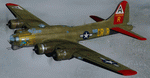
This folder contains a repaint for the A2A WoP2 B-17G in the colors of B-17G-30-BO 'Nine o nine". Nine-O-Nine was a Boeing B-17G-30-BO Flying Fortress heavy bomber, of the 323rd Bomb Squadron, 91st Bomb Group, that completed 140 combat missions during World War II, believed to be the Eighth Air Force record for most missions, without loss to the crews that flew it. The original aircraft, a block 30 B-17G manufactured by Boeing, was nicknamed after the last three digits of her serial number: 42-31909. Nine-0-Nine was added to the USAAF inventory on December 15, 1943, and flown overseas on February 5, 1944. After depot modifications, she was delivered to the 91st BG at RAF Bassingbourn, England, on February 24, 1944, as a replacement aircraft, one of the last B-17s received in factory-applied camouflage paint.
A former navigator of the 91st BG, Marion Havelaar, reported in his history of the group that Nine-O-Nine completed either 126 or 132 consecutive missions without aborting for mechanical reasons, also believed to be a record. M/Sgt. Rollin L. Davis, maintenance line chief of the bomber, received the Bronze Star for his role in achieving the record.
Her first bombing raid was on Augsburg, Germany, on February 25, 1944. She made 18 bombing raids on Berlin. In all she flew 1,129 hours and dropped 562,000 pounds of bombs. She had 21 engine changes, four wing panel changes, 15 main gas tank changes, and 18 changes of Tokyo tanks (long-range fuel tanks).
After the hostilities ceased in Europe, Nine-O-Nine was returned to the United States on June 8, 1945, and was consigned to the RFC facility at Kingman, Arizona on December 7, 1945, and eventually scrapped.
B-17G-85-DL, 44-83575, civil registration N93012, owned and flown by The Collings Foundation, Stow, Massachusetts, flew marked as the historic Nine-O-Nine until its crash on the 2nd of October 2019. Repaint by Jan Kees Blom.
| Filename: | Boeing_B17G_91st_BG_ORR_Nine_O_Nine.zip |
| License: | Freeware |
| Added: | 6th October 2019, 20:39:06 |
| Downloads: | 234 |
| Author: | Jan Kees Blom |
| Size: | 18.73 MB |
| Category: Flight Simulator X - Flight Plans | |
| Chas mod of Stearmandriver RNP RNAV Approach into PAJN Rwy 26 for 737NGX |
|
Images related to this file:
File Description:
Modded StearmanDriver(SD) RNP RNAV Rwy 26 into PAJN, Juneau, Alaska. SD gave us a cool little route that while not LATLONG nor Fixname accurate, it couldn't be without legal and occupational liabilities...and it worked, but if you look at his FixNames and the LATLONG from the PAJN.txt file for the 737 NGX...it did work pretty nicely...at least as nicely as the charted RNAV course into Rwy 8. So I created my own procedure LATLONG rightly or wrongly in a multi-step procedure as follows:
1. I took the raw info provided by SD and flew to each of his waypoints,(if you look, almost all of his FIXs were rounded off...to avoid company or legal problems) noting safe altitude, starting out at 7000ft, creating user waypoints in my GTN750, looking around for first, vertical, then horizontal safety...keeping in mind that Ultimately...I would not be using this data for my Duke, but for the Procedure page of my PMDG 737 NGX..which you already saw me fly with SD's fixes.
2. I took my Turbine Duke up and noted the REAL LATLONG as reported by slewing and world map...transposed those numbers into the format that PMDG's procedures needed DDD.mm fractional minutes. I converted using http://www.directionsmag.com/site/latlong-converter/
3.I created my own mid-point user waypoints from the west CHRTRN,and the NNE CHRTS so we could have approaches from those directions.
4. I put my Duke into autopilot, knowing the lateral info...my flightplan was correct, but I would have to handle the Vnav manually. Turns out its rather manageable with the following info: CHRTRN 5000FT - MARMN 3500FT - TRDWL 2500FT - SALMN 1500 - LEMNN 500 - PAJN5 50
My MOD OF SDs RNP RNAV PAJNRwy 26, will be up on Avsim as ChasModRNP RNAV PAJN Rwy 26.zip
Contact:[email protected] - Support: http://forum.avsim.net/topic/466094-any-interest-in-updated-se-alaska-rnav-rnp-approach-procedures-including-juneau/
| Filename: | Chas_mod_of_Stearmandriver_RNP_RNAV_Approach_into_.zip |
| License: | Freeware |
| Added: | 8th May 2015, 11:35:16 |
| Downloads: | 339 |
| Author: | Chas Reed |
| Size: | 144.78 KB |
| Category: Flight Simulator 2004 - Aircraft Repaints, Textures and Modifications | |
| Italian Air Force "S.M.Luigi Gorrini" AerMacchi C.205 VELTRO (Greyhound) |
|
Images related to this file:
File Description:
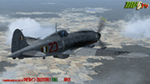
Regarded as the best Italian aircraft of World War II together with the Fiat G-55 Centauro,the Macchi-Castoldi C.205 proved to be extremely effective in action, destroying a large number of Allied bombers and capable of successfully clashing on equal terms with such renowned fighters as the North American P-51D Mustang.Although the C.205 was able to match the best Allied opponents both in speed and maneuverability,it was introduced late during the conflict.Moreover,due to the poor Italian industrial capability of the time,only a small production run was delivered to combat units before the end of the war.Famous C.205 pilots are Italy's highest scoring ace Adriano Visconti and the top scoring C.205 Sergente Maggiore pilota (Sargeant Major pilot) Luigi Gorrini.To date,there's still debate about
Gorrini's score,since Regia Aeronautica preferred crediting units over individual combat achievements.
Gorrini's official aerial combat score is 19 victories,but,according to his memories,he achieved 7 more during his service with Aeronautica Nazionale Repubblicana (A.N.R.), flying a Macchi C.205. These victories did not enter his officiall tally due to political reasons,since the A.N.R. fought by the side of the German Luftwaffe after the Italian September 8th,1943 armistice.These bring his total tally to 26 victories,making him the top scoring Italian fighter ace of WWII.For his combat record with the A.N.R he was awarded twice by the Luftwaffe with the Iron Cross First and Second Class.Luigi Gorrini was also awarded for his actions,after the end of the war,with the highest Italian military decoration,the "Medaglia d'Oro al Valor Militare" (M.O.V.M.,Gold Medal for Military Valour).Last surviving Italian fighter pilot of WWII,he died recently at the age of 97 and this repaint is dedicated to his memory.
Repaint by Manuele Villa/MVG3D, November 2014.
Requires the previous installation of the base Aermacchi C.205 Veltro package by Manuele Villa (C205_V01.zip).
| Filename: | Italian_Air_Force_SMLuigi_Gorrini_AerMacchi_C205_V.zip |
| License: | Freeware |
| Added: | 25th November 2014, 08:39:29 |
| Downloads: | 128 |
| Author: | Manuele Villa |
| Size: | 4.31 MB |
| Category: Flight Simulator 2004 - Aircraft Repaints, Textures and Modifications | |
| W91 Smith Mountain Lake Airport in Virginia |
|
File Description:
W91 Smith Mountain Lake Airport near Lynchburg, Virginia (MY soon to be NEW HOME)
This project is nearly ALL RWY12 ... I did use the Lago Scenery enhancer for the
trees.. so if you have LAgo.. the .SE2 is included, but you really don't need it.
But you will need RWY12 with all the latest additions... all freeware and all
available here at avsim.
Instructions... best to unzip to a temp directory... then do the following..
if you use Lago's Scenery Enhancer... place the .SE2 file in (Your flightsim main
folder)\LAGO\FSE\Data. Unziping will create a folder titled "Smith Mountain Lake" .. in that folder is one titled "scenery" Simply place Smith Mountain Lake in (your flightsim main folder)\Addon scenery\ folder then start the simulator.. go to settings, the library.. and - well most all know the drill .... add the folder Spring Mountain Lake then exit.. and restart.. and blamo... it is there... (Hopefully- LOL) ALSO in the scenery folder are two exclude .bgl.. this got rid of the default buildings and an AFCAD .bgl... this modified the airport properity a bit.. just leave all the .bgls where they are in the scenery folder.. all should work well.
oh.. for those who use RWY12 for scenery making... I have included the .XML file.. so you are welcome to add..subtract or change anything you find at Smith Mountain Lake.
if you have any questions or comments.. PLEASE do drop me a line.
Oh.. since I have your attention... a question for YOU... whether you download this
scenery or not.... How in the world does one get rid of that idiot "Flying Tips"
translucant window that appears.. telling you among other things .. your engines are not started... hit control E ... you ever notice how it ONLY appears when you have set up a screen shot and are ready to shoot?????? Write me and PLEASE tell me how to get rid of it.. I remember reading how somewhere, but for the life of me ..can't remember where.
| Filename: | W91_Smith_Mountain_Lake_Airport_in_Virginia.zip |
| License: | Freeware |
| Added: | 18th March 2005, 22:37:05 |
| Downloads: | 330 |
| Author: | Dale Caruso |
| Size: | 563.31 KB |
| Category: Flight Simulator X - Aircraft Repaints, Textures and Modifications | |
| P-47D 324th FG/ 316th FS #86 "Black Sheep" |
|
File Description:
This folder contains a repaint for the Shockwave World War II Fighters P-47D Thunderbolt, representing the aircraft flown by Lt Jerry Wurmser of the 316thnd FS/324th FG, in France and Germany, between 6 march 1945 and the end of the war. He is still alive, and told me: "The name "Black Sheep" was already painted on the plane when it was assigned to me. It previously had been assigned to someone in Britain, and eventually ended up in France after either being shot down or having crashed and then repaired. It had a brand new engine in it when I received it on March 6, 1945. At this time I had already completed 39 missions, and finally was assigned my own airplane. My first flight in it was to break in the new engine, or "slow time" it. This required flying it about for a period of time at very low throttle settings, to break in the new engine. The plane had already seen a lot of action, and the "form 1" contained a long list of malfunctions that was written up by the previous flyers and dates of repairs. Several times I had to sign the "exceptional release" form before going up, acknowledging that I knew and understood what the previous pilot stated what was wrong with it. This plane was a razorback, with the tail assembly out of line, so that I had to apply rudder correction constantly. It got such bad gas mileage that I carried one less bomb and a gas tank instead. I hated that plane. I finally did get a new bubble canopy plane, but by this time the War was over!"
Repaint by Jan Kees Blom, based on two repaint kits, one by John Terrell and one by Shockwave. Included is a 1024 x 1024 bmp repaint, which should work in both FS9 and FSX.
| Filename: | P47D_324th_FG_316th_FS__86_Black_Sheep.zip |
| License: | Freeware |
| Added: | 24th January 2009, 18:52:28 |
| Downloads: | 283 |
| Author: | Jan Kees Blom |
| Size: | 5.05 MB |


© 2001-2026 AVSIM Online
All Rights Reserved
Privacy Policy |