
Where Flight Simulation Enthusiasts Gather from Around the World!
AVSIM Library - Search Results

| Category: Flight Simulator X - Aircraft Repaints, Textures and Modifications | |
| Boeing 747 BDSF GE FlyMeta 9H-WFF operated by Air Atlanta |

|
Images related to this file:
File Description:
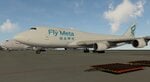
9H-WFF is a BDSF (Bedek Special Freighter) that started life in 1992 as a passenger variant with Japan Airlines on lease from Aersale. Was transferred to Asiana in 2012 under lease as a freighter after conversion by IAI (Israel Aerospace Industries), then leased to Air Atlanta who operate the airframe for FlyMeta, originally with an Icelandic registration of TF-WFF and as of 2026 under a Maltese registration 9H-WFF. As of January 2026 this machine (along with her two FlyMeta sister ships) can be seen operating cargo flights to Europe out of China from VHHH/Hong Kong and ZSHC/Hangzhou to EBLG/Liege and LHBP/Budapest and various central asian locations in between such as OMSJ/Sharjah and OMDW/Dubai World Central.
This repaint is for the Project Opensky (POSKY) 747-400BCF GE-CF6 model and the archive includes textures only, you will need a working copy of the model, sounds and panel, all of which can be found here at avsim.com
| Filename: | Boeing_747_BDSF_GE_FlyMeta_9HWFF_operated_by_Air_A.zip |
| License: | Freeware |
| Added: | 16th February 2026, 12:40:33 |
| Downloads: | 28 |
| Author: | Dean Stringer |
| Size: | 8.29 MB |
| Category: Flight Simulator X - AFCAD Files | |
| Tamchy Airport Kyrgyzstan (UAFL) |
|
File Description:
Tamchy Airport (ICAO: UAFL) is an airport in Kyrgyzstan.
This AFCAD file for FSX adds a taxiway, apron, 3 parking spots and some generic buildings and other airport objects to the standard FSX Tamchy airport.
Although this airport has been designed roughly from looking at Google Earth/Maps, this is by no means 100% realistic. The buildings are all placed randomly by me, just to make it more interesting. Same story for the fuel tanks, trees, and vehicles. However, I did keep the proportions realistic, i.e. you won't land or park an A380 here.
In FSX, this is an awesome airport, right next to the massive Issyk-Kul lake which is one of the largest in the world. The scenery (even the standard FSX scenery) is just awesome. Hop into a turboprop plane, plan a flight between this airport and Bishkek or Almaty, and off you go.
This airport is served by Central Asian Airlines VA - www.flycentralasian.com
| Filename: | Tamchy_Airport_Kyrgyzstan_UAFL.zip |
| License: | Freeware |
| Added: | 22nd March 2012, 04:07:05 |
| Downloads: | 254 |
| Author: | Peter Wouters |
| Size: | 3.41 KB |
| Category: Flight Simulator X - Scenery | |
| KMRY - Monterey Regional Airport - California, USA |
|
Images related to this file:
File Description:
FSX Scenery - Monterey Regional Airport (IATA: MRY, ICAO: KMRY, FAA LID: MRY) is three miles (5 km) southeast of Monterey, in Monterey County, California, USA. It was created in 1936 and was known as the Monterey Peninsula Airport until the board of directors renamed it on September 14, 2011. The airport is owned by the several municipalities that make up the Monterey Peninsula Airport District. It is a public entity and its five-member board of directors is publicly elected. The airport has its origins with flights from the polo field of the Hotel Del Monte in 1910. In 1941, local communities formed the Monterey Peninsula Airport District and acquired land to build an airport. World War II intervened, and the U.S. Navy leased the land, opening Naval Auxiliary Air Station Monterey on May 23, 1943. The Navy remained at the airport until 1972. For your flying pleasure by John B. Loney, Jr.
| Filename: | KMRY__Monterey_Regional_Airport__California_USA.zip |
| License: | Freeware, limited distribution |
| Added: | 5th June 2016, 12:11:50 |
| Downloads: | 591 |
| Author: | John B. Loney, Jr. |
| Size: | 39.38 MB |
| Category: Flight Simulator 2004 - Scenery | |
| Chicago O'Hare International Airport circa 2018 (reupload) |
|
File Description:
This is a reupload of my Chicago O'Hare redevelopment (KORD). I apologize for the first time, but it appeared I had uploaded xml files into avsim instead of bgl files so it may not work at all.
Description from before: This is a complete makeover of the default O'Hare scenery. For a long time no freeware addon scenery existed for O'Hare, and the paywares that exist now are outdated by several years and, aren't free. I entirely used the default airport buildings utilized by the airport, but added lots of jetways and parking assignments to match the real world layout based on Google Maps. This will give you a March 2018 rendition of the airport. More about the airport in the readme file. Screenshots enclosed, however I recommend only looking at one or two of them first to evaluate, and to fly into the airport first from any other airport of your choice so you can see it for the first time flying in.
| Filename: | Chicago_OHare_International_Airport_circa_2018_reu.zip |
| License: | Freeware |
| Added: | 8th July 2020, 17:31:26 |
| Downloads: | 1,265 |
| Author: | Carlos Si |
| Size: | 37.44 MB |
| Category: Flight Simulator X - Utilities | |
| FSTramp v8.84 for MSFS, FSX(-SE), Prepart3D, X-Plane (Win) |
|
Images related to this file:
File Description:
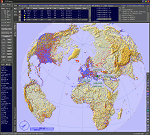
This add-on is an EXE application for Microsoft Flight Simulator and a DLL module for all other simulators. The DLL variant is activated via hotkeys or the simulator menu add-ons or plugins. Window size and layout are configurable for one or more screens. To avoid dazzling, the brightness of the entire application is customizable. Primarily it is a flight management system (FMS) with automatic control from start to landing. This also includes the observance of SID, STAR and Approaches in unmatched quality. The flight plan required for the FMS can be created manually or automatically, interactive changes and additions during the flight are possible. The basis of the flight planner is the 3D world map and the search function for airfields and navigation aids. The FMS by FSTramp relies on the autopilot of the aircraft. In case of incompatibility, the autopilot integrated in FSTramp will be used. This allows FSTramp to control almost all aircraft from airport to airport. The altitude profile of the flight plan, SID, STAR and approach is taken into account. This means that FSTramp extends the often incomplete airport procedures to and from the runway so that they can be flown completely automatically. During the fully automatic flight, the autopilot values ​​for HDG, ALT, VSPEED, SPD and MACH can be manually overridden. This is e.g. useful for being able to react to the instructions of the tower in the final approach without completely stopping the automatic flight. The rotating or north pointing 3D world map with numeric display of the terrain elevation under the mouse arrow is another special feature. It does not need an internet but is synthesized from included height profiles of the globe. The Data of continents, mountains and rivers are included in the setup. Airspaces, Airways, Waypoints and SID, STAR and Approaches are also included in the setup, but can be updated by installing additional AIRAC cycles. Airfields and navigation stations are taken from the simulator. NVIDIA: If the frame rate of the simulator drops sharply about 20 seconds after FSTramp's visibility, the power management of the GPU slows down prematurely. In the NVIDIA Control Panel, change the 'Manage 3D settings - Power management mode' option to 'Adaptive'.
| Filename: | FSTramp_v884_for_MSFS_FSXSE_Prepart3D_XPlane_Win.zip |
| License: | Shareware, time limited |
| Added: | 7th July 2023, 04:35:43 |
| Downloads: | 130 |
| Author: | Helge Schroeder |
| Size: | 358.21 MB |
| Category: Prepar3D V5 - Utilities | |
| FSTramp v8.84 for Prepart3D 2-6, MSFS, FSX(-SE), X-Plane (Win) |
|
Images related to this file:
File Description:
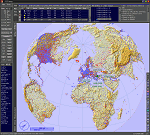
This add-on is an EXE application for Microsoft Flight Simulator and a DLL module for all other simulators. The DLL variant is activated via hotkeys or the simulator menu add-ons or plugins. Window size and layout are configurable for one or more screens. To avoid dazzling, the brightness of the entire application is customizable. Primarily it is a flight management system (FMS) with automatic control from start to landing. This also includes the observance of SID, STAR and Approaches in unmatched quality. The flight plan required for the FMS can be created manually or automatically, interactive changes and additions during the flight are possible. The basis of the flight planner is the 3D world map and the search function for airfields and navigation aids. The FMS by FSTramp relies on the autopilot of the aircraft. In case of incompatibility, the autopilot integrated in FSTramp will be used. This allows FSTramp to control almost all aircraft from airport to airport. The altitude profile of the flight plan, SID, STAR and approach is taken into account. This means that FSTramp extends the often incomplete airport procedures to and from the runway so that they can be flown completely automatically. During the fully automatic flight, the autopilot values ​​for HDG, ALT, VSPEED, SPD and MACH can be manually overridden. This is e.g. useful for being able to react to the instructions of the tower in the final approach without completely stopping the automatic flight. The rotating or north pointing 3D world map with numeric display of the terrain elevation under the mouse arrow is another special feature. It does not need an internet but is synthesized from included height profiles of the globe. The Data of continents, mountains and rivers are included in the setup. Airspaces, Airways, Waypoints and SID, STAR and Approaches are also included in the setup, but can be updated by installing additional AIRAC cycles. Airfields and navigation stations are taken from the simulator. NVIDIA: If the frame rate of the simulator drops sharply about 20 seconds after FSTramp's visibility, the power management of the GPU slows down prematurely. In the NVIDIA Control Panel, change the 'Manage 3D settings - Power management mode' option to 'Adaptive'.
| Filename: | FSTramp_v884_for_Prepart3D_26_MSFS_FSXSE_XPlane_Wi.zip |
| License: | Shareware, time limited |
| Added: | 7th July 2023, 04:35:26 |
| Downloads: | 42 |
| Author: | Helge Schroeder |
| Size: | 358.21 MB |
| Category: Microsoft Flight Simulator (2020) - Utilities | |
| FSTramp v8.84 for MSFS, FSX(-SE), Prepart3D, X-Plane (Win) |
|
Images related to this file:
File Description:

This add-on is an EXE application for Microsoft Flight Simulator and a DLL module for all other simulators. The DLL variant is activated via hotkeys or the simulator menu add-ons or plugins. Window size and layout are configurable for one or more screens. To avoid dazzling, the brightness of the entire application is customizable. Primarily it is a flight management system (FMS) with automatic control from start to landing. This also includes the observance of SID, STAR and Approaches in unmatched quality. The flight plan required for the FMS can be created manually or automatically, interactive changes and additions during the flight are possible. The basis of the flight planner is the 3D world map and the search function for airfields and navigation aids. The FMS by FSTramp relies on the autopilot of the aircraft. In case of incompatibility, the autopilot integrated in FSTramp will be used. This allows FSTramp to control almost all aircraft from airport to airport. The altitude profile of the flight plan, SID, STAR and approach is taken into account. This means that FSTramp extends the often incomplete airport procedures to and from the runway so that they can be flown completely automatically. During the fully automatic flight, the autopilot values ​​for HDG, ALT, VSPEED, SPD and MACH can be manually overridden. This is e.g. useful for being able to react to the instructions of the tower in the final approach without completely stopping the automatic flight. The rotating or north pointing 3D world map with numeric display of the terrain elevation under the mouse arrow is another special feature. It does not need an internet but is synthesized from included height profiles of the globe. The Data of continents, mountains and rivers are included in the setup. Airspaces, Airways, Waypoints and SID, STAR and Approaches are also included in the setup, but can be updated by installing additional AIRAC cycles. Airfields and navigation stations are taken from the simulator. NVIDIA: If the frame rate of the simulator drops sharply about 20 seconds after FSTramp's visibility, the power management of the GPU slows down prematurely. In the NVIDIA Control Panel, change the 'Manage 3D settings - Power management mode' option to 'Adaptive'.
| Filename: | FSTramp_v884_for_MSFS_FSXSE_Prepart3D_XPlane_Win.zip |
| License: | Shareware, time limited |
| Added: | 7th July 2023, 04:35:12 |
| Downloads: | 111 |
| Author: | Helge Schroeder |
| Size: | 358.21 MB |
| Category: Prepar3D V1-4 - Aircraft Repaints, Textures and Modifications | |
| North American P-51D 20th FG (LC-N) 'June Nite' |
|
Images related to this file:
File Description:

This folder contains a repaint for the A2A WoP3 P-51D Mustang (with AccuSim), in the colors of P-51K 44-11161 LC-N "June Nite" as flown by Ernest "Feeb" Fiebelkorn of the 20th FG. He was one of the biggest aces of the 8th Air Force, meaning tallest and heaviest. 6ft 4in combined with 225 pounds must have made a placement into the Mustang's cockpit a bit problematic.
This did not prevent Feeb from becoming the top-scoring pilot of the 20th Fighter Group. Moreover, it was not Fiebelkorn's only claim to fame. On November 8th 1944 he and Edward Haydon from 357th FG managed to shoot down German Me 262 piloted by then top-scoring ace of the World - Walter Nowotny. The famous Austrian pilot was not lucky enough to survive that onslaught.
Feeb finished the war unscathed only to die in F-82 over Korea. His total score includes 8 individual aerial victories, 2 shared aerial victories and 2 individual ground victories. Repaint by Jan Kees Blom, based on the A2A paintkit.
| Filename: | North_American_P51D_20th_FG_LCN_June_Nite.zip |
| License: | Freeware |
| Added: | 4th November 2018, 17:24:10 |
| Downloads: | 62 |
| Author: | Jan Kees Blom |
| Size: | 13.1 MB |
| Category: Prepar3D V1-4 - Aircraft Repaints, Textures and Modifications | |
| Consolidated B-24D Liberator RAF (BZ862) 160 Sqn J |
|
Images related to this file:
File Description:
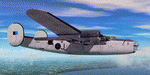
This folder contains a repaint for the Consolidated B-24D by Flight Replicas, adapted for use in P3Dv5. It shows B-24D-10-Cf 42-62885 BZ862 of the RAF. Arrived in the UK in 1943, it was flown to Karachi, arriving there in August 1943. It first flew with 354 Sqn with serial A, before going to 160 Sqn as J. It was based in Minneriya, in present-day Sri Lanka and was used for long distance mine-laying operations. For this, they removed all extra weight and installed three additional tanks in the forward bomb-bay. This aircraft flew a sortie to southern Malaya to drop two British officers near the Kota Tinggi/Johore road on 31-7/1-8-1945, captained by Flt Lt J A Muir RCAF, and was airborne for 24 hrs 10 mins, the longest unrefuelled flight ever made by any Allied landplane in World War II; the distance flown was 3,735 mls (6,013 km). Repaint by Jan Kees Blom, based on the paintkit by Flight Replicas.
| Filename: | Consolidated_B24D_Liberator_RAF_BZ862_160_Sqn_J.zip |
| License: | Freeware |
| Added: | 26th April 2020, 19:02:14 |
| Downloads: | 51 |
| Author: | Jan Kees Blom |
| Size: | 40.41 MB |
| Category: Flight Simulator X - Missions | |
| MSF |
|
Images related to this file:
File Description:
MSF is a mission which consists of several episodes. The present mission here is the 1st episode. It is obvious that the 2nd episode will be the logical result of the adventure, and so on for the following episodes.
The story of this 1st episode, takes place since the base camp of MSF (Médecins sans Frontières) at BUKOBA in TANZANIA, and ends inside the hangar of a small runway on the shores of Lake Victoria.
The briefing of departure is voluntarily very short, you will find no indication for the realization of the episode, simply the description of the context there of departure. All the indications to realize the episode, will be given to you by sound files. In other words, it will be necessary to you to be very attentive to the diverse dialogues, in French, sorry, which you will hear. I will try to create an English version later.
ALL EPISODES OF MSF ARE A TRIBUTE TO THE WOMEN AND MEN OF THE MEDIACL WORLD.
| Filename: | MSF.zip |
| License: | Freeware |
| Added: | 21st May 2021, 18:13:32 |
| Downloads: | 73 |
| Author: | Alain BOUTIE |
| Size: | 4.81 MB |


© 2001-2026 AVSIM Online
All Rights Reserved
Privacy Policy |