
Where Flight Simulation Enthusiasts Gather from Around the World!
AVSIM Library - Search Results

| Category: Flight Simulator 2004 - AI Aircraft | |
| AI Volaris Airbus A321-271 Neo Faib N544VL & XA-VSH Updated Pack |

|
Images related to this file:
File Description:
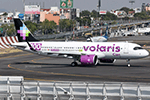
This are the new aircrafts of the mexican low cost Volaris the Airbus A320-271 Neo for now it consists in 38 aircrafts, the registrations of the aircrafts are: N544VL (El Salvador), XA-VSH (Avion Cien). Those aircrafts have the newest Volaris New Livery, and Special Liveries. This is my website: https://el-mundo-de-los-aviones-ai-traffic.jimdosite.com The aircraft model is from Faib Airbus A320Neo. I hope you enjoy it!.
| Filename: | AI_Volaris_Airbus_A321271_Neo_Faib_N544VL__XAVSH_U.zip |
| License: | Freeware |
| Added: | 12th January 2022, 16:18:04 |
| Downloads: | 117 |
| Author: | Jesús Gibran Soriano Solleiro |
| Size: | 8.67 MB |
| Category: Flight Simulator X - AI Aircraft | |
| AI Volaris Airbus A321-271NX Neo Faib XA-VSB & XA-VSL |
|
Images related to this file:
File Description:

This is the new aircrafts of the mexican low cost Volaris the Airbus A321-271NX Neo for now it consists in 2 aircrafts, the registrations of the aircrafts are: XA-VSB and XA-VSL. Those aircrafts have the newest Volaris New Livery and the Racoon Cockpit Mask.
This is my website: https://el-mundo-de-los-aviones-ai-traffic.jimdosite.com
The aircraft model is from Faib Airbus A321Neo. I hope you enjoy it!.
| Filename: | AI_Volaris_Airbus_A321271NX_Neo_Faib_XAVSB__XAVSL.zip |
| License: | Freeware |
| Added: | 25th March 2022, 23:49:44 |
| Downloads: | 117 |
| Author: | Jesus Gibran Soriano Solleiro |
| Size: | 7.78 MB |
| Category: Flight Simulator X - AI Aircraft | |
| FSX/P3D FAIB A321-200neo PW NEO Middle East Airlines NC |
|
Images related to this file:
File Description:
Textures only for FAIB 321PW_S. Painted by Joel Branchu for real traffic with the registrations (2 in use and 3 in order). Sep 2020
| Filename: | FSXP3D_FAIB_A321200neo_PW_NEO_Middle_East_Airlines.zip |
| License: | Freeware |
| Added: | 3rd September 2020, 19:35:55 |
| Downloads: | 231 |
| Author: | Joel Branchu |
| Size: | 1.47 MB |
| Category: Orbiter - Sound Packs | |
| Radio Free Orbiter Sound Pack |
|
File Description:
A sound addon for the ORBITER Space Simulator which provides some original neo-classical music for those long journeys to other worlds....
Definitely just an experiment (albeit an expensive one, in terms of file size and download times), exploring the opportunity for original compositions to be enjoyed concurrently with DanSteph's FABULOUS OrbiterSound 2.1a or later. Certainly a self-serving, narcissistic effort to make myself available for further musical development along the ORBITER line (LOL!). Read the enclosed .txt file for installation tips.
| Filename: | Radio_Free_Orbiter_Sound_Pack.zip |
| License: | Freeware |
| Added: | 11th December 2002, 13:11:51 |
| Downloads: | 1,588 |
| Author: | Shawn E. Beard |
| Size: | 9.18 MB |
| Category: Flight Simulator 2004 - AI Aircraft | |
| Aer Lingus A320 NC Repaints |
|
Images related to this file:
File Description:

These repaints are only for FS9! They are the newest livery in a teal color instead of the original Irish Green. One is the A320-200 normal CFM and the other is for the A320-200 with NEO Leap engines. You must have the original Airbus A320-200 CFM and CFML models from FSX AI Bureau installed. You can find then at https://fsxaibureau.com/. The repaint was done with FS Repaint V2 and are in DXT3 format. Thanks to The FSX AI for the great model!
| Filename: | Aer_Lingus_A320_NC_Repaints.zip |
| License: | Freeware |
| Added: | 15th August 2023, 14:40:45 |
| Downloads: | 185 |
| Author: | Johnny Alford |
| Size: | 739.21 KB |
| Category: Flight Simulator X - Aircraft Repaints, Textures and Modifications | |
| Philippine Airlines Airbus A321 Sharklets |
|
Images related to this file:
File Description:

This is a repaint of Aerosoft Airbus X Xtended Airbus A321 IAE NEO in Philippine Airlines Livery. Philippine Airlines is a flag carrier of the Philippines founded in 1941 and is the first and oldest commercial airline in Asia operating under its original name. Out of its hubs at Ninoy Aquino International Airport of Manila and Mactan-Cebu International Airport of Cebu City, Philippine Airlines serves 31 destinations in the Philippines and 36 overseas destinations in South East Asia, East Asia, Middle East, Oceania, North America and Europe.
Textures only. To be used with the payware Aerosoft Airbus Xtended Livery Manager.
| Filename: | Philippine_Airlines_Airbus_A321_Sharklets.zip |
| License: | Freeware |
| Added: | 26th February 2014, 15:29:43 |
| Downloads: | 1,773 |
| Author: | Arnel S. Alfanta |
| Size: | 11.56 MB |
| Category: Flight Simulator 2004 - Scenery | |
| The Mill Stucky Scenery |
|
File Description:
The monumental mill Stucky complex is located on Venice's biggest island, the Giudecca.
The mill, a majestic terra cotta monument in neo-Gothic style, was designed in 1895 by architect Ernst
Wullekopf of Hanover for Stucky, a Venetian entrepreneur.
In its heyday the mill employed 1500 workers 24 hours a day, churning out bread, pasta and biscuits and
becoming a model of its kind due to the technology employed in its plants and its strategic location for
transportation by sea.
The complex was abandoned after it was forced to close in 1955 due to competition from mills on the mainland.
Various attempts had been made to redevelop the mill, the most recent of which had been underway for a number
of years; the mill was due to be reopened soon. Redevelopment of this huge complex, promoted by the Acqua Pia
Antica Marcia association of Rome, which co-owns the complex along with Banco San Paolo of Turin, was intended
to make it into a miniature city, a big multifunctional centre featuring a large luxury hotel, a shopping
centre, a conference centre and a hundred or so residential units of various sizes.
But on April 15, 2003 a major fire broke out and seriously damaged the remaining mill structures.
The future of the complex is uncertain, though the initial reactions are encouraging: Francesco Caltagirone of
Acqua Pia Antica Marcia has said that he intends to start the work all over again, for he has promised the city
of Venice that he would restore mill Stucky.
| Filename: | The_Mill_Stucky_Scenery.zip |
| License: | Freeware, limited distribution |
| Added: | 20th April 2004, 17:00:23 |
| Downloads: | 3,244 |
| Author: | Claudio Grassi |
| Size: | 1.48 MB |
| Category: Flight Simulator X - Aircraft Repaints, Textures and Modifications | |
| FS2004/FSX/P3D Project Airbus Himalaya Airlines 9N-ALV Airbus A320-214(WL) |
|
Images related to this file:
File Description:

(TEXTURES ONLY)
(ONLY TESTED IN FSX: STEAM EDITION)
This was requested by Ney Costa on the Official Project Airbus Facebook Group.
This was my attempt on making my own lightmaps for the logo lights, and honestly, it came out better than I expected! I used Kevin Chung's photos of 9N-ALV from Flickr to copy it.
I also changed the wing inspection lights from the Incandescent Halogen Lightbulbs to the Light Emitting Diode, or LED Lightbulbs to match the aircraft.
A320s from the 2010s and 2020s usually arrive with these updated lights. Not just the NEO, LR and XLR planes but also the normal CEO planes as well.
My first attempt on doing the LED Wing Inspection Lightbulbs were bad as I usually just copy and paste them from A321 photos from Flickr, I needed them for my Royal Air Philippines NNJT A321PCF Livery Pack, which I will try to soon complete as it will include RP-C9867, RP-C9866, and RP-C9869.
So, my second attempt on finding photos was with this livery, and it just looks much better than the 2nd attempt. I even included both the Incandescent Lights and LED Lights in the Decal just in case someone wants to use it. It is from Kevin Chung's photos, which I greatly appreciated!!!
Another thing is that this is my 2nd attempt on doing the livery, as my first was actually done all the way back in late 2023 / early 2024. But unfortunately, while it was completed, it was from my old laptop, which is now broken. A lot of those other liveries that I made but never released were there as well. I could try re-creating them though, like the Sun Country A320 Fictional Livery I made months ago when I also originally did it back in 2024.
| Filename: | FS2004FSXP3D_Project_Airbus_Himalaya_Airlines_9NAL.zip |
| License: | Freeware |
| Added: | 12th July 2026, 14:17:33 |
| Downloads: | 75 |
| Author: | Ryubunao |
| Size: | 48.17 MB |
| Category: Prepar3D V1-4 - Utilities | |
| Flightplan Visualizer 1.13 |
|
Images related to this file:
File Description:
Flightplan Visualizer (FV) version 1.13.0. Copyright 2018-2019 by Pelle F. S. Liljendal ([email protected]), all rights reserved.
FV comes with 586 pre-imported Commercial AI flightplans (+380 BizJet flightplans are available as a separate download). However you are able to import additional (AI) flightplans yourself. Once imported these (AI) flightplans can be visualized on a map-view, and the user will be able to search accross all these. Hence you can use the program as inspiration as to which routes to fly. E.g. you can search across all imported flightplans to find all flights in an A321 flying into/out from LDDU, or simply to look for all flights in a Boeing 747-8F.
Simply run the included installer to install the software. The program will be installed into "C:\Program Files (x86)\Flightplan Visualizer" and all datafiles will be installed into: "C:\Users\[UserName]\AppData\Roaming\FlightplanVisualizer". The program comes with a full manual explaining everything, and a 3 page quick manual to get you started. The first 3 times you run the program the quick manual will automatically open. The forum is hosted here: https://forum.aerosoft.com/index.php?/forum/919-flightplan-visualizer/
Version 1.13 Contains the following changes: Flightplans can now be exported in AIFP/TrafficTool-format (the same format that FV is able to import). It means if you have made any changes to a flightplan (e.g. redirected some airports) the flightplan can be exported from FV, and imported into AIFP (AI Flight Planner, by Don Grovestine) where it can be compiled into an AI-traffic bgl-file (traffic "scenery"). A new setting called "Adjust flight-time on airport-redirect" have been added. This setting defaults to "false" (un-checked), however if changed to "true" (checked) the flight-time will be changed if/when departure/destination-airports are changed due to airport-redirections (both automatic and manually). The flight-time is the result of the difference between departure-/destination-time, hence if the flight-time is changed either- or both departure-/destination-time will change as well. The original flight-time is scaled based on the original- and the redirected distance between the departure/destination-airports. When importing/editing flightplans you can now select one or multiple aircraft and delete them. When deleting an aircraft all schedules attached to that aircraft will be deleted as well. One use of this feature could be to remove aircraft you don't have a AI aircraft, prior to exporting the flightplan in AIFP/TT-format, and loading it into AIFP. When importing/editing flightplans a "Similar" button will appear next to the flightplan name if a similar named flightplan exists (e.g. "same name", but different season), or other flighplans exists for the same airline (ICAO). Hoovering the mouse over this button will show the names of these flightplans as a tool-tip, and if you click the button the list will be shown in a window (with some additional information), from where it can be copied to the clipboard if you need to. On the Edit/Import-flightplan form, the Aircraft- and Airport tab-sheets have been swapped, and a new tab-sheet was added to list all routes of the flightplan. For each route the distance is listed along will all aircraft types of the flightplan servicing that route. The "Aircraft" tabsheet of the form to import/edit flightplans now contains a button called: "Fleet report". Pressing this button will generate a report showing the fleet of an airline (based on the flightplan), that is sorted by Aircraft type and registration. For each aircraft it will show a list of all the airports served by that particular aircraft. A "Word-wrap" check-box have been added to the Result-viewer to toggle word-wrap on/off (word-wrap defaults to "on"). In previous versions any changes made in the settings form resulted in all flightplans having to reload (while showing the splash-screen). Changing the path for MakeRunway-files still results in an automatic "reboot" of the program. The combo-box for choosing default direction (outbound/inbound/both) for the leg-search (on reset) have been removed from settings, and it now defaults to "Outbound or Inbound". However in the search legs form you can now save your own preferred "Reset" criteria. When you press the reset-button, it will load this Reset-file (with your preferred reset criteria). If you hold SHIFT while pressing the reset-button (or you have not saved a personal reset-file), it will reset to the default factory-criteria. In the traffic tabsheet of the airport info form there is a combo-box letting you switch between "Selected flightplan" or last-search on main-form" and "All flights to/from this airport". In previous versions it did not perform the search of flights to-/from- the viewed airport until you selected the 2nd item from the combo-box. Now this search is performed in the background as soon as the form is opened, hence choosing the 2nd item in the combo-box is now instantaneous. The "Nearby Airports" tab-sheet in the "Airport Info" form, now have a column listing direction (from the airport to the nearby airports). When listing number of runways and gates (e.g. in the form showing nearby airports, or in the redirection-report), the radius of the largest gate is now included, as there is no need to redirect any 747 traffic to an airport where the largest gate is 23m (a 747 requires a gate with a radius of at least 36m). The frequency-count was removed from the before mentioned listing of runways and gates, to make more room for listing the aircraft serving each airport. The search for airport browse now have a new optional column listing comments (e.g. length of longest rwy and largest gate). The "show" combo-box lets you choose to show comments in stead of "Size/Rank/Traffic" or "Hint-text". Opening the search airport browser from the import/edit flightplan form, will automatically choose to show the comments column, as information regarding rwy length/gate radius can be relevant when redirecting airports. Form "Nearby Airports" now show the GPS-position in the caption of the form. Added runway/gate summary to caption-bar of airport info form, so you no longer need to look at both the runway- and gate- tab-sheet in order to see: number of runways, longest runway, number of gates and largest rate (radius). New check-box added to settings allowing you to include the before mentioned runway/gate info in the airport marker tool-tip on the main map. Region/sub-region added to "Airport Info" form (top/left corner). A new setting (default to disabled) lets you add region/sub-region to the airport marker-hint on the map as well. Added a button to the "airport info" to show the airport at flightradar24 (opens the default browser), and the button on the leg info form to show route the route at flightaware (also using the browser) have been replicated on the route info form. The METAR-/TAF-buttons on the leg info form now shows the raw METAR/TAF-message - as a tool tip - when you hoover the mouse over the buttons. As before, when you press these buttons it will open a window showing the decoded messages. Various minor changes to the leg info form: added info regarding longest runway and largest gate for each airport, and re-positioned some of the fields. Likewise the info copied to the clipboard when you click the appropriate button have been re-ordered as well. Changed flightplan format to accommodate additional information, but the format remains backward compatible. Button added to about-box allowing the user to copy version-info to the clipboard. Managed to "shave off" approx ½ a second during start-up (on my pc). Not a lot but still an improvement :-) Fixed: In the form for importing/editing flightplans the leg-page showed the original distance even if the airports were redirected. Fixed: On leg info form "Dest.Country" and "Dest.Apt" column-order were swapped. Fixed: Tweaked aircraft type detecting to better detect 740-400 and 767-200/300 freighters. In previous versions a few aircrafts were wrongly detected as pax, when they should have been detected as freighter. Data: Airbus 330-800/900 Neo, Boeing 747-400LCF (Dreamlifter), and Embraer 175/190/195-E2 have been added as supported aircraft, and a few additional airlines and airports were added as well. Flightplans: Installer comes with +70 new pre-imported (Summer 2019) flightplans of which some are replacements of obsolete flightplans (from previous installers), and 2 of the "old" flightplans have been marked as defunct, as "Adria Airways" and "Aigle Azur" have filed for bankruptcy and ceased their operations. Flightplans: Among the added flightplans you will find the first flightplan I have made myself, a flightplan for Airbus Transport International covering their 5 Beluga's an 2 Beluga XL's (the latter 2 are stil performing test-flights and have yet to be implemented into their "normal schedule").
| Filename: | Flightplan_Visualizer_113.zip |
| License: | Freeware, limited distribution |
| Added: | 13th October 2019, 17:50:53 |
| Downloads: | 355 |
| Author: | Pelle Liljendal |
| Size: | 30.45 MB |


© 2001-2026 AVSIM Online
All Rights Reserved
Privacy Policy |