
Where Flight Simulation Enthusiasts Gather from Around the World!
AVSIM Library - Search Results

| Category: Flight Simulator X - Aircraft Repaints, Textures and Modifications | |
| "Classic German livery" Embraer EMB-505 Phenom 300 (D-CHIC) |

|
Images related to this file:
File Description:

This is a very close representation of an existing Phenom 300 with the D-CHIC req number current flying in Europe with the small German flag on the tail. White wings, white fuselage and two small full length stripes along the sides of the fuselage. The basic white only tail has the Embraer Phenom 300 logo up high and the small German ID flag lower down. A nice world traveler, will not call attention to you.
You will need to have a payware copy of the Carenado EMB505 HD Phenom 300 for FSX, P3D, or FSX:Steam installed in order to use this repaint.
| Filename: | Classic_German_livery_Embraer_EMB505_Phenom_300_DC.zip |
| License: | Freeware |
| Added: | 3rd October 2015, 18:35:18 |
| Downloads: | 1,134 |
| Author: | Ray Marshall |
| Size: | 29.65 MB |
| Category: Flight Simulator X - Aircraft Repaints, Textures and Modifications | |
| "White fuselage, gray tail and wings" Embraer EMB-505 Phenom 300 (N24RM) |
|
Images related to this file:
File Description:

An original repaint of the Carenado EMB505 Phenom 300 for FSX, P3D or FSX:Steam. This one is the first to have an all gray tail, gray wings top and bottom, with a white fuselage and a couple of accent stripes. This is not a copy or meant to represent an existing model flying someplane in the world. I just think we need a conservative repaint and I like the gray colors.
You will need a payware copy of the Carenado EMB505 HD Phenom 300 for FSX, P3D, or FSX:Steam installed in order to use this repaint.
| Filename: | White_fuselage_gray_tail_and_wings_Embraer_EMB505_.zip |
| License: | Freeware |
| Added: | 3rd October 2015, 18:44:47 |
| Downloads: | 585 |
| Author: | Ray Marshall |
| Size: | 24.75 MB |
| Category: Flight Simulator X - Aircraft Repaints, Textures and Modifications | |
| Embraer EMB-505 Phenom 300 (N414RM) |
|
Images related to this file:
File Description:

This one is a soft bluish green (or greenish blue) with silver accents and the reg# on the back of the fuselage. White wings and dirty white fuselage show off the full greenish tail with the silver accents. (N414RM) For FSX, P3D, and FSX:Steam.
You must have the payware Carenado EMB505 HD Phenom 300 installed to used this repaint.
| Filename: | Embraer_EMB505_Phenom_300_N414RM.zip |
| License: | Freeware |
| Added: | 2nd October 2015, 19:27:07 |
| Downloads: | 662 |
| Author: | Ray Marshall |
| Size: | 27.25 MB |
| Category: Flight Simulator X - Aircraft Repaints, Textures and Modifications | |
| TNTAIR Piper PA-23 Aztec F (VH-COO) |
|
Images related to this file:
File Description:
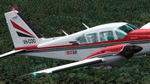
This repaint is for our friends down under and anyone that like to fly down under aircraft. I was asked to build a repaint based on a real world Red and White Aztec that was operating in AU once upon a time. We only have one photo and I guessed the rest of the story. I started with the outstanding red livery that comes with the Alabeo Aztec F model and made a few additions and changes. This involved making a logo for TNTAIR, a white Piper logo in script for the cowling and a little white AZTEC near the tail along with changing the registration to VH-COO. Let's see how it flies with the community. You must have the payware Alabeo PA23-250 Aztec F model for FSX/FSX:SE/P3Dv2-v3 to use this repaint.
| Filename: | TNTAIR_Piper_PA23_Aztec_F_VHCOO.zip |
| License: | Freeware |
| Added: | 26th February 2016, 10:14:56 |
| Downloads: | 475 |
| Author: | Ray Marshall |
| Size: | 22.55 MB |
| Category: Flight Simulator X - Aircraft Repaints, Textures and Modifications | |
| Sportys Pilot Shop Piper Aztec PA23 250 (N706SP) ** UPDATE ** |
|
Images related to this file:
File Description:

This is a special repaint for all those folks that grew up listening and watching the tapes and dvds with the red and white Aztec at Sportys Pilot Shop. This one is famous for the multi-engine training package and also the real life training. Pilots are still training for their multi-engine Airline Transport Pilot rating in this Aztec as recently as last week. I tried very hard to make this repaint as close as possible to the real one at Sportys Academy home base at Clermont County Airport (I69) just outside Cincinnati, OH. Check out the comparison photo and see how close I got. I changed the panel to black just like the real one. You will need the outstanding PA23 250 F Aztec payware add on for FSX/FSX:SE or P3Dv2-v3 from Alabeo.
| Filename: | Sportys_Pilot_Shop_Piper_Aztec_PA23_250_N706SP__UP.zip |
| License: | Freeware |
| Added: | 9th April 2016, 15:20:48 |
| Downloads: | 770 |
| Author: | Ray Marshall |
| Size: | 26.66 MB |
| Category: Flight Simulator X - Aircraft Repaints, Textures and Modifications | |
| Replacement Panel Files PA23 F Aztec |
|
Images related to this file:
File Description:
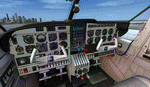
These are only texture files (dds) for replacing the blue or gold colored panels in the Alabeo PA23 Aztec F 250 payware airplane for FSX, FSX:SE, or P3Dv2-v3. You must have the payware add on from Alabeo installed in your flight sim. The download includes 3 new color files - A black one, a gray one, and an ivory or cream colored one. You only need these if you are unhappy with the two choices of bluish and gold or yellowish that comes with the default repaints from Alabeo. Follow the instructions in the readme.txt file included to rename and move one file to change the panel color of a given airplane.
| Filename: | Replacement_Panel_Files_PA23_F_Aztec.zip |
| License: | Freeware |
| Added: | 26th February 2016, 10:18:04 |
| Downloads: | 904 |
| Author: | Ray Marshall |
| Size: | 14.6 MB |
| Category: Flight Simulator 2004 - Scenery Design | |
| Add an Animated Windsock to your scenery - An Illustrated Tutorial |
|
File Description:
How to easily add an Animated Windsock to your scenery - an Illustrated Tutorial. Few items make an airport - especially a GA airport - look more realistic than a Windsock that reacts to wind speed and direction. You can easily add one to your favorite airport by using this short, step by step tutorial. No programming knowledge is needed and all required files are included in the package. Anyone can do it. Please unzip (using folders option) to a temporary location and follow the steps in the tutorial. Compiled in .doc and .pdf formats for your flying enjoyment by David "Opa" Marshall.
| Filename: | Add_an_Animated_Windsock_to_your_scenery__An_Illus.zip |
| License: | Freeware |
| Added: | 3rd September 2005, 15:33:52 |
| Downloads: | 4,068 |
| Author: | David Marshall |
| Size: | 5.5 MB |
| Category: Flight Simulator X - Aircraft Repaints, Textures and Modifications | |
| "Black and White" Embraer EMB-505 Phenom 300 (N5RM) |
|
Images related to this file:
File Description:
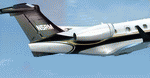
"Black and White" with a gold accent stripe and white engine covers, full black tail, white wings, and black winglets. (N5RM) For FSX, P3D and FSX:Steam. You must have the payware Carenado EMB505 HD Phenom 300 installed to use this repaint.
| Filename: | Black_and_White_Embraer_EMB505_Phenom_300_N5RM.zip |
| License: | Freeware |
| Added: | 2nd October 2015, 19:26:14 |
| Downloads: | 688 |
| Author: | Ray Marshall |
| Size: | 27.98 MB |
| Category: Flight Simulator 2004 - Scenery | |
| Just For Fun 1 |
|
File Description:
Here's a little "just for fun" addition to make your GA flying in California a bit more interesting. Moffett Field, Mountain View, CA is a major landmark in the San Francisco Bay area. It is my understanding that NASA now controls this property and may convert all or a part of it to an Aviation Musuem. Microsoft elected to include the two ENORMOUS hangers that apparently were once used by the Navy to store Blimps and train crews. This scenery has the Goodyear Blimp (by Bill Lyons) doing touch and goes - taking off from inside of and landing in one of the immense hangers! Perhaps not very realistic but great fun to watch! Everything is included plus a recommendation to add John Townsend's great Hangar One scenery to the same airport. Works in FS2004 only. Just unzip to a Temp folder and read the simple installation instructions.
Created by David "Opa" Marshall - Plano, Texas
| Filename: | Just_For_Fun_1.zip |
| License: | Freeware |
| Added: | 29th June 2004, 03:00:05 |
| Downloads: | 2,077 |
| Author: | David Marshall |
| Size: | 192.53 KB |
| Category: Flight Simulator 2004 - Gauges | |
| Easly Add Altitude Callouts to Any Aircraft |
|
File Description:
Hear altitude callouts - (from your trusty co-pilot) - at 400, 300, 200, 100, 50, 40, 30, 20 and 10 feet above the runway. This can be easily done to virtually any aircraft. You may already have the necessary FPDA sound and gauge files but if not, they are included. Just unzip to a temporary directory (using folders option) and follow the very simple instructions, Compiled for your flying enjoyment by David "Opa" Marshall. For FS2004 only.
| Filename: | Easly_Add_Altitude_Callouts_to_Any_Aircraft.zip |
| License: | Freeware |
| Added: | 27th January 2005, 04:38:21 |
| Downloads: | 19,650 |
| Author: | David Marshall |
| Size: | 62.68 KB |


© 2001-2026 AVSIM Online
All Rights Reserved
Privacy Policy |