
Where Flight Simulation Enthusiasts Gather from Around the World!
AVSIM Library - Search Results

| Category: Flight Simulator 2004 - Gauges | |
| AI Radar, Traffic Collision Avoidance System |

|
File Description:
FS2004 Gauge: AI Radar, Traffic Collision Avoidance System (TCAS). This gauge has five ranges from 1 NM to 30 NM. It displays all moving aircraft in green within the selected range. A switch will allow static aircraft to also be displayed in white when desired. Traffic Advisory (TA) aircraft are displayed in yellow, Resolution Advisory (RA) aircraft are shown in red. AI aircraft have their relative altitudes pinned to each aircraft symbol. Bearing to an aircraft can be obtained using the optional 360-degree sweep cursor. For panel or separate window installation. With Radar Icon gauge. By Glenn Copeland
| Filename: | AI_Radar_Traffic_Collision_Avoidance_System.zip |
| License: | Freeware |
| Added: | 8th July 2006, 01:56:49 |
| Downloads: | 19,509 |
| Author: | Glenn Copeland |
| Size: | 244.57 KB |
| Category: Flight Simulator 2002 - Panels | |
| Beech Baron 58 |
|
File Description:
A replacement for the default Baron panel. Hand drawn bitmap with crisp graphics, and a much more accurate layout. Suitable for both VFR and IFR flight, and offers good visibility, even during landings. Flight instruments and radios are all on the main panel, and the switches and ECU are available via a non-intrusive pop-up window. Uses both default and some new custom gauges including a new NAV/GPS switch and a static stormscope. Panel night lighting has been tweaked to offer night time visibility with out the abnoxious pink default color. VC has been left in tact, and will install right over the default panel.
| Filename: | Beech_Baron_58.zip |
| License: | Freeware, limited distribution |
| Added: | 3rd October 2002, 00:40:05 |
| Downloads: | 2,995 |
| Author: | Ian Grant |
| Size: | 1.39 MB |
| Category: Navigation and ATC - Navigation | |
| Flight Time Calculator 1.4.6 (multi-languages installer setup) |
|
File Description: Version 1.4.6 features:
| Filename: | Flight_Time_Calculator_146_multilanguages_installe.zip |
| License: | Freeware |
| Added: | 27th July 2003, 00:43:27 |
| Downloads: | 1,152 |
| Author: | Franck KRIEGER |
| Size: | 1.62 MB |
| Category: Fly! II - Aircraft | |
| Moving Map ROTW 230 PA 28 |
|
File Description:
Moving Map ROTW 230 PA 28 by Laurent Claudet and TJ (ROTW).
The ROTW PA 28 is now equipped with the new ROTW 230 moving map GPS.
Other improvements :
* Improved instruments : airspeed indicator, altimeter, artificial horizon, ADF
* A master switch for the avionics (no more small white switches)
* Improved pilot position : the yoke is now in the middle of the field of view.
* Improved precision of the fuel level, oil pressure and fuel pressure gauges.
* Bugfix for the rheostat : it now changes the level of the instrument lighting and not of the whole cockpit
* Improved sideviews
Make sure that you already have the original PA 28
| Filename: | Moving_Map_ROTW_230_PA_28.zip |
| License: | Freeware, limited distribution |
| Added: | 9th January 2004, 13:40:37 |
| Downloads: | 461 |
| Author: | Laurent Claudet and TJ (ROTW) |
| Size: | 7.62 MB |
| Category: Flight Simulator 2004 - Miscellaneous Files | |
| Go To Any Airport and Fly to London Gatwick |
|
File Description:
Go To Any Airport.
Always wanted to return to your favourite local Airport from aywhere in the world? simply - with no fuss? Look no Further.
Start at your Designated Airport, [in this case London Gatwick in a 737], then Goto any Airport - via FS9 World menu and return to the Original Designated Airport - By Just turning on the GPS and clicking on the Nav Autopilot Heading switch - thats it by Direct GPS. Set Weather and Altitude as required and Speed in autopilot and away you go. Use the FS9 ATC as You Travel, call into designated Airport when close and receive the curent ATIS and Runway approach in use.
HAVE FUN.
| Filename: | Go_To_Any_Airport_and_Fly_to_London_Gatwick.zip |
| License: | Freeware |
| Added: | 7th March 2004, 01:30:26 |
| Downloads: | 546 |
| Author: | Alan Trussell |
| Size: | 4.16 KB |
| Category: Flight Simulator 2004 - Gauges | |
| Kingair Radio 20 |
|
File Description:
Freeware modified default Kingair Radio gauge.
This is the gauge file which contains the six separate Nav 1, 2; Comm 1, 2; Transponder; and ADF radios, as well as the metallic toggle switches. All except the ADF have transparent bitmaps, so that only the numerical frequency display is visible. The separate numerical displays can be placed in any customized radio image with any typical panel-maker program. The black, or grey, rectangular base of the toggle switches have also been made transparent, so that the metallic ring at the base of the switch blends better with a panel background. It should also work in FS2002. This gauge is Freeware.
| Filename: | Kingair_Radio_20.zip |
| License: | Freeware |
| Added: | 3rd December 2004, 02:38:10 |
| Downloads: | 892 |
| Author: | Will Fisher |
| Size: | 28.12 KB |
| Category: Flight Simulator X - Original Aircraft | |
| Piaggio PD-808 V2.2X |
|
Images related to this file:
File Description:
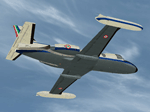
A true FS-X SDK compliant aircraft! DX-10 Tested. Not a FS-9 Port-over!
This is a complete simulation of the Piaggio PD-808. It includes advanced engine management, realistic systems, and some failure modeling. The model features a complete 3-D virtual cockpit,and a 2-D panel. Sounds are inculded. The external model features all typical animations plus a load of custom ones. Also incluides all custom special effects, including different selectable floodlights for the virtual cockpit (by simply flicking ON the proper light switch on the cockpit itself). Plus with a fly-on-the-numbers flight dynamics file. Includes full documentation.
| Filename: | Piaggio_PD808_V22X.zip |
| License: | Freeware |
| Added: | 3rd February 2013, 20:19:44 |
| Downloads: | 2,275 |
| Author: | Mario Noriega |
| Size: | 99.72 MB |
| Category: Flight Simulator 2004 - Gauges | |
| Groundhandling V4.0 |
|
File Description:
This archive contains version 4.0 of my "groundhandling"
gauges, like automated pushback with conversation sounds, a Taxispeed controller using
throttle AND brake settings, an arming switch that activates Taxispeed
after a landing (incl. setting flaps, spoilers, autobrakes Off), Brakes sound,
etc...., and can be added to any FS2004 (!!) aircraft panel.
New in V4.0:
1. Better sound mechanism (using Doug Dawsons XMLsound gauge), with advantages:
- Individually adjustable sound volumes.
- No more "mis-use" of the ADF1 frequency, so no more SoundOn/Off function needed.
2. Reworked bitmaps and code.
3. State-dependant tooltips.
4. Straight pushback before turn is now in meters instead of seconds.
By Rob Barendregt.
| Filename: | Groundhandling_V40.zip |
| License: | Freeware, limited distribution |
| Added: | 4th July 2005, 01:32:44 |
| Downloads: | 28,832 |
| Author: | Rob Barendregt |
| Size: | 427.93 KB |
| Category: Flight Simulator X - Original Aircraft | |
| Aero Union Lockheed P-3A |
|
Images related to this file:
File Description:

P-3A AeroUnion for FSX. P-3C Orion FSX (here) is required in order to use this model.
If it's entered appropriately to [LIGHTS] in aircraft.cfg, an effect will appear by operating the Fire Retardant Spraying switch in VC.
(Refer to the New assign.jpg). This is a native FSX model. However, it is not compatible with DX10. It did not apply the bump mapping. Exterior and painting of this model has been created in more detail than previous work. Especially, the main wing relation (flap and engine nasser, etc.) are the new designs.
| Filename: | Aero_Union_Lockheed_P3A.zip |
| License: | Freeware |
| Added: | 30th March 2014, 14:23:18 |
| Downloads: | 1,838 |
| Author: | Tean FS KBT / Hiroaki Kubota |
| Size: | 6.65 MB |
| Category: Flight Simulator 2004 - Panels | |
| Airbus A320 Detailed Overhead Panel |
|
Images related to this file:
File Description:
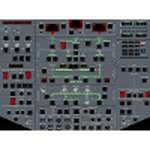
This is a set of gauges for twin-enigne jets, especially Airbus, containing:
- overhead panel with realistic procedures and almost all switches working
- lower EICAS with 10 working screens (F/CTL, FUEL, HYD, DOOR, APU, BLEED, COND, ELEC, WHEEL, EN-GINE, STATUS)
- EICAS switch
- Multiradio gauge (all radio functions in one place)
- optional Multiswitch gauge (flaps, spoilers, gear, autobrake indicators and switches)
It should work with any free or default twin-engine jet aircraft, however it was tested with Airbus models from iFDG and Project OpenSky. It should work on FS2004 and FSX.
Requirements: VasFMC 2.09 or newer in GAUGE version - it provides PFD, ND, upper EICAS, FMC, MCDU.
| Filename: | Airbus_A320_Detailed_Overhead_Panel.zip |
| License: | Freeware |
| Added: | 26th July 2013, 07:13:30 |
| Downloads: | 3,154 |
| Author: | Slawomir Wawak |
| Size: | 12.3 MB |


© 2001-2026 AVSIM Online
All Rights Reserved
Privacy Policy |