
Where Flight Simulation Enthusiasts Gather from Around the World!
AVSIM Library - Search Results

| Category: Flight Simulator X - Original Aircraft | |
| Piaggio P-166 Collection |

|
Images related to this file:
File Description:
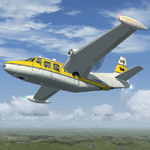
This package contains a FS-X native conversion of all my original Piaggio P-166 models developed for FS-2002/2004. All versions are included: P-166A, P-166BL-2, P-166CL-2, P-166M, P-166S, P-166DL-3 and P-166DP-1. The 3D models are virtually the same, so these are fairly simple models. Yet they come with a VC (no 2D panel this time!). With respect to the FS-2002/2004 releases, they come with very much improved panels, in two flavors: Piston and Turboprop. Gauges developed by Milton Shupe & Scott Thomas for the Aero Commander / Turbo Commander Aircraft series, and Edgar Guinart López of Aeroproyecto for the Embraer 110. Other Gauges from my own Piaggio P-180 & PD-808. Also Included is a brand-new flight model redeveloped from scratch. The 3D models are mildly improved, with a proper pilot figure, main panel backlighting and bump-mapping. Please refer to the Reference and Checklist pages provided via the FS Kneeboard for flying and operating instructions. Models converted with Arno Gerretsen’s Model Converter X.
The Piaggio P-166 is a light small twin. An Exotic twin-engine prop that sold all over the world including America, UK, and Australia. Its origin is traced Back to the Piaggio P-136, a light amphibian, which the P-166 keeps the wings, the engines and the tail planes. The first P-166A flew in November 1957. The aircraft was still in production in the early 21st century in an improved turboprop version, the P-166DP-1.
| Filename: | Piaggio_P166_Collection.zip |
| License: | Freeware |
| Added: | 2nd April 2020, 17:49:58 |
| Downloads: | 703 |
| Author: | Mario Noriega |
| Size: | 56.4 MB |
| Category: Flight Simulator X - Scenery | |
| Toulouse Blagnac (LFBO) v1 |
|
File Description:
This is an addon scenery for FSX of the Toulouse Blagnac Airport LFBO. It has been made using the excellent freeware tool Airport Design Editor for the layout. I have used Sketchup from Google and Model Converter X to design the buildings of the airport.
You will find all the terminals of LFBO and the control tower, as well as the Airbus facilities of the A380 Lagardere plant North East of LFBO, the A380 delivery center Henry Ziegler North West of LFBO, and some buildings of the Airbus facilities in Blagnac, West of LFBO. All buildings have photo textures, most of them taking with my camera, as I am working in the area. All buildings include night textures. You have two landing pads for helicopters like in reality South East of LFBO.
I used google earth for some items position, but the current view not being up to date, I used my knowledge of the area to correctly position the taxiways, parkings, gates and building position.
I used the FSX generic buildings for the other missing buildings, however they have the size and position which corresponds as far as possible to the position of the real buildings. The surroundings of the airport not being too realistic with Ultimate Terrain X or with FSX, I have modified the landclass of the surroundings to make them look more in accordance with reality. I have changed the parking assignment to make sure that the usual traffic will park on the parkings E, F D AB, V and U.
| Filename: | Toulouse_Blagnac_LFBO_v1.zip |
| License: | Freeware |
| Added: | 21st December 2011, 13:09:29 |
| Downloads: | 23,277 |
| Author: | Jose Mauriz |
| Size: | 34.72 MB |
| Category: Flight Simulator X - Scenery | |
| ZGGG Guangzhou Baiyun Int'l Airport 2017 |
|
File Description:
Guangzhou Baiyun International Airport (ZGGG) is the major airport of Guangzhou, China. Located in Guangzhou's Baiyun District, it opened on August 5, 2004, but has gone through major changes since FSX was created. The default version only has one terminal and two runways and is slightly out of place from the actual location. I placed the airport in its real location based upon the charted latitude and longitude of the airport reference point. Guangzhou Baiyun Int'l Airport now has three runways. The third runway opened in February 2015. The centerpiece is the new Terminal 2, faithfully rendered here as much as possible. The terminal footprint and gates are accurate. The 3D terminal itself is a simple Sketchup project with generic textures (including night textures). The scenery converted and placed using MCX's amazing Convert and Place Wizard. I added the FBO ramp and the FEDEX Cargo Ramp Aprons and added some hangars to both locations, all default FSX buildings, so no additional library downloads are required. The new runway (now called 02R/20L) was added with Airport Design Editor. The old runway 02R/20L was renamed to the current runway 02L/20R and the old runway 02L/20R was renamed to the current runway 01/19. All taxiways are accurately drawn and designated with taxisigns using the latest AIRAC 1712 Jeppesen chart for ZGGG. All six ILS approaches are rendered as well as ADE would let me.
| Filename: | ZGGG_Guangzhou_Baiyun_Intl_Airport_2017.zip |
| License: | Freeware |
| Added: | 26th November 2017, 22:43:37 |
| Downloads: | 1,086 |
| Author: | Randy Tyndall |
| Size: | 490.4 KB |
| Category: Orbiter - Miscellaneous Files | |
| Gusev Crater Scenery |
|
File Description:
Gusev Crater is an impact crater on Mars that looks as though a lake may have once filled it in the distant past.
Gusev Crater is about 145 km (90 miles) wide. It is located at 14.6° South latitude and 175.3° East longitude, along the boundary between Mars' southern highlands and its lowland northern plains. The crater is about 3,000 km (1,900 miles) southeast of the volcano Elysium Mons. Scientists believe the Gusev Crater was formed by the impact of an asteroid three to four billion years ago.
A valley named Ma'adim Vallis, which is connected to the south side of the crater, looks like it may have been a river channel that poured water into the crater in the past, forming a large lake. If the crater was indeed a lake, scientists expect it to contain layers of sediments as much as 915 meters (3,000 feet) thick that flowed in with the water. There may be other clues to a watery past within the crater, such as deposits of minerals, such as halite and gypsum, that form when water evaporates. Wet environments are the best places to look for life, which is why scientists are so eager to track down places on Mars that were once wet.
On the 3rd of January 2004, MER-A Spirit, one of the two Mars Exploration Rovers (MER) had landed within an 81 km by 12 km (50 by 7 miles) oval near the center of Gusev Crater. Once settled into its new "home", Spirit will begin its mission of exploring for geologic evidence of the presence of water in Gusev Crater's past.
| Filename: | Gusev_Crater_Scenery.zip |
| License: | Freeware |
| Added: | 5th January 2004, 17:56:22 |
| Downloads: | 1,376 |
| Author: | Robert Stettner (Foxtrot) |
| Size: | 378.72 KB |
| Category: Flight Simulator X - Flight Plans | |
| Chas mod of Stearmandriver RNP RNAV Approach into PAJN Rwy 26 for 737NGX |
|
Images related to this file:
File Description:
Modded StearmanDriver(SD) RNP RNAV Rwy 26 into PAJN, Juneau, Alaska. SD gave us a cool little route that while not LATLONG nor Fixname accurate, it couldn't be without legal and occupational liabilities...and it worked, but if you look at his FixNames and the LATLONG from the PAJN.txt file for the 737 NGX...it did work pretty nicely...at least as nicely as the charted RNAV course into Rwy 8. So I created my own procedure LATLONG rightly or wrongly in a multi-step procedure as follows:
1. I took the raw info provided by SD and flew to each of his waypoints,(if you look, almost all of his FIXs were rounded off...to avoid company or legal problems) noting safe altitude, starting out at 7000ft, creating user waypoints in my GTN750, looking around for first, vertical, then horizontal safety...keeping in mind that Ultimately...I would not be using this data for my Duke, but for the Procedure page of my PMDG 737 NGX..which you already saw me fly with SD's fixes.
2. I took my Turbine Duke up and noted the REAL LATLONG as reported by slewing and world map...transposed those numbers into the format that PMDG's procedures needed DDD.mm fractional minutes. I converted using http://www.directionsmag.com/site/latlong-converter/
3.I created my own mid-point user waypoints from the west CHRTRN,and the NNE CHRTS so we could have approaches from those directions.
4. I put my Duke into autopilot, knowing the lateral info...my flightplan was correct, but I would have to handle the Vnav manually. Turns out its rather manageable with the following info: CHRTRN 5000FT - MARMN 3500FT - TRDWL 2500FT - SALMN 1500 - LEMNN 500 - PAJN5 50
My MOD OF SDs RNP RNAV PAJNRwy 26, will be up on Avsim as ChasModRNP RNAV PAJN Rwy 26.zip
Contact:[email protected] - Support: http://forum.avsim.net/topic/466094-any-interest-in-updated-se-alaska-rnav-rnp-approach-procedures-including-juneau/
| Filename: | Chas_mod_of_Stearmandriver_RNP_RNAV_Approach_into_.zip |
| License: | Freeware |
| Added: | 8th May 2015, 11:35:16 |
| Downloads: | 340 |
| Author: | Chas Reed |
| Size: | 144.78 KB |
| Category: Flight Simulator X - Scenery | |
| Silloth Aerodrome plus Great Orton |
|
File Description:
RAF Station Silloth is a former Royal Air Force station located 1 mile (1.6 km) north-east of Silloth, Cumbria, England and 6.7 miles (10.8 km) south-west of Kirkbride, Cumbria. The station was used by RAF Coastal Command during WW2.
I designed this scenery primarily for my own pleasure using Airport Design Editor and FSX SDK. I use FSX Acceleration and Horizon VFR photo scenery but it should work with standard FSX SP2.
This scenery depicts the airfield as closely as i can get it with the available information. I have modelled all of the Airfield buildings as closely as I could with the information available to me and this was done using Sketchup, the models were then converted for use in FSX using Model converter X.
It is not 100% accurate and no claim is being made by the author that it is. I have depicted the buildings in wartime camo.
All the buildings can be used as as you wish. My only request is that if you should design better textures for them that you let me have a copy, my textures are pretty basic.
Some buildings have night lighting, lights and smoke effects, these should be in your FSX effects files already.
I have not yet completed the Domestic Site but i may do this in the future...(I've hit the buffers for now though!!)
Included in this scenery pack is the Satellite Airfield RAF Great Orton. Built in 1943 to accommodate the larger bombers now being used by the RAF. This airfield is very sparse as i am unable to get much info about it.
Runways, Taxiways, Watch Office and Ground Signals are all that is included in this scenery pack, along with Sloped flattens, crosswind runways and AGN files.
I have included this as a destination for the Bristol Beaufort AI aircraft that i have included with the scenery.
The Bristol Beaufort AI is a freeware model from Alphasim and is used with their permission. I have altered the model textures and aircraft file and it works well enough as AI.
I have used other scenery libraries within this scenery (mainly to depict the village of Silloth) and these will need to be downloaded from the appropriate sources and activated within FSX.
| Filename: | Silloth_Aerodrome_plus_Great_Orton.zip |
| License: | Freeware |
| Added: | 6th December 2015, 22:32:18 |
| Downloads: | 491 |
| Author: | Mark Byers |
| Size: | 357.87 MB |
| Category: X-Plane - Utilities | |
| X-Camera 2.2.1 |
|
Images related to this file:
File Description:
The X-Camera 2.1.1 plugin for X-Plane 9 and 10 is a replacement camera system that lets you define multiple view categories and multiple views within those categories that are associated with specific aircraft. X-Camera is similar to EzDok for FSX only for X-Plane. Watch this short X-Camera demo on YouTube: https://www.youtube.com/watch?v=PgOxG8ejq9A
Each view can have options:
- TrackIR:
Each view can enable or disable the TrackIR input. If the view is out the cockpit window having TrackIR enabled is desirable. However, if the view is a close-up of an instrument panel then having TrackIR disabled is probably the better choice since the view will be stable making it easy to click on cockpit controls with the mouse. We also support LinuxTrack on Linux and Mac systems.
- HeadShake:
If the HeadShake plugin from SimCoders is installed then the view can accept input from HeadShake. Similar to the TrackIR feature you will likely want this enabled for certain views but disabled for views on instrument panel close-ups where a stable camera makes it easier to use a mouse to control cockpit knobs and switches. The HeadShake plugin must be at version 1.3 or higher for the integration to work.
- Scenic Flyer:
If the Scenic Flyer plugin from Digital Avionics is installed then the view can choose to display either the Scenic Flyer Glass panel or GA panel.
- Smooth Transition:
When this option is enabled the camera with smoothly transition from one view to another over approximately half a second. When the option is off the view will transition immediately.
- Views can be controlled in a number of ways:
> Each view can be positioned by using keyboard keys or a control panel
> The camera'™s X, Y, Z, Heading, and Pitch can all be adjusted for each view
> Views can be assigned to a HotKey or JoyStick button for easy selection
> HotKey or JoyStick button can be used to navigate to next or previous views
> The views for a specific aircraft can be saved to a CSV file for easy editing
- Walk Mode:
Any view'™s camera can be placed in Walk Mode. While in this mode the camera can be walked or floated around using keyboard input. If you ever played the video game asteroid that is what walk mode is like. The mode is particularly useful for pre-flight inspections of your aircraft. You can create a external view and after selecting that view you can "Walk" the camera around checking out your landing gear, props, etc.
- Linear Transitions and Auto Advance:
Linear transitions allows you to define a transition between two adjacent cameras in category. This capability, in conjunction with the auto advance feature, allows you define fairly sophisticated animations that can be used for automated Pre-flight inspections, scenery viewing, and cool transitions affects that can be used when creating flight videos. All the transitions in our YouTube video were done with X-Camera.
- Bezier Curve Transitions:
Bezier curve transitions allows you to define a transition between three or more adjacent cameras in a category. This capability, in conjunction with the auto advance feature, allows you define fairly sophisticated animations that have an ultra smooth movement between the curve control points.
- Many Unique Camera Attributes:
Tracking Cameras - Camera Leveling - Smooth Camera Joining - Auto Advance to the Next Camera - Individual Zoom and Field of View Setting - External Cameras - Free Cameras - Target Following Cameras - Cineflex Cameras - Automatically Generate Unique Orbit and Fly-By Animations
X-Camera can create unique orbit and fly-by camera sequences by providing a few key parameters
- Airport Cameras:
You can define a set of free cameras associated with an airport. You can create up to 2,000 cameras per airport. X-Camera can also automatically populate airport cameras by reading the airport scenery files and creating cameras at runways, starting locations, taxiway signs, and airport viewpoints. You can map a joystick button to quickly switch between your aircraft camera set and the nearest camera at the nearest airport.
- Target Following Cameras:
Targets are locations defined by a latitude, longitude, and elevation in meters. Target following cameras are a special type of external camera that is attached to your plane and it has the ability to track a selected target. You can also view the target reciprocal which as a view from the target back to you plane.
X-Camera Tutorial Videos: There is also a four part series of tutorial videos that will help you get started with X-Camera. You can access them from the X-Camera Tutorial Page: https://www.stickandrudderstudios.com/x-camera-tutorial-videos/
The full manual is included in the zip file you can also view it here: https://www.stickandrudderstudios.com/downloads/User_Guide.pdf
| Filename: | XCamera_221.zip |
| License: | Shareware, limited functionality |
| Added: | 27th January 2017, 15:14:21 |
| Downloads: | 478 |
| Author: | Mark Ellis |
| Size: | 4.61 MB |


© 2001-2026 AVSIM Online
All Rights Reserved
Privacy Policy |