
Where Flight Simulation Enthusiasts Gather from Around the World!
AVSIM Library - Search Results

| Category: Prepar3D V1-4 - Scenery | |
| TNCC - Curaçao International Airport |

|
File Description:
This is my first scenary, any problem or sugestion send-me an e-mail ([email protected]). The scenery was made using the Airport Design Editor, SketchUp 2017 an others.
Curaçao International Airport (IATA: CUR, ICAO: TNCC), (Dutch: Hato Internationale luchthaven) also known as Hato International Airport (formerly Dr. Albert Plesman International Airport), is the only airport for the island of Curaçao.
The airport is located on the north coast of Curaçao, 12 kilometres (7.5 mi) from the capital Willemstad. Curaçao International Airport services flights from the Caribbean region, South America, North America and Europe and has the third longest commercial runway in the Caribbean region after Rafael Hernández Airport in Puerto Rico and Pointe-à -Pitre International Airport in Guadeloupe.
The airport serves as a main base for Divi Divi Air, Jetair Caribbean as well as EZAir; it formerly served as a main base for ALM, KLM, DCA, DAE and Insel Air.
Located on the Dutch Caribbean island of Curaçao, connects Europe, the Americas and the Caribbean. Curaçao International Airport is served by several airlines.
The Curaçao International Airport has one of the longest runways in the Caribbean, accommodating up to a Boeing 747. In the early fall of 2014, Curaçao International Airport opened a new General Aviation Center offering premier service in a separate building with a private entrance and exit and special amenities.
| Filename: | TNCC__Curaao_International_Airport.zip |
| License: | Freeware |
| Added: | 8th March 2021, 19:00:36 |
| Downloads: | 562 |
| Author: | Eduardo Puelker |
| Size: | 7.24 MB |
| Category: Flight Simulator 2004 - Sounds | |
| General Electric CF6-80C2 Complete Sound Suite |
|
Images related to this file:
File Description:
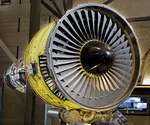
After a long hiatus due to payware obligations and a lack of spare time, I'm back with a bang. Over the course of the last few years or so I have slowly worked on CF6 sounds mainly for personal use. Over time I ended up with something that I knew I just had to share with the Flight Sim community. This is a complete all in one download for all CF6-80C2 powered aircraft. Having spent countless amounts of flights on CF6-80C2 powered A300-600s and 767s I can swear by the authenticity of this work. Additionally I have spent hours on end listening to sound clips and watching videos of CF6 powered aircraft. The quality and accuracy of these sounds will absolutely blow you away! I have included 2 specific soundsets for a wide variety of CF6-80 powered aircraft. One for the CF6-80C2A series that covers the A300-600 and A310 and another for the CF6-80C2B & D series for 767-200ER/300/400, 747-400, MD-11, Air Force 1 & C5 Galaxy M aircraft. All sounds are in full uncompressed Stereo and Mono PCM quality and have been expertly edited, mixed and compiled by myself. You will not encounter distortion or phasing issues, and because of this, these sounds are fully compatible with FSX even without soundcones. Remember, payware doesn't automatically mean better! So turn up the volume and bass and let these sounds immerse you to an all new level!!
| Filename: | General_Electric_CF680C2_Complete_Sound_Suite.zip |
| License: | Freeware, limited distribution |
| Added: | 29th April 2012, 14:14:41 |
| Downloads: | 10,853 |
| Author: | Emil Serafino |
| Size: | 176.22 MB |
| Category: Prepar3D V1-4 - Utilities | |
| GENav pro Navigation |
|
Images related to this file:
File Description:

Previous payware product at SimMarket, now 100% free.
With GENav pro you will view all AIRAC navigation data and terminal procedures inside Google Earth. GENav pro run under Windows and require only Google Earth for displaying. You can also edit your own routes or just copy routes into GENav to view in Google Earth. You can search for example an airport or a fix by short or long name, Google Earth will take you there.
You can connect to Microsoft Flight Simulator to view your aircraft. Moving map and heading is available.
GENav pro is highly optimized for best performance and clear views without clutter. There are smart filters to select relevant data to display, all AIRAC items are available. You will find all data such as nav-aid frequencies, airport runways with ILS frequencies by click the displayed icons in Google Earth.
You can edit routes visual direct inside Google Earth by click. The database can always be updated with Navigraph's latest AIRAC data.
With GENav you can easy build valid routes. Unlike other common autorouting program, GENav is the tool for you to build routes with correct airway direction and correct connected to SID/STAR's. You will easy draw your routes most stright and correct to destination. It is also excellent for visual and instrument navigation flights.
FEATURES:
*** Display airports, nav aids, waypoints
*** Display High/Low airways and airways direction
*** Display SID/STAR, Approaches and Transitions
*** Display ARTCC/FIR border
*** AIRAC data available by click
*** Search airport and fixes
*** AIRAC data compatible Navigraph data
*** Visual editable routes
*** VOR to VOR route navigation data
*** Display your aircraft
BASIC SYSTEM REQUIREMENTS:
*** Windows with Google Earth installed
( Notice, no flightsim program required )
OPTIONALLY REQUIREMENTS:
*** SID/STAR require the Navigraph purchase or an alternative free source
*** Airways direction & high/low info require the Navigraph purchase
*** To display aircraft, Microsoft Flight Simulator or Prepare3D v1/v2, with free FSUIPC is required.
*** To display aircraft at a separate computer, also the payware WideFS is required.
| Filename: | GENav_pro_Navigation.zip |
| License: | Freeware |
| Added: | 25th May 2016, 11:24:52 |
| Downloads: | 654 |
| Author: | Lennart Vedin |
| Size: | 4.5 MB |
| Category: Flight Simulator 2004 - Utilities | |
| GENav pro Navigation |
|
Images related to this file:
File Description:

Previous payware product at SimMarket, now 100% free.
With GENav pro you will view all AIRAC navigation data and terminal procedures inside Google Earth. GENav pro run under Windows and require only Google Earth for displaying. You can also edit your own routes or just copy routes into GENav to view in Google Earth. You can search for example an airport or a fix by short or long name, Google Earth will take you there.
You can connect to Microsoft Flight Simulator to view your aircraft. Moving map and heading is available.
GENav pro is highly optimized for best performance and clear views without clutter. There are smart filters to select relevant data to display, all AIRAC items are available. You will find all data such as nav-aid frequencies, airport runways with ILS frequencies by click the displayed icons in Google Earth.
You can edit routes visual direct inside Google Earth by click. The database can always be updated with Navigraph's latest AIRAC data.
With GENav you can easy build valid routes. Unlike other common autorouting program, GENav is the tool for you to build routes with correct airway direction and correct connected to SID/STAR's. You will easy draw your routes most stright and correct to destination. It is also excellent for visual and instrument navigation flights.
FEATURES:
*** Display airports, nav aids, waypoints
*** Display High/Low airways and airways direction
*** Display SID/STAR, Approaches and Transitions
*** Display ARTCC/FIR border
*** AIRAC data available by click
*** Search airport and fixes
*** AIRAC data compatible Navigraph data
*** Visual editable routes
*** VOR to VOR route navigation data
*** Display your aircraft
BASIC SYSTEM REQUIREMENTS:
*** Windows with Google Earth installed
( Notice, no flightsim program required )
OPTIONALLY REQUIREMENTS:
*** SID/STAR require the Navigraph purchase or an alternative free source
*** Airways direction & high/low info require the Navigraph purchase
*** To display aircraft, Microsoft Flight Simulator or Prepare3D v1/v2, with free FSUIPC is required.
*** To display aircraft at a separate computer, also the payware WideFS is required.
| Filename: | GENav_pro_Navigation.zip |
| License: | Freeware |
| Added: | 25th May 2016, 11:24:32 |
| Downloads: | 533 |
| Author: | Lennart Vedin |
| Size: | 4.5 MB |
| Category: Miscellaneous Files - Demos from Commercial Vendors | |
| Singapore Airlines Airbus A380 version 2 |
|
File Description:
Demoversion with banners, new VOR gauge, with new PANEL and GAUGES, new external model, sound and virtuall cockpit. The Airbus A380 is a doubledecker, four-engined airliner manufactured by Airbus S.A.S. It first flew on April 27, 2005 from Toulouse, France. Commercial flights should begin in 2006 after 15 months of testing. During much of ist development, the aircraft was known as the Airbus A3XX. The A380 is now the largest passenger airliner, topping the Boeing 747, which was the largest for 35 years. However, the Antonov An-225 retains the record of being the world's largest commercial aircraft. The media has termed the A380 a "superjumbo", with some comparing it to Howard Hughes's Spruce Goose. The first A380 prototype was unveiled during a ceremony in Toulouse, France, on January 18, 2005. Its manufacturer's serial number is 001, and is registered as F-WWOW. The new Airbus will initially be sold in two versions: the A380-800, carrying 555 passengers in a three-class configuration or up to 800 passengers in a single-class economy configuration. Expected range for the -800 model is 8,000 nautical miles (14,800 km). The second model, the A380-800F dedicated freighter, will carry 150 tons of cargo 5,600 miles (10,400 km). Airbus made the cockpit layout, procedures and handling characteristics similar to those of other Airbus aircraft to reduce crew training costs. Likewise, the A380 features a glass cockpit and side-stick flight controller. Panel, GAUGES, model, sound and textures by www.afs-design.de - Author: A.Meyer.
| Filename: | Singapore_Airlines_Airbus_A380_version_2.zip |
| License: | Commercial demo |
| Added: | 22nd March 2008, 00:56:59 |
| Downloads: | 2,866 |
| Author: | Andreas Meyer |
| Size: | 2.04 MB |
| Category: Miscellaneous Files - Demos from Commercial Vendors | |
| AIR FRANCE Airbus A380v2, , |
|
File Description:
Demoversion with banners, new VOR gauge, with new PANEL and GAUGES, new external model, sound and virtuall cockpit. The Airbus A380 is a doubledecker, four-engined airliner manufactured by Airbus S.A.S. It first flew on April 27, 2005 from Toulouse, France. Commercial flights should begin in 2006 after 15 months of testing. During much of ist development, the aircraft was known as the Airbus A3XX. The A380 is now the largest passenger airliner, topping the Boeing 747, which was the largest for 35 years. However, the Antonov An-225 retains the record of being the world's largest commercial aircraft. The media has termed the A380 a "superjumbo", with some comparing it to Howard Hughes's Spruce Goose. The first A380 prototype was unveiled during a ceremony in Toulouse, France, on January 18, 2005. Its manufacturer's serial number is 001, and is registered as F-WWOW. The new Airbus will initially be sold in two versions: the A380-800, carrying 555 passengers in a three-class configuration or up to 800 passengers in a single-class economy configuration. Expected range for the -800 model is 8,000 nautical miles (14,800 km). The second model, the A380-800F dedicated freighter, will carry 150 tons of cargo 5,600 miles (10,400 km). Airbus made the cockpit layout, procedures and handling characteristics similar to those of other Airbus aircraft to reduce crew training costs. Likewise, the A380 features a glass cockpit and side-stick flight controller. Panel, GAUGES, model, sound and textures by www.afs-design.de - Author: A.Meyer.
| Filename: | AIR_FRANCE_Airbus_A380v2_.zip |
| License: | Commercial demo |
| Added: | 12th April 2008, 02:10:45 |
| Downloads: | 3,203 |
| Author: | Andreas Meyer |
| Size: | 2.15 MB |
| Category: Miscellaneous Files - Demos from Commercial Vendors | |
| Emirates Airbus A380 |
|
File Description:
Demoversion with banners, new VOR gauge, with new PANEL and GAUGES, new external model, sound and virtuall cockpit. The Airbus A380 is a doubledecker, four-engined airliner manufactured by Airbus S.A.S. It first flew on April 27, 2005 from Toulouse, France. Commercial flights should begin in 2006 after 15 months of testing. During much of ist development, the aircraft was known as the Airbus A3XX. The A380 is now the largest passenger airliner, topping the Boeing 747, which was the largest for 35 years. However, the Antonov An-225 retains the record of being the world's largest commercial aircraft. The media has termed the A380 a "superjumbo", with some comparing it to Howard Hughes's Spruce Goose. The first A380 prototype was unveiled during a ceremony in Toulouse, France, on January 18, 2005. Its manufacturer's serial number is 001, and is registered as F-WWOW. The new Airbus will initially be sold in two versions: the A380-800, carrying 555 passengers in a three-class configuration or up to 800 passengers in a single-class economy configuration. Expected range for the -800 model is 8,000 nautical miles (14,800 km). The second model, the A380-800F dedicated freighter, will carry 150 tons of cargo 5,600 miles (10,400 km). Airbus made the cockpit layout, procedures and handling characteristics similar to those of other Airbus aircraft to reduce crew training costs. Likewise, the A380 features a glass cockpit and side-stick flight controller. Panel, GAUGES, model, sound and textures by www.afs-design.de - Author: A.Meyer.
| Filename: | Emirates_Airbus_A380.zip |
| License: | Commercial demo |
| Added: | 24th May 2008, 08:30:10 |
| Downloads: | 2,150 |
| Author: | Andreas Meyer |
| Size: | 2.05 MB |
| Category: Flight Simulator 2004 - Aircraft Repaints, Textures and Modifications | |
| Louisiana State Police Texture Updates Bell/Textron 430 |
|
File Description:
FS2004 Bell/Textron 430 Helicopter Louisiana State Police Updates
This package contains 2 revised texture sets for: N810SP & N918SP which are based here in Baton Rouge.
These fixes add the gold stripe on the tail and reflect the readjusted bottom
gold cheat stripe and a few more small tweaks that make the textures more accurate.
There is a well known member of the FS Community that is also painting up more LSP Bell430s.I believe that his will feature 430s from LSP Troop I,B and C.
Giving you all more N#'s to fly based on your preference of which Troop you want to fly for.So keep an eye out for more LSP Bell 430s in the near future!!
As always....Enjoy!!
**P.S.***
I am finishing up on a custom scenery to compliment these repaints.
The scenery will feature a large photoreal terrain area of the Independence Park area here in Baton Rouge wich houses on its grounds the following:
Louisiana State Police Headquarters,Louisiana Statepolice Training acadamy,various State Gov't offices such as Dept. of Motor Vehicles,Louisiana State Office of Emergency Managment,State fire Marshals Offices,e.t.c.....
The main Helipad is set up as a runway..rwys 9-27 which feature their own ILS systems with outermarkers,an NDB,Fictioal Airport Designation of 1LSP.Trees,Military Landing Zones,resturants,minmalls,gas stations along the perimeter,the main Fire House/Fire Station for that area.the Main branch of the Public Library and the big school bus transfer area on the west side.Street lights along the roadways,and much more.With minimal impact of FPS.
This will be a great add-on tool for the real LSP and AIr Med pilots who fly into this place everyday.Now you guys/gals can practice approaches in inclement weather conditions without fear of ruining a 5 million dollar chopper,all the while honing your IMC skills.
This scenery will integrate seemlessly with the upcoming release of KBTR v2.
The screenshots in this archive are from KBTRv2 Beta and the 1LSP beta sceneries!!
Keep an eye out at the BSMP forum for updates and preview screenshots... www.bsmp.co.nz
| Filename: | Louisiana_State_Police_Texture_Updates_BellTextron.zip |
| License: | Freeware |
| Added: | 25th May 2008, 19:00:07 |
| Downloads: | 358 |
| Author: | Joe DeGregorio / Alan Devins / Rory Kelly / Keith Devins |
| Size: | 2.96 MB |
| Category: Flight Simulator X - Utilities | |
| GENav pro Navigation |
|
Images related to this file:
File Description:

Previous payware product at SimMarket, now 100% free.
With GENav pro you will view all AIRAC navigation data and terminal procedures inside Google Earth. GENav pro run under Windows and require only Google Earth for displaying. You can also edit your own routes or just copy routes into GENav to view in Google Earth. You can search for example an airport or a fix by short or long name, Google Earth will take you there.
You can connect to Microsoft Flight Simulator to view your aircraft. Moving map and heading is available.
GENav pro is highly optimized for best performance and clear views without clutter. There are smart filters to select relevant data to display, all AIRAC items are available. You will find all data such as nav-aid frequencies, airport runways with ILS frequencies by click the displayed icons in Google Earth.
You can edit routes visual direct inside Google Earth by click. The database can always be updated with Navigraph's latest AIRAC data.
With GENav you can easy build valid routes. Unlike other common autorouting program, GENav is the tool for you to build routes with correct airway direction and correct connected to SID/STAR's. You will easy draw your routes most straight and correct to destination. It is also excellent for visual and instrument navigation flights.
FEATURES:
*** Display airports, nav aids, waypoints
*** Display High/Low airways and airways direction
*** Display SID/STAR, Approaches and Transitions
*** Display ARTCC/FIR border
*** AIRAC data available by click
*** Search airport and fixes
*** AIRAC data compatible Navigraph data
*** Visual editable routes
*** VOR to VOR route navigation data
*** Display your aircraft
BASIC SYSTEM REQUIREMENTS:
*** Windows with Google Earth installed
( Notice, no flightsim program required )
OPTIONALLY REQUIREMENTS:
*** SID/STAR require the Navigraph purchase or an alternative free source
*** Airways direction & high/low info require the Navigraph purchase
*** To display aircraft, Microsoft Flight Simulator or Prepare3D v1/v2, with free FSUIPC is required
*** To display aircraft at a separate computer, also the payware WideFS is required
| Filename: | GENav_pro_Navigation.zip |
| License: | Freeware |
| Added: | 23rd May 2016, 19:57:35 |
| Downloads: | 1,579 |
| Author: | Lennart Vedin |
| Size: | 4.5 MB |
| Category: Flight Simulator X - Utilities | |
| Graphic Realism and FSX Optimization |
|
File Description:
The add-ons configuration step by step
Not configured FSX is a pain in the neck for many people. A small number of fps and frequent CTD (crash to desktop) can be extremely annoying or even depressing to some users. A lot of you probably came to a conclusion that it was going to be a losing battle and you gave up after a few fruitless days or you spent money on the FSPS-XTREME FSX PC V2 program, which can automatically do practically everything for us. But what's the point of spending money on something that we can do by ourselves with the help of this handbook?
I myself was dealing with the FSX platform three times before I gave up FS9. Microsoft gave out the engine to us, but in order to make sense, our passion involves radical tuning of the device. On the ground of one's own experience and thousands of hours devoted by people to diving into the core of the platform, I'll present a way of installation, add-ons selection and their configuration starting from the installation of the system. Having done the procedures described below, FSX will look beautiful and it'll work smoothly even with challenging sceneries. The entirety is based on quite a popular hardware configuration, which will let us use 85% of the graphic potential of Microsoft Flight Simulator X. We want t to achieve the goal of minimum 25 fps in VC B738 PMDG NGX, with challenging sceneries, flying in the window mode. For the mode the full screen efficiency should reach 33 fps.
In this handbook, I'm neither going to describe each and every change made in cfg nor explain what the alterations are to conduce. You will be given a simple and ready recipe which I use myself. I can't guarantee a 100% satisfaction for the poorer equipment computers. I can assure you, however, that FSX will definitely work so much better and playing with FSX sliders or with the size of textures in REX you will be able to obtain the desired effect.
| Filename: | Graphic_Realism_and_FSX_Optimization.zip |
| License: | Freeware, limited distribution |
| Added: | 15th November 2013, 20:33:26 |
| Downloads: | 5,755 |
| Author: | Grzegorz Trzoch |
| Size: | 3.96 MB |


© 2001-2026 AVSIM Online
All Rights Reserved
Privacy Policy |