
Where Flight Simulation Enthusiasts Gather from Around the World!
AVSIM Library - Search Results

| Category: Flight Simulator X - Scenery | |
| ENTA - Masjok Airfield - Tana (Finnmark), Norway *v2* |

|
Images related to this file:
File Description:
**This is a second version of the Masjok Airfield. This version fixed the taxiways and location of the airfield. If you have the old scenery, please disable it!** . I made this because i wanted to fly at my nearest airfield. The airfield can operate everything smaller than a Twin Otter. It's in the middle of the region East-Finnmark in Norway, so you can fly to a lot of other airports around the region. Happy flying :D
Check out my Facebook page for repaints!: http://facebook.com/krijagrepaints
Check out my page for other repaint and scenery download's: http://krijagrepaints.wix.com/krijag-repaints
| Filename: | ENTA__Masjok_Airfield__Tana_Finnmark_Norway_v2.zip |
| License: | Freeware |
| Added: | 9th March 2016, 22:44:50 |
| Downloads: | 505 |
| Author: | Kristian Jaegervand |
| Size: | 6.37 KB |
| Category: Flight Simulator X - Scenery Design | |
| 3D People Library BUGFIX |
|
File Description:
This is a Bugfix for the 3d People library, which corrects a bug in FSX on higher situated airports. (https://library.avsim.net/download.php?DLID=192454)
This bug causes a misplacement of the objects depending on the altitude of the airport.
This means that if you have placed an object on its correctly position at an airport with higher altitude (for example 1600 Ft),
this object will be shown up to two meters from its placed position after a new booting of the FSX.
This Bugfix correct this issue. This Bugfix does not touch other sceneries in which the 3d People library is already implemented.
This Bugfix is therefore highly recommended.
| Filename: | 3D_People_Library_BUGFIX.zip |
| License: | Freeware |
| Added: | 21st May 2017, 16:34:20 |
| Downloads: | 2,706 |
| Author: | Wolfgang Allers |
| Size: | 30.82 MB |
| Category: Flight Simulator 2004 - AFCAD Files | |
| Irish Sea Military Traffic |
|
File Description:
This is a little project I worked on to increase traffic on the Irish Sea. I also have amended some default AFCAD files and added gates and opened airports for Military Traffic. Enclosed you will find AFCADs for Kerry (Fictional)& Baldonnel Air Bases in Ireland and Valley EGOV in the UK. I've included flight plans for Aer Corps (Irish Air Force) and fictional RAF plans for Valley to allow aircraft to fly back and forth between these locations. Aircraft are not included as its up to you to what you want to include. You will need the MRAI installer for the flight plans www.mostrealisticai.com
| Filename: | Irish_Sea_Military_Traffic.zip |
| License: | Freeware |
| Added: | 13th April 2004, 15:01:17 |
| Downloads: | 1,194 |
| Author: | René Bruun |
| Size: | 22.96 KB |
| Category: Flight Simulator 2004 - Aircraft Repaints, Textures and Modifications | |
| Air Inuit Boeing 737-200 |
|
Images related to this file:
File Description:

This is a repaint for the Aerosim Boeing 737-200ADV, of the Air Inuit Boeing 737-200C. Air Inuit is a Canadian airline serving many northern towns and cities, where,a s the name suggests, the people of the Inuit live. Air Inuit has only one jetliner, and it is this Boeing 737-200C, which seems adapted structurally for the airports it operates from. Because of this the repaint isn't 100% accurate, since with this repaint I can not alter the model itself, only the paintjob that is "pasted onto" the model by FS. The repaint itself, however, is quite accurate. I wish you many happy landings!
| Filename: | Air_Inuit_Boeing_737200.zip |
| License: | Freeware |
| Added: | 29th April 2010, 10:14:01 |
| Downloads: | 273 |
| Author: | Benjamin van Soldt, Aerosim |
| Size: | 2.74 MB |
| Category: Flight Simulator X - Aircraft Repaints, Textures and Modifications | |
| FSX Thomson Airways Camsim B787-8 |
|
Images related to this file:
File Description:
Thomson Airways is the largest charter Airline in the World. Operating from 22 airports in the UK to holiday destinations in Europe, North/South America, Africa, Asia and The Caribbean.
This is a repaint in the new livery which has a darker blue on the fuselage and tail, and drops the 'fly.com' from the logo. (based on the repaint of First Choice Airways 757 G-OOBA).
Thomson Airways will be the European launch airline for the 787.
Repaint is by Ben Thomson and the model is the original Camsim 787-8 with full animations and features. These textures are in 32 bit. Created for FSX but works with FS9, see readme.
| Filename: | FSX_Thomson_Airways_Camsim_B7878.zip |
| License: | Freeware |
| Added: | 27th December 2009, 17:48:59 |
| Downloads: | 461 |
| Author: | Ben Thomson, Camsim |
| Size: | 3.55 MB |
| Category: Flight Simulator 2004 - Scenery | |
| RJTT - Tokyo (Haneda) International Airport - Tokyo, Japan |
|
Images related to this file:
File Description:
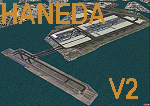
This is a reload of my recent Haneda scenery (RJTT_JS.zip) and contains all fixes and missing files. Haneda International (RJTT) is one of the oldest (1931) civil airports in Japan. Over 80% of its traffic is domestic and, with the opening of the new Terminal 2, is a major hub for both JAL and ANA airlines. This scenery I did for myself because I've always preferred Haneda to Narita. This scenery includes photo-ground cover for the airport with custom objects including the new runway 5 island and harbor Aqualine structures. Certainly not a patch on the many fine commercial sceneries available but it's free and an improvement over the default.
| Filename: | RJTT__Tokyo_Haneda_International_Airport__Tokyo_Ja.zip |
| License: | Freeware, limited distribution |
| Added: | 20th March 2015, 14:07:00 |
| Downloads: | 6,719 |
| Author: | John Stinstrom |
| Size: | 7.32 MB |
| Category: Flight Simulator 2004 - Scenery | |
| Hellas Scenery Project (HSP) - All in One scenery package 1 of 2 |
|
Images related to this file:
File Description:
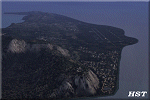
First of the two files needed. The package includes all freeware scenery created by the HSP team for Greece in FS9 up to June 2009. The package bundles all HSP released scenery in one pack which was necessary following the loss of several files after avsim's file library crash.
By using this scenery you do not need to download anything else from HSP. Included are detailed airport sceneries of LGAL Alexandroupolis, LGAV Athens Venizelos, LGIR Iraklion, LGKO Kos, LGMK Mikonos, LGSA Chania, LGSO Syros, LGSR Santorini as well as HSP base scenery with essential improvements to other airports and finally the detailed mesh terrain for all Hellenic territory.
| Filename: | Hellas_Scenery_Project_HSP__All_in_One_scenery_pac.zip |
| License: | Freeware, limited distribution |
| Added: | 20th May 2010, 13:12:04 |
| Downloads: | 165,096 |
| Author: | Hellas Scenery Team (HST) |
| Size: | 59.32 MB |
| Category: Flight Simulator 2004 - Sounds | |
| ATC Voices -Airport names set 10 |
|
File Description:
A collection of 14 additional or corrected airport names, for use with
Flight Simulator 2004 and FS2002. Installation requires the
EditVoicepack software (see
http://bevelstone.xs4all.nl/FlightSimulator/EditVoicepack) by Lars
Møllebjerg which is also available free download from the usual Flight
Simulator download sites such as Avsim.
The airports represented here are:
EDEL: Langenlonsheim (Germany),
EFMI: Mikkeli (Finland),
EFSI: Seinajoki (Finland),
EFTS: Teisko (Finland),
KOT: Kotlik (USA),
LFQN: St Omer/Wizernes (France),
LSZF: Birrfeld (Switzerland),
MPLP: Cap Ramon Xatruch (Panama),
MRAO: Turtuguero (Costa Rica),
OEGT: Guriat (Saudi Arabia),
SKEM: San Pedro de Uraba/La Esmeralda (Colombia),
SKNQ: Nuqui (Colombia),
WMBI: Taiping (Malaysia), and
Z11F: Alavus Highway Strip (Finland).
| Filename: | ATC_Voices_Airport_names_set_10.zip |
| License: | Freeware |
| Added: | 25th September 2007, 17:13:50 |
| Downloads: | 1,693 |
| Author: | John Hinson |
| Size: | 11.46 KB |
| Category: Flight Simulator X - Utilities | |
| FS2004/FSX Flight Analyzer, Logbook Utility V4.09 |
|
Images related to this file:
File Description:
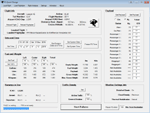
FS2004/FSX Flight Analyzer Utility V4.09
Flight Data Recorder - Logbook.
NOW WITH STATISTICS TOP 5 AIRPORTS, CITIES AND COUNTRIES.
Very easy to use, just make a flight plan in the simulator or in this utility.
What this program do:
- quickly change the settings of FSX/Fs2004, such as time, date, fuel, weight, traffic etc.
- start a failure sytem, such as gear, flaps, engine, etc.
- freeze the time, so you can fly in a for everlasting sunset.
- runway detecting system to see wich runways are in use.
- flight analyzing/data recording from departure to parking at the gate.
- When flight analysis is finished you can print a report, the report is automaticly saved as pdf File.
- graphical landingchart.
- record all your flights
- quickly look to your FSX display settings (only FSX) and change them even before the flight simulator is running.
- After a flight is finished FsQC saves your flight automaticly as 'FsQC last Flight', so you can continue the next day or hour.
Flight analysis start recording at the moment when you begin taxiing.
It gives you huge information such as:
- takeoff- and landing-weight.
- takeoff- and landing-roll in m. and ft.
- separate fuel consumption in taxi, climb, cruise and descent.
- maximum banking in flight.
- which speed you using the flaps and gear.
- when autopilot on or off.
- vertical speed on touchdown.
- reverser set after landing.
- wich speed you cancel reverser.
- bouncing at landing.
- graphical landingchart.
- and lots of more.
You can better look the example of the pdf document located in the 'Flight Reports' folder.
Logbook records:
- fuel consumption.
- payload.
- distance.
- number of different airports.
- flight hours.
- landings.
- flaps.
- speed.
- and lots of more.
- quickly show touchdown wind information in a picture.
- quickly show the graphical landing chart.
- Now with statistics: top 5 Countries, Cities and Airports
Requirements:
Computer with vista or higher and internet access.
Microsoft .net framework 4.6 or higher.(free download on microsft.com)
Flightsimulator FSX or 2004 and FSUIPC installed.
Note: requires paid activation for full use.
Register and you have 1 month free.
Program fully works without registration at airport Athens and Iraklion (Greece)
| Filename: | FS2004FSX_Flight_Analyzer_Logbook_Utility_V409.zip |
| License: | Shareware, time limited |
| Added: | 3rd March 2019, 00:20:37 |
| Downloads: | 251 |
| Author: | Evander Tholen |
| Size: | 3.35 MB |
| Category: Prepar3D V1-4 - Aircraft Repaints, Textures and Modifications | |
| Asiana Airlines 1998 AI Package |
|
File Description:
Asiana and Korean Air had full control of the Korean domestic market in 1998 as South Korea's only 2 scheduled airlines, making them appear at the vast majority of Korean airports. 737-500s were exiting the fleet, with only 3 remaining, and the first A321 had just come online. International routes were flown by 747-400 Combis or 767-300s, with several "tag on" routes onward from Seoul. Asiana served many commercial airports in Japan with 737-400s at the time, and is an important part of the Japanese traffic as well. The carrier had 2 737-500s and it's first A321 painted in a special "Experimental Color Scheme"(EC), and this is represented in the flightplans. One 737-500 also remained in a slightly different older livery dubbed as the "1994" colors, while the rest of the fleet had been modified to the "1998" colors. As a BONUS, ranmori has painted the 747-400, 747-400M and 737-400 in the 1994 livery for use with those flightplans, though there is no use for them in these 1998 plans. Repaints included for the FAIB 737-400, 737-500, 767-300, 747-400, and A321. All repaints were done by the very talented Ranmori Scythe, flightplans done by the not-so-talented Chasen Richardson. Part of the 1998 Flight Simulator Project. Follow us on Facebook at facebook.com/flightsim98 and on instagram as @bayviationsim. For more Retro AI, check out the forums at: http://retroai.proboards.com/
| Filename: | Asiana_Airlines_1998_AI_Package.zip |
| License: | Freeware, limited distribution |
| Added: | 21st November 2019, 19:17:55 |
| Downloads: | 235 |
| Author: | Ranmori Scythe, Chasen Richardson/Bayviation |
| Size: | 27.13 MB |


© 2001-2026 AVSIM Online
All Rights Reserved
Privacy Policy |