
Where Flight Simulation Enthusiasts Gather from Around the World!
AVSIM Library - Search Results

| Category: Flight Simulator X - Panels | |
| Cessna 185F 2-D Panel |

|
File Description:
The Cessna 185F for FSX from Carenado is supplied without a 2-D panel which some pilots prefer. This panel is an almost exact 2-D rendition of the 3-D cockpit layout as supplied by Carenado. The download includes a full height standard or IFR panel and a lower aspect VFR or landing panel, with new gauge files for cowl flaps, primer and lower panel switches. All other instruments used in the panels are the Carenado gauges supplied with the payware aircraft, and are not included in the download for obvious copyright reasons. Permission to upload this file has been received from Carenado.
| Filename: | Cessna_185F_2D_Panel.zip |
| License: | Freeware |
| Added: | 7th February 2013, 16:17:27 |
| Downloads: | 467 |
| Author: | Peter Dodds |
| Size: | 4.87 MB |
| Category: Flight Simulator X - Aircraft Repaints, Textures and Modifications | |
| "Old Dog Zero" Boeing B-52G |
|
Images related to this file:
File Description:
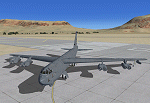
This standalone full package of a modified version of Alphasim's B-52G. It sports the BX tail code of Aeroworks Flight Center IV in Railroad Valley, Nevada. It is a special modified version based loosely on what would become the EB-52 Megafortress of the Dale Brown novels. It represents the pre-Megafortress modifications of a mostly stock B-52, and it's nose art is that of "Old Dog Zero". The package includes one scheme, a new digital autopilot and digital fuel management gauge and various other upgrades and changes. It uses only the advanced flight model. Base model by Alphasim. Updates and new gauges by Jason L. Terry.
| Filename: | Old_Dog_Zero_Boeing_B52G.zip |
| License: | Freeware |
| Added: | 26th October 2013, 23:58:45 |
| Downloads: | 321 |
| Author: | Jason L. Terry |
| Size: | 9.61 MB |
| Category: Flight Simulator X - Aircraft Repaints, Textures and Modifications | |
| North American AT-6 Texan, N13FY, Version 2 |
|
Images related to this file:
File Description:
The "Dutch" N13FY, although on US registration, based in Hilversum, the Netherlands and owned and flown by ex-KLM Captain Hanno Wesdorp.
To be used with the freeware T-6G Texan by Warwick Carter (Wozza)
Besides the outside, the inside of the aircraft is repainted as-well, including the pilot and most of the gauge bitmaps.
This version 2 which is made with repaintkit provided my John Terrell. Also most of the bitmaps are now HD, meaning 2048x2048 pixels for more detail.
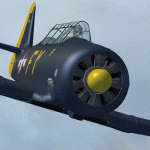
This packets includes 1 Dutch repaints of T-6G TEXAN.
| Filename: | North_American_AT6_Texan_N13FY_Version_2.zip |
| License: | Freeware, limited distribution |
| Added: | 17th March 2014, 05:32:04 |
| Downloads: | 292 |
| Author: | Marcel Ritzema |
| Size: | 9.74 MB |
| Category: Flight Simulator X - Flight Plans | |
| FSX World Explorer Abel Tasman |
|
Images related to this file:
File Description:
Abel Janszoon Tasman (1603 – 10 October 1659) was a Dutch seafarer, explorer, and merchant, best known for his voyages of 1642 and 1644 in the service of the Dutch East India Company (VOC). He was the first known European explorer to reach the islands of Van Diemen's Land (now Tasmania) and New Zealand, and to sight the Fiji islands. Download and install the beautiful Consolidated_PBY5A_Catalina.zip (Original aircraft design by C Edwards, ECU gauge by H Pralle, Adaptation for FSX and panel by Philippe Wallaert) and the mighty Dornier Do-24 (Original aircraft design by W.Regeer, FSX conversion by Erwin Welker; files do24vc-fsx.zip + do24vc-fixv2.zip).
| Filename: | FSX_World_Explorer_Abel_Tasman.zip |
| License: | Freeware |
| Added: | 4th March 2020, 18:58:37 |
| Downloads: | 92 |
| Author: | Nis Verkijk |
| Size: | 2.66 MB |
| Category: Flight Simulator 2004 - Panels | |
| Douglas DC-3 MAAM-SIM Panel Modifications - Update |
|
File Description:
Some pilots have reported a CTD (crash to desktop) problem with my MAAM-SIM panel modifications as uploaded in DCAMAAM4.ZIP. This has been pinned down to a conflict caused by the 'FSTSTuner' status light installed on the panel, which is relevant to the use of 'FSTSTuner' with 'Teamspeak' communciations software. These revised PANEL.CFG files will blank off this gauge (although not remove the entry, in case you should ever wish to revert) and, hopefully, prevent any further problems of this nature. If you are experiencing no problems (particularly, when calling up the kneeboard within the sim) then you may not need this update.
| Filename: | Douglas_DC3_MAAMSIM_Panel_Modifications__Update.zip |
| License: | Freeware |
| Added: | 20th July 2004, 17:22:29 |
| Downloads: | 9,258 |
| Author: | Mark Beaumont |
| Size: | 129.22 KB |
| Category: Flight Simulator 2004 - Gauges | |
| WindGauge |
|
File Description:
These gauge was written after a VFR ferryflight from Key West (Florida) to
St. Johann (Austria). Often I missed wind-informations for higher or lower
altitudes. Sometimes I have noticed, that if I will fly at an other altitude
I will have tail wind instead of head wind. But this informations i could only
got flying to this altitude and test it.
You will get following informations:
- Feet
- Speed (in Knots)
- Dir (Wind direction)
- Gust (max gust speed
- Turb ( Turbulence 0-4)
- Shear (0-3)
- Var (direction variability)
- Temp (temp in Celsuis and Fahrenheit)
- Var (temp variation Day/Night)
- DewPoint (dewpoint in Celsuis and Fahrenheit)
| Filename: | WindGauge.zip |
| License: | Freeware |
| Added: | 8th November 2004, 03:23:36 |
| Downloads: | 3,044 |
| Author: | Widmann Andreas |
| Size: | 41.38 KB |
| Category: Flight Simulator X - Aircraft Repaints, Textures and Modifications | |
| Boeing 737-200ADV, V1.40 Wide-Screen Panel Update |
|
File Description:
V1.40 wide-screen update to the TinMouse II Boeing 737-200 add-on. Universal update for both FS9 and FSX versions.
Update only, requires install of full version V1.30 plus both the V1.31 and V1.32 updates prior to installing this update. Adds both 16:10 and 16:9 widescreen 2D panels, including new gear, hydraulic, brake, and right-side caution/warning gauges. Other minor bug fixes and improvements. Users of standard 4:3 format monitors can use the included gauge file for improvements to non-widescreen panels as well. Visit the TinMouse forum here on AVSIM for support and information.
| Filename: | Boeing_737200ADV_V140_WideScreen_Panel_Update.zip |
| License: | Freeware, limited distribution |
| Added: | 15th April 2011, 01:15:28 |
| Downloads: | 13,096 |
| Author: | Bob Scott, Richard Probst |
| Size: | 5.69 MB |
| Category: Flight Simulator X - Original Aircraft | |
| Bombardier Global Express XRS |
|
Images related to this file:
File Description:

Bombardier Global Express XRS - FSX Native Model. The Global Express is a growth from the Challanger 601 series. The Global Express cruises at an airspeed of 488 kts and has a maximum altitude of 51,000 ft.. The aircraft is powered by 2 BMW\/Rolls Royce BR700-710A2-20 Turbofan engines, rated at 14,750 pounds takeoff thrust. The cockpit features the Primus 2000 system. This package contains both 4:3 and Wide-Screen 2d panels, as well as a fully interactive Virtual Cockpit. The gauge system was designed to use the freeware FMS by Garett Smith (honeywellfmc.zip) available exclusively at AVSIM. By Fr. Bill Leaming & Richard Schwertfeger, October 2009.
| Filename: | Bombardier_Global_Express_XRS.zip |
| License: | Freeware |
| Added: | 31st January 2010, 21:38:42 |
| Downloads: | 9,687 |
| Author: | Fr. Bill Leaming & Richard Schwertfeger |
| Size: | 16.01 MB |
| Category: Flight Simulator 2004 - Gauges | |
| Groundhandling V4.0 |
|
File Description:
This archive contains version 4.0 of my "groundhandling"
gauges, like automated pushback with conversation sounds, a Taxispeed controller using
throttle AND brake settings, an arming switch that activates Taxispeed
after a landing (incl. setting flaps, spoilers, autobrakes Off), Brakes sound,
etc...., and can be added to any FS2004 (!!) aircraft panel.
New in V4.0:
1. Better sound mechanism (using Doug Dawsons XMLsound gauge), with advantages:
- Individually adjustable sound volumes.
- No more "mis-use" of the ADF1 frequency, so no more SoundOn/Off function needed.
2. Reworked bitmaps and code.
3. State-dependant tooltips.
4. Straight pushback before turn is now in meters instead of seconds.
By Rob Barendregt.
| Filename: | Groundhandling_V40.zip |
| License: | Freeware, limited distribution |
| Added: | 4th July 2005, 01:32:44 |
| Downloads: | 28,846 |
| Author: | Rob Barendregt |
| Size: | 427.93 KB |
| Category: Flight Simulator X - Panels | |
| Project Black Panels v6.3 |
|
Images related to this file:
File Description:
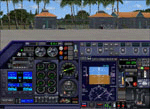
Looking for a functional all-in-one panel? This package might be worth a look then. With a consistent layout for all instrumentation except aircraft type specific gauges (like engine displays and controls), this package offers panels for nearly all possible aircraft types. These IFR compatible 2D panels use the proper autopilot system for the aircraft type and have all the bells and whistles in easy reach; including an upgraded PFD, backup gauges, full IFR gauges (including ADF), fuel request, jetway toggle, engine startup and shutdown ability, a speed reduction system with auto spoilers, auto reverse thrust and auto taxi after landing, automatic gear, a true auto-smoke gauge that works with any aircraft having an engine smoke system, ground handling and popups like a custom exits control gauge, flight information computer and a TCAS radar plus much more. No attempt was made to replicate an actual aircraft panel, these were designed to allow flight of any aircraft in any location or situation without having to figure out how to use a different panel for each plane, and to assure all the necessary controls are present.
v6.3 is a Major Upgrade with a cleaner, more uniform look and tons of updated graphics, along with a load of new and improved features, including a functional TOGA system and, for piston engine aircraft, an Auto-Takeoff system. Complete package, no previous version required.
Support & Updates for this package can be found here:
http://www.thecurrentpage.com/?page_id=2686
| Filename: | Project_Black_Panels_v63.zip |
| License: | Freeware, limited distribution |
| Added: | 18th June 2010, 01:50:04 |
| Downloads: | 1,863 |
| Author: | Don Janusz |
| Size: | 28.84 MB |


© 2001-2026 AVSIM Online
All Rights Reserved
Privacy Policy |