
Where Flight Simulation Enthusiasts Gather from Around the World!
AVSIM Library - Search Results

| Category: Flight Simulator 2004 - Scenery | |
| Steamboat Springs (KSBS), Flat Tops Wilderness Area, Colorado - Photo-Scenery |

|
Images related to this file:
File Description:

Steamboat Springs (KSBS), Flat Tops Wilderness Area, Colorado, Photo-Scenery (FS9 & FSX)
The Flat Tops Wilderness Area, which is the second largest wilderness area in Colorado, is named for its many flat topped mountains that are clearly visible from the sky. Trappers Lake, located in the north of the area inspired Arthur Carhart, a US Forest Service official, to initiate a plea for Wilderness preservation as early as 1919. Finally in 1975, three years before his death in 1978, the Flat Tops were designated a wilderness area. No wonder he found the area so entrancing: Behind Trappers Lake loom majestic volcanic cliffs, and beyond them a vast subalpine terrain reluctantly yields to alpine tundra with an average elevation of about 10.000 feet. More than 100 lakes dot the country above and below numerous flat-topped cliffs. Steamboat Springs is an internationally known winter resort destination.
To explore the scenery depart from Steamboat Springs Airport (KSBS) or Yampa Valley Airport (KHDN) and head south. High resolution versions of this scenery for FS9 and FSX (much sharper, but larger and multiple downloads) are available at www.blueskyscenery.com/GNB_West2.html . The screenies are taken from the high-res versions, so expect this version to be slightly more blurry. Thanks to Joop Mak for providing custom AFCADs that correct airport layouts so that they align with the photo-textures! They are available at www.blueskyscenery.com/AFCADs.html . YourDonation@Work: Dedicated to James.
| Filename: | Steamboat_Springs_KSBS_Flat_Tops_Wilderness_Area_C.zip |
| License: | Freeware, limited distribution |
| Added: | 26th April 2010, 17:53:25 |
| Downloads: | 1,303 |
| Author: | Gottfried Razek - blueskyscenery.com |
| Size: | 91.57 MB |
| Category: Flight Simulator 2004 - Aircraft Repaints, Textures and Modifications | |
| JetBlue 'Circles' Airbus A320 |
|
Images related to this file:
File Description:
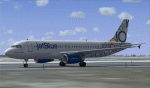
This repaint is of the very unusual but striking "JetBlue - Circles" livery for the Project Airbus A320 model (included in zip). This is a complete file and for FS9 (FS2004). While it may work in FSX, I cannot and will not confirm that as these textures have only been tested in FS9. All repainted textures, which were completely hand painted (other than the JetBlue text) have been saved and formatted in 32 bit. This model comes with all of the standard PA animations. New Alpha channels have been created to highlight the detail which has also been highlighted in terms of the doors and windows to resemble the actual aircraft. This has been an intense repaint to do due to the very nature of the livery so please PLEASE DO NOT count the circles and email me to say I missed one. If I have (which I haven't I don't think) pretend it is due to excessive weathering :) While there are some screen shots here, there are more in the Read Me file so if you have any doubts, please take a look at all of them. Installation, Distribution and Contact Details for me can be found in the enclosed PA TC Read Me File. Enjoy this paint and download it lots just so I know the work, frustration, a bottle and half of Capt Morgan and lots of Asprin were worth it :) Cheers and safe flying!
| Filename: | JetBlue_Circles_Airbus_A320.zip |
| License: | Freeware, limited distribution |
| Added: | 11th March 2012, 19:40:09 |
| Downloads: | 594 |
| Author: | Tony Cannon, Project Airbus |
| Size: | 13.54 MB |
| Category: Flight Simulator 2004 - Miscellaneous Files | |
| Nick's LightFix |
|
File Description:
The concept and the base textures for this package are from Mark Poole and his original light replacement releases. Mark's original Nav Light package has a really good concept and uses light textures which create sharp lens flairs or bursts. I found the lens flair in his packages to be a bit too large and out of scale for my display and taste. Also, I wanted to have an easy way to replace all the FS9 lights in one shot with little or no configuration file editing. With that in mind, this package was created. This release will automatically replace ALL the Flight Simulator aircraft and airport lights with more realistic ones along with better distance visuals of slower flashing radio tower/smoke stack and ground beacons. It also includes replacement lights in scale for the PMDG 737, 747 and for all Project Opensky aircraft offered on their site. It works automatically with Ultimate Traffic and other AI add-ons which use the default Microsoft aircraft lights. I added a diffused halo effect to Mark's original airport_lighting_v2 texture which gives a more realistic look in cloudy or weather conditions and enhances the dynamic directional brightness of the lights. In addition to the navigation lights, I have also created aircraft beacons and strobes which will also install automatically . A restore package is included allowing to you to revert back to default FS9 texture and FX files.
ENJOY!
From Nick Needham
[email protected]
| Filename: | Nicks_LightFix.zip |
| License: | Freeware, limited distribution |
| Added: | 4th April 2006, 21:47:56 |
| Downloads: | 19,322 |
| Author: | Nick Needham |
| Size: | 1.55 MB |
| Category: Flight Simulator 2004 - Scenery | |
| Anaktuvuk PAKP Runway and Taxiway Lighting in Alaska |
|
Images related to this file:
File Description:
Anaktuvuk is in Alaska, and this posting adds proper runway and taxiway lighting to the scenery, as shown in the screenshots. There will be runway and taxiway lights visible during the day and at night there will be lit lights that properly illuminate the runway for landing, and at a lower level of brightness the taxiways. Put the bgl's into the existing scenery folder of your previous Anaktuvuk PAKP installation and say yes to replace the existing bgl's that have the same names. Instal the Library objects once and for all by placing the CONTENTS of the Lighting Library scenery folder in your static objects scenery folder and the CONTENTS of the texture folder in the static objects texture folder (which is how I install scenery objects libraries). Alternatively, put them in the scenery and texture folders of your Add on scenery folder, or even in the main scenery and texture folders. They just have to be in related scenery and texture folders that are always active when FS9 is running. If you do all this and there are no textures to the lights then put the library textures into the Anaktuvuk texture folder too; FS9 has done some strange things while I was making scenery so I would never rule out a possibility.
There will be further retro upgrades to other recent scenery that was posted with temporary lighting. Say thank you to Greg Putz for making the lighting.
| Filename: | Anaktuvuk_PAKP_Runway_and_Taxiway_Lighting_in_Alas.zip |
| License: | Freeware, limited distribution |
| Added: | 25th November 2019, 17:52:18 |
| Downloads: | 136 |
| Author: | Roger Wensley |
| Size: | 699.17 KB |
| Category: Flight Simulator X - Scenery | |
| 2 Fronson Hangars |
|
Images related to this file:
File Description:
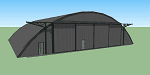
This model was created to be placed in FSX as airport scenery using Airport Design Editor.
I created it for my own use when i was re-creating RNAS HMS Nuthatch which was a Naval Airstation near Anthorn on the Solway Coast in Cumberland (now Cumbria), United Kingdom.
History of RNAS HMS Nuthatch...
Work began on building an airfield at Anthorn for the Fleet Air Arm in late 1943, with Royal Naval Air Station Anthorn, or HMS Nuthatch opening on 7 September 1944, with three tarmac runways.
It was the base of No. 1 Aircraft Receipt and Despatch Unit (No. 1 ARDU), which had the job of receiving aircraft fresh from manufacturers, modifying them to Service standards and despatching them to operational squadrons, with the unit specialising in the Vought F4U Corsair.
No. 1 ARDU continued to operate from Anthorn following the end of the Second World War, while a number of Fleet Air Arm Squadrons were also based at the airfield in the immediate post war years.
The airbase shut down in March 1958.
The Airfield is now the site of a VLF/LF transmitter used for transmitting orders to Submarines, it is also home to three atomic clocks for transmitting Britains time signal transmissions.
None of the Hangars (11 Pentad and 22 Fromson) survive at the site but their concrete standings are still visable.
Depicted here are representations of the Fromson type hangers created from dimensions in a 1947 survey.
I created the model using Google Sketchup and converted it for use in FSX using Model ConverterX.
This is my 1st attempt at scenery creation and is therefore pretty basic.
There are no known issues and it works fine in FSX.
| Filename: | 2_Fronson_Hangars.zip |
| License: | Freeware |
| Added: | 8th June 2014, 07:13:54 |
| Downloads: | 251 |
| Author: | Mark John Byers |
| Size: | 1.4 MB |
| Category: Flight Simulator 2004 - Utilities | |
| FlightSim Manager 2.5.1 |
|
File Description:
Compatible with both FS2002 and FS2004
FlightSim Manager is a great tool for managing add-ons to Microsoft Flight Simulator. Using easy to Wizard - FSM can install aircraft, panels, textures and scenery directly from distribution ZIP files you may have downloaded, with proper uninstallation of add-ons. From an easy to use Aircraft editor to add or remove aircraft variants, to an comprehensive Hangar management allows you to manage and configure your add-ons off your live FS installation.
You can now create Virtual Fleets, and enable/disable the complete fleet with ease. For serious pilots, FSM also offers a complete Logbook.
Using FSM, you can create Texture Sets - i.e.. different Tree Sets, and you can install any set with a single click, capture screenshots from Flight Simulator, Benchmark with log, launch it with Random Splash Screens, and fly from anywhere in the world using an map view.
You can also control Flight Simulator with speech commands using FSM. It also supports auto-saving flight, warning sytem, and custom event sounds.
Finally with a comprehensive Diagnostic Tools and Repository feature, FSM keeps your FS installation clean. Apart from the usual Missing and unused gauges, FSM can also locate Aircraft problems, Missing and unused effects, Scenery Problems with a LandClass File relocate feature - say bye-bye to all the memory leaks.
To provide you - the user with the best Freeware FS-Addon, I need your help... if you have any suggestions, recommendations or problem using this software, please contact me through our Forum at:
http://softwares.ranainside.com/forum/
You can find the latest version from -
http://www.ranainside.com/
| Filename: | FlightSim_Manager_251.zip |
| License: | Freeware |
| Added: | 27th August 2004, 17:26:52 |
| Downloads: | 4,306 |
| Author: | Rana Hossain |
| Size: | 4.3 MB |
| Category: Flight Simulator X - AFCAD Files | |
| MHRO - Juan Manuel Galvez International Airport / Roatan, Honduras (version 1.1) |
|
Images related to this file:
File Description:

MHRO - Juan Manuel Galvez International Airport / Roatan, Honduras (version 1.1)
This airport update was made with the latest version of ADE (Airport Design Editor) and made for FSX as a replacement for the stock (default) airport. I found that most stock airports in FSX lack a decent amount of character and realism and this area in particular was dreadful! The stock airport file for Roatan was completely devoid of any life. There were absolutely no parking spots for commercial aircraft and no terminal buildings; the nearby areas of Colonia/Loma Linda were completely barren. I've done major reworking to this airport and added the small terminal building as well as renumbered the runway to the correct designation and length. The nearby town has been rendered complete with a variety of vessels small and large in the ocean. I hope you enjoy. Below is a list of changes/additions. All these enchancements are as close to the real airport as I can get with stock library objects. I've used satellite images, terminal photos and maps throughout the whole process so building locations are as accurate as possible. Happy landings in Honduras!
Features:
*Expanded parking apron
*Terminal building with parking for commercial traffic (Delta and United fly to Roatan from the US with regular service)
*Renumbered runways to correct designations and modified runway length and lighting accurately
*Nearby neighborhoods modeled complete with marinas and cruise ship port (cruise ship parked at the pier visible on approach)
*Diving, fishing, cargo and recreational vessels visible in the ocean surrounding the airport v1.1
*Several hotels dotting the area near the airport as well as West End/Gibson Bight
*Roads with static vehicles near the airport
*Corrected taxiway signs v1.1
| Filename: | MHRO__Juan_Manuel_Galvez_International_Airport__Ro.zip |
| License: | Freeware |
| Added: | 15th July 2012, 06:47:04 |
| Downloads: | 686 |
| Author: | Jaison Diaz |
| Size: | 6.85 KB |
| Category: Flight Simulator X - Panels | |
| Fokker S-14 Mach-Trainer Triple Instrument Panel Display ** VERSION 2 ** |
|
Images related to this file:
File Description:
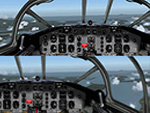
A new triple screen combined pilot and first officer panel for use with three displays. This new Fokker S-14 Mach-Trainer flight deck panel allows for switching between pilot's and first officer's position. The panel configuration design is optimized for use with three displays with a total resolution of 3840 x 1024. However use of three panoramic displays is possible. This flightdeck panel is based on the Fokker S-14 Mach-Trainer version published by David Wooster and Emile lancee and installation of this aircraft in your Flightsim program is a prerequisite.This issue includes the earlier released fix and superseeds Fokker_S-14_Triple_Monitors_2D_flightdeck.zip.By Emile Lancee.
Compatible with FS9 and FSX.
| Filename: | Fokker_S14_MachTrainer_Triple_Instrument_Panel_Dis.zip |
| License: | Freeware |
| Added: | 18th June 2015, 16:27:21 |
| Downloads: | 168 |
| Author: | E. Lancee |
| Size: | 30.44 MB |
| Category: Prepar3D V5 - AI Aircraft | |
| Antonov An-30 for AI Traffic |
|
Images related to this file:
File Description:

Antonov An-30 for AI Traffic. This MCX conversion of the FS9 CIS An-30 model is only compatible with P3Dv4.5/P3Dv5.2. The models have PBR texturing and other P3Dv4/5 upgrades. This package includes three models and 15 repaints. Permission for conversion kindly given by Sergey Bunevich on behalf of the CIS Traffic Team. With minor prop texture modifications stated in the documentation, all previous repaints are compatible with these models. Please read documentation for instructions and additional credits. Original aircraft by CIS Traffic Team, MCX and RADiator utilities by Arno Gerretsen, MCX conversion by Michael Pearson. Permission to include cached repaints given by Christian Gold. Repaints by Nikolai Samsonov, Vadim Schornikov, Kevin McCarthy, and Michael Pearson.
| Filename: | Antonov_An30_for_AI_Traffic.zip |
| License: | Freeware |
| Added: | 17th August 2021, 02:51:53 |
| Downloads: | 159 |
| Author: | Michael Pearson |
| Size: | 5.92 MB |
| Category: Flight Simulator 2004 - Gauges | |
| ILH TCAS and Transponder for QualityWings 757 SP2 |
|
Images related to this file:
File Description:

Lee Hetherington TCAS & Transponder addition to QualityWings (www.qwsim.com) 757 SP2 FS9 panel in order to be able to have transponder modes (Standby, Ident, Mode C) and TCAS TA/RA, ABOVE, BELOW modes, radar interrogation light etc. while flying on line on VATSIM network with SquawkBox or FSInn. Jose Oliveira ilhtcaschange.gau which gives ILH TCAS signal for avionics power on/off is also included. The transponder and TCAS logic are already tested and found fully compatible with QualityWings TCAS function inside the HSI (ND) as well as the QualityWings stock radio stack Transponder which indicates same squawk but has no squawk modes.
This is not for FSX version. This is not for FSX.
| Filename: | ILH_TCAS_and_Transponder_for_QualityWings_757_SP2.zip |
| License: | Freeware |
| Added: | 15th December 2011, 12:08:20 |
| Downloads: | 985 |
| Author: | Kyprianos Biris |
| Size: | 667.36 KB |


© 2001-2026 AVSIM Online
All Rights Reserved
Privacy Policy |