
Where Flight Simulation Enthusiasts Gather from Around the World!
AVSIM Library - Search Results

| Category: Flight Simulator X - Scenery | |
| RAF Oulton - Norfolk, England |

|
File Description:
I did this scenery for a gentlemen in Canada whose father served at the station during the war I've lost his details but hope he'll pick the scenery up when he searches on line.
RAF Oulton is a former Royal Air Force Satellite airfield located 3 miles (4.8 km) west of Aylsham, Norfolk and 12.5 miles (20.1 km) northwest of Norwich, Norfolk, England.
The airfield was built over 1939 and 1940 as a bomber airfield with T2 type hangars and grass runways, the facility operating as a satellite airfield of nearby RAF Horsham St. Faith between July 1940 and September 1942 after which it operated as a satellite airfield of RAF Swanton Morley.
In September 1943 Oulton was transferred from 2 Group to 3 Group and closed to flying for re-construction as a heavy bomber base with concrete runways, taxiways and parking areas. The work was completed in April 1944 and the airfield transferred to No. 100 Group RAF. Flying operations ceased at the end of July 1945, after which it was taken over by RAF Maintenance Command which used it to store de Havilland Mosquitos until November 1947.
Third Party add-on's will be required to gain the best effect - see the readme file.
| Filename: | RAF_Oulton___Norfolk_England.zip |
| License: | Freeware |
| Added: | 18th November 2015, 14:08:12 |
| Downloads: | 237 |
| Author: | Terry Boissel |
| Size: | 17.25 KB |
| Category: Flight Simulator X - Scenery | |
| YTTI Troughton Island, Western Australia |
|
File Description:
YTTI Troughton Island - ShoreAir operates Troughton Island airstrip as an alternate to Mungalalu-Truscott. It has a 980m x 30m unsealed runway. Troughton Island sits 6 metres above sea level on a natural reef. Troughton is managed by two people who spend one month at a time on the island. During that time they are almost completely isolated from the outside world. Although they are isolated they are not alone; previous occupants of the island brought in quails and children's pythons that were once pets that escaped their cages during a cyclone. Now there is a healthy population of snakes living off the quails. Today Troughton Island is maintained as an emergency landing area for aircraft that are unable to reach Truscott. It also serves as a landing area if Truscott is inaccessible due to weather conditions. The Bureau of Meteorology has a weather station on Troughton island. Mungalalu-Truscott aerodrome supports all the FPSO (floating production storage and offloading facility) operations in the WA and NT waters of the Timor Sea, while the alternate aerodrome at Troughton Island is 20 nautical miles north of the main air route to Timor Sea facilities. REQUIRES Blencowe_LibraryKit.zip
REQUIRES blencowe_librarykit_309494.zip (Available HERE)
| Filename: | YTTI_Troughton_Island_Western_Australia.zip |
| License: | Freeware |
| Added: | 28th February 2013, 14:01:54 |
| Downloads: | 279 |
| Author: | Alan Blencowe |
| Size: | 2.37 MB |
| Category: X-Plane - Original Aircraft | |
| F/A18 Hornet |
|
File Description:
The F/A-18 Hornet is an all-weather aircraft used as an attack aircraft as well as a fighter. It was designed to replace both the A-7 Corsair in the light ground attack role, and the F-4 Phantom which operated in both the air defense and ground attack roles. It compliments the F-14 Tomcat and can be operated from forward airstrips for the U.S. Marine Corps. In the fighter mode, the F/A-18 is used primarily as a fighter escort and for fleet air defense; in the attack mode, it is used for force projection, interdiction and close and deep air support. The F/A-18 currently equips the majority of Navy and Marine fighter-attack squadrons and will ultimately replace the F-14 Tomcat as it has the F-4 Phantom, the A-4 Skyhawk and the A-7 Corsair II. The Blue Angels flight demonstration team has used the F/A-18 since 1987. The final Hornet to be built was rolled out of Boeing's facility at Patuxent River, Maryland, in August 2000. Over 1,400 Hornets were built and over 1,200 are now flying in fifty-five active duty, reserve and test squadrons, as well as in seven foreign countries.
| Filename: | FA18_Hornet.zip |
| License: | Freeware |
| Added: | 18th March 2003, 02:00:44 |
| Downloads: | 1,784 |
| Author: | Robert App |
| Size: | 687.47 KB |
| Category: Flight Simulator 2004 - Scenery | |
| Monument Valley UT25 and Oljato 05UT in Utah USA |
|
Images related to this file:
File Description:
Monument Valley is an impressive sight in south Utah but not, unfortunately, in FS9. Unless you invest in a detailed terrain mesh there are no stacks of rocks reaching for the sky and the lasting overall impression is just of a desert. But I had already downloaded the land textures so I ended up making the Monument Valley UT25 airfield and the nearby Oljato 05UT, which has no buildings of any sort. Maybe I was bored. There is a lodge close to the field with dozens of cabins, but I had insufficient information so this is for the airfield only. The 4,000 feet of new tarmac is aligned 16-34 and is single ended with a large chunk of rock at the southern end; 16 is only used for landing and 34 is only for take off. The runway is not lit. Do not be surprised when you ask to select a runway for take off and FS9 only gives you 16 as a choice, even though you know this is the wrong one. When you accept it FS9 will quickly switch it to 34; apart from a possible sense of humour I have no idea why it does this. Nothing much to say about Oljato. What do you need? You actually don't need Ultimate Terrain as there are other land textures used here, so you will definitely need to have downloaded and installed the land textures "cny_south3west_2010 lr" and "cny_south3west2_2010 lr" by Gottfried Razek, as these land textures showed the runways in the correct positions. Look in the scenery library here or at the other place. A note here about my scenery making. There will not be many more to follow this (unless you count 4 as many) as I am almost at the end of the photos I either took or found for scenery purposes, plus I expect to move on from FS9 at some point during next year.
| Filename: | Monument_Valley_UT25_and_Oljato_05UT_in_Utah_USA.zip |
| License: | Freeware, limited distribution |
| Added: | 22nd January 2020, 20:13:54 |
| Downloads: | 218 |
| Author: | Roger Wensley |
| Size: | 2.91 MB |
| Category: Flight Simulator 2004 - Miscellaneous Files | |
| Active ILS - LEBL Simwings/New Spanish Airports (El Prat - Barcelona Airport) |
|
File Description:
This file is made for Barcelona LEBL Aerosoft/Simwings FS9's New Spanish Airports. As most know initiating the ILS at certain airports for AI Traffic or the User Aircraft is not a function at this time when using AFCAD2. If you add a new ILS runway to an airport such as LEBL (El Prat/Barcelona 7R/25L) only the user aircraft can use this runway (without ATC commands) when visibility falls below 3 miles. ATC will no longer use this runway for AI Traffic because FS9 sees it as a visual runway. This will cause ATC to vector all your AI Traffic back to runway 7/25 old numbers, 7L/25R new numbers which is also a Terminal departure runway. This ILS bgl file adds all NAVAIDS for making 7R/25L a Precision Instrument Runway by adding all the radar fixes for both the ILS approach portion and the missed approach procedures, altitudes and intersections as per current published plates. All AI Aircraft/User Planes will now continue to use the new 7R/25L runway when Airport weather conditions are less than 3 miles. ATC will also use the right naming/numbers of the runways. The DME/VOR approaches have also been written using the new BCN/PRA VOR's for runways 7L/25R and 02. Many different default FS9 scenery GUID's added including Taxiway Signs. *** FS2004 Simwings Barcelona Scenery AFCAD2 included with the new 7R/25L runway ***
| Filename: | Active_ILS__LEBL_SimwingsNew_Spanish_Airports_El_P.zip |
| License: | Freeware, limited distribution |
| Added: | 31st December 2004, 04:59:21 |
| Downloads: | 3,943 |
| Author: | Jim Vile |
| Size: | 32.52 KB |
| Category: Flight Simulator 2004 - Scenery | |
| Tongass Remote Airfield v2 - for Tongass Fjords |
|
Images related to this file:
File Description:
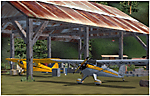
Tongass Remote Airfield v2 - for Tongass Fjords (FS9)
"Tongass Remote Airfield" v2 (RATR) Alaskan bush flying scenery (Fictitious).
This airstrip is for Flight Simulator 2004 and for the "Tongass Fjords" (FS9) addon by Holger Sandmann & Bill Womack; you must have "Tongass Fjords" (FS9) for this to work. Version 2 is a detailed, stand alone, remake of the first version, see PDF file.
Field history and description:
In the early days this area was well known to prospectors and hunters. A small mine was established and later abandoned. Around the late 40s a crew was contracted to clear a small landing area to gain easier access for hunters and campers. Due to the extreme remoteness of this area that clearing took several years. The last phase was the approach, clearing by hand a descending glide slope through just the tops of the tall trees. There is now just enough room for a very experienced pilot to get in and out of this field. The airfield is 26 miles north of Petersburg Alaska (PAPG). This is a tricky narrow approach with a left hand dogleg and then an immediate right hand dogleg turn just before the final approach. Not much time to set up your approach; also, it's a very short runway. For experienced pilots only, and make sure that your life insurance is up to date. Good luck.
| Filename: | Tongass_Remote_Airfield_v2__for_Tongass_Fjords.zip |
| License: | Freeware, limited distribution |
| Added: | 22nd March 2010, 13:16:16 |
| Downloads: | 626 |
| Author: | Jay Langham |
| Size: | 6.18 MB |
| Category: Flight Simulator 2004 - Miscellaneous Files | |
| GoTo Any Airport |
|
File Description:
GoTo Any Airport.
Inclued here Heathrow and London Luton. Always wanted to return to your favourite local Airport from anywhere in the world? simply - with no fuss? Look no Further.
Start at these Designated Airports,then Goto any Airport! - via the FS9 World menu and return to the Original Airport - every time! - By Just turning the GPS/nav switch to GPS and Flight Director and autothrottle on whilst still on the ground.Click on the Autopilot, IAS, ALT and Nav Hold switches once above 1000ft - thats it !! . Set Weather and Altitude as required and Speed in autopilot and away you go. Use the FS9 ATC as You Travel, call into Airport when close and receive the curent ATIS and Runway approach in use.
The added circuit flights are on Autopilot and allow you to observe the airport befor landing.They make good moving screen savers - but make sure you have plenty of fuel!compatible with UK2000 Airports & VFR scenery for UK.
| Filename: | GoTo_Any_Airport.zip |
| License: | Freeware |
| Added: | 19th June 2004, 07:12:30 |
| Downloads: | 690 |
| Author: | Alan Trussell |
| Size: | 38.37 KB |
| Category: Flight Simulator 2004 - Aircraft Repaints, Textures and Modifications | |
| LOU IV Texture for Baron 58 |
|
File Description:
Updated texure for my previous LOU IV texture.
This texture is for the Beechcraft Baron 58 by Dreamfleet, a paint sceme copied from a P-51 Mustang. This scheme requires, that you have Dreamfleet's Baron 58 installed to Flight Simulator. The scheme was designed with the lite version, it is not tested with the Reality XP version. Copy the LOU IV2.bmp and LOU IV2_a.bmp into your FS9\DreamFleet\DreamManager\Paint Schemes folder and use Dreamfleet's Dreammanager to create a new aircraft variation. After this, copy the DFB58_PROPDISK.bmp to the texture folder (for example c:\FS9\Aircraft\DreamFleet Baron 58 Lite\texture.E2-C ). It is needed for the spinning prop. Without this, the spinning prop has two white stripers instead of the yellow tip.
Changes from the previous texture:
- Slightly darker colors,
- white outlined E2-C letters,
- yellow engine housing,
- yellow prop spinners,
- Black "Hamilton Standard propellers" with yellow tips
- LOU IV emblem
| Filename: | LOU_IV_Texture_for_Baron_58.zip |
| License: | Freeware |
| Added: | 31st March 2006, 18:46:01 |
| Downloads: | 209 |
| Author: | Valent Levente |
| Size: | 6.61 MB |
| Category: Flight Simulator X - Original Aircraft | |
| Moller M400 Skycar |
|
File Description:
This package contains a simulation of the Moller M400 Skycar, and was
developped in close coöperation with the Moller company.
Apart from it being fun to fly, it gives you an impression of how the real M400
Skycar will look like and behave.
Besides all the usual animations you find in an aircraft addon, it contains a
wealth of features and animations specific for this M400 Skycar, like:
- Automated nacelles, ductvanes and folding wings.
- True VTOL operation.
- Full VirtualCockpit, with moving sidesticks, throttle lever and all needed
instruments/switches to drive/fly this Skycar.
- Accurate lighting.
- Seat-dependant "camera" views.
Besides some general information on Moller's M400 Skycar, the README includes
extensive installation and flying instructions.
This package is for FSX ONLY !!!! (FS9-version: package rcbsc1-9.zip).
Compatibility note:
Although the included visual model was originally created for FS9, it is *fully*
compatible with FSX-RTM, FSX-SP1, FSX-SP2 and FSX-Accelleration.
By Rob Barendregt and Stephen Vernava
| Filename: | Moller_M400_Skycar.zip |
| License: | Freeware, limited distribution |
| Added: | 11th September 2008, 00:03:05 |
| Downloads: | 2,969 |
| Author: | Rob Barendregt / Stephen Vernava |
| Size: | 4.44 MB |
| Category: Flight Simulator 2004 - Aircraft Repaints, Textures and Modifications | |
| USCG, Lockheed C-130H Hercules, 50th Anniversary Retro Paint Scheme "Corrected" |
|
Images related to this file:
File Description:
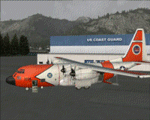
This is a complete re-upload and contains the "Night LightMap Fix".
You must have the FS9 "CaptainSim Legendary C-130 Base pack" as well as the "Extra Pack Expansion" installed to utilize these textures... these textures are palletized/optimized for the FS9 CaptainSim Legendary C-130H and saved in DXT3 format... due to a texture mapping bug found with the 5b (HC-130H) model, I have chosen to use the 21b (C-130H) model instead........
USCG C-130H Hercules displaying an historic colour scheme to commemorate the 50th anniversary of the C-130 in Coast Guard Service, from Air Station Elizabeth City. This aircraft will be used by the Aviation Logistics Center as a prototype platform for aircraft upgrades and modifications. Air Station Elizabeth City has the first operational J models. The Coast Guard has been using a version of the C130 since Air Station Elizabeth City took delivery of the first one in December 1959.
| Filename: | USCG_Lockheed_C130H_Hercules_50th_Anniversary_Retr.zip |
| License: | Freeware |
| Added: | 19th December 2010, 16:13:40 |
| Downloads: | 1,232 |
| Author: | Greg Spellmen, Captain Sim |
| Size: | 12.11 MB |


© 2001-2026 AVSIM Online
All Rights Reserved
Privacy Policy |