
Where Flight Simulation Enthusiasts Gather from Around the World!
AVSIM Library - Search Results

| Category: Flight Simulator 2004 - Scenery | |
| FS-Blaze |

|
File Description:
FS-Blaze is a utility which places sensational forest fire effects as scenery within Microsoft Flight Simulator. The locations of the created fires are either of historical significance (Yellowstone 1988 and South Canyon 1994 are included), user-created (instructions provided), or real-time for North America using data updated daily from the NOAA website. Requires MSXML4 and DotNET2.0 (see documentation for links)
| Filename: | FSBlaze.zip |
| License: | Freeware, limited distribution |
| Added: | 29th June 2006, 22:28:17 |
| Downloads: | 2,863 |
| Author: | Scott Gridley, Ron Jeffers |
| Size: | 2.49 MB |
| Category: Flight Simulator 2004 - Aircraft Repaints, Textures and Modifications | |
| Frontier Airlines/Republic Airlines ("Blaze" the Red Fox), Embraer 190 (N163HQ) |
|
Images related to this file:
File Description:
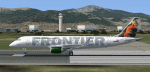
One of Frontier Airlines'/Republic Airlines' recent livery additions, "Blaze" the Red Fox (N163HQ) for the Wilco/Feelthere Embraer 190 from the Ejets series. "Blaze" was previously seen on N823MD (an E170) and N319FL (a B737-300). Textures only.
| Filename: | Frontier_AirlinesRepublic_Airlines_Blaze_the_Red_F.zip |
| License: | Freeware, limited distribution |
| Added: | 11th September 2011, 20:48:20 |
| Downloads: | 316 |
| Author: | Kyle Weber |
| Size: | 10.66 MB |
| Category: Flight Simulator 2004 - Utilities | |
| FS SmartVIEW |
|
File Description:
Add-in module for Flight Simulator 2004. Once installed, FS SmartVIEW is added to the Modules menu of Flight Simulator 2004 and modifies the behaviour of mouse wheel & buttons, as well as keys, adding support for SmartVIEW rotation and zoom. Change your eye point, fine tuning the angle and looking towards any direction, in just seconds, through natural movements of the mouse or by user's defined keys. Make a pre-flight external inspection by turning around the aircraft and zooming in/out quickly. Works in "Cockpit View" (2D) also,
with or without instrument panel displayed on screen, in addition to Virtual Cockpit and Spot Plane View. Load and save the most frequently used view setups. Cool user's selectable
options, including mouse sensitivity and key assignments.
| Filename: | FS_SmartVIEW.zip |
| License: | Shareware, time limited |
| Added: | 5th March 2006, 19:50:06 |
| Downloads: | 4,326 |
| Author: | Rodolfo Arata, Luciano Napolitano |
| Size: | 552.1 KB |
| Category: Miscellaneous Files - General Utilities | |
| FS Clock |
|
File Description:
FS Clock is a small program that it runs with itself. The time FSclock is
running does not have any relationship with your system,your real world.
Thus,FSclock is a clock which could match the time in FS and running "outside"
the FS program.
Now you can leave the FS minimized and do other works without lose the time during cursing.
Features:
-Runs separately with system clock
-Adjust or input new hour, minute or second any time you want
-Alarm clock function
-Time caculator
-Flight timer (adjustable)
-Synchronize with your system clock if needed
| Filename: | FS_Clock.zip |
| License: | Freeware, limited distribution |
| Added: | 9th March 2007, 22:26:07 |
| Downloads: | 677 |
| Author: | Shikai Xu |
| Size: | 25.85 KB |
| Category: Flight Simulator X - Utilities | |
| FS-Butler |
|
File Description:
The paperless cockpit - features of FS-Butler: Management of maps, information, files, etc. The documents are sorted into the following categories: General, Airport, Aircraft. A viewer is integrated for the *.Bmp and *.Jpg. You may input NAV/COM/ADF/SQUAWK/COURSE values quickly via the keyboard to type and send it to FSX via FSUIPC (freeware version).
| Filename: | FSButler.zip |
| License: | Freeware |
| Added: | 23rd February 2012, 15:47:54 |
| Downloads: | 629 |
| Author: | Juergen Beisler |
| Size: | 4.99 MB |
| Category: Flight Simulator 2004 - Utilities | |
| FS Launcher |
|
File Description:
Yes I know there are more programs like this, but this one includes some features I have missed:
You can optionally select the start flight from your saved flights and you can also set another time or weather for it.
And there is something else, which may sound familiar to you:
You had a nice flight yesterday with VATSIM or IVAO with your FS configured to keep running during temporary application changes.
Today you are flying on your own and are on short final for landing when you get interrupted by another application (like an incoming email).
When you came back to FS you may find your aircraft with it's nose in the ground because it did not wait for you.
Besides the usual preparations, FSLaunch lets you set the pause configuration before starting FS.
The program is in English and German and provides a short help file.
| Filename: | FS_Launcher.zip |
| License: | Freeware, limited distribution |
| Added: | 11th May 2005, 15:21:48 |
| Downloads: | 1,276 |
| Author: | Wolfgang Meininghaus |
| Size: | 590.67 KB |
| Category: Flight Simulator X - Utilities | |
| FS Screen |
|
Images related to this file:
File Description:
This is a small, yet very useful utility for taking screenshots in all versions of Flight Simulator or any other program or game you wish, without having to pause and leave the program. This tool stores your screenshot everytime you hit the "PrtScrn" key an can store up to 1,000 screenshots in any folder you wish.
| Filename: | FS_Screen.zip |
| License: | Freeware |
| Added: | 18th February 2010, 14:35:26 |
| Downloads: | 26,734 |
| Author: | Matthias Holzer |
| Size: | 5.61 KB |
| Category: Flight Simulator X - Scenery | |
| Northland v2- Bay of Islands |
|
File Description:
FSX Scenery--NorthlandV2. 2.5m photoreal layed down for part of the top of the North island of New Zealand,.Freeware coverage 200sq miles of the 600 sq miles available
enhanced recoloring and water masking .
| Filename: | Northland_v2_Bay_of_Islands.zip |
| License: | Freeware |
| Added: | 10th August 2010, 03:13:26 |
| Downloads: | 1,357 |
| Author: | fs-creations.co.nz |
| Size: | 44.97 MB |
| Category: Flight Simulator 2002 - Scenery | |
| Anitkabir - Atatürk Mausoleum |
|
File Description:
Ads the Atatürk Mausoleum (tomb of Mustafa Kemal Atatürk) to your scenery, to enhance the "being-there" feeling of your flights in and out of Ankara, capital of Turkey.
| Filename: | Anitkabir__Atatrk_Mausoleum.zip |
| License: | Freeware, limited distribution |
| Added: | 7th August 2002, 17:06:27 |
| Downloads: | 2,101 |
| Author: | FS Millennium |
| Size: | 578.14 KB |
| Category: Flight Simulator 2002 - Aircraft Repaints, Textures and Modifications | |
| Varig Log McDonnell Douglas DC-10-30 ca. 2001 PP-VQY |
|
File Description:
Varig Log McDonnell Douglas DC-10-30 PP-VQY ca. 2001
Model: FFG
Paint: Rafael Bessa
| Filename: | Varig_Log_McDonnell_Douglas_DC1030_ca_2001_PPVQY.zip |
| License: | Check within download |
| Added: | 2nd February 2003, 22:41:57 |
| Downloads: | 1,817 |
| Author: | FS EMPENHO |
| Size: | 3.87 MB |


© 2001-2026 AVSIM Online
All Rights Reserved
Privacy Policy |