
Where Flight Simulation Enthusiasts Gather from Around the World!
AVSIM Library - Search Results

| Category: Flight Simulator X - Original Aircraft | |
| B-52J |

|
Images related to this file:
File Description:
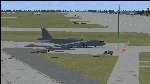
Since it became operational in 1955, the B-52 has been the main long-range heavy bomber of the U.S. Air Force. It first flew on Apr. 15, 1952. Nearly 750 B-52s were built when production ended in Oct. 1963. This "J" model is the future re-engined "h" model 60-0042 of the 917th Wing AFRC based at Barksdale AFB (KBAD). She flies higher, further, and faster than any previous version. The aircraft can cruise at 380 KIAS at 500 ft agl over about 5,000 nm which makes her capable of reaching targets within enemy airspace anywhere on the globe without being detected by radar until it's too late. Her normal high altitude cruise speed has been increased to Mach .88 above FL550E over 9,000 nm without refueling, and her service ceiling has increased to FL570E. The 50,000 lb payload is still nominal, but due to the lighter engines she now has more accomidations for the crew, and does not require refueling very often. She can range much further with less speed (i.e., Mach .85), but there is normally no need for that. This aircraft is designed to fly like the real thing. It is likely one of the best B-52 models available at this time. I have test-flown this aircraft around the globe several times to reassure myself that all is well. You will not have a bouncing effect occur when cruising with 16x speed acceleration and autopilot engaged because all aerodynamics and balance are perfected to a very low margin of error, or no error margin at all. Please be sure to read the INSTRUCT.TXT file for extended details. Original aircraft designer: Mike Stone; Textures by Bill Baldwin; Panel and gauges by Philippe Wallaert; Auto Smoke Effects by Richard Wisman; BR-725 Sound by Ronald Buffalo; Real World aero/engine dynamics, data, lights and effects by: Douglas E. Trapp, FS Flight Dynamics Engineer, Irving, Texas, [email protected], October 2018. The use of this model, and the configuaration of such, is designed for free educational purposes, and protected by the Free Use Act: (https://www.law.cornell.edu/uscode/text/17/107). This model and/or aspects of such cannot be used for monetary purposes!
| Filename: | B52J.zip |
| License: | Freeware |
| Added: | 27th October 2018, 18:57:21 |
| Downloads: | 628 |
| Author: | Douglas E. Trapp |
| Size: | 24.51 MB |
| Category: Flight Simulator X - Panels | |
| Eurofighter Typhoon Panel |
|
Images related to this file:
File Description:
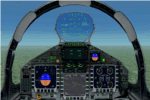
The panel has been developed for FSX Flight Simulator SP1 or SP2. It has also been tested with Microsoft Acceleration, but compatibility is not guaranteed by the author.
This panel has been designed according to a large number of technical documents, descriptions, and pictures out of the Internet. The design goal was to develop a panel and gauges as close as possible to the original aircraft. It was, however by far not possible to programming all the functions and displays, because of the complexity of the real Eurofighter panel, and also because of limitations in FSX.
However, I believe, that the panel with the MFD screen displays gives a good impression on how the real Eurofighter cockpit looks inside.The aircraft model, development by ALPHA/VIRTAVIA, has been used as the base for this panel development. The aim was to go with one model version only , the two seater air to air model. A number of parameter of the aircraft.cfg have been modified to achieve a best possible result of the flight dynamics for the model. It is up to the user to use any other model as this one, and use this panel for it.
For this package, panel and model, I decided to call it the X -Version which shall be seen as an experimental military test version, or if you like, a " Proof of Concept " version. So, you will see a neutral paint with just the Typhoon letters on the aircraft tail. This approach allows to go with deviations and differences to the current technical implementations for the cockpit displays and functions for the Eurofighter.
The panel includes gauges for the afterburner effects, sonic sound effect, callout sounds, weapon explosions effects, and a full functioning TCAS gauge (A future requirement for the Eurofighter), A2A fuel functions, target radar tracking functions and more. The panel has been developed for widescreen monitors only. No VC panel is part of this package.
This is not a load and fly package. Please take your time to read the included panel documentation carefully. Do not skip chapters because you may think, they are not important for you.
For copyrights and credits please look at the documentation for this panel.
| Filename: | Eurofighter_Typhoon_Panel.zip |
| License: | Freeware, limited distribution |
| Added: | 13th April 2016, 20:37:48 |
| Downloads: | 394 |
| Author: | Dietmar Loleit |
| Size: | 24.77 MB |
| Category: Flight Simulator X - Original Aircraft | |
| C-17 Globemaster III/ER |
|
Images related to this file:
File Description:

The C-17 Globemaster III/ER is a heavy cargo aircraft used by several foreign militaries, but primarily the U.S. Air Force. She is designed to do many things that other cargo aircraft cannot, based on her unique design. This version incorporates the extended range fuel tanks. The real world aircraft can actually use reverse thrust in flight, up to 100% reverse power, during descents or on the ground. It is also the only heavy aircraft in the world with a wing efficiency factor over 1.0, which is theoretically impossible, but true. All of the dynamics in this model are correct down to the inch, so she does almost everything the real aircraft does. Some things are not possible in FSX, including reverse thrust while in flight, but full flaps/slats employed in a steep descent will adequately simulate this effect without damage to the model while in flight. The landing gear are authentic and capable of heavy loads. The weight and balance is authentic. The fuel tanks are authentic. The aircraft name, tail number, location, and callsign are authentic. The calculated range(s) listed are all authentic, understanding that most public data released is based on average range, at average altitude, and normal payload missions. The sound is authentic. The engine dynamics are authentic. The panel used is the best I could find, is fairly authentic, and requires some pre-flight study before flight. All-in-All the aircraft is very simple to fly, but requires some study to operate correctly, so I recommend all simmers watch as many "You Tube" videos, read as many authentic sites, and study as much as possible about this aircraft before operation. Model by: Bob Chicilo, Sound by: Devyn Silverstein, Panel by: Phillip Wallaert, Auto Smoke Effects by Richard Wisman/Douglas E. Trapp, Real World Aero/Engine Dynamics and modifications by: Douglas E. Trapp, FS Flight Dynamics Engineer, [email protected], July 2018, FOR EDUCATIONAL USE ONLY. This aircraft is designed for educational use protected under the Fair Use Doctrine:
(http://www.expertlaw.com/library/intellectual_property/fair_use.html). It cannot be sold or bundled for sale, and such will never be approved by me or the original authors. FREEWARE DISTRIBUTION ONLY!!! Douglas E. Trapp, [email protected], July 2018
| Filename: | C17_Globemaster_IIIER.zip |
| License: | Freeware |
| Added: | 14th July 2018, 17:41:34 |
| Downloads: | 775 |
| Author: | Dougals E. Trapp |
| Size: | 13.5 MB |
| Category: Flight Simulator X - Utilities | |
| FS2004/FSX Flight Analyzer, Logbook Utility V4.09 |
|
Images related to this file:
File Description:
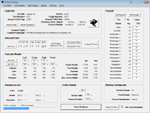
FS2004/FSX Flight Analyzer Utility V4.09
Flight Data Recorder - Logbook.
NOW WITH STATISTICS TOP 5 AIRPORTS, CITIES AND COUNTRIES.
Very easy to use, just make a flight plan in the simulator or in this utility.
What this program do:
- quickly change the settings of FSX/Fs2004, such as time, date, fuel, weight, traffic etc.
- start a failure sytem, such as gear, flaps, engine, etc.
- freeze the time, so you can fly in a for everlasting sunset.
- runway detecting system to see wich runways are in use.
- flight analyzing/data recording from departure to parking at the gate.
- When flight analysis is finished you can print a report, the report is automaticly saved as pdf File.
- graphical landingchart.
- record all your flights
- quickly look to your FSX display settings (only FSX) and change them even before the flight simulator is running.
- After a flight is finished FsQC saves your flight automaticly as 'FsQC last Flight', so you can continue the next day or hour.
Flight analysis start recording at the moment when you begin taxiing.
It gives you huge information such as:
- takeoff- and landing-weight.
- takeoff- and landing-roll in m. and ft.
- separate fuel consumption in taxi, climb, cruise and descent.
- maximum banking in flight.
- which speed you using the flaps and gear.
- when autopilot on or off.
- vertical speed on touchdown.
- reverser set after landing.
- wich speed you cancel reverser.
- bouncing at landing.
- graphical landingchart.
- and lots of more.
You can better look the example of the pdf document located in the 'Flight Reports' folder.
Logbook records:
- fuel consumption.
- payload.
- distance.
- number of different airports.
- flight hours.
- landings.
- flaps.
- speed.
- and lots of more.
- quickly show touchdown wind information in a picture.
- quickly show the graphical landing chart.
- Now with statistics: top 5 Countries, Cities and Airports
Requirements:
Computer with vista or higher and internet access.
Microsoft .net framework 4.6 or higher.(free download on microsft.com)
Flightsimulator FSX or 2004 and FSUIPC installed.
Note: requires paid activation for full use.
Register and you have 1 month free.
Program fully works without registration at airport Athens and Iraklion (Greece)
| Filename: | FS2004FSX_Flight_Analyzer_Logbook_Utility_V409.zip |
| License: | Shareware, time limited |
| Added: | 3rd March 2019, 00:20:37 |
| Downloads: | 250 |
| Author: | Evander Tholen |
| Size: | 3.35 MB |
| Category: Flight Simulator X - Scenery Design | |
| (Version 2.0) KEFD -Ellington 2025 Refresh FSX (Circa 2006-2010)- Johnson Space Center Houston |
|
Images related to this file:
File Description:
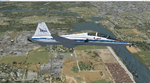
Version 2.0 covers landclass across the entire greater Houston area, with a large increase in LOD. This version significantly tightens up and improves the landclass from version 1.0, and adds a vast amount of scenery objects that brings the Bay Area-KEFD area into the modern era. This improves and adds a highly accurate runway 17 approach with accurate placement of buildings and scenery around the year 2011-modern day. In addition, includes several new files including a new airport/helipad via Houston Clear lake regional airport, T41 La Porte Municipal and surrounding shipping ports, Kemah Boardwalk, and a giant improvement to Johnson Space Center Houston. Rundway 35 and Runway 22 landclass is significantly increased, and more accurate as well. You can fly an accurate VFR approach or set up an ILS for any one of KEFD's runways with ease with this improvement.List of Version 2.0 additions and changes: - I added a ton of scenery objects and tightened up the landclass at Johnson Space Center Houston- NASA Control Center--- Added Talon Park with T38s (via static objects)--- Added Gemeni V rocket and 747 for the shuttle transporter--- And a whole bunch of vegetation, new buildings, and tour buses.- Added Kemah boardwalk and several boat docks- Removed a TON of highrise textures and replaced with medium and large city suburb landclass.- Added Clear Lake regional Hospital with helipad and surrounding scenery by Walter Reed Park- Added El Jardin or "Bayport Container port" with several scenery objects and significantly tightened up landclass.-- Looks great when setting up ILS approach for RWY 22- Tightened up Bay Area BLVD landclass, "adding" University of Houston Clear Lake"-- UHCL was semi already present, just made it more pronounced.- Made Red Bluff road landclass super recognizable!-- Red Bluff road is used to set up VFR approach and or field break for RWY 22 and RWY 17 R.----- Its common to see private jets and the USAF doing a break along Red Bluff road.- Added First Baptist Church, and water tower to Pasadena Convention center- Made Fairmont Parkway pronounced with landclass- Added Houston Port Authority at Morgan's Point--- Another Landmark for the RWY 22 ILS approach, NASA religiously uses this to line up the 10 mile ILS.- Tightened up landclass at Village Grove East and along Fairmont Parkway- Added a TON of scenery objects and landclass corrections for approach of RWY 17 L and 17 R.---- Added Home Depot, Lowes, Walmart Super center, Guitar center etc.---- added South Main Baptist Church--- Bondy Jr High, Turner Elementary, and Pasadena Memorial High School--- Added Saint Luke's Hospital--- Added Hampton Inn Suites and HCA rehab hospital--- Added a ton to the container facility behind best buy and storage facility--- Added smaller churches on RWY 17 approach--- Added a ton of scenery at the base of RWY 17 R, i.e., concrete plant, containers, trucks-- Added gas stations on the corner of beltway 8 and genoa red bluff-- Significantly changed and tightened up landclass at the base of RWY 22 and RWY 17 L and 17 R-- Made several roads and Beltway pronounced------ This decision looks AWESOME at night, really adds demarcation to the roads.**All of this makes the RWY 17 approach super recognizable** RWY 22 approach landclass is much more accurate.- Significantly changed and tightened up landclass near southbelt ellington and interstate 45.- Added Grace Church-- I wanted to do San Jacinto College south, but seemed over kill at that point.- SIGNIFICANTLY tightened up landclass for RWY 35 approach and near baybrook mall.-- Along I45- Added TDECU stadium at the University of Houston Main Campus---- So you can practice flybys for Cougar games!- Added the Battleship at San Jacinto Monument- I also "borrowed" T41 La Porte Municipal's tower camera to make a SWEET view of KEFD.- I included landclass for Sealy Texas this time, as well as my significant enhancements of Austin, Texas greater area as well (optional, but recommended!)---------------------------------------------------------------------------Version 1.0 originally added:- Added the Johnson Space Center Houston, which is now greatly enhanced and blended.- San Jacinto Community College-Central- Pasadena Convention Center- Pasadena Water Treatment Facility- NASA Bouncy Lab- Pasadena Shopping center, now greatly enhanced and blended.- Baybrook Mall and other shopping spots.- Significant Landclass improvements across the entire greater Houston Area File also includes landclass and scenery improvements for the greater Austin, Texas Area (optional), KIAH, KDWH, and Sealy, Texas. Each of these projects combined covers roughly 15,000 square miles of landclass improvement. Allowing you to fly entirely from Houston to Austin, or Houston to San Antonio in accurate landclass. -Enjoy!DJN
| Filename: | Version_20_KEFD_Ellington_2025_Refresh_FSX_Circa_2.zip |
| License: | Freeware |
| Added: | 12th October 2025, 16:15:47 |
| Downloads: | 67 |
| Author: | Dan Nelson |
| Size: | 277.28 MB |
| Category: X-Plane - Scenery | |
| London 2004 |
|
File Description:
Continuing my new free releases for this year, here is my London 2004 scenery package that I designed for my personal
use but now I want to share it with the community. I have had numerous requests to do more cities and airports so this is my third scenery for 2004. Being the lazy
person I am, no research was done and no claim to real life cities and airports is intended or implied.
I have added many objects to the airports and cities including terminals, hangers, buildings, castles, city scapes and
other fun and interesting things. All of which were culled from all the wonderful designers in the X-Plane Community
such as B. Brooks & Christian Franz, Ted Davis, Tom Curtis, Ralph Glass, Tim Chandler, Didier Chauveau and all the
other hard working and exceptionally talented designers who have inspired me. Many thanks to each of you for your
contributions to the X-Plane community.
Like all my scenery packages, the additions to the citys and airports are purely fictional. The airports themselves are
unaltered. I have enhanced London Heathrow (EGLL), London Gatwick (EGKK), London City (EGLC) airports and of
course the city of London . A special thanks to Robert Bunce for his NYEXPRO packages and Ken Spiker for his
KWIKCITIES package. If I inadvertently left out other objects and scenery designers, it was purely unintentional and I
offer my apologies.
All airports and cities come with Night Textures. Flying at dusk and dawn will add additional enjoyment to your
experience. You may want to experiment with your Autogen settings for best results. I turn mine way down in the
rendering settings so that autogen buildings don't sit on top of custom objects and roads. It will improve framerates as
well.
Installation: Place the extracted "London 2004" folder into your "Custom Scenery" folder. I have included apt.dat files
for v6.70 and v7.30. Keep the apt.dat file for your particular XP version. Apt.dat files are different formats for v6 and v7.
Please send any comments or suggestions to [email protected]. If you choose to rate my Scenery Packs and
give less than a "9" rating, I would appreciate knowing what I can do to improve them. I can only do that with your
feedback.
My Other Free Scenery Packages are:
Charlotte-Rock Hill,
Houston-Galveston,
Iraq,
Nice, France,
San Diego 2004,
San Francisco 2004.
All are available at X-Plane.org and Avsim.com.
Have fun and FLY SAFE!.
| Filename: | London_2004.zip |
| License: | Freeware |
| Added: | 18th January 2004, 22:54:38 |
| Downloads: | 6,517 |
| Author: | Bill Moore |
| Size: | 9.28 MB |
| Category: Flight Simulator 2004 - Utilities | |
| FlightSim Manager v2.6.1 |
|
File Description:
Compatible with both FS2002 and FS2004
FlightSim Manager is a great tool for managing add-ons to Microsoft Flight Simulator. Using easy to Wizard - FSM can install aircraft, panels, textures and scenery directly from distribution ZIP files you may have downloaded, with proper uninstallation of add-ons. From an easy to use Aircraft editor to add or remove aircraft variants, to an comprehensive Hangar management allows you to manage and configure your add-ons off your live FS installation.
You can now create Virtual Fleets, and enable/disable the complete fleet with ease. For serious pilots, FSM also offers a complete Logbook.
Lan View feature allows you to create virtual cockpits with multiple monitor support, using networked PCs.
With FSM, you can create Texture Sets - i.e.. different Tree Sets, and you can install any set with a single click, capture screenshots from Flight Simulator, Benchmark with log, launch it with Random Splash Screens, and fly from anywhere in the world using an map view.
You can also control Flight Simulator with speech commands using FSM. It also supports auto-saving flight, warning sytem, and custom event sounds.
Finally with a comprehensive Diagnostic Tools and Repository feature, FSM keeps your FS installation clean. Apart from the usual Missing and unused gauges, FSM can also locate Aircraft problems, Missing and unused effects, Scenery Problems with a LandClass File relocate feature - say bye-bye to all the memory leaks.
You can find the latest version from: http://www.ranainside.com/
To provide you - the user with the best Freeware FS-Addon, I need your help... if you have any suggestions, recommendations or problem using this software, please contact me through our Forum at: http://softwares.ranainside.com/forum/
You may not distribute the original archive/setup utility of the program(s) to anyone else, any Bulletin Board System, Portable Media or any web-site unless EXPRESS PERMISSION FROM THE AUTHOR is granted. You may not sell, lease, rent, or include this program or its original archive by any media without EXPRESS PERMISSION FROM THE AUTHOR. You are not required to pay for this program in any way, shape or form, but you are not licensed to distribute this program or its original archive for any financial gain.
| Filename: | FlightSim_Manager_v261.zip |
| License: | Freeware, limited distribution |
| Added: | 15th September 2004, 12:51:52 |
| Downloads: | 5,440 |
| Author: | Rana Hossain |
| Size: | 4.43 MB |
| Category: Flight Simulator 2004 - Original Aircraft | |
| Caproni-Vizzola C-22J Ventura |
|
Images related to this file:
File Description:

The Machine:
A fully aerobatic, very-light Jet that compares to the Bede BD-5J, but heavier and sporting two instead of one TRS-18 turbojets. Up to Mach 0.47 and 650 NM of range, with a service ceiling of 25000ft. A low stall speed (for a jet) makes the aircraft good for short field operations.
Certified for VFR operations only, yet includes a good avionics suite.
This is a "Classic" aircraft featuring "Steam" gauges and radios. Yet, controls and systems are easy to operate.
The History:
The C-22J is the last aircraft to be adorned with the legendary Caproni name. Originally known as "Caproncino", then marketed as "Ventura". A very-light jet developed in the 1980s as a military trainer, surveillance and reconnaissance aircraft. Powered by two TRS-18 turbojets fed from a dorsal NACA intake, the aircraft reached Mach 0.47 and was fully aerobatic. The airframe shows its origin in a glider design, the Caproni A-21 Calif. After the merger with SIAI Marchetti, the project was cancelled in favor of the SF-260.
The Simulation - 3D Model:
This aircraft ships with a 3-D cockpit, that incorporates realistic night lighting, in the form of a dim dome flood light, backlit gauges and luminous digital displays. The flight crew of 2 is affected by your input in the payloads menu of Flight Simulator, allowing to choose between male, female or empty seats. The Copilot Figure can be hidden with a quick click in the internal 3D view as well.
The Simulation - Realism:
This aircraft has been tuned with the invaluable help of Engineer Carlo Ferrarin, who created the real aircraft. Unique and one-off documentation has been kindly provided, and used extensively, for the creation of this product!
Just like the real aircraft, the systems are simple and of easy operation. Engines can be started with the press of a button. Systems modelling allows the following of real-world checklists as closely as Flight Simulator allows. An in-sim checklist is included, as well as a full flight manual.
The flight model is tuned with advanced aerospace techniques, resulting in a highly realistic aircraft, yet, it is very pleasant to fly, both during aerobatic displays or "A to B" cruising.
Highlights:
- High-Resolution 3D cockpit
- Full Documentation
- Aerobatic
FS-2004 Version comes with limited support and is free due to platform limitations. See Readme. FS-X & P3Dv4 (64-bit) versions are commercial products.
| Filename: | CaproniVizzola_C22J_Ventura.zip |
| License: | Freeware, limited distribution |
| Added: | 7th November 2020, 18:31:45 |
| Downloads: | 677 |
| Author: | Mario Noriega |
| Size: | 157.85 MB |
| Category: X-Plane - Utilities | |
| X-Camera 2.2.1 |
|
Images related to this file:
File Description:
The X-Camera 2.1.1 plugin for X-Plane 9 and 10 is a replacement camera system that lets you define multiple view categories and multiple views within those categories that are associated with specific aircraft. X-Camera is similar to EzDok for FSX only for X-Plane. Watch this short X-Camera demo on YouTube: https://www.youtube.com/watch?v=PgOxG8ejq9A
Each view can have options:
- TrackIR:
Each view can enable or disable the TrackIR input. If the view is out the cockpit window having TrackIR enabled is desirable. However, if the view is a close-up of an instrument panel then having TrackIR disabled is probably the better choice since the view will be stable making it easy to click on cockpit controls with the mouse. We also support LinuxTrack on Linux and Mac systems.
- HeadShake:
If the HeadShake plugin from SimCoders is installed then the view can accept input from HeadShake. Similar to the TrackIR feature you will likely want this enabled for certain views but disabled for views on instrument panel close-ups where a stable camera makes it easier to use a mouse to control cockpit knobs and switches. The HeadShake plugin must be at version 1.3 or higher for the integration to work.
- Scenic Flyer:
If the Scenic Flyer plugin from Digital Avionics is installed then the view can choose to display either the Scenic Flyer Glass panel or GA panel.
- Smooth Transition:
When this option is enabled the camera with smoothly transition from one view to another over approximately half a second. When the option is off the view will transition immediately.
- Views can be controlled in a number of ways:
> Each view can be positioned by using keyboard keys or a control panel
> The camera'™s X, Y, Z, Heading, and Pitch can all be adjusted for each view
> Views can be assigned to a HotKey or JoyStick button for easy selection
> HotKey or JoyStick button can be used to navigate to next or previous views
> The views for a specific aircraft can be saved to a CSV file for easy editing
- Walk Mode:
Any view'™s camera can be placed in Walk Mode. While in this mode the camera can be walked or floated around using keyboard input. If you ever played the video game asteroid that is what walk mode is like. The mode is particularly useful for pre-flight inspections of your aircraft. You can create a external view and after selecting that view you can "Walk" the camera around checking out your landing gear, props, etc.
- Linear Transitions and Auto Advance:
Linear transitions allows you to define a transition between two adjacent cameras in category. This capability, in conjunction with the auto advance feature, allows you define fairly sophisticated animations that can be used for automated Pre-flight inspections, scenery viewing, and cool transitions affects that can be used when creating flight videos. All the transitions in our YouTube video were done with X-Camera.
- Bezier Curve Transitions:
Bezier curve transitions allows you to define a transition between three or more adjacent cameras in a category. This capability, in conjunction with the auto advance feature, allows you define fairly sophisticated animations that have an ultra smooth movement between the curve control points.
- Many Unique Camera Attributes:
Tracking Cameras - Camera Leveling - Smooth Camera Joining - Auto Advance to the Next Camera - Individual Zoom and Field of View Setting - External Cameras - Free Cameras - Target Following Cameras - Cineflex Cameras - Automatically Generate Unique Orbit and Fly-By Animations
X-Camera can create unique orbit and fly-by camera sequences by providing a few key parameters
- Airport Cameras:
You can define a set of free cameras associated with an airport. You can create up to 2,000 cameras per airport. X-Camera can also automatically populate airport cameras by reading the airport scenery files and creating cameras at runways, starting locations, taxiway signs, and airport viewpoints. You can map a joystick button to quickly switch between your aircraft camera set and the nearest camera at the nearest airport.
- Target Following Cameras:
Targets are locations defined by a latitude, longitude, and elevation in meters. Target following cameras are a special type of external camera that is attached to your plane and it has the ability to track a selected target. You can also view the target reciprocal which as a view from the target back to you plane.
X-Camera Tutorial Videos: There is also a four part series of tutorial videos that will help you get started with X-Camera. You can access them from the X-Camera Tutorial Page: https://www.stickandrudderstudios.com/x-camera-tutorial-videos/
The full manual is included in the zip file you can also view it here: https://www.stickandrudderstudios.com/downloads/User_Guide.pdf
| Filename: | XCamera_221.zip |
| License: | Shareware, limited functionality |
| Added: | 27th January 2017, 15:14:21 |
| Downloads: | 478 |
| Author: | Mark Ellis |
| Size: | 4.61 MB |
| Category: X-Plane - Scenery | |
| XP11 German Scenery EDHK 2018+ Kiel-Holtenau |
|
File Description:
The small Zip-file will include a link for scenery download, because the scenery file size is above 500 Mbyte. Just follow the link and download EDHK 2018. This is an "install and fly" version, everything you need is already included (*see info below) and I will continously update the scenery. The story, in November 2012 the German MFG5 (Marineflieger-Geschwader) was relocated to Nordholz (ETMN). This was the end of the main military use in the southern and eastern part of the airport. Because the German harbor city Kiel needs living space for their citizens, opponents of the airport tried to convince citizens and politics to close the airport and to create there living space instead. In 2018 the citizen of Kiel voted with a citizen’s decision with the result that the majority voted for the preservation of the traditional airport. Personally, I am very happy with this decision. On the area of the airport some companies are settled, their employees should be able to sleep a little better now. In addition, there will certainly be future investments in the airport due to the election results. Since the airport has been financially in the red for years, the operator of the airport, the Port of Kiel Flughafen GmbH & Co. KG has converted large areas of the airport as parking area. These parked vehicles are part of the constantly increasing cruise ship operations within Kiel, making it possible for passengers to safely park their vehicles for extended periods of time. The taxiways “A†and “D†of EDHK are no longer in operation. This was of course taken into account in my scenery. The access to this taxiway was marked as in the original by yellow "X". The taxiway lighting was also turned off there. The on-site Luftsportverein (LSV) uses above the runway 08/26 an individually marked grass runway (not official), I called it 08S/26S and it is for the winch launch of their gliders only. The size of this provisional winch runway is about 820x20m. A glider takeoff by towing aircraft is usually handled by the Runway 08/26.(*) There is no copyright infringement, since I have received all the needed permissions to use the listed objects/libraries full or in parts within my scenery, the same for the single objects or non-Library bound objects/elements. I got all these permissions in writing from each individual author/rights holder. Take the time and read the full, included descritpion, please. If you have question, ask me first!
| Filename: | XP11_German_Scenery_EDHK_2018_KielHoltenau.zip |
| License: | Freeware |
| Added: | 28th November 2018, 22:46:11 |
| Downloads: | 69 |
| Author: | Marco Moschet |
| Size: | 1.3 KB |


© 2001-2026 AVSIM Online
All Rights Reserved
Privacy Policy |