
Where Flight Simulation Enthusiasts Gather from Around the World!
AVSIM Library - Search Results

| Category: Flight Simulator 2004 - Original Aircraft | |
| Super Mystere B2 |

|
Images related to this file:
File Description:
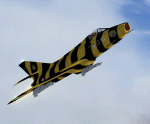
Includes eight external configurations and 22 texture sets. From Team FsFrance: Models by Pierre Marchadier. Textures by Gilles Mercier. Panel and gauges by Jean-Pierre Langer. Flight dynamics by Jean-Pierre Bourgeois and Benoit Dube.
This is a re-upload to the Avsim library of the original from 2007.
| Filename: | Super_Mystere_B2.zip |
| License: | Freeware, limited distribution |
| Added: | 17th June 2012, 19:13:56 |
| Downloads: | 1,497 |
| Author: | Pierre Marchadier, Gilles Mercier, Jean-Pierre Langer, Jean-Pierre Bourgeois, and Benoit Dube |
| Size: | 34.23 MB |
| Category: Flight Simulator 2002 - Aircraft Repaints, Textures and Modifications | |
| Orbit Airlines Boeing 717-200 |
|
File Description:
A repaint of Sam Chin's 717-200 in the Microsoft livery "Orbit Airlines" (seen on the default Boeing 737-400 and Dash 8-100). These are textures only: to get the model, you can search the site for Sam Chin's model, or download the repaints I've done, such as "landmark717.zip" or "ampac717.zip"
| Filename: | Orbit_Airlines_Boeing_717200.zip |
| License: | Freeware |
| Added: | 28th November 2002, 20:59:55 |
| Downloads: | 379 |
| Author: | Sam Chin. Textures inspired by Microsoft default liveries and painted by Bart Denny. |
| Size: | 646.74 KB |
| Category: Flight Simulator 2002 - Aircraft Repaints, Textures and Modifications | |
| CF-18A Blue Angels Package |
|
File Description:
This Blue Angels package includes all 6 of the blue angels aircraft with ALL FIXES. They have a smoke system and full moving, HIGHLY detailed parts. It also has a panel, virtual cockpit, and night lighting. With full flaps the tail hook drops. This aircraft was originally designed by Dean Reimer and repainted in blue angels colors by Jeff Fatkin and Travis Cruz.
| Filename: | CF18A_Blue_Angels_Package.zip |
| License: | Freeware |
| Added: | 2nd November 2002, 17:50:24 |
| Downloads: | 2,092 |
| Author: | Original CF-18A by Dean Reimer repainted by Jeff Fatkin and Travis Cruz |
| Size: | 4.26 MB |
| Category: Microsoft Train Simulator - Trains and Consist | |
| Royal Blue Trainset |
|
File Description:
MSTS The Royal Blue v1.0. Contained in this package are the likenesses of Baltimore & Ohio's Royal Blue, circa 1910. This set contains a 4-6-2 Class P locomotive with tender, two baggage cars, six coaches, customized cabview, and passenger view. Locomotive by Richard Cowen and Julian Abram. Coaches by Columbus Locomotive Works.
| Filename: | Royal_Blue_Trainset.zip |
| License: | Freeware |
| Added: | 26th December 2003, 04:23:25 |
| Downloads: | 2,007 |
| Author: | Ted Thompson - w/ Richard Cowen, Julian Abram, Eric Weber, and Columbus Locomotive Works |
| Size: | 10.03 MB |
| Category: Fly! II - Aircraft | |
| US Air Force Reserve Command KC-135E Stratotanker |
|
File Description:
Fly! II Aircraft of Boeing's KC-135E Stratotanker assigned to the US Air FOrce Reserve Command 452nd Air Refueling Wing, March Air Force Base, California.
| Filename: | US_Air_Force_Reserve_Command_KC135E_Stratotanker.zip |
| License: | Freeware |
| Added: | 12th October 2002, 19:35:30 |
| Downloads: | 1,606 |
| Author: | Jean Sabatier, Roberto Vigetti, Roger Mazengarb, Bob Lyddy, Abbas Alli and Pete Sterling |
| Size: | 7.81 MB |
| Category: Microsoft Flight Simulator (2020) - Utilities | |
| Flightplan Visualizer 1.19 |
|
Images related to this file:
File Description:
Flightplan Visualizer (FV) version 1.19.0. Copyright 2018-2021 by Pelle F. S. Liljendal ([email protected]), all rights reserved.
FV comes with 1164 pre-imported AI flightplans (of which +380 are BizJet flightplans, the rest are commercial). However you are able to import additional (AI) flightplans yourself. Once imported these (AI) flightplans can be visualized on a map-view, and the user will be able to search accross all these. Hence you can use the program as inspiration as to which routes to fly. E.g. you can search across all imported flightplans to find all flights in an A321 flying into/out from LDDU, or simply to look for all flights in a Boeing 747-8F.
Simply run the included installer to install the software. The program will be installed into "C:\Program Files (x86)\Flightplan Visualizer" and all datafiles will be installed into: "C:\Users\[UserName]\AppData\Roaming\FlightplanVisualizer". The program comes with a full manual explaining everything, and a 3 page quick manual to get you started. The first 3 times you run the program the quick manual will automatically open. The forum is hosted here: https://forum.aerosoft.com/index.php?/forum/919-flightplan-visualizer/
Version 1.19 Contains the following changes:
- The release-version of the application is now aimed at 64-bit (granting access to more memory if needed). Enabling 64-bit adds a memory overhead of approx 50% compared to 32-bit, but its the "price to pay" to have access to more memory (for those of you with many active flightplans loaded into memory at the same time).
- FV can now connect to your simulator using FSUIPC (tested both with P3D and MSFS). By default you will have to manually connect/disconnect (using new menu-items in the File-menu). However in settings you can choose to do it automatic. When automatic-connection is selected the connect/disconnect menu-items becomes inactive.
- When connected to a sim, the location/heading of your aircraft can be displayed on the map, using an orange aircraft-marker, and hoovering the mouse over this marker will display some key data (GPS-location, altitude, heading, speed and so on).
- Added abillity to playback audio-files. In settings you can choose which audio-device to use, and set the volume at which these files are played (defaults to 50%). If volume>0 these files will automatically be played back whenever FV connects to/disconnects from the Sim.
- Added additional icons that are automatically selected to indicate when the program is connected to the simulator. Hence the icon in the main-form will indicate if FV is connected to a simulator or not.
- In the form for editing (user)-airlines and in the form for searching airlines the context menu now have a menu-item called "Show usage". When selected, it will generate a report showing all the (active) flightplans in which the airline is used.
- Added a new "Manual" check-box next to the load-factor when editing user-airlines. This check-box needs to be checked if you want to manually enter a load-factor. When not checked (default) the load-factor will automatically be set to the default value of the selected country.
- When editing user-airlines, the airline just added/edited will be visible and selected in the list-view. Likewise when deleting an airline, the previous item will be be visible/selected (in stead of always scrolling to the top afterwards, as in previous versions).
- The Insert/Delete keyboard-keys can now be used as shortcuts adding/deleting user-airlines and user-aircraft (both owned and types).
- The gate-map context-menu (Airport Info), now allows you to re-center the map (in case your have been panning the map, and can't locate the airport again).
- Added a new menu-item/form to calculate head/cross-wind from manually entered flight/runway-heading and wind-direction/speed. Don't forget the runways tab-page in the Airport-info form already calculates this for each runway (and wind-direction/speed is automatically obtained from METAR).
- Added a new menu-item/form to convert plain-text into morse-code. There is also a button that lets you listen to the generated morse-code, so you can practice your morse-code listening skills (e.g. entering an ILS/VOR-ident, to know which morse-code to listen for in the aircraft, to verify the correct ident is reqeived).
- The "Cruise speed" column have been removed from the aircraft tab-page of the Edit Flightplan form to make more room for the Carrier/Operator-columns. In the past these simply contained the ICAO for the airlines. Now it both contains: ICAO, IATA (if not blank) and Name.
- The criteria in the leg-search window now allows you to filter on departure/arrival week-days (e.g. only include flights departing a particular airport on a Saturday or Sunday).
- When using the flightplan-filter on the main-form, it will favour the current active flightplan (as in previous versions), however if not able to, it will select the first flightplan included in the filtered list (in stead of choosing "[None]").
- Improved import of AIGFP-flightplans where the airport is not contained within the embedded airport.txt file and is using a different ICAO-code in route-files (observed for "AIG_UTair_Summer2018v6" and "AIG_S7Airlines_Winter2019-2020v3").
- Added runway-info (for both Departure/Destination-airports) to the flightplan leg-report. For ILS-eqiupped runways its lists the ID (both as text, as morse-code), frequency and ils-slope.
- Morse-code also added to ILS-ID column on the "Runways" tab-page of the airport-info form. Above the list-view there is also a label showing the morse-code (using a larger font), and next to it there is a button that lets you listen to the morse-code.
- Traffic-pattern direction (for take-off and landing) are now displayed for each runway. These data are extracted from the scenery by MakeRunways, hence the info can't be "better" than the info in the scenery (hence most default airports simly shows 'Left').
- Current/peak- memory usage is now logged at various stages while running, and when closing the program. These values can also be observed opening the about-box, which will also forcefully append these values to the log.
- When using MkRwy with MSFS it can't obtain the country-name, hence these are taken from the airport-database embedded with FV. However the name for USA ("United States of America") is too long to be shown together with state-name, hence code have beed added it to shorten it to "United States" (which was the default country-name used in FSX/P3D).
- Changed font in Comments-box for user-aircraft to a fixed font, in case some users what to enter text "in columns" (e.g. if you make "tables" with speed-restrictions).
- Changed the color of the splitter-bars in the Airport-info and leg-search forms to a draker color, to better indicate where it is.
- The build-part of the version-number can now be ignored when performing the automatic version-check at start-up. This new setting is by default disabled. If enabled it will ignore changes from version 1.x.0 to 1.x.1 (e.g. an update from 1.19.0 to 1.19.1). However major/minor versions-updates (e.g. from 1.19.x to 1.20.x) will not be ignored.
- Fixed: Excessive logging while importing AIGFP flightplans removed (leftover from fixing a bug before the release of version 1.18).
- Fixed: When using kg in the leg-info report, the weight of Luggage incl. pax weight (shown in parentees) was wrong.
- Fixed: Button to open filter-manual on Gate-page of the Airport-info form was not visible/position was not fixed.
- Fixed: The wind-speed obtained from the METAR and used to calc head/tail-wind on the Runway tab-page of the Airport-info form, did not considder the unit (e.g. Khp or meters-per-second).
- Data: A VERY BIG THANK YOU to Bruce Nicholson for assistance updating the Airline-database, both with new/missing entries and marking defunct airlines as such.
- Data: A lot of "fictios airlines" was added as well. These are used for companies without official ICAO/IATA codes. To indicate they are fictios the ICAO-code is set to "---" and the IATA-code is used to indicate the kind of traffic (e.g. the combination "---/BZ" is used for biz-jet flights).
- Data: Also thanks to Bruce for pointing out that a few aircraft were not being detected as they should. So this version should do a better job with Cessna T206H, Cessna Citation SII/S550 and Global 7500.
- Flightplans: The bundled AIG flightplans have been updated to the latests versions/revisions available from AIG (there were a few defunct that was removed, a few new versions that was added, and a lot of new revisions being updated).
- Flightplans: Eric Steinmetz's Bizjet (AI) flightplans that have previously been available as a separate download are once again bundled with the installer (they are only installed if you choose the option during installation). These have all been updated to use the new "---/BZ" airlines (for companies without official ICAO/IATA-codes), and the Author/Provider have been set to "Eric Steinmetz"/"ESAI" (the previous/separate download was created before adding author/provider to the software).
Pelle
| Filename: | Flightplan_Visualizer_119.zip |
| License: | Freeware, limited distribution |
| Added: | 2nd May 2021, 00:02:01 |
| Downloads: | 280 |
| Author: | Pelle Liljendal |
| Size: | 35.71 MB |
| Category: Flight Simulator 2004 - Miscellaneous Files | |
| The Steamer PATRIA, pearl on VFR of Lario - Como Lake, Italy |
|
Images related to this file:
File Description:
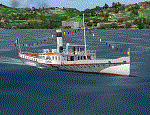
Steamship sailing, GMax model with photo real textures and panel with exterior views.
The History: Born with the name of "Savoia" this steamer was placed in the yard June 7, 1926 by the Odero's workers at the construction site of Dervio, and in a very short time, triumphantly launched July 31, 1926 first in the waters of Dervio , to start shipping in the Como Lake.
Soon after this launch, the site was put on the twin " October 28 ", which later became the "Concordia". In December 1926, the " Savoia " incorporates a major change : the distribution system of the machine new one "Caprotti" type that has excellent results and is , up to date, the only example in the world (reduction of rolling steam). In May 1927, the " Savoia " has the honor to welcome on board the King of Italy Vittorio Emanuele III , escorted by the steamers " October 28" and " Plinio". During World War II , following the fall of the fascist regime , July 25, 1943 , is required to change the name of the steamer. Even public opinion is mobilized and decide to rename the steamer by the name of "PATRIA". At the same time the twin " October 28 " is renamed "Concordia". Back after a break in service , January 10, 1945 is attacked and strafed while browsing the center of the lake . At the end of was counted 5 victims and 17 injured of which one will die as a result. At the height of the bridge spread of a fire, for piercing and incendiary bullets used by the Anglo-Americans, but soon subdued by the crew. In June 1951, the PATRIA is back in service with some modifications. The smokestack is shortened to about 3 mts and boilers and burners are converted from coal to oil. In August 1952, the boat service on the lake shift from "Lariana " to Government Management, which taken the steamer. In 1973 the interior of the " Patria" is restored according to the original scheme: the magnificent ship back into service June 10, 1973.
Great new features are the stained glass windows in the inner surface that allow you to see the paddle wheels in motion. In the 80s the PATRIA is used mainly for special cruises and rentals, limiting the use of the line. The summer of 1990 is the last one that sees the "PATRIA" in service. In the fall it is stopped at the construction site of Tavernola, later transferred to Dervio where it remains moored for years waiting to know his fate ... between demolition or renovation (this strongly desired by the Lariana population). Finally in 2003, the Province of Como takes the field by engaging in the recovery of the steamer, with PATRIA's historic "friends" of "Famiglia Comasca"; February 27, 2004 the remains of the steamer is formally sold to the Province of Como in the symbolic figure of " 1 Euro". After a series of bureaucratic delays, in August 2008 is finally contracted the first batch of works and the renovation starts. On 8 May 2013, PATRIA comes to Dervio for a short cruise, and for testing stability on the lake, and received a "Certificate of Class" that officially renames it as a ship. After 23 years it is the first time that the PATRIA sails again, since 1990, the year of its disarmament. The inauguration takes place July 19, 2013, at Villa Olmo in Como present authorities, proponents of the huge recovery and many other enthusiasts ... as me. Enjoy.
Check video available here: http://youtu.be/KALgHsGiPu8
| Filename: | The_Steamer_PATRIA_pearl_on_VFR_of_Lario__Como_Lak.zip |
| License: | Freeware |
| Added: | 22nd February 2014, 01:25:28 |
| Downloads: | 590 |
| Author: | Aldo Della vedova, Daniele Lanfranchi, Gian Mario Verga |
| Size: | 10.5 MB |
| Category: Flight Simulator 2004 - Scenery | |
| 1960 Nice Côte d'Azur Airport (LFMN) |
|
Images related to this file:
File Description:
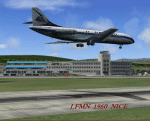
We have produced this scenery to provide taxiways and details as they were around 1960 at Nice airport. We have also included new parking to allow the AI aircraft to taxi correctly at the new (old!) airport. We had just a few photographs of the "old" Nice airport, so we tried to come as close as possible. Our goal was to reflect something of the atmosphere and feel of that period, prior to the all jet era of today.
| Filename: | 1960_Nice_Cte_dAzur_Airport_LFMN.zip |
| License: | Freeware, limited distribution |
| Added: | 20th December 2012, 21:16:20 |
| Downloads: | 4,005 |
| Author: | Harry Biard, Johan Dees, Jaap de Baare, Wolfgang Gersch, Nikko Yaginuma and Tom Gibson |
| Size: | 6.41 MB |
| Category: Flight Simulator 2004 - Scenery | |
| Paris Orly 1966 Scenery (LFPO) |
|
Images related to this file:
File Description:
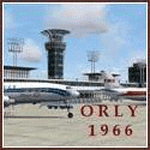
We proudly present this scenery of the airport of Paris-Orly (LFPO) as it was around 1966. We have produced this scenery to provide taxiways and details as they were around this period. We have also included new parking to allow the AI aircraft to taxi correctly at the new (old!) airport. Although we did not always have enough photos and information we tried to come as close as possible. Our goal was to reflect something of the atmosphere and feel of that period, prior to the all-jet era of today. You also will find a moving crash tender at the airport. The major difference between the 1961 and 1966 scenery is the new control tower. Updated zip file with correctly named Setup file.
| Filename: | Paris_Orly_1966_Scenery_LFPO.zip |
| License: | Freeware, limited distribution |
| Added: | 1st December 2013, 20:42:03 |
| Downloads: | 1,137 |
| Author: | Harry Biard, Nikko Yaginuma, Jaap de Baare, Wolfgang Gersch, Tom Gibson and Bernard Leuenberger |
| Size: | 7.06 MB |
| Category: Flight Simulator 2002 - Aircraft Repaints, Textures and Modifications | |
| AeroUnion Airbus A300B4-203(F) |
|
File Description:
AeroUnion A300 called "Tata". This plane was ex-ICC Cargo, now with Mexican registration flying for New Mexican Cargo Airline called AeroUnion. We hope you enjoy it!!.
| Filename: | AeroUnion_Airbus_A300B4203F.zip |
| License: | Freeware |
| Added: | 21st January 2003, 00:35:16 |
| Downloads: | 517 |
| Author: | Original model by : Jaefree Lin . Taipei. Repaint by Tharik Rivas and Carlos de Anda. |
| Size: | 436.63 KB |


© 2001-2026 AVSIM Online
All Rights Reserved
Privacy Policy |