
Where Flight Simulation Enthusiasts Gather from Around the World!
AVSIM Library - Search Results

| Category: Flight Simulator 2004 - Sounds | |
| Boeing 777 General Electric GE90-115B Sound Pack |

|
File Description:
SkyHigh Audio Simulations and Audiosim are proud to present what is quite possibly the most realistic sounding GE90 sound pack available for the 777! This sound pack is designed to work with ANY model in FS9, but moreso intended for Posky's 777s with GE90 engines. This sound pack includes many unique and realistic features, including realistic start up 'mooing' sounds and the famous GE90 growl. Realistic interior ambiance noises such as the touchdown, flaps, gear sound, and more are featured in this sound pack. Please visit our website at: www.skyhighflightsim.webs.com, or Audiosim's website at: www.audiosim.webs.com for more info and sound packs!
| Filename: | Boeing_777_General_Electric_GE90115B_Sound_Pack.zip |
| License: | Freeware |
| Added: | 13th November 2011, 04:22:36 |
| Downloads: | 11,379 |
| Author: | Adam Murphy and Jesse Casserly - Skyhigh Audio Simulations, Max Cossette - Audiosim |
| Size: | 35.36 MB |
| Category: Flight Simulator X - Sounds | |
| Boeing 777 General Electric GE90-115B Sound Pack |
|
File Description:
SkyHigh Audio Simulations and Audiosim are proud to present what is quite possibly the most realistic sounding GE90 sound pack available for the 777! This sound pack is designed to work with ANY model in FSX, but more so intended for Posky's 777s with GE90 engines. This sound pack includes many unique and realistic features, including realistic start up 'mooing' sounds and the famous GE90 growl. FSX exclusive features include real 3D sounds providing a much more realistic exterior sound experience. Also distant sounds are included, such as distant start up 'mooing' noises. Realistic interior ambiance noises such as the touchdown, flaps, gear sound, and more are featured in this sound pack. Please visit our website at: www.skyhighflightsim.webs.com, or Audiosim's website at: www.audiosim.webs.com for more info and sound packs from Audiosim!
| Filename: | Boeing_777_General_Electric_GE90115B_Sound_Pack.zip |
| License: | Freeware |
| Added: | 25th November 2011, 09:23:04 |
| Downloads: | 17,465 |
| Author: | Adam Murphy and Jesse Casserly - Skyhigh Audio Simulations, Max Cossette - Audiosim |
| Size: | 57.67 MB |
| Category: Flight Simulator 2004 - Original Aircraft | |
| Aeroprakt A-22LS "Foxbat", Ultralight - beta version |
|
Images related to this file:
File Description:

Model only for FS-9. 3 versions of model - wheel, ski, and amphibian. Completely working detailed VC and 2-D panel, effects, gauges, textures, PaintKit. Model uses a lot of custom animations, therefore it is necessary to read the MANUAL. Sounds from Barry Blaisdell - for engine Rotax-912.
| Filename: | Aeroprakt_A22LS_Foxbat_Ultralight__beta_version.zip |
| License: | Freeware |
| Added: | 29th December 2012, 20:26:19 |
| Downloads: | 2,098 |
| Author: | Autor of model - V.Zhyhulskiy, test-pilot and consulting - A.Vodopyanov, sound - B.Blaisdell |
| Size: | 43.94 MB |
| Category: Flight Simulator 2004 - Scenery | |
| Byron Bay, Cape Dyer, Cape Hooper, Dewar Lakes, and Durban Island adapted for the FSGenesis 76m North Canada Terrain Mesh |
|
Images related to this file:
File Description:
These are replacement bgl's to convert five northern Canada fields for use with the FSGenesis 76m terrain mesh for northern Canada. The five are Byron Bay CWBB, Cape Dyer CWFD, Cape Hooper CWFH, Dewar Lakes CWFL, and Durban Island CWFB. These are not stand-alone, and the presumption is that you have already downloaded and installed the previously posted sceneries. The installation consists solely of replacing the existing scenery bgl's with the new. There will be further posts of northern airfields in groups of five, alphabetically, and observations regarding the amendments and any further corrections that are required would be welcomed.
| Filename: | Byron_Bay_Cape_Dyer_Cape_Hooper_Dewar_Lakes_and_Du.zip |
| License: | Freeware, limited distribution |
| Added: | 3rd September 2017, 20:01:55 |
| Downloads: | 73 |
| Author: | Roger Wensley |
| Size: | 3.49 MB |
| Category: Flight Simulator 2002 - Aircraft Repaints, Textures and Modifications | |
| Frontier Airlines Convair 340 |
|
File Description:
Gmax Frontier Airlines Convair 340 with panel and sounds.
| Filename: | Frontier_Airlines_Convair_340.zip |
| License: | Freeware, limited distribution |
| Added: | 10th April 2003, 00:58:25 |
| Downloads: | 1,478 |
| Author: | Built by Greg Pepper and Tom Gibson. Repainted by David Grogg. Panel by Greg Pepper, Allen Jennings, and Tom Gibson. Flight Dynamics by FSAviator. |
| Size: | 11.67 MB |
| Category: Flight Simulator X - Flight Plans | |
| Flight plan Beijing Capital International Airport to King Khalid International Airport iFly 747-8 sp 3a for FSX and FSX SE |
|
File Description:
This file contains information for the route for a flight between Beijing, china and Riyadh, Saudi Arabia using the following airports:
Departure: Beijing Capital International Airport
IATA: PEK
ICAO: ZBAA
WMO: 54511
Destination: King Khalid International Airport
IATA:RUH
ICAO: OERK
WMO: 40437
| Filename: | Flight_plan_Beijing_Capital_International_Airport_.zip |
| License: | Freeware |
| Added: | 21st March 2025, 20:36:07 |
| Downloads: | 8 |
| Author: | David M. Long |
| Size: | 9.68 KB |
| Category: Flight Simulator X - Scenery | |
| Tindari Geographic Coordinates N 38.08.27 E 15.02.48.Important VFR reference point for planes coming from Palermo and heading to Reggio Calabria |
|
File Description:
I wanted to realize the scenery of the sanctuary of Maria Santissima of Tindari village of Patti, in the province of Messina. It rises on the summit of the homonymous hill and overlooks Marinello's ponds in the homonymous nature reserve. Important VFR reference point for planes coming from Palermo and heading to Reggio Calabria. Geographic Coordinates N 38.08.27 E 15.02.48. For more information on the site search on google. In the Package you will also find instructions for installing the scenery.
| Filename: | Tindari_Geographic_Coordinates_N_380827_E_150248Im.zip |
| License: | Freeware |
| Added: | 24th August 2017, 05:08:31 |
| Downloads: | 256 |
| Author: | Pasquale Marrulli |
| Size: | 1.6 KB |
| Category: Prepar3D V1-4 - Utilities | |
| Flightplan Visualizer 1.16 |
|
Images related to this file:
File Description:
Flightplan Visualizer (FV) version 1.16.0. Copyright 2018-2020 by Pelle F. S. Liljendal ([email protected]), all rights reserved.
FV comes with 765 pre-imported Commercial AI flightplans (+380 BizJet flightplans are available as a separate download). However you are able to import additional (AI) flightplans yourself. Once imported these (AI) flightplans can be visualized on a map-view, and the user will be able to search accross all these. Hence you can use the program as inspiration as to which routes to fly. E.g. you can search across all imported flightplans to find all flights in an A321 flying into/out from LDDU, or simply to look for all flights in a Boeing 747-8F.
Simply run the included installer to install the software. The program will be installed into "C:\Program Files (x86)\Flightplan Visualizer" and all datafiles will be installed into: "C:\Users\[UserName]\AppData\Roaming\FlightplanVisualizer". The program comes with a full manual explaining everything, and a 3 page quick manual to get you started. The first 3 times you run the program the quick manual will automatically open. The forum is hosted here: https://forum.aerosoft.com/index.php?/forum/919-flightplan-visualizer/
Version 1.16 Contains the following changes:
- First of all a big THANK YOU to AIG (Alpha India Group) for allowing me to add features to both download their flight-plans (actually a feature suggested by Kai Kamjunke who is one of the developers of AIG AIM and other AIG tools) and access their list of defunct/renamed flightplans. While giving thanks, I also want to thank all (AI) aircraft-model creators, repainters and those who create all the flightplans ... our virtual sky would not be the same without your hard and dedicated work.
- Added new form to download or install AIG flightplans (downloaded directly from the AIG-servers). The form will identify all flightplans that are newer than those already installed or flightplans that are not currently installed. You can simply double-click a flightplan and it will be directly installed without the need to first download the file, and then choose to import this file.
- Both the new flightplan download- and the enable/disable flightplan- form contains a button which download- and show a list of defunct/renamed flightplans (obtained directly from the AIG forum).
- If you create a user-Airline while importing a flight-plan, when you return to the import-form you will be asked if you want to use that newly created flightplan (saves you from having to open the airline-browser and search-for/select that user-airline).
- Added Flightplan-, Airline- and Aircraft-filter to the top of the leg-search form to filter the items shown in the listviews.
- The "Select All" and "Select None" buttons now only (de)select visible items (if a filter is active there might be more items not displayed). However holding SHIFT while pressing these buttons, ALL items will be (de)selected no matter if they are shown or not.
- Replaced the two airport entry fields (in the leg-search form) with filter combo-boxes (MRU) so you can now enter a filter-text to filter which airports to include (the default filter is usign ICAO-codes so the old functionallity is preserved).
- Added filters to search for legs with specific flight-numbers and/or served by aircraft with specific registrations.
- When setting up a filter, sub-elements of the same type can now be separated by "/" so you only have to enter the type-name once (e.g. "country=dnk/nor/swe"). The pipe-char ("|") can be uses in stead if you prefer (e.g. "country=dnk|nor|swe").
- Now both "?" and "%" can be used as a single char wildcard in the filters ("?" is a DOS wildcard, whereas "%" is a SQL-wildcard).
- Added "#" as a wildcard for a single numeric value (0-9) in filters.
- Added "@" as a wildcard for a single alpha value (A-Z) in filters.
- Improved detection of invalid filter-text, which changes the text-color into red, to indicatet that the filter is invalid.
- The ISO3 country-code is now visible in the country combo-boxes in the leg-search form (these codes can be used in the airline- and airport- filters).
- Likewise 3-char Region- and Sub-region -codes have been added to their respective combo-boxes (these codes can also be used in the airline- and airport- filters).
- Saving the leg-search criteria will no longer require the input to be validated. E.g. you can now save the criteria where no aircraft have been selected. If you want to make sure that the criteria is valid for a search, please perform a search before you save the criteria.
- Flightplan-filter added to the "Re-process flightplans" form.
- Aircraft-filter added to the "Choose favorite aircraft-types" form. Also a few extra columns were added to the aicraft list-view.
- The Decode-METAR/TAF form now allows the user to manually enter METAR/TAF messages, and the form can now be opened directly from the main-menu (in case you optain METAR/TAF from other sources and need to decode it).
- Added a new button to the Randomizer form which lets you pick a random route (there is already a button to pick a random flight). The difference is the statistical chance of the chosen route.
- Added 2 columns to the runways listview in the Airport-info form showing head/cross-wind based on selected wind-direction/speed (automatically updated from the obtained METAR report).
- When accepting the result of a leg-search the previous used criteria (if different) are now archived. So you are able to load the 5 last used search criteria.
- The Result-viewer form now have a "Top-most" check-box. When checked that form will be shown on top of all other windows. This allows you to have this form shown on top of other forms (e.g. if you need to enter data from a metar-message into the FMC in the simulator).
- Many of the result-viewer forms now opens non-modal, meaning it can be displayed next to the window form where it was opened and you can switch between the two (you might need to use the new "Top-most" check-box for the best result). When closing the form from where the result-viewer was opened, the result-viewer will be closed as well.
- Likewise the Unit Conversion form also got the "Top-most" check-box in case you want to display this window on top of another program (e.g. if you have paper-work with weight based on kg and you need to enter the weights into a FMC/MCDU that only accepts lbs (or vice versa).
- The "Copy to clipboard" buttons on the METAR/TAF-decode form, and the Leg-Info form have been replaced by a "Show Report" button in stead. This new button will in stead show the text in the Result-viewer form (if you need to, it can be clipped to the clipboard from there).
- Below the (left/right) list-views in the "Enable/disable flightplans" form you now find a label showing two numbers. The 1st number shows the number of items (flightplans) shown in the list-view, and the 2nd number (in the parentheses) shows the number of selected items.
- When importing a flightplan where the aircraft-type can not be detected, the "lines" assigned to the "DUMMY AIRCRAFT" are now all automatically selected. So it is easy to just hit the "Change Aircraft type" button in case there is just a single, or multiple that should have the same type assigned.
- Hoovering the mouse over the gate-markers in the Airport-info form, the tool-tip now contains the GPS-position of the gate. Likewise editing the gate the caption of the edit window contains the GPS-position.
- Added airport size to "FS Comment" column in the "Nearby Airports" form.
- Added line-breaks to the METAR/TAF tool-tips displayed in the Leg-info form (line-breaks also included in the report).
- Fixed: There was a nasty bug in the "Legs" tab-page of the Airport-Info form where the same time-zone was used for both departure- and destination-airport when showing the departure-/destination-times as local times, even if departure- and destination-airports were in different time-zones.
- Fixed: The value of the "Calculated flighttime" check-box in the leg-search form was not set to the loaded value.
- Fixed: If one of your user-airlines had a blank callsign, it would list all airlines with a blank callsign as alternatives. Now it will only try to match non-blank callsigns.
- Fixed: The METAR/TAF decoder was not able to correctly detect a fraction visibility if following variable wind (e.g. "210V290 3/8SM").
- Fixed: Some of the combo-boxes in the leg-search form were enabled for text-entry, where the user should only be able to pick a value.
- Fixed: If "[None]" was selected and you executed a leg-search the "Edit" button remained disabled when you returned to the main form.
- Data: While testing some of the new filters I saw a few erros in the aircraft data (e.g. a few freight aircraft had a non-zero passenger count and other minor issues like that), which were fixed.
- Data: Thanks to Bruce Nicholson for bringing it to my attention that DC-9-15F was not being detected in version 1.15. Now all the DC-9 sub-variants should be detected correctly (e.g. 9-11/12/13/14...51 both pax and freight). The same better sub-variant detection was added to the DC-8's and DC-10's as well.
- Data: Thanks to Aucery for bringing it to my attension that some of the (BizJet) aircraft were not being detected, or not being detected correctly. The King Air 250/300 should now be detected correctly as are Hawker-700/1000, Mitsubishi MU-300, IAI Astra Jet 1125, Cessna T210/T303, and Dornier 328JET/PROP.
- Flightplans: All new/updated flightplans have been added to the installer, and all obsolete have been removed. A total of 765 active flightplans are bundled with the installer.
Pelle
| Filename: | Flightplan_Visualizer_116.zip |
| License: | Freeware, limited distribution |
| Added: | 2nd May 2020, 23:15:38 |
| Downloads: | 318 |
| Author: | Pelle Liljendal |
| Size: | 29.27 MB |
| Category: Flight Simulator 2004 - Aircraft Repaints, Textures and Modifications | |
| Lufthansa B747-400 (D-ABVH) - Fix |
|
Images related to this file:
File Description:
This little fix will replace the engine inlet textures with realistic white ones, how they can originally be seen on Lufthansa 747s.
| Filename: | Lufthansa_B747400_DABVH___Fix.zip |
| License: | Freeware |
| Added: | 27th December 2016, 18:30:14 |
| Downloads: | 136 |
| Author: | Original Repaint by Steve Drabek; FS2004 Conversion and Fix by Nicolas Moellenhoff |
| Size: | 185.37 KB |
| Category: Flight Simulator 2004 - Aircraft Repaints, Textures and Modifications | |
| Max Holste "Broussard" MH1521 s/n 261 , F-GIBN |
|
Images related to this file:
File Description:
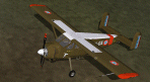
Max Holste "Broussard" MH1521 s/n 261 , F-GIBN
This Flightsim-model for Microsoft Flightsimulator (FS9 only) was made and published by Yann Koun in March 2005.
For this livery, representing the F-GIBN owned and flown by Luc Weber (The Netherlands) ,this model made by Yann Koun was used.( model included!!!)
Textures and 2D interior-views for this F-GIBN livery were made by Leen "Flybike" de Jager.
The interior-views are based on photos taken inside the real F-GIBN , to give the utmost real-flying experience in the 2D panel mode.
(using the numeric keyboard to scroll the views)
| Filename: | Max_Holste__Broussard__MH1521__sn_261__FGIBN.zip |
| License: | Freeware, limited distribution |
| Added: | 9th May 2010, 01:44:51 |
| Downloads: | 1,516 |
| Author: | Model by Yann Koun in- and exteriortextures by Leen "Flybike" de Jager |
| Size: | 12 MB |


© 2001-2026 AVSIM Online
All Rights Reserved
Privacy Policy |