
Where Flight Simulation Enthusiasts Gather from Around the World!
AVSIM Library - Search Results

| Category: Flight Simulator 2004 - AI Flight Plans | |
| Miami Air International, Summer 2010 |

|
Images related to this file:
File Description:

Miami Air International flightplans for the summer of 2010. See the read me for details. Data taken from flight aware during a one week period during July 2010.
| Filename: | Miami_Air_International_Summer_2010.zip |
| License: | Freeware |
| Added: | 18th August 2010, 18:26:34 |
| Downloads: | 1,001 |
| Author: | Brian Summers |
| Size: | 3.18 KB |
| Category: Flight Simulator 2004 - AI Flight Plans | |
| Avianca Brasil - August 2015 |
|
Images related to this file:
File Description:

Avianca Brasil AI FLIGHT PLANS for FS9 and FSX from August 2015 schedule. Created based on "ANAC HOTRANS VIGENTES" spreadsheet and information from Avianca Brasil website.
| Filename: | Avianca_Brasil__August_2015.zip |
| License: | Freeware |
| Added: | 10th August 2015, 23:07:21 |
| Downloads: | 382 |
| Author: | Eduardo Mello |
| Size: | 12.41 KB |
| Category: Flight Simulator 2004 - AI Flight Plans | |
| CSA (Czech Airlines) - Summer 2012 |
|
Images related to this file:
File Description:
CSA - Czech Airlines Summer 2012 Flight Plans. Airline: Czech Airlines. Callsign: "CSA-LINES". Date released: 23.04.2012. Valid period: Summer 2012. 710 weekly flights. Hub - PRG/LKPR, Prague Airport.
| Filename: | CSA_Czech_Airlines__Summer_2012.zip |
| License: | Freeware, limited distribution |
| Added: | 23rd April 2012, 23:43:07 |
| Downloads: | 916 |
| Author: | Maksim Rudakov, United Traffic Team |
| Size: | 112.07 KB |
| Category: Flight Simulator 2004 - AI Flight Plans | |
| Frontier Airlines Winter 2006 |
|
File Description:
Frontier Airlines Flightplans - Q1 2006. Flightplans for Frontier based on the airline's February schedule. Includes all scheduled flights. Look for my Frontier Jet Express flight plans as well.
| Filename: | Frontier_Airlines_Winter_2006.zip |
| License: | Freeware |
| Added: | 7th February 2006, 01:34:27 |
| Downloads: | 1,436 |
| Author: | Brian Wheatley |
| Size: | 36.21 KB |
| Category: Flight Simulator X - Aircraft Repaints, Textures and Modifications | |
| Horizon Air Fokker F27-200 (N274PH) |
|
Images related to this file:
File Description:
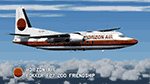
Repaint in the colors of Horizon Air for the payware Just Flight Fokker F27-100/200/300 addon.
The real N274PH was a licence built Fairchild F-27A.
| Filename: | Horizon_Air_Fokker_F27200_N274PH.zip |
| License: | Freeware |
| Added: | 18th June 2015, 16:27:57 |
| Downloads: | 393 |
| Author: | Carsten Gurk |
| Size: | 3.87 MB |
| Category: Flight Simulator 2004 - Scenery | |
| ZLZW - Zhongwei Shapotou Airport - Zhongwei, China |
|
Images related to this file:
File Description:
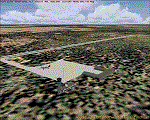
Zhongwei, China airport has missing database airport in FS2004. I created add new airport. I found that Sichuan Airlines' flight plans has airport where is missing in FS2004.
| Filename: | ZLZW__Zhongwei_Shapotou_Airport__Zhongwei_China.zip |
| License: | Freeware |
| Added: | 13th April 2014, 22:30:38 |
| Downloads: | 306 |
| Author: | Stuart J Gilbert II |
| Size: | 2.25 MB |
| Category: Flight Simulator X - Utilities | |
| FSTramp v8.84 for MSFS, FSX(-SE), Prepart3D, X-Plane (Win) |
|
Images related to this file:
File Description:
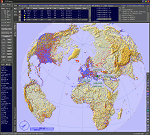
This add-on is an EXE application for Microsoft Flight Simulator and a DLL module for all other simulators. The DLL variant is activated via hotkeys or the simulator menu add-ons or plugins. Window size and layout are configurable for one or more screens. To avoid dazzling, the brightness of the entire application is customizable. Primarily it is a flight management system (FMS) with automatic control from start to landing. This also includes the observance of SID, STAR and Approaches in unmatched quality. The flight plan required for the FMS can be created manually or automatically, interactive changes and additions during the flight are possible. The basis of the flight planner is the 3D world map and the search function for airfields and navigation aids. The FMS by FSTramp relies on the autopilot of the aircraft. In case of incompatibility, the autopilot integrated in FSTramp will be used. This allows FSTramp to control almost all aircraft from airport to airport. The altitude profile of the flight plan, SID, STAR and approach is taken into account. This means that FSTramp extends the often incomplete airport procedures to and from the runway so that they can be flown completely automatically. During the fully automatic flight, the autopilot values ​​for HDG, ALT, VSPEED, SPD and MACH can be manually overridden. This is e.g. useful for being able to react to the instructions of the tower in the final approach without completely stopping the automatic flight. The rotating or north pointing 3D world map with numeric display of the terrain elevation under the mouse arrow is another special feature. It does not need an internet but is synthesized from included height profiles of the globe. The Data of continents, mountains and rivers are included in the setup. Airspaces, Airways, Waypoints and SID, STAR and Approaches are also included in the setup, but can be updated by installing additional AIRAC cycles. Airfields and navigation stations are taken from the simulator. NVIDIA: If the frame rate of the simulator drops sharply about 20 seconds after FSTramp's visibility, the power management of the GPU slows down prematurely. In the NVIDIA Control Panel, change the 'Manage 3D settings - Power management mode' option to 'Adaptive'.
| Filename: | FSTramp_v884_for_MSFS_FSXSE_Prepart3D_XPlane_Win.zip |
| License: | Shareware, time limited |
| Added: | 7th July 2023, 04:35:43 |
| Downloads: | 130 |
| Author: | Helge Schroeder |
| Size: | 358.21 MB |
| Category: Prepar3D V5 - Utilities | |
| FSTramp v8.84 for Prepart3D 2-6, MSFS, FSX(-SE), X-Plane (Win) |
|
Images related to this file:
File Description:
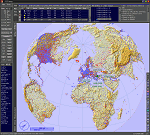
This add-on is an EXE application for Microsoft Flight Simulator and a DLL module for all other simulators. The DLL variant is activated via hotkeys or the simulator menu add-ons or plugins. Window size and layout are configurable for one or more screens. To avoid dazzling, the brightness of the entire application is customizable. Primarily it is a flight management system (FMS) with automatic control from start to landing. This also includes the observance of SID, STAR and Approaches in unmatched quality. The flight plan required for the FMS can be created manually or automatically, interactive changes and additions during the flight are possible. The basis of the flight planner is the 3D world map and the search function for airfields and navigation aids. The FMS by FSTramp relies on the autopilot of the aircraft. In case of incompatibility, the autopilot integrated in FSTramp will be used. This allows FSTramp to control almost all aircraft from airport to airport. The altitude profile of the flight plan, SID, STAR and approach is taken into account. This means that FSTramp extends the often incomplete airport procedures to and from the runway so that they can be flown completely automatically. During the fully automatic flight, the autopilot values ​​for HDG, ALT, VSPEED, SPD and MACH can be manually overridden. This is e.g. useful for being able to react to the instructions of the tower in the final approach without completely stopping the automatic flight. The rotating or north pointing 3D world map with numeric display of the terrain elevation under the mouse arrow is another special feature. It does not need an internet but is synthesized from included height profiles of the globe. The Data of continents, mountains and rivers are included in the setup. Airspaces, Airways, Waypoints and SID, STAR and Approaches are also included in the setup, but can be updated by installing additional AIRAC cycles. Airfields and navigation stations are taken from the simulator. NVIDIA: If the frame rate of the simulator drops sharply about 20 seconds after FSTramp's visibility, the power management of the GPU slows down prematurely. In the NVIDIA Control Panel, change the 'Manage 3D settings - Power management mode' option to 'Adaptive'.
| Filename: | FSTramp_v884_for_Prepart3D_26_MSFS_FSXSE_XPlane_Wi.zip |
| License: | Shareware, time limited |
| Added: | 7th July 2023, 04:35:26 |
| Downloads: | 42 |
| Author: | Helge Schroeder |
| Size: | 358.21 MB |
| Category: Microsoft Flight Simulator (2020) - Utilities | |
| FSTramp v8.84 for MSFS, FSX(-SE), Prepart3D, X-Plane (Win) |
|
Images related to this file:
File Description:

This add-on is an EXE application for Microsoft Flight Simulator and a DLL module for all other simulators. The DLL variant is activated via hotkeys or the simulator menu add-ons or plugins. Window size and layout are configurable for one or more screens. To avoid dazzling, the brightness of the entire application is customizable. Primarily it is a flight management system (FMS) with automatic control from start to landing. This also includes the observance of SID, STAR and Approaches in unmatched quality. The flight plan required for the FMS can be created manually or automatically, interactive changes and additions during the flight are possible. The basis of the flight planner is the 3D world map and the search function for airfields and navigation aids. The FMS by FSTramp relies on the autopilot of the aircraft. In case of incompatibility, the autopilot integrated in FSTramp will be used. This allows FSTramp to control almost all aircraft from airport to airport. The altitude profile of the flight plan, SID, STAR and approach is taken into account. This means that FSTramp extends the often incomplete airport procedures to and from the runway so that they can be flown completely automatically. During the fully automatic flight, the autopilot values ​​for HDG, ALT, VSPEED, SPD and MACH can be manually overridden. This is e.g. useful for being able to react to the instructions of the tower in the final approach without completely stopping the automatic flight. The rotating or north pointing 3D world map with numeric display of the terrain elevation under the mouse arrow is another special feature. It does not need an internet but is synthesized from included height profiles of the globe. The Data of continents, mountains and rivers are included in the setup. Airspaces, Airways, Waypoints and SID, STAR and Approaches are also included in the setup, but can be updated by installing additional AIRAC cycles. Airfields and navigation stations are taken from the simulator. NVIDIA: If the frame rate of the simulator drops sharply about 20 seconds after FSTramp's visibility, the power management of the GPU slows down prematurely. In the NVIDIA Control Panel, change the 'Manage 3D settings - Power management mode' option to 'Adaptive'.
| Filename: | FSTramp_v884_for_MSFS_FSXSE_Prepart3D_XPlane_Win.zip |
| License: | Shareware, time limited |
| Added: | 7th July 2023, 04:35:12 |
| Downloads: | 111 |
| Author: | Helge Schroeder |
| Size: | 358.21 MB |
| Category: Flight Simulator X - Missions | |
| CastleTeckTour.zip |
|
File Description:
Beginner helicopter mission. A helicopter company located at EDDS airport provides tour services.Today's flight takes passengers on an aerial and walking tour of the Teck Castle in Esslingen, Germany.
| Filename: | CastleTeckTourzip.zip |
| License: | Freeware |
| Added: | 15th January 2022, 16:46:57 |
| Downloads: | 62 |
| Author: | helomissionman |
| Size: | 6.07 MB |


© 2001-2026 AVSIM Online
All Rights Reserved
Privacy Policy |