
Where Flight Simulation Enthusiasts Gather from Around the World!
AVSIM Library - Search Results

| Category: Flight Simulator 2004 - Aircraft Repaints, Textures and Modifications | |
| NHL "Pittsburgh Penguins" Beechcraft Twin Bonanza" |

|
File Description:
Simmers,and Hockey fans,
This aircraft includes my NEW Twin Bonanza Panel_ V3, and for you FSX users it also includes "Camera Definitions" so ***BE SURE YOU COPY aircraft.cfg file to your main Twinstar_ Twin_ Bonanza folder.NOTE!(Camera Definitions will have no effect in FS9)***These 1951 D Model Beechcraft Twin Bonanzas are pristine,no dirt,grease or oil leaks on these babies!Just fresh out of the paint booth, these are the 24th repaint of my in progress NHL collection.All repaints are of "Eric Dantes" Beechcraft Twin Bonanza. All NHL teams will be represented.These repaints are not layered so each one has to be redrawn in its official colors.All repaints will have two liveries,one with team logos and one without logos.All NHL team names were put in two hats, Eastern Conference and Western Conference, they are drawn one from each hat at random.The next repaint will be the San Jose Sharks.(Look for it soon. :)I hope you have as much fun collecting all 30 liveries as I will have painting them!
This file includes the texture.Penguins"(The Pittsburgh Penguins Edition)",texture.NHL Pittsburgh,
"(The NHL Pittsburgh Edition....NOLOGOS)",panel.Penguins and the panel.NHL Pittsburgh folders and the aircraft.cfg file.It also includes two files to correct the knee board,they are the beech_baron_58_check.htm and the beech_baron_58_ref.htm,just copy these two files to your main Twinstar_ Twin_ Bonanza folder.
The following additional file is required.--------------twinstar__twin__bonanza.zip--------------
This file can be downloaded @ http://www.avsim.com/
Go to the file library and just use the Quick Search: type: Chris Tuinstra and you should see the twinstar__twin__bonanza.zip,along with my other NHL and NFL repaints.Again I thank each of you for your downloads.
This file includes a complete matching interior for both liveries".
| Filename: | NHL_Pittsburgh_Penguins_Beechcraft_Twin_Bonanza.zip |
| License: | Freeware |
| Added: | 11th May 2008, 12:37:49 |
| Downloads: | 261 |
| Author: | Chris Tuinstra |
| Size: | 10.38 MB |
| Category: Flight Simulator 2004 - Aircraft Repaints, Textures and Modifications | |
| NHL "Chicago Blackhawks" Beechcraft Twin Bonanza" |
|
File Description:
Simmers,and Hockey fans,
This aircraft includes my Twin Bonanza Panel_ V3, and for you FSX users it also includes "Camera Definitions" so ***BE SURE YOU COPY aircraft.cfg file to your main Twinstar_ Twin_ Bonanza folder.NOTE!(Camera Definitions will have no effect in FS9)***These 1951 D Model Beechcraft Twin Bonanzas are pristine,no dirt,grease or oil leaks on these babies!Just fresh out of the paint booth, these are the 27th repaint of my in progress NHL collection.All repaints are of "Eric Dantes" Beechcraft Twin Bonanza. All NHL teams will be represented.These repaints are not layered so each one has to be redrawn in its offical colors.All repaints will have two liveries,one with team logos and one without logos.All NHL team names were put in two hats, Eastern Conference and Western Conference, they are drawn one from each hat at random.The next repaint will be the Washington Capitals .(Look for it soon. :)I hope you have as much fun collecting all 30 liveries as I will have painting them!
This file includes the texture.Blackhawks"(The Chicago Blackhawks Edition)",texture.NHL Chicago,
"(The NHL Chicago Edition....NOLOGOS)",panel.Blackhawks and the panel.NHL Chicago folders and the aircraft.cfg file.It also includes two files to correct the kneeboard,they are the beech_baron_58_check.htm and the beech_baron_58_ref.htm,just copy these two files to your main Twinstar_ Twin_ Bonanza folder.
The following additional file is required.--------------twinstar__twin__bonanza.zip--------------
This file can be downloaded @ http://www.avsim.com/
Go to the file library and just use the Quick Search: type: Chris Tuinstra and you should see the twinstar__twin__bonanza.zip,along with my other NHL and NFL repaints.Again I thank each of you for your downloads.
This file includes a complete matching interior for both liveries".
| Filename: | NHL_Chicago_Blackhawks_Beechcraft_Twin_Bonanza.zip |
| License: | Freeware |
| Added: | 15th June 2008, 14:52:59 |
| Downloads: | 246 |
| Author: | Chris Tuinstra |
| Size: | 6.75 MB |
| Category: Flight Simulator 2004 - Scenery | |
| Dallas Ft. Worth KDFW / DFW, version 3.2 |
|
Images related to this file:
File Description:

Thank you for downloading this scenery. This is an extensive upgrade to the default Dallas/Ft. Worth International airport. The brand new Terminal D is added and in use now at DFW. FRF's rendition of this terminal is in no way photoreal or exact as it is in real life. The basic shape and dimensions are correct,but due to the limitations of the building blocks available to me at the time, We were not able to design the curved roof and some other architectural details of the actual building. The gates are generally accurate and I have seen no parking problems so far. The original main terminals remain with new, more accurate jetways. The overhead tramway which circles the entire terminal area has been added. It is not perfectly correct or photoreal, but it is a good basic representation.
An AFCAD is included with accurate parking per the DFW website and AA.com. There is a substantial frame rate hit with full AI traffic and weather enabled, but it is not a slideshow.
Update from v3:
The afcad file for KDFW is all new, made with AFX, and reflects recent updates to the taxiway layout. The new afcad file is no longer "all runways active" due to the incorrect behavior of AI aircraft overflying the main runways when using the 13/31's. The new end-around taxiway at the end of Rwys 17R/C is now in place. The runway 18R/17C extensions are reflected as well as associated new taxiways and signage. Parking changes are now reflected per the DFW website. Visual changes include the midfield hangar change from Delta to American titles, courtesy of Joe Degregorio.
| Filename: | Dallas_Ft_Worth_KDFW__DFW_version_32.zip |
| License: | Freeware |
| Added: | 30th May 2010, 10:39:01 |
| Downloads: | 23,468 |
| Author: | William Morgan, FRFSTUDIO.NET |
| Size: | 10.12 MB |
| Category: Flight Simulator X - Aircraft Repaints, Textures and Modifications | |
| Southwest Airlines Boeing 737-700 v2.2 Final Package |
|
File Description:
**** THIS FILE SUPERCEEDS MY ORIGINAL FILE b737_700_southwest_v21.zip **** v2.2 - REPORTED BUGS HAVE BEEN CORRECTED. The 737 was born out of Boeing's need to field a competitor in the short-range, small capacity jetliner market which had been opened up by the BAC 1-11 and the Douglas DC-9. Boeing was badly behind however when the 737 program was initiated in 1964, as both of these rivals were already into their flight certification programmes. The 737 was cheaper and quicker to design, featuring six-abreast seating compared to the 1-11 and DC-9's five-abreast layout.By the 1990s, the 737 had lost ground technologically to the newer Airbus A320. In 1993, Boeing initiated the 737-X or Next Generation (NG) program. The Next-Generation 737 encompasses the -600, -700, -800 and -900, and amounted to a complete redesign of the 30-year old airliner. The 737NG is an entirely new aircraft, sharing very little with previous 737s, other than fuselage frames. New wings, new avionics and revised engines were the biggest engineering changes. The 737 was given a glass cockpit with CRT screens (except the -900, which had newer and higher tech LCD screens) and digital systems inspired by the ones that were used on the 777. The parts count is down by about 33%, reducing weight and simplifying maintenance. Additional changes since its introduction include a new interior and performance enhancing winglets which reduce fuel consumption and improve take-off and climb performance. All textures have been modified in DXT-3 format for crisp visuals without comprimising frame rates. Includes the default FS-X Boeing 737 panel. Sounds have been defaulted to the FS-X 737-800, however I recommend the excellent 737 CFM56 "the real deal" version 2 soundpack (file name:737_cfm56__the_real_deal_version_2.zip located at AVSIM.com) for this aircraft series. Additionally, this aircraft series has no Virtual Cockpit (VC), therefore you must fly them using the 2-D default panel view only! This package includes Southwest Airlines liveries (Canyon Blue, Maryland One, Nevada One, Old Color & Shamu).
| Filename: | Southwest_Airlines_Boeing_737700__v22_Final_Packag.zip |
| License: | Freeware |
| Added: | 9th December 2006, 20:24:49 |
| Downloads: | 11,832 |
| Author: | Brian C. Selb |
| Size: | 13.59 MB |
| Category: Miscellaneous Files - General Utilities | |
| Random Airport Generator |
|
Images related to this file:
File Description:
I can be contacted at [email protected] for any help required or different drive versions needed.
[ABOUT THE PROGRAM]
This program will read a text file from the route of your hard drive depending on the version you run, and select a random line and display that line. The file must be a text file named "Airports.txt". This program was designed with ease of use in mind for selecting a random airport for the Flight Sim community, though can be used for any purpose with any text file called "Airports.txt". The program will display the airport ICAO code then co-ordinates.
[ABOUT ME]
I am a 16 year old aviation enthusiast that loves flying and ATC, but hate having to choose an airport to depart from and arrive at, or to controll. This program has now removed this to make my flight more random with less decisions to make. I also like to explore areas I haven't been before, again this selects a random airport, from thousands of different ones, so exploring is inevitable.
[INSTALLATION]
The only installation required is to copy the Airports.txt file to the route of your hard drive C: or D: (for more drives e-mail me as above), then run the respective program for that drive from any folder you wish.
[ABOUT THE AIRPORTS.TXT FILE]
This file was collected from my FS2004 and contains every airport in it. Currently the program selects a line at random and displays it, whether a large international airport or small grass field. You could edit the file just to contain your favourite airports and it will NOT affect the running of the program as long as the file remains as Airports.txt. I am hoping in future versions to allow you to select a type of airfield, i.e. large, medium or small or select from runway length, though this will take a while to produce, if ever.
For now i hope everyone enjoys the program and happy flying :)
| Filename: | Random_Airport_Generator.zip |
| License: | Freeware |
| Added: | 9th June 2010, 02:41:14 |
| Downloads: | 211 |
| Author: | Alexander Aschacher |
| Size: | 254.45 KB |
| Category: Flight Simulator 2004 - Scenery | |
| PAEN, PAEX, 3AK4, 30AK, 52AK - Alaska, USA |
|
Images related to this file:
File Description:
The town of Kenai is on the east coast of Cook Inlet, 60 miles southwest of Anchorage. The airport is in the northern part of the town, with a runway aligned 1-19, 7,550 feet long and 150 feet wide (with an ILS on 19). A second runway is gravel, 2,000 feet long and for winter use by ski planes. There is also a water runway, and all three are aligned the same and called "1 left-19 right" (the main runway) "1 right-19 left" (gravel) and "1 water-19 water". The taxiways are extensive and designed for a far larger traffic than the airport has today, though even now the airport is fairly busy. In FS9 a water runway for AI cannot work with an ATC control tower; the water part of PAEN has therefore been separated into another call sign PAEX which has ONLY the water runway; the tower will therefore direct the plane that makes contact to use the water runway. The PAEN airport runway has taxiway connections at each end and also two intermediates; at the northern end there are in fact two so a total of 5; B, C, D, E, and F; there is an airport diagram included. GA traffic goes to one of two parking aprons, both at the southern end, and at the far southern end there is the hangar for the Civil Air Patrol. The AI includes aircraft from my previous Alaska posts, as Kenai is where I sent them when they departed from, for instance, Palmer. Airlines and cargo companies that operate from and to Kenai are included in the AI: ERA (which has recently changed it's name), Grant Aviation, Air North, Wings of Alaska, North Star Air, and a small local company Air Supply Alaska, along with Fedex, UPS, Everts, and Northern Air Cargo. There is also GA and float AI. Nearby smaller airfields are included, partly because one of them was dramatically misaligned in FS9.
| Filename: | PAEN_PAEX_3AK4_30AK_52AK___Alaska_USA.zip |
| License: | Freeware, limited distribution |
| Added: | 26th December 2015, 15:33:19 |
| Downloads: | 485 |
| Author: | Roger Wensley |
| Size: | 23.08 MB |
| Category: Flight Simulator X - Scenery | |
| Carnes Farm |
|
Images related to this file:
File Description:
These are the files that I talked about in the Prepar3d forums. I created these objects for Fs9, then upgraded them to the scenery SDK for FSX. They were created 10 years ago in GMAX, and I have used them successfully ever since in Prepared 1.4 as well.
For some reason the individual farmhouse and other objects that I created are not showing up in Prepar3d version 2.0.
That's where you guys come in! These files are free to use in anyway you want as long as proper attribution is given, but, I would like you guys who have both Prepar3d 1.4 and 2.0 to try them out in both and report back to me as to whether you have the same problems that I do. That's your only fee. And I'd like you guys to give it a shot in both, or all four( I am not sure that they will work in FS9 anymore, but try it out. Unfortunately I can't recompile my FSX SDK Files back to FS9 if it doesn't work).
What's included:
1. Photo real scenery of Barbourville, 10 miles to the north west of stinking Creek where we live, and;
2. Photo real scenery of the farm area and stinking Creek, upon which I have placed my GMAX objects;
A. The farm house.Carnes Farm From the Bridge at 500 AGL.jpg
B. The barn, shed and the RV in back of the farmhouse.
C. A two-story long structure the top of which is an apartment but the bottom of which is a re-creation of Mama Carne's store, along with all the real wood floors shelves and original contents.. It is also o n Google earth in 3-D as it is here with further description .
... A little note on Gmax.. Mama Carne's store was one the first structures that I built in Gmax. It was just a box. Later, I added the true architectural features that you see including the steps and rails which took about as long to create as it would have to Saw and fit and hammer the real rails, risers and steps.
D. K-6, my little 2300 foot strip for runways 03 and 21. It has VOR - (117.55), ILS(110.1), and NDB(222).
E. Gerald Bingham's house, 1/4 mile up Warriors Path North from us.( mostly dirt road with gravel topping).
F. Dewitt Baptist Church.
Off property Knox county
G.Escoe's Store and Post Office complete with great prices for gas at the included pumps.
Escoes.jpg
H. Rex allen's killer corner...sheds and farm equipment on the sharpest bend on Stinking Creek...my son went off it with a flat tire, unscathed, but more than several have lost their lives on that curve... there may be several iterations of the sheds...just delete or rename the wrong ones...I was experimenting with ModelConverterX, Arno Gerretsen's wonderful model and object scenery tool.
I. sitting on top of the Barbourville Photo real scenery Barbourville PhotoReal over the shopping center.jpg is the Barbourville P3D Shopping Center2.jpg shopping center all the stores and all the storefronts ... it's on 25 E. as you head into Barbourville.
Recreated, is the entire shopping center with the now outmoded Wal-Mart sign. Probably my magnum opus.
note on the Gmax scenes.
All of the scenery was either directly measured and if not practical for a such a long measuring device, walked off, as in the Stinking Creek Bridge and shopping center. All of the objects were then photographed, in 360° where possible and saved as texture for inclusion in the Gmax model.
Enjoy!
...oh... how do you get there? Wellllll.... situate yourself at Middlesboro (1a6), and tune your Nav radio to K-69's VOR, 117.55, take off and climb to 3500 feet...grinnnnn
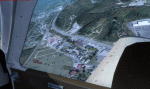
Welcome to Knox County Kentucky!
| Filename: | Carnes_Farm.zip |
| License: | Freeware |
| Added: | 2nd December 2013, 05:34:20 |
| Downloads: | 454 |
| Author: | Chas Honce |
| Size: | 91.13 MB |
| Category: Flight Simulator X - Scenery | |
| Freeware Project Kobe X (RJBE) Japan |
|
Images related to this file:
File Description:
Freeware project KOBE X (RJBE) Japan. Contains fully detailed airport with custom ground polygons. Accurate 3d model and texture of all the building of the airport including the terminal, control tower, hangars, bridge and many more. Please note that this project was my initial experience in many fields of scenery design so take it as it is and enjoy flying in Japan. The design is never done but I think it was ready to be released. Still have some work to do with the animated jetways and night lighting for my next "payware" project (KSAN, San Diego Intl). It's going to be far better than this freeware.
You can download the world of ai installer and install the All Nippon Airways package and maybe the JAL too. The jetways are not animated but you can park a 747 in gate 1, a 767 in gate 5 and a 737 in gate 6 and be perfectly aligned with the jetway door.
Also I've not try this scenery in a less powerful computer than mine. I run a Windows 7, I7-950 @ 3.8 GHz and a GTX 570. So don't get mad if you're having bad performances :). With all sliders in the "display settings" set to max I've around 20 fps in the virtual cockpit of the level-d 767. You'll get a nicer airport with also the global texture resolution set to max, water effects set to High 2.x and traffic to ultra-high. Do not turn on Ground scenery shadows as it will make a shadow for the entire airport (ground poly).
I've some tutorial on my YouTube channel (n170toga) on how to make fsx sceneries if you are interested. Don't forget to subscribe there and have updates for the upcoming scenery. Please review this airport if you like as I will learn a lot for my next
project and it's only going to be better.
This scenery is a freeware and should be considered as a freeware. Arigato, Sagga Toure (Devinci), Devinci Design and Development (3De)
| Filename: | Freeware_Project_Kobe_X_RJBE_Japan.zip |
| License: | Freeware |
| Added: | 12th June 2011, 08:28:51 |
| Downloads: | 6,660 |
| Author: | Sagga Toure |
| Size: | 66.48 MB |
| Category: Prepar3D V1-4 - Aircraft Repaints, Textures and Modifications | |
| Douglas A-20C Boston Dutch Naval Air Service |
|
File Description:
This folder contains a repaint for the Douglas A-20C by Milton Shupe and his team. It shows Douglas DB7 Boston D52 of the Royal Dutch East Indies Navy, Andir, 6 March 1942. In december 1941, the Dutch government ordered 32 Douglas Boostons for the defence of the Dutch Indies after the outbreak of war in the Pacific. These aircraft were destined for the MLD, or Dutch Naval Air Service. The aircraft were painted in RAF camouflage colors and received Dutch orange triangles on the fuselage and the underside of the wings, together with a serial consisting of a D with a number and the text KON.MARINE on the nose. The aircraft were crated and shipped to the Dutch East Indies, with the first six arriving in Java on the 27th of February 1942, just a day before the Japanese landings in Java. The crates were unloaded in Tjilatjap. It was decided to try and assemble a few aircraft on the spot, in the harbor of Tjilatjap, while three crates were sent to Andir by train. Despite Japanese bombing raids on the harbor, the MLD technicians managed to assemble two Bostons in the harbor, and on the morning of the 5th of March, Lt Burgerhout, a Catalina pilot, took of from an improvised runway withh D52 and flew to Tasikmalaja, where it was planned to fill the aircraft with fuel for the flight to Andir air base. However, no suitable fuel was found. Before the second Boston could be flown out, the 'runway' was destroyed by a second Japanese bomb raid, so the ground crew destroyed the aircraft. The aircraft at Tasikmalaja was destroyed on the 8th of Mmarch, just before the capitulation of the Dutch East Indies. Of the aircraft transported by train, one was assembled, and this fell intact into the hands of the Japanese, who later used it for flight evaluations. The other two aircraft were destroyed by their ground crews. The other 26 Bostons still underway were diverted to Australia, and these later flew with no 22 squadron of the RAAF. Repaint by Jan Kees Blom, based on the paintkit by William Ellis.
| Filename: | Douglas_A20C_Boston_Dutch_Naval_Air_Service.zip |
| License: | Freeware |
| Added: | 16th July 2018, 16:43:50 |
| Downloads: | 109 |
| Author: | Jan Kees Blom |
| Size: | 8.32 MB |
| Category: Flight Simulator 2004 - Original Aircraft | |
| Caproni-Vizzola C-22J Ventura |
|
Images related to this file:
File Description:
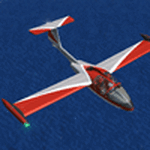
The Machine:
A fully aerobatic, very-light Jet that compares to the Bede BD-5J, but heavier and sporting two instead of one TRS-18 turbojets. Up to Mach 0.47 and 650 NM of range, with a service ceiling of 25000ft. A low stall speed (for a jet) makes the aircraft good for short field operations.
Certified for VFR operations only, yet includes a good avionics suite.
This is a "Classic" aircraft featuring "Steam" gauges and radios. Yet, controls and systems are easy to operate.
The History:
The C-22J is the last aircraft to be adorned with the legendary Caproni name. Originally known as "Caproncino", then marketed as "Ventura". A very-light jet developed in the 1980s as a military trainer, surveillance and reconnaissance aircraft. Powered by two TRS-18 turbojets fed from a dorsal NACA intake, the aircraft reached Mach 0.47 and was fully aerobatic. The airframe shows its origin in a glider design, the Caproni A-21 Calif. After the merger with SIAI Marchetti, the project was cancelled in favor of the SF-260.
The Simulation - 3D Model:
This aircraft ships with a 3-D cockpit, that incorporates realistic night lighting, in the form of a dim dome flood light, backlit gauges and luminous digital displays. The flight crew of 2 is affected by your input in the payloads menu of Flight Simulator, allowing to choose between male, female or empty seats. The Copilot Figure can be hidden with a quick click in the internal 3D view as well.
The Simulation - Realism:
This aircraft has been tuned with the invaluable help of Engineer Carlo Ferrarin, who created the real aircraft. Unique and one-off documentation has been kindly provided, and used extensively, for the creation of this product!
Just like the real aircraft, the systems are simple and of easy operation. Engines can be started with the press of a button. Systems modelling allows the following of real-world checklists as closely as Flight Simulator allows. An in-sim checklist is included, as well as a full flight manual.
The flight model is tuned with advanced aerospace techniques, resulting in a highly realistic aircraft, yet, it is very pleasant to fly, both during aerobatic displays or "A to B" cruising.
Highlights:
- High-Resolution 3D cockpit
- Full Documentation
- Aerobatic
FS-2004 Version comes with limited support and is free due to platform limitations. See Readme. FS-X & P3Dv4 (64-bit) versions are commercial products.
| Filename: | CaproniVizzola_C22J_Ventura.zip |
| License: | Freeware, limited distribution |
| Added: | 7th November 2020, 18:31:45 |
| Downloads: | 680 |
| Author: | Mario Noriega |
| Size: | 157.85 MB |


© 2001-2026 AVSIM Online
All Rights Reserved
Privacy Policy |