
Where Flight Simulation Enthusiasts Gather from Around the World!
AVSIM Library - Search Results

| Category: Flight Simulator 2004 - Aircraft Repaints, Textures and Modifications | |
| Thomas Cook UK Airbus 320 (G-BXKD) |

|
File Description:
Thomas Cook UK repaint for A320 Pilot In Command from Wilco Publishing. The repaint is based on Textures Upgrade Pack, it's detailed and use semi-photorealistic textures. The paintscheme accuracy is based on the real aircraft pictures : this UK repaint is different from Thomas Cook Belgium Airlines (already available as a320pic_thomas_cook_airlines.zip), because of texts height and width, flags and markings. Exterior and Interior are customized, even passengers seats and the front panel in the flight deck has the registration plate of G-BXKD. This works on both FS 2002 and 2004. Full automatic installation, no aircraft.cfg editing is required. Get more Thomas Cook Belgium repaints for A320 PIC with each registration available at Thomas Cook VA : http://users.telenet.be/nva/index3.html.
| Filename: | Thomas_Cook_UK_Airbus_320_GBXKD.zip |
| License: | Freeware, limited distribution |
| Added: | 8th May 2004, 23:32:45 |
| Downloads: | 2,266 |
| Author: | Sebastien Belluteau, Alex Johanssen |
| Size: | 8.35 MB |
| Category: Flight Simulator 2004 - Aircraft Repaints, Textures and Modifications | |
| Aer Lingus Airbus A330-301 'Colmcille' |
|
File Description:
High detailed repaint for Wilco Airbus Series Vol.2. Aer Lingus A330-301 Reg: EI-JFK. Aer Lingus is the flag carrier of the Republic of Ireland. Based at Dublin Airport, it operates 41 Airbus aircraft serving Europe, Africa, North America and the Middle East. The airline is 28% owned by the Irish government; it was floated on the Dublin and London Stock Exchanges on 2 October 2006, following prior government approval (the government previously owned 85% of the airline). Aer Lingus is a former member of the Oneworld airline alliance, which it left on March 31, 2007. The company employs 4,000 people and has revenue of €1.1 billion as of 2006. Aer Lingus transferred 8.6 million passengers in 2006.
| Filename: | Aer_Lingus_Airbus_A330301_Colmcille.zip |
| License: | Freeware |
| Added: | 29th March 2008, 21:39:34 |
| Downloads: | 2,801 |
| Author: | Nicolas Nastri / McPhat Studios |
| Size: | 13.61 MB |
| Category: Flight Simulator X - Aircraft Repaints, Textures and Modifications | |
| Chance Vought F4-U Corsair Royal Navy X115 |
|
Images related to this file:
File Description:
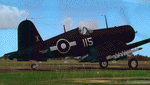
This folder contains a repaint for the A2A/Aircraft Factory F4-U Corsair, in the colors of the aircraft of Robert Hampton "Hammy" Gray VC, DSC. Lt Grey was a Canadian naval officer, pilot, and recipient of the Victoria Cross (VC) during World War II, one of only two members of the Royal Navy's Fleet Air Arm to have been thus decorated in that war. The citation for his VC read: "The KING has been graciously pleased to approve the award of the VICTORIA CROSS for valour to: — the late Temporary Lieutenant Robert Hampton GRAY, R.C.N.V.R.,for great valour in leading an attack on a Japanese destroyer in Onagawa Wan, on 9th August, 1945. In the face of fire from shore batteries and a heavy concentration of fire from some five warships Lieutenant Gray pressed home his attack, flying very low in order to ensure success, and, although he was hit and his aircraft was in flames, he obtained at least one direct hit, sinking the destroyer. Lieutenant Gray has consistently shown a brilliant fighting spirit and most inspiring leadership."
Repaint by Jan Kees Blom, based on the A2A paintkit.
| Filename: | Chance_Vought_F4U_Corsair_Royal_Navy_X115.zip |
| License: | Freeware |
| Added: | 5th August 2018, 16:48:02 |
| Downloads: | 99 |
| Author: | Jan Kees Blom |
| Size: | 4.49 MB |
| Category: Miscellaneous Files - Demos from Commercial Vendors | |
| TOPCAT 2.35 - Take-Off and Landing Performance Calculation Tool |
|
File Description:
TOPCAT is an acronym for Take-Off and Landing Performance Calculation Tool. It's a highly realistic, easy-to-use planning tool for all serious flight simulator enthusiasts. It brings into a single application all of the calculations required to plan for safe and repeatable take-offs and landings including de-rated thrust and assumed temperature calculation. Currently the follwing airplane types are available in TOPCAT (more to come): Boeing 747-400, Boeing 747-400 Freighter, Boeing 747-400, Boeing 767-300, Boeing 767-300 ER, Boeing 767-300 Freighter and the Airbus A320-214. Now compatible with PMDG 747(F), LDS 767-300 and Wilco/Feelthere Load Managers. NOTE: This is an unlimited, fully functional demo version. Win32 installer package including uninstall function. Take your simulation to the next level!
| Filename: | TOPCAT_235__TakeOff_and_Landing_Performance_Calcul.zip |
| License: | Commercial demo |
| Added: | 30th September 2008, 10:27:42 |
| Downloads: | 1,632 |
| Author: | Judith Blaschegg & Christian Grill |
| Size: | 4.23 MB |
| Category: Flight Simulator X - Panels | |
| Boeing 747X Widescreen Panel (1920x1080) |
|
Images related to this file:
File Description:

This is a release of the PMDG 747X Widescreen Panel. Alachtio's panels are simple reworks, taking existing 2D panels and making them have the proper aspect ratio for widescreen displays! This specific file includes a widescreen panel for the PMDG 747X. This panel maintains the clarity of the panels night lighting while increasing the real estate for more displays. Like the Lower DU and DU Control Panel. Included is a document that outlines all the soon-to-be-released packages, including the: PMDG MD11 FS9/FSX, Wilco Vol1-Vol2 FS9/FSX, Level-D 767 FS9/FSX, and more! If you find an issue with this release, please email us at the included email, and it will be fixed for the next release. You must own the PMDG 747X for FSX in order to use this widescreen panel. Enjoy!
| Filename: | Boeing_747X_Widescreen_Panel_1920x1080.zip |
| License: | Freeware |
| Added: | 1st February 2012, 23:52:31 |
| Downloads: | 1,823 |
| Author: | Alachtio Design, Kylan Walters, Daniel Sikounnavong |
| Size: | 1.47 MB |
| Category: Flight Simulator 2004 - Panels | |
| Boeing 747 Widescreen Panel (1920x1080) |
|
Images related to this file:
File Description:

This package is the first of many true 1080p panels being released by Alachtio Design over the next few months. These panels are simple reworks. Taking existing 2D panels, not optimized for 1920x1080 resolutions, and making them have the proper aspect ratio like they should! This specific file includes a widescreen panel for the PMDG 747 FS9. This panel maintains the clarity of the panels night lighting while increasing the real estate for more displays. Like the Lower DU and DU Control Panel. Included is a document that outlines all the soon-to-be-released packages, including the: PMDG 747 FSX, PMDG MD11 FS9/FSX, Wilco Vol1-Vol2 FS9/FSX, Level-D 767 FS9/FSX, and more! If you find an issue with this release, please email us at the included email, and it will be fixed for the next release. You must own the PMDG 747 for FS9 in order to use this widescreen panel. Enjoy!
| Filename: | Boeing_747_Widescreen_Panel_1920x1080.zip |
| License: | Freeware |
| Added: | 23rd December 2011, 15:02:22 |
| Downloads: | 2,672 |
| Author: | Alachtio Design, Kylan Walters, Daniel Sikounnavong |
| Size: | 1.47 MB |
| Category: Flight Simulator X - Panels | |
| Ultimate Airbus A32x V2 |
|
Images related to this file:
File Description:

Ultimate Airbus A32x V2 is an Advancement of the previous Version "Ultimate Airbus V1" and generally follows the same Idea: To ease flying the WILCO Airbus Volume 1 (models A318, A319, A320 and A321). This Package therefore introduces 6 smaller Sub-Panels (p.e. Engine Starter, ECAM Control, Flaps Lever, Radio etc. including Clickspots to handle those Panels) instead of allways using the Pedestal or Overhead Panel covering the complete View. It also includes a "Co-Pilot" functionality to automate certain Parts of Flight Procedures (Lights, Gear, Spoliers, Flaps etc.), Buttons for Panel Lights and Doors as well as new Views.
A detailed Tutorial Flight considering the a. m. added functionality - based on Airbus Original Procedure- and Checklist but modified to fit with the functionality available in WILCO's Airbus Volume 1 - is also Part of this Package. It is especially written for Beginners because there is no such detailed Tutorial currently available.
This zip-file contains the FSX version only which is slightly different from the FS9 version. More detailed information on this package as well as on installation you will find in the "Readme_ExtVers_FSX.pdf" file.
| Filename: | Ultimate_Airbus_A32x_V2.zip |
| License: | Freeware |
| Added: | 10th March 2010, 23:44:24 |
| Downloads: | 7,059 |
| Author: | Steffen Froemter / Rolf Fritze |
| Size: | 3.13 MB |
| Category: Flight Simulator 2004 - Panels | |
| Ultimate Airbus A32x V2 |
|
Images related to this file:
File Description:

Ultimate Airbus A32x V2 is an Advancement of the previous Version "Ultimate Airbus V1" and generally follows the same Idea: To ease flying the WILCO Airbus Volume 1 (models A318, A319, A320 and A321). This Package therefore introduces 6 smaller Sub-Panels (p.e. Engine Starter, ECAM Control, Flaps Lever, Radio etc. including Clickspots to handle those Panels) instead of allways using the Pedestal or Overhead Panel covering the complete View. It also includes a "Co-Pilot" functionality to automate certain Parts of Flight Procedures (Lights, Gear, Spoliers, Flaps etc.), Buttons for Panel Lights and Doors as well as new Views.
A detailed Tutorial Flight considering the a. m. added functionality - based on Airbus Original Procedure- and Checklist but modified to fit with the functionality available in WILCO's Airbus Volume 1 - is also Part of this Package. It is especially written for Beginners because there is no such detailed Tutorial currently available.
This zip-file contains the FS9 version only which is slightly different from the FSX version. More detailed information on this package as well as on installation you will find in the "Readme_ExtVers_FS9.pdf" file.
| Filename: | Ultimate_Airbus_A32x_V2.zip |
| License: | Freeware |
| Added: | 10th March 2010, 23:43:20 |
| Downloads: | 8,408 |
| Author: | Steffen Froemter / Rolf Fritze |
| Size: | 3.18 MB |
| Category: Flight Simulator 2002 - Utilities | |
| FS Quick Launch (Full Release) |
|
File Description:
A program to automatically launch many of the programs needed to play FS2002 online. This program will start up to 12 of the programs you might need. There are 8 preset programs that FS Quick Launch will automatically search for. These include FS2002, Serve Info, Squawk Box Host, Squawk Box Main, FSMeteo, Whazzup, FSBuild and Roger Wilco. After you have configured the programs, you can save as default, and click one button to launch all the other programs. you need. In case you have a slower computer you can configure delays between program starts so that you don't crash you computer trying to start 12 programs all at the same time.
Features:
| Filename: | FS_Quick_Launch_Full_Release.zip |
| License: | Freeware |
| Added: | 31st December 2002, 20:10:08 |
| Downloads: | 3,050 |
| Author: | Gregg Baker |
| Size: | 2.01 MB |
| Category: Flight Simulator 2004 - Sounds | |
| Bombardier/Canadiar Regional Jet GE CF34-series Soundpack |
|
File Description:
This sound is intended for use on Project Opensky's models, but they'll work pretty good I am sure on Wilco/Feelthere models and other freeware and payware planes. After month's of hard precision work, I present to you my new realistic and accurate CRJ General Electric CF34-3B and CF34-8C soundpack for Microsoft Flight Simulator 2004 and x. This sound more specifically replicates the sound of the CF34-3C1 which powers CRJ-100 and CRJ-200s, however the CF34-8C sounds extremely similar to the -3B1 with a few minor differences. Also the interior sounds are mainly from a passenger perspective. Once you load your aircraft with these sounds, you'll hear the APU System and Fans in the cabin. You hear the humming sound of the CF34 at idle after you have started the engines. You spool up the engines at takeoff then hear the buzzsaw-like sound of the CF34 engine's fans. Once you lift off and put up the landing gear you will hear a chime from the cabin. It features realistic cockpit sounds like the autopilot deactivation sound, stall buzzer, overspeed beeper, gear up warning sound buzzer, flaps, rolling, and touch-down. I am sure that if you are a frequent Canadier/Bombardier Regional jet aircraft flyer, or if you're a pilot or flight crew onboard a CRJ aircraft, that you'll pretty impressed by these sounds. Give this soundpack a try, I am sure you won't be disappointed!
| Filename: | BombardierCanadiar_Regional_Jet_GE_CF34series_Soun.zip |
| License: | Freeware |
| Added: | 17th May 2010, 00:02:01 |
| Downloads: | 8,860 |
| Author: | Adam Murphy - Skyhigh Sound Systems |
| Size: | 86.12 MB |


© 2001-2026 AVSIM Online
All Rights Reserved
Privacy Policy |