
Where Flight Simulation Enthusiasts Gather from Around the World!
AVSIM Library - Search Results

| Category: Flight Simulator 2004 - AFCAD Files | |
| Honolulu International Airport, Honolulu, Oahu, Hawaii (PHNL) with Active Crosswind Runways V2 |

|
File Description:
A high quality AFCAD2 for Honolulu Int'l Airport (PHNL). Only for use with the freeware scenery by Bill Melichar (honov5.zip). The file is built from scratch using the latest FAA charts, various photographs and information from the airport website, in order to be as near real as possible. All taxiways are named as per real life and runway lengths are 100% accurate. All Airline gates are named as per real life and have the correct airlines assigned to them. Using the crosswind runway technique, all runways are now active for use at the same time. The Air Freight Terminal, to the west of the airport is also featured, with parking assignments for the cargo carriers that use it. Hickham AFB parking is included, consisting of a Military Combat area, Military Cargo area and airline gates for troop charter flights. Maintenance parking for Air Pacific, Aloha Airlines and Hawaiian airlines jets can be found on the south ramp area. An extensive GA area can also be found on the south ramp, and can accomodate any privately owned aircraft ranging from Cessna to Boeing 747. It is recommended (but not necessary) that you also download the freeware "Hickam AFB" scenery by Derek and Brendan Webb (dbwsimhickam04.zip) as it greatly enhances the appearance of the Air Force Base. This file has been extensively tested and all AI flows as it should. New in this release are updated gate assignments for new airlines that recently started to serve Honlulu, plus updated parking for new cargo carriers. Previous version of this file had over 2000 downloads. Enjoy!!
| Filename: | Honolulu_International_Airport_Honolulu_Oahu_Hawai.zip |
| License: | Freeware, limited distribution |
| Added: | 9th December 2005, 02:05:45 |
| Downloads: | 8,238 |
| Author: | Lee Brompton |
| Size: | 113.3 KB |
| Category: Flight Simulator 2004 - Scenery | |
| Bethel: St Mary's area airfields in southwest Alaska close to the Yukon River |
|
Images related to this file:
File Description:
This presumes you have already installed Bethel PABE and Bethel Local Airfields. In the Yukon River area of Alaska to the north of Bethel there are small villages, served by flights from both Bethel and the nearer St Mary's PASM. St Mary's has a gravel runway like the other villages, but has a larger population and airport services including maintenance and fuel. This, plus the saving of an average one hundred miles of flying by a Cessna 205 when compared with flights from Bethel, means it acts as a distribution centre fed from Bethel by larger aircraft. Go to "http://vfrmap.com/" for free vfr maps of the area (see the attached). The ten village airfields included here are all to the north and west of St Mary's: Hooper Bay PAHP, Chevak VAK, Cape Romanzof PACZ (closed air force field servicing a radar station), Scammon Bay SCM, Sheldon Point SXP, Alakanuk AUK, Emmonak PAEM, Kotlik 2A9, Mountain Village MOU, and of course St Mary's PASM itself. With these airfields not everything is as it appears to be. For instance, Hooper Bay is not a new and modernised airfield, despite the asphalt runway and apron; the current version has dispensed with the aging asphalt and gone back to gravel. I have tended to go for the 2005 or so versions, which sometimes means a small runway amid or close to the housing; Kotlik was an early renewal for reasons of safety as much as anything else and has had (since 2003?) a new and longer runway located outside of the town. The second batch of airfields will be to the east of St Mary's.
| Filename: | Bethel_St_Marys_area_airfields_in_southwest_Alaska.zip |
| License: | Freeware, limited distribution |
| Added: | 29th April 2019, 17:07:24 |
| Downloads: | 228 |
| Author: | Roger Wensley |
| Size: | 11.53 MB |
| Category: Flight Simulator 2004 - Scenery | |
| Knight Inlet CF36 float base in British Columbia, Canada |
|
Images related to this file:
File Description:
Knight Inlet is a floating lodge that organises "nature experiences", ranging from close encounters with local grizzly bears to fishing. Knight Inlet is to the north of "the narrows" where the Inside Passage gets squeezed between the mainland and Vancouver Island, and there is a chart section attached with a pointer to the location. At the bottom of the chart is Campbell River floatbase, and to the west is Port Hardy. Knight Inlet initially runs east-west, and the lodge is tucked into a smaller north-south offshoot, close to where the main inlet turns north. The water runway here is in the middle of the north-south offshoot, though of course in reality the "runway" is wherever the wind dictates it to be. The names highlighted in green on the chart are float bases to be renovated and posted with working AI. The buoyed log boom next to the lodge is to keep escaped logs from drifting in and colliding with boats; float plane pilots keep their eyes peeled too. Because of large hills adjacent to the lodge the landing of the AI may or may not take place, depending on wind direction and whether or not they fly into rock before landing. Take off and departure are far more reliable, particularly if the wind is from the south. Most of the AI is from Vancouver Harbour, Harbour Air Otters and West Coast Air Beavers, plus a SeAir Beaver from Campbell River and a private Cessna from the nearby Minstrel Island. This is the second in a series of new and renovated float bases in BC (the first being Sproat Lake) and to cope with the AI demands FSAddon have authorised the inclusion here of a bunch of AI Otters and Beavers that were originally part of a payware scenery for the area. Thanks are due there.
| Filename: | Knight_Inlet_CF36_float_base_in_British_Columbia_C.zip |
| License: | Freeware, limited distribution |
| Added: | 23rd December 2016, 08:16:24 |
| Downloads: | 220 |
| Author: | Roger Wensley |
| Size: | 16.95 MB |
| Category: Prepar3D V1-4 - AI Aircraft | |
| AI Aerocaribe McDonnell Douglas DC-9-31 Fleet Pack |
|
Images related to this file:
File Description:
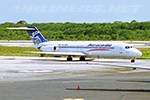
This is Aerocaribe McDonnell Douglas DC-9-31 Fleet Pack with the registrations: C5-JDZ as Azmar Airlines, C5-LPS, as Azmar Airlines, XA-ABQ (With Cancun VTP included), XA-ABR (With Albine Colors included), XA-ABS (With Albine Colors included), XA-ABT (With Albine Colors, and Tapatia Name included), XA-AEB (With Albine Colors included), XA-AEC (With Riviera Maya VTP included), XA-TVB, XA-TVC (With Metal Colors and USAir Livery), XA-TXG Aerocaribe was an airline founded in Merida, Yucatan, Mexico. Aerocaribe was founded in 1972 as "Aerolineas Bonanza", it started operations on July 12th, 1975, under the name of "Aerocaribe". It was a regional subsidiary of Mexicana Airlines that operated services under the flag of "Mexicana Inter" and shared codes with its parent company. it operated almost 120 flights per day. in 2005 Mexicana decided to rename Aerocaribe as a low cost airline, "MexicanaClick". Aerocaribe was purchased by "Compañia Mexicana de Aviacion". On August 23th, 1990. In 1996 Mexicana became part of the Cintra Group. Its subsidiary Aerocozumel was integrated. Mexicana decided to transfer its fleet of Fokker 100 aircraft to Aerocaribe to change the airline's brand. Its new name is MexicanaClick, And it is an attempt to create a low cost mexican airline, starting operations in July 2005. It had aircraft together with its subsidiary Aerocozumel: FAIRCHILD FOKKER F27 FRIENDSHIP, MCDONNELL DOUGLAS DC-9-14/MCDONNELL DOUGLAS DC- 9-15, BRITTEN-NORMAN ISLANDER, CESSNA 208B CARAVAN, BAE JETSTREAM 31, MCDONNELL DOUGLAS DC-9-31, FOKKER 100. The model is Alpha India Group (AIG) McDonnell Douglas DC-9-30, coming soon more Douglas DC-9-30 registrations and textures, Basepack. This is my website: https://el-mundo-de-los-aviones-ai-traffic.jimdosite.com I hope enjoy it!.
| Filename: | AI_Aerocaribe_McDonnell_Douglas_DC931_Fleet_Pack.zip |
| License: | Freeware |
| Added: | 12th July 2022, 18:26:23 |
| Downloads: | 38 |
| Author: | Jesus Gibran Soriano Solleiro |
| Size: | 99.65 MB |
| Category: Flight Simulator 2004 - AI Aircraft | |
| AI Aerocaribe McDonnell Douglas DC-9-31 Fleet Pack |
|
Images related to this file:
File Description:
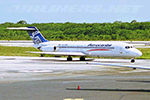
This is Aerocaribe McDonnell Douglas DC-9-31 Fleet Pack with the registrations: C5-JDZ as Azmar Airlines, C5-LPS, as Azmar Airlines, XA-ABQ (With Cancun VTP included), XA-ABR (With Albine Colors included), XA-ABS (With Albine Colors included), XA-ABT (With Albine Colors, and Tapatia Name included), XA-AEB (With Albine Colors included), XA-AEC (With Riviera Maya VTP included), XA-TVB, XA-TVC (With Metal Colors and USAir Livery), XA-TXG
Aerocaribe was an airline founded in Merida, Yucatan, Mexico. Aerocaribe was founded in 1972 as "Aerolineas Bonanza", it started operations on July 12th, 1975, under the name of "Aerocaribe". It was a regional subsidiary of Mexicana Airlines that operated services under the flag of "Mexicana Inter" and shared codes with its parent company.
it operated almost 120 flights per day. in 2005 Mexicana decided to rename Aerocaribe as a low cost airline, "MexicanaClick". Aerocaribe was purchased by "Compañia Mexicana de Aviacion". On August 23th, 1990. In 1996 Mexicana became part of the Cintra Group. Its subsidiary Aerocozumel was integrated. Mexicana decided to transfer its fleet of Fokker 100 aircraft to Aerocaribe to change the airline's brand. Its new name is MexicanaClick, And it is an attempt to create a low cost mexican airline, starting operations in July 2005.
It had aircraft together with its subsidiary Aerocozumel: FAIRCHILD FOKKER F27 FRIENDSHIP, MCDONNELL DOUGLAS DC-9-14/MCDONNELL DOUGLAS DC- 9-15, BRITTEN-NORMAN ISLANDER, CESSNA 208B CARAVAN, BAE JETSTREAM 31, MCDONNELL DOUGLAS DC-9-31, FOKKER 100.
The model is Alpha India Group (AIG) McDonnell Douglas DC-9-30, coming soon more Douglas DC-9-30 registrations and textures, Basepack. This is my website: https://el-mundo-de-los-aviones-ai-traffic.jimdosite.com I hope enjoy it!.
| Filename: | AI_Aerocaribe_McDonnell_Douglas_DC931_Fleet_Pack.zip |
| License: | Freeware |
| Added: | 12th July 2022, 18:26:10 |
| Downloads: | 80 |
| Author: | Jesus Gibran Soriano Solleiro |
| Size: | 99.65 MB |
| Category: Flight Simulator X - AI Aircraft | |
| AI Aerocaribe McDonnell Douglas DC-9-31 Fleet Pack |
|
Images related to this file:
File Description:
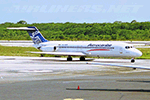
This is Aerocaribe McDonnell Douglas DC-9-31 Fleet Pack with the registrations: C5-JDZ as Azmar Airlines, C5-LPS, as Azmar Airlines, XA-ABQ (With Cancun VTP included), XA-ABR (With Albine Colors included), XA-ABS (With Albine Colors included), XA-ABT (With Albine Colors, and Tapatia Name included), XA-AEB (With Albine Colors included), XA-AEC (With Riviera Maya VTP included), XA-TVB, XA-TVC (With Metal Colors and USAir Livery), XA-TXG
Aerocaribe was an airline founded in Merida, Yucatan, Mexico. Aerocaribe was founded in 1972 as "Aerolineas Bonanza", it started operations on July 12th, 1975, under the name of "Aerocaribe". It was a regional subsidiary of Mexicana Airlines that operated services under the flag of "Mexicana Inter" and shared codes with its parent company.
it operated almost 120 flights per day. in 2005 Mexicana decided to rename Aerocaribe as a low cost airline, "MexicanaClick". Aerocaribe was purchased by "Compañia Mexicana de Aviacion". On August 23th, 1990. In 1996 Mexicana became part of the Cintra Group. Its subsidiary Aerocozumel was integrated. Mexicana decided to transfer its fleet of Fokker 100 aircraft to Aerocaribe to change the airline's brand. Its new name is MexicanaClick, And it is an attempt to create a low cost mexican airline, starting operations in July 2005.
It had aircraft together with its subsidiary Aerocozumel: FAIRCHILD FOKKER F27 FRIENDSHIP, MCDONNELL DOUGLAS DC-9-14/MCDONNELL DOUGLAS DC- 9-15, BRITTEN-NORMAN ISLANDER, CESSNA 208B CARAVAN, BAE JETSTREAM 31, MCDONNELL DOUGLAS DC-9-31, FOKKER 100.
The model is Alpha India Group (AIG) McDonnell Douglas DC-9-30, coming soon more Douglas DC-9-30 registrations and textures, Basepack. This is my website: https://el-mundo-de-los-aviones-ai-traffic.jimdosite.com I hope enjoy it!.
| Filename: | AI_Aerocaribe_McDonnell_Douglas_DC931_Fleet_Pack.zip |
| License: | Freeware |
| Added: | 12th July 2022, 18:25:56 |
| Downloads: | 72 |
| Author: | Jesus Gibran Soriano Solleiro |
| Size: | 99.65 MB |
| Category: Flight Simulator 2004 - Scenery | |
| 8AK7 - Bullen Point - Alaska North Slope 7 |
|
Images related to this file:
File Description:
The town of Barrow is in the far north of Alaska, and these are coastal villages or radar installations to the west, south, and now east of Barrow. There will be further additions. Bullen Point is a DEW station Air Force base 240 miles east of Barrow and 75 miles east of Oliktok. The runway is just under 4,000 feet of gravel and aligned 05-23; this is approximately at right angles to the default FS9 alignment and how that came about is something I doubt Bill Gates could explain. Most of the DEW buildings have now been removed (including the large hangar, which is unusual) but as I had a layout I made the whole site as it was originally, way back in the days when the north slope was still a wilderness. The AI is one day a C-130, on another a Cessna, and on a third a DC3. When I started this North Slope series it was my intention to create the full monty and make all the oil and gas installations and Deadhorse airport etc. I have come to realise that the oil side is impossible to make. There is so much of it and each bit is as time consuming as Heathrow while the actual airfields are more like Rockcliffe CYRO, so a lot of effort for what is just background to an adjoining airfield. But at the same time, if I make the new airstrips it is impossible NOT to make the oil installations as they are the dominating feature. So no new airstrips, and this is going to be just the 1960's or 1970's, when the oil business was only exploratory and the airfields were for villages or DEW stations, and Harmon Helmerick had his dirt strip on the Colville River estuary and was guiding hunters and fishermen and had just started to help out Sinclair Oil with oil exploration in 1966. Read his book. Download my previous post of his field.
| Filename: | 8AK7__Bullen_Point__Alaska_North_Slope_7.zip |
| License: | Freeware, limited distribution |
| Added: | 15th July 2016, 17:46:54 |
| Downloads: | 280 |
| Author: | Roger Wensley |
| Size: | 2.5 MB |
| Category: Flight Simulator 2004 - Scenery | |
| Bethel area airfields in southwest Alaska close to the Yukon River |
|
Images related to this file:
File Description:
This presumes you have already installed my post of Bethel PABE. In the Yukon River area of Alaska there are a lot of small villages close together, which is unusual for Alaska. Almost all of them are on the coast or a river bank, and the local economies depend on fishing. Some are larger than others and have a fish processing plant, such as in Emmonak. This is the largest such plant and it exports prepared fish by cargo planes which fly in on a daily basis, using an extended runway. This post includes airfields to the south and west of PABE, 17 of them; some of them already included and now modified. There will be more airfields to the north and northwest of Bethel in a future post. There are revisions to Bethel to include parking spaces for Yute Air (newly included here) and extra spaces for Ryan Air. Both of these flew Cessna 205 planes into the smaller village strips from Bethel (past tense as Yute Air recently went bankrupt). The northwest area is served both from Bethel and also from St Mary's PASM, which is in the northwest and at a more economical range to the local airfields (100 miles closer than Bethel). These smaller airfields have few airfield buildings or any other creature comforts; featuring heavily are a new standard blue garage building (sometimes not yet installed) and a small and old terminal shed (that has sometimes collapsed and been removed). Go to "http://vfrmap.com/" for free vfr maps of the area, There is a pic of the local chart area included here. The screenshots are a random sample. Kipnuk PAKI is the one that appears to have a second and long grass runway; what it actually has is the ground prepared for a new and long gravel runway but which hasn't been started yet as it has taken 10 years just to prepare the ground. I have no idea why.
| Filename: | Bethel_area_airfields_in_southwest_Alaska_close_to.zip |
| License: | Freeware, limited distribution |
| Added: | 16th April 2019, 22:47:47 |
| Downloads: | 156 |
| Author: | Roger Wensley |
| Size: | 5.93 MB |
| Category: Flight Simulator 2004 - Scenery | |
| Kotzebue PAOT on the northwestern coast of Alaska |
|
Images related to this file:
File Description:
There are four main northwestern Alaska towns which have good airports and are serviced by Alaska Airlines. From these airports local flights connect to nearby villages, "nearby" in Alaska meaning up to 150 miles away. The northernmost is Barrow. Southwest of Barrow is Kotzebue, then Nome, and the furthest south is Bethel. The town of Kotzbue is north of the Bering Strait on the northwestern coast, 320 miles southwest of Barrow. The population is just over 3,000 people. The location was for a long time a base for trading in furs, with three rivers emptying into the sea and providing routes into the interior land and villages; a meeting place between hunters and traders from Russia and elsewhere. The Kotzebue airport is called the Ralph Wien Memorial and has two runways. The modern one is aligned 08-26 and is 5,880 feet of 150 feet wide asphalt built across a shallow lagoon, with an ILS on 08 and PAPI on both ends. The second and older runway is originally military and gravel, aligned 17-35 and 3,786 feet long and used (wind allowing) by the GA planes that park alongside the runway. The prevalent wind is from the west; when the wind is from the east it is generally relatively feeble and with a much lower cloud base, possibly to the ground, hence the need for an ILS. All AI aircraft in FS9 much prefer to use a runway that has an ILS and so will continue to use 08-26 even if the wind is from the south until it reaches 30+ knots, even if they are a Cessna 150 flying VFR. So for AI realism in FS9 a northern or southern wind needs to be a strong one so that the runway is actually used. However, as Alaska Airlines, Northern Air Cargo, and Everts Air also fly to Kotzebue and can only use the east-west runway (as less than 4,000 feet of asphalt would be seriously inconvenient for a Boing 737 or DC6) it is necessary to have the northern or southern wind UNDER 30 knots at the times when they are landing or taking off. Your choice. I suppose a permanent strong wind from the west would be the most realistic on a daily basis, deterring all planes from ever using 17-35. The AI will develop along with further scenery additions in the neighbourhood.
| Filename: | Kotzebue_PAOT_on_the_northwestern_coast_of_Alaska.zip |
| License: | Freeware, limited distribution |
| Added: | 2nd August 2016, 16:47:52 |
| Downloads: | 463 |
| Author: | Roger Wensley |
| Size: | 19.32 MB |
| Category: Microsoft Flight Simulator (2020) - Utilities | |
| Flightplan Visualizer 1.19 |
|
Images related to this file:
File Description:
Flightplan Visualizer (FV) version 1.19.0. Copyright 2018-2021 by Pelle F. S. Liljendal ([email protected]), all rights reserved.
FV comes with 1164 pre-imported AI flightplans (of which +380 are BizJet flightplans, the rest are commercial). However you are able to import additional (AI) flightplans yourself. Once imported these (AI) flightplans can be visualized on a map-view, and the user will be able to search accross all these. Hence you can use the program as inspiration as to which routes to fly. E.g. you can search across all imported flightplans to find all flights in an A321 flying into/out from LDDU, or simply to look for all flights in a Boeing 747-8F.
Simply run the included installer to install the software. The program will be installed into "C:\Program Files (x86)\Flightplan Visualizer" and all datafiles will be installed into: "C:\Users\[UserName]\AppData\Roaming\FlightplanVisualizer". The program comes with a full manual explaining everything, and a 3 page quick manual to get you started. The first 3 times you run the program the quick manual will automatically open. The forum is hosted here: https://forum.aerosoft.com/index.php?/forum/919-flightplan-visualizer/
Version 1.19 Contains the following changes:
- The release-version of the application is now aimed at 64-bit (granting access to more memory if needed). Enabling 64-bit adds a memory overhead of approx 50% compared to 32-bit, but its the "price to pay" to have access to more memory (for those of you with many active flightplans loaded into memory at the same time).
- FV can now connect to your simulator using FSUIPC (tested both with P3D and MSFS). By default you will have to manually connect/disconnect (using new menu-items in the File-menu). However in settings you can choose to do it automatic. When automatic-connection is selected the connect/disconnect menu-items becomes inactive.
- When connected to a sim, the location/heading of your aircraft can be displayed on the map, using an orange aircraft-marker, and hoovering the mouse over this marker will display some key data (GPS-location, altitude, heading, speed and so on).
- Added abillity to playback audio-files. In settings you can choose which audio-device to use, and set the volume at which these files are played (defaults to 50%). If volume>0 these files will automatically be played back whenever FV connects to/disconnects from the Sim.
- Added additional icons that are automatically selected to indicate when the program is connected to the simulator. Hence the icon in the main-form will indicate if FV is connected to a simulator or not.
- In the form for editing (user)-airlines and in the form for searching airlines the context menu now have a menu-item called "Show usage". When selected, it will generate a report showing all the (active) flightplans in which the airline is used.
- Added a new "Manual" check-box next to the load-factor when editing user-airlines. This check-box needs to be checked if you want to manually enter a load-factor. When not checked (default) the load-factor will automatically be set to the default value of the selected country.
- When editing user-airlines, the airline just added/edited will be visible and selected in the list-view. Likewise when deleting an airline, the previous item will be be visible/selected (in stead of always scrolling to the top afterwards, as in previous versions).
- The Insert/Delete keyboard-keys can now be used as shortcuts adding/deleting user-airlines and user-aircraft (both owned and types).
- The gate-map context-menu (Airport Info), now allows you to re-center the map (in case your have been panning the map, and can't locate the airport again).
- Added a new menu-item/form to calculate head/cross-wind from manually entered flight/runway-heading and wind-direction/speed. Don't forget the runways tab-page in the Airport-info form already calculates this for each runway (and wind-direction/speed is automatically obtained from METAR).
- Added a new menu-item/form to convert plain-text into morse-code. There is also a button that lets you listen to the generated morse-code, so you can practice your morse-code listening skills (e.g. entering an ILS/VOR-ident, to know which morse-code to listen for in the aircraft, to verify the correct ident is reqeived).
- The "Cruise speed" column have been removed from the aircraft tab-page of the Edit Flightplan form to make more room for the Carrier/Operator-columns. In the past these simply contained the ICAO for the airlines. Now it both contains: ICAO, IATA (if not blank) and Name.
- The criteria in the leg-search window now allows you to filter on departure/arrival week-days (e.g. only include flights departing a particular airport on a Saturday or Sunday).
- When using the flightplan-filter on the main-form, it will favour the current active flightplan (as in previous versions), however if not able to, it will select the first flightplan included in the filtered list (in stead of choosing "[None]").
- Improved import of AIGFP-flightplans where the airport is not contained within the embedded airport.txt file and is using a different ICAO-code in route-files (observed for "AIG_UTair_Summer2018v6" and "AIG_S7Airlines_Winter2019-2020v3").
- Added runway-info (for both Departure/Destination-airports) to the flightplan leg-report. For ILS-eqiupped runways its lists the ID (both as text, as morse-code), frequency and ils-slope.
- Morse-code also added to ILS-ID column on the "Runways" tab-page of the airport-info form. Above the list-view there is also a label showing the morse-code (using a larger font), and next to it there is a button that lets you listen to the morse-code.
- Traffic-pattern direction (for take-off and landing) are now displayed for each runway. These data are extracted from the scenery by MakeRunways, hence the info can't be "better" than the info in the scenery (hence most default airports simly shows 'Left').
- Current/peak- memory usage is now logged at various stages while running, and when closing the program. These values can also be observed opening the about-box, which will also forcefully append these values to the log.
- When using MkRwy with MSFS it can't obtain the country-name, hence these are taken from the airport-database embedded with FV. However the name for USA ("United States of America") is too long to be shown together with state-name, hence code have beed added it to shorten it to "United States" (which was the default country-name used in FSX/P3D).
- Changed font in Comments-box for user-aircraft to a fixed font, in case some users what to enter text "in columns" (e.g. if you make "tables" with speed-restrictions).
- Changed the color of the splitter-bars in the Airport-info and leg-search forms to a draker color, to better indicate where it is.
- The build-part of the version-number can now be ignored when performing the automatic version-check at start-up. This new setting is by default disabled. If enabled it will ignore changes from version 1.x.0 to 1.x.1 (e.g. an update from 1.19.0 to 1.19.1). However major/minor versions-updates (e.g. from 1.19.x to 1.20.x) will not be ignored.
- Fixed: Excessive logging while importing AIGFP flightplans removed (leftover from fixing a bug before the release of version 1.18).
- Fixed: When using kg in the leg-info report, the weight of Luggage incl. pax weight (shown in parentees) was wrong.
- Fixed: Button to open filter-manual on Gate-page of the Airport-info form was not visible/position was not fixed.
- Fixed: The wind-speed obtained from the METAR and used to calc head/tail-wind on the Runway tab-page of the Airport-info form, did not considder the unit (e.g. Khp or meters-per-second).
- Data: A VERY BIG THANK YOU to Bruce Nicholson for assistance updating the Airline-database, both with new/missing entries and marking defunct airlines as such.
- Data: A lot of "fictios airlines" was added as well. These are used for companies without official ICAO/IATA codes. To indicate they are fictios the ICAO-code is set to "---" and the IATA-code is used to indicate the kind of traffic (e.g. the combination "---/BZ" is used for biz-jet flights).
- Data: Also thanks to Bruce for pointing out that a few aircraft were not being detected as they should. So this version should do a better job with Cessna T206H, Cessna Citation SII/S550 and Global 7500.
- Flightplans: The bundled AIG flightplans have been updated to the latests versions/revisions available from AIG (there were a few defunct that was removed, a few new versions that was added, and a lot of new revisions being updated).
- Flightplans: Eric Steinmetz's Bizjet (AI) flightplans that have previously been available as a separate download are once again bundled with the installer (they are only installed if you choose the option during installation). These have all been updated to use the new "---/BZ" airlines (for companies without official ICAO/IATA-codes), and the Author/Provider have been set to "Eric Steinmetz"/"ESAI" (the previous/separate download was created before adding author/provider to the software).
Pelle
| Filename: | Flightplan_Visualizer_119.zip |
| License: | Freeware, limited distribution |
| Added: | 2nd May 2021, 00:02:01 |
| Downloads: | 280 |
| Author: | Pelle Liljendal |
| Size: | 35.71 MB |


© 2001-2026 AVSIM Online
All Rights Reserved
Privacy Policy |