
Where Flight Simulation Enthusiasts Gather from Around the World!
AVSIM Library - Search Results

| Category: Flight Simulator X - AI Aircraft | |
| Hainan Airlines Boeing 787-8 |

|
Images related to this file:
File Description:
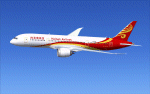
FSX CamSim AI Aircraft, Boeing 787-8 Hainan Airlines, textures only, to be used with CamSim AI Aircraft Base Model files package available separately: camsim788ai_x.zip for AI traffic.
Model design and paint by Camil Valiquette.
| Filename: | Hainan_Airlines_Boeing_7878.zip |
| License: | Freeware |
| Added: | 10th November 2014, 19:32:08 |
| Downloads: | 228 |
| Author: | Camil Valiquette |
| Size: | 429.49 KB |
| Category: Flight Simulator 2004 - AI Aircraft | |
| America West Airlines Boeing 747-200 (1980's Colors) |
|
File Description:
Boeing 747-200 in America West Airlines 1980's livery, for AI; and painted in 32-bit textures. This aircraft is also flyable, and works in both FS2002 and FS9. Aircraft and model by FSPainter.
| Filename: | America_West_Airlines_Boeing_747200_1980s_Colors.zip |
| License: | Freeware |
| Added: | 7th January 2004, 00:31:57 |
| Downloads: | 673 |
| Author: | Michael Pearson |
| Size: | 706.78 KB |
| Category: Flight Simulator 2004 - Aircraft Repaints, Textures and Modifications | |
| US Airways Airbus A330-300 |
|
Images related to this file:
File Description:

The A330-300 is the largest aircraft in the US Airways fleet and flies mostly transatlantic routes. A -200 version of this aircraft is available as well. Painted on the great Project Opensky model. Enjoy!
| Filename: | US_Airways_Airbus_A330300.zip |
| License: | Freeware |
| Added: | 28th December 2009, 20:16:59 |
| Downloads: | 1,367 |
| Author: | Joe Shimmel / POSKY |
| Size: | 4.91 MB |
| Category: Flight Simulator X - Aircraft Repaints, Textures and Modifications | |
| Navy N2S-5 Stearman (N53549) |
|
Images related to this file:
File Description:
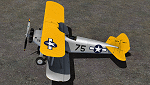
This is a repaint only, for the payware Vertigo Studios Stearman Vol.1 set. This repaint depicts the restored Stearman N2S-5 N53549, owned/operated by Vanessa Jago, based at Oshkosh, Wisconsin. The aircraft, originally manufactured as U.S. Navy BuNo. 38575, was purchased by Charles F. Wright in 2001 and restored to factory-original award-winning condition. The number '75' on the side of the aircraft symbolic of the aircraft being the Model 75 (or A75). Vanessa Jago, who began flying at the age of 16 and is currently an airline pilot flying 747's with over 12,000 hrs of flight time, acquired the aircraft in 2015. The aircraft won "Best N2S" at the 2016 National Stearman Fly-In.
| Filename: | Navy_N2S5_Stearman_N53549.zip |
| License: | Freeware |
| Added: | 22nd January 2017, 04:09:01 |
| Downloads: | 140 |
| Author: | John Terrell |
| Size: | 23.58 MB |
| Category: Prepar3D V1-4 - Aircraft Repaints, Textures and Modifications | |
| Messerschmitt Bf-109E - Ernst Nittmann - White 8 |
|
Images related to this file:
File Description:
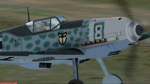
Ernst Nittmann - White 8, belonging to JG27, which force landed at Belan, nea Canterbury on 6 September 1940. The Pilot Ernst Nittmann. This aircraft had only been delieverd a fortnight before it force landed so had no cockpit head armour fitted. Aircraft was in clean condition except for the mottling and overspray camouflage, aircraft was immaculate. Curously, the serial numbre '8' has been masked onto the white cowling with no border. Fuselage bears no serials or chevrons. TEXTURES only. Included are textures for a non-Swastika version. Repaint for the Shockwave (A2) Messerschmitt BF 109 for FSX. The aircraft works without issues in P3D. Just copy aircraft the installation folder from FSX to the P3D Simobjects folder.
| Filename: | Messerschmitt_Bf109E__Ernst_Nittmann__White_8.zip |
| License: | Freeware, limited distribution |
| Added: | 21st March 2019, 17:09:04 |
| Downloads: | 128 |
| Author: | Eberhard Haberkorn / A2A |
| Size: | 51.72 MB |
| Category: Flight Simulator 2004 - Original Aircraft | |
| Voisin Hydro-Canard |
|
File Description:
This aircraft type became a popular sight at aerial demonstration meets around the globe. Despite its marginal controllability, the Voisin set many records, and is largely responsible for creating an interest in aviation amongst all Europeans. Aircraft designer Henry Farman (responsible for the Farman observation aircraft of World War I), had his earliest flight experiences in Voisin aircraft. Perhaps the most famous man to ever fly a Voisin was the world renowned escape artist and magician, Harry Houdini, who became the first recorded pilot to ever successfully fly an aircraft in Australia. This plane has a VC, XML animations, custom airfile, and the animated pilot's scarf blows in the wind. happy flyin!
| Filename: | Voisin_HydroCanard.zip |
| License: | Freeware, limited distribution |
| Added: | 18th January 2005, 19:24:42 |
| Downloads: | 2,577 |
| Author: | Joe Binka |
| Size: | 1.43 MB |
| Category: Flight Simulator X - Aircraft Repaints, Textures and Modifications | |
| Boeing 747-8i Delta Northwest |
|
File Description:
FSX Boeing 747-8i Delta Northwest with advanced VC by Alejandro Rojas Lucena and VC Texture Upgrade by Enrique Cornejo. This gives the b747 a payware Virtual Cockpit look! It even has a pilot jacket hanged in the rear of the cockpit (besides the right jumpseat).
The panel.cfg and the aircraft.cfg have been assembled and edited by the Flightsim Workshop Team. Now you can pop up "My icons" window in the Virtual Cockpit to easily reach the following windows: GPS, avionics, map, ATC, Climb/Radio Altimeter/Spoiler switch, auto-break switch, throttle quadrant, clock, descentometer, kneeboard and overhead panel.
The aircraft has new engine views (from both wings) and new Virtual Cockpit interior views from the left, right and central jump seats.
The Delta Northwest texture is wonderful and it has a unique paintscheme by Mcphat Studios with a repaint by Enrique Cornejo which also includes details such as some stains caused by humidity and other details just like a real aircraft.
This aircraft uses the Project Opensky FSX Boeing B747-800 Model OSX748V4_GENX(MDL), and includes the gauge window Posky Utility to view the main stairs, ground cargo servicing, etc. The engine sounds are edited like the real ones with cockpit ambient, so you can enjoy a pleasant flight. The Flight Management Computer (FMC) is fixed and looks like a payware instrument. The VC includes FMC, Primary Flight Display (PFD) and Multi-Function Display (MDF) displayed in the correct size.
The virtual cockpit also has an Engine-Indicating and Crew-Alerting System also known as EICAS, Ground Proximity Warning System (GPWS), working wipers, cabin lights, fire suppression, avionics switch, fuel crossfeed, and you can identify those intruments in the overhead panel because they are bordered with color lines. You can also find landing lights switches, taxi light switch, engine generators, APU generator, battery switch, starter switches, de-ice switch, general lights switches which are a great work of Alejandro. So now the whole cockpit and texture upgrade with all these improvements looks better than a payware version. The clock numbers are now in orange which makes them look better and easily recognizable.
Assembled and edited for FSX by Enrique Cornejo.
| Filename: | Boeing_7478i_Delta_Northwest.zip |
| License: | Freeware |
| Added: | 13th January 2013, 01:02:31 |
| Downloads: | 990 |
| Author: | Enrique Cornejo |
| Size: | 78.26 MB |
| Category: Flight Simulator X - Aircraft Repaints, Textures and Modifications | |
| Boeing 747-8i Delta Northwest |
|
File Description:
FSX Boeing 747-8i Delta Northwest with advanced VC by Alejandro Rojas Lucena and VC Texture Upgrade by Enrique Cornejo. This gives the b747 a payware Virtual Cockpit look! It even has a pilot jacket hanged in the rear of the cockpit (besides the right jumpseat).
The panel.cfg and the aircraft.cfg have been assembled and edited by the Flightsim Workshop Team. Now you can pop up "My icons" window in the Virtual Cockpit to easily reach the following windows: GPS, avionics, map, ATC, Climb/Radio Altimeter/Spoiler switch, auto-break switch, throttle quadrant, clock, descentometer, kneeboard and overhead panel.
The aircraft has new engine views (from both wings) and new Virtual Cockpit interior views from the left, right and central jump seats.
The Delta Northwest texture is wonderful and it has a unique paintscheme by Mcphat Studios with a repaint by Enrique Cornejo which also includes details such as some stains caused by humidity and other details just like a real aircraft.
This aircraft uses the Project Opensky FSX Boeing B747-800 Model OSX748V4_GENX(MDL), and includes the gauge window Posky Utility to view the main stairs, ground cargo servicing, etc. The engine sounds are edited like the real ones with cockpit ambient, so you can enjoy a pleasant flight. The Flight Management Computer (FMC) is fixed and looks like a payware instrument. The VC includes FMC, Primary Flight Display (PFD) and Multi-Function Display (MDF) displayed in the correct size.
The virtual cockpit also has an Engine-Indicating and Crew-Alerting System also known as EICAS, Ground Proximity Warning System (GPWS), working wipers, cabin lights, fire suppression, avionics switch, fuel crossfeed, and you can identify those intruments in the overhead panel because they are bordered with color lines. You can also find landing lights switches, taxi light switch, engine generators, APU generator, battery switch, starter switches, de-ice switch, general lights switches which are a great work of Alejandro. So now the whole cockpit and texture upgrade with all these improvements looks better than a payware version. The clock numbers are now in orange which makes them look better and easily recognizable.
Assembled and edited for FSX by Enrique Cornejo.
| Filename: | Boeing_7478i_Delta_Northwest.zip |
| License: | Freeware |
| Added: | 13th January 2013, 01:24:18 |
| Downloads: | 1,962 |
| Author: | Enrique Cornejo |
| Size: | 78.71 MB |
| Category: Flight Simulator 2004 - Panels | |
| PIC 737 wing views |
|
File Description:
Version 2 of wing views for FeelThere PIC737 aircraft series
| Filename: | PIC_737_wing_views.zip |
| License: | Freeware, limited distribution |
| Added: | 23rd May 2006, 17:08:29 |
| Downloads: | 5,683 |
| Author: | Rafal Haczek |
| Size: | 736.05 KB |
| Category: Flight Simulator X - Aircraft Repaints, Textures and Modifications | |
| Air France - Airbus A321 |
|
File Description:
Air France repaint of the original A321 aircraft from FSX.
| Filename: | Air_France__Airbus_A321.zip |
| License: | Freeware |
| Added: | 17th April 2007, 01:26:03 |
| Downloads: | 10,716 |
| Author: | Sebastien Pero |
| Size: | 2.76 MB |


© 2001-2026 AVSIM Online
All Rights Reserved
Privacy Policy |