
Where Flight Simulation Enthusiasts Gather from Around the World!
AVSIM Library - Search Results

| Category: Flight Simulator 2004 - Miscellaneous Files | |
| The ultimate guide to the best approaches ! |

|
File Description:
If you find ILS approaches boring and you're looking for something more fun and exciting ... look no further! 'The ultimate guide to the best approaches' present you five of the most popular, beautiful and difficult approaches to airports from all over the world. All the five approaches presented have the approach chart and detialed information included, for you to fly them with the maximum possible realism! - Visit www.fsstation.com to read many other reviews and tutorials and get support for this one.
| Filename: | The_ultimate_guide_to_the_best_approaches_.zip |
| License: | Freeware |
| Added: | 15th October 2005, 22:34:10 |
| Downloads: | 9,633 |
| Author: | Bernardo Srulzon |
| Size: | 2.65 MB |
| Category: Flight Simulator 2004 - AI Flight Plans | |
| Chukotavia - Summer 2013 |
|
Images related to this file:
File Description:

Season:Summer 2013,Callsign:CHUKOTAVIA,ICAO:ADZ,Weekly flights:89,Hubs:Ugolny Airport,Beringovskiy Airport,Kresta Bay Airport,Lavrentiya Airport,Markovo Airport,Mys Shmidta Airport,Pevek Airport,Provideniya Bay Airport.
| Filename: | Chukotavia__Summer_2013.zip |
| License: | Freeware, limited distribution |
| Added: | 20th May 2013, 05:48:10 |
| Downloads: | 296 |
| Author: | Michael 'Pushen' Babitskiy / United Traffic Team |
| Size: | 169.97 KB |
| Category: Flight Simulator X - Scenery | |
| ZUSH AIRPORT "Peace Airport" |
|
File Description:
China has named it �Peace Airport�, the project to utilize the Shigatse (Xigaze) Airport as both a military and civil airport is currently progressing smoothly, and the civil airport is expected to open this October 2010.
| Filename: | ZUSH_AIRPORT_Peace_Airport.zip |
| License: | Freeware |
| Added: | 4th July 2010, 03:38:00 |
| Downloads: | 760 |
| Author: | Anwar Gonzalez |
| Size: | 659.92 KB |
| Category: Flight Simulator 2004 - AI Flight Plans | |
| Jet2.com - Summer 2013 |
|
Images related to this file:
File Description:

Include Optimize speed version,Season:Summer 2013,Callsign:CHANNEX,ICAO:EXS,IATA:LS,Weekly flights:1144,Hubs:Alicante Airport,Belfast International Airport,Blackpool International Airport,East Midlands Airport,Edinburgh Airport,Glasgow Airport,Leeds Bradford International Airport,Manchester Airport,Newcastle Airport
| Filename: | Jet2com__Summer_2013.zip |
| License: | Freeware, limited distribution |
| Added: | 4th May 2013, 10:02:08 |
| Downloads: | 772 |
| Author: | Michael 'Pushen' Babitskiy,UTT |
| Size: | 151.84 KB |
| Category: Flight Simulator 2004 - Scenery | |
| A set of 8 Korean Airport sceneries |
|
Images related to this file:
File Description:

This is Korea Airport Scenery for FS9. This scenery package includes airport such as Gimpo INTL Airport(RKSS), Gwangju Airport (RKJJ), Gimhae INTL Airport (RKPK), Choengju INTL airport (RKTU), Muan INTL airport (RKJB), Ulsan Airport (RKPU), Mokpo Airport (RKJM), Gunsan Airport (RKJK). Apply newest data to All Airport sceneries.
| Filename: | A_set_of_8_Korean_Airport_sceneries.zip |
| License: | Freeware, limited distribution |
| Added: | 23rd September 2010, 20:36:07 |
| Downloads: | 2,755 |
| Author: | Seongsu Kim |
| Size: | 11.6 MB |
| Category: Miscellaneous Files - Demos from Commercial Vendors | |
| QuickPlan for Windows |
|
Images related to this file:
File Description:

QuickPlan for Windows is a visual point and click flight planner that makes it easy to generate flight plans in native FSX, FS2004 or X-Plane formats.
The entire route is generated visually, by tapping the map to add the departure airport, intermediate waypoints and arrival airport in the same order that you intend flying the plan.
During plan creation and after adding the final arrival waypoint you also have the opportunity to remove any of the intermediate waypoints before saving the plan in your preferred format.
QuickPlan utilises a new mapping engine and includes 12 world-wide map styles and has support for FSWidgets Cloud Based Aero Charts (free Cuba/Puerto Rico WAC Cloud Based Chart included) and FSWidgets Cloud Based World Nav Data (Free KSFO - San Francisco Bay area Nav Data included).
QuickPlan can be used in Freeform Mode, Advanced Mode, or a combination of both.
FREEFORM MODE: Simply click anywhere on the map and QuickPlan will allow you to add it as a generic waypoint. VFR pilots often use towns, lakes and other unique geographic features and with QuickPlan you can add any geographical location shown on the base map. Plans created this way label the waypoints automatically with generic names (e.g. DEP, WP1, WP2, ARR).
If desired, the entire route from departure to arrival can be created without reference to any navigational aids or official airports. This is handy for bush pilots who often use unlicensed airfields and small landing strips (or seaplane landing areas). Helicopter pilots can also quickly create plans that depart from off-airport locations like building rooftops or land on a road.
ADVANCED MODE: If you own the FSWidgets Cloud Based World Nav Data product you can create more advanced flight plans by clicking on any of the icons displayed on the map to add them as waypoints - airports, VOR's, NDB's and intersections (data for the KSFO area is included free). Plans created this way label the waypoints automatically with airport and navigational aid identifiers taken from the Nav Data (e.g. KSFO, OSI, LV, FABLA). FEATURE LIST:
- Generates native FSX (.pln), FS2004 (.pln) and X-Plane (.fms) format flight plans
- Saves flight plans to any folder (preferred folder set in Preferences)
- Search for airport by ICAO identifier
- Map powered by CloudMade Leaflet API (using OpenStreetMap data)
- Includes 12 world-wide maps styles
- Supports FSWidgets Cloud Based AERO CHARTS
- Free Cuba/Puerto Rico WAC Cloud Based Chart included
- Supports FSWidgets Cloud Based WORLD NAV DATA
- Free KSFO (San Francisco Bay) area Nav Data included
- World-wide Metar and TAF Data icons
- US Nexrad (Next-Gen Radar) Data
| Filename: | QuickPlan_for_Windows.zip |
| License: | Commercial demo |
| Added: | 27th October 2012, 09:22:33 |
| Downloads: | 523 |
| Author: | Fermin Fernandez - FSWidgets |
| Size: | 1.95 MB |
| Category: Flight Simulator X - Utilities | |
| Little Logbook 1.5.0 |
|
Images related to this file:
File Description:
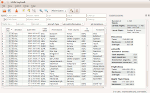
FSX, FSX SE, P3D Logbook Viewer and Extraction program.
Little Logbook allows fast and intuitive search and grouping of logbook entries based on several parameters as well as export to HTML, CSV and Google Earh KML documents.
Additional information about airports can be shown together with the MakeRunways utility of Peter Dowson.
New in 1.5.0:
* Now supports FSX, FSX SE, P3D V2 and P3D V3
* Detects paths to all simulators automatically
* Added Google Earth KML export
* Added import filter to ignore incomplete logbook entries
* HTML export now uses paging and creates multiple linked documents
* Added zoom functionality to change font size in table
* Other bug fixes and improvements - see included change log
The Software is released under the GPL. Source code is available. See http://albar965.github.io/littlelogbook.html for more Information.
| Filename: | Little_Logbook_150.zip |
| License: | Freeware |
| Added: | 20th January 2016, 22:40:37 |
| Downloads: | 1,389 |
| Author: | Alexander Barthel |
| Size: | 18.74 MB |
| Category: Microsoft Train Simulator - Miscellaneous Files | |
| MSTS Utility - Object Rotator 2 |
|
File Description:
This tool for advanced route builders allows you to accurately orient and position objects in the Route Editor of MSTS. It is typically used to modify an object's QDirection and/or Position in world tile files (*.w). Object Rotator requires Microsoft Excel (it will not function with an Excel viewer). Version 2 adds several applications, which now include: precise alignment of bridges and platforms along tracks or roads; accurate orientation of objects; precise lining up of rows of objects, along a straight or curved line; accurate aiming of tracks or roads between distant points; shaping S-curves; making tracks deviate around a platform; joining tracks; shaping steep and smooth rollercoaster tracks. The enlarged documentation also explains the not very obvious way in which QDirection expresses heading, slope and bank angles for tracks, roads and other objects.
| Filename: | MSTS_Utility__Object_Rotator_2.zip |
| License: | Freeware |
| Added: | 16th August 2003, 14:39:57 |
| Downloads: | 1,907 |
| Author: | Michael Vone |
| Size: | 3.64 MB |
| Category: Flight Simulator 2004 - Scenery | |
| Knight Inlet CF36 float base in British Columbia, Canada |
|
Images related to this file:
File Description:
Knight Inlet is a floating lodge that organises "nature experiences", ranging from close encounters with local grizzly bears to fishing. Knight Inlet is to the north of "the narrows" where the Inside Passage gets squeezed between the mainland and Vancouver Island, and there is a chart section attached with a pointer to the location. At the bottom of the chart is Campbell River floatbase, and to the west is Port Hardy. Knight Inlet initially runs east-west, and the lodge is tucked into a smaller north-south offshoot, close to where the main inlet turns north. The water runway here is in the middle of the north-south offshoot, though of course in reality the "runway" is wherever the wind dictates it to be. The names highlighted in green on the chart are float bases to be renovated and posted with working AI. The buoyed log boom next to the lodge is to keep escaped logs from drifting in and colliding with boats; float plane pilots keep their eyes peeled too. Because of large hills adjacent to the lodge the landing of the AI may or may not take place, depending on wind direction and whether or not they fly into rock before landing. Take off and departure are far more reliable, particularly if the wind is from the south. Most of the AI is from Vancouver Harbour, Harbour Air Otters and West Coast Air Beavers, plus a SeAir Beaver from Campbell River and a private Cessna from the nearby Minstrel Island. This is the second in a series of new and renovated float bases in BC (the first being Sproat Lake) and to cope with the AI demands FSAddon have authorised the inclusion here of a bunch of AI Otters and Beavers that were originally part of a payware scenery for the area. Thanks are due there.
| Filename: | Knight_Inlet_CF36_float_base_in_British_Columbia_C.zip |
| License: | Freeware, limited distribution |
| Added: | 23rd December 2016, 08:16:24 |
| Downloads: | 220 |
| Author: | Roger Wensley |
| Size: | 16.95 MB |
| Category: Flight Simulator 2004 - Scenery | |
| A set of 8 Korean Airport sceneries (Final version) |
|
Images related to this file:
File Description:
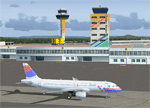
This is Korea Airport Scenery for FS9 Final Version. This scenery package includes airport such as Gimpo INTL Airport(RKSS), Gwangju Airport (RKJJ), Gimhae INTL Airport (RKPK), Choengju INTL airport (RKTU), Muan INTL airport (RKJB), Ulsan Airport (RKPU), Mokpo Airport (RKJM), Gunsan Airport (RKJK). Apply newest data to All Airport sceneries and Solve the known problems.
| Filename: | A_set_of_8_Korean_Airport_sceneries_Final_version.zip |
| License: | Freeware, limited distribution |
| Added: | 27th September 2010, 13:31:57 |
| Downloads: | 5,000 |
| Author: | Seongsu Kim |
| Size: | 11.77 MB |


© 2001-2026 AVSIM Online
All Rights Reserved
Privacy Policy |