
Where Flight Simulation Enthusiasts Gather from Around the World!
AVSIM Library - Search Results

| Category: Flight Simulator 2002 - Miscellaneous Files | |
| Manual/Checklist ATR72-500 |

|
File Description:
The Manual/Checklist describes all neccessary settings and operations for the "ATR72-500", starting with a "dark and cold" panel/engine. From Pre Start - Startup - Before Taxi - Taxi - Before Takeoff - Takeoff - Climb Out - Cruise - Descent - Approach - Landing - Taxi To Ramp - Shutdown - Securing Aircraft - to "cold". Based on the ATR72-500 aircraft and panel by Francisco Sànchez-Castañer
| Filename: | ManualChecklist__ATR72500.zip |
| License: | Freeware |
| Added: | 31st March 2003, 05:51:17 |
| Downloads: | 1,038 |
| Author: | Werner Schott |
| Size: | 575.26 KB |
| Category: Flight Simulator 2002 - Miscellaneous Files | |
| Manual/Checklist Cirrus SR20 |
|
File Description:
The Manual/Checklist describes all neccessary settings and operations for the "Cirrus SR20", starting with a "dark and cold" panel/engine. From Pre Start - Startup - Before Taxi - Taxi - Before Takeoff - Takeoff - Climb Out - Cruise - Descent - Approach - Landing - Taxi To Ramp - Shutdown - Securing Aircraft - to "cold". Based on the Cirrus SR20 aircraft and panel by Guenter Kraemer.
| Filename: | ManualChecklist__Cirrus_SR20.zip |
| License: | Freeware |
| Added: | 31st March 2003, 05:51:49 |
| Downloads: | 1,707 |
| Author: | Werner Schott |
| Size: | 875.09 KB |
| Category: Flight Simulator X - Original Aircraft | |
| UPDATE TO FSX - Me Bf-110G4 GroundDesignCrew |
|
Images related to this file:
File Description:
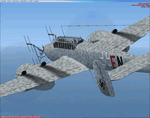
UPDATE TO FSX - Me Bf-110G4 of GroundDesignCrew. The changes now in 2010 are only:
Glass textures & Gauges, updated for use in FSX; changes in aircraft.cfg (flaps). The panel uses the gauges of FS DeHavilland Comet (DeHavilland_Comet.cab; not included). I added another alternative German panel called panel.ger that required the gauges of ALPHASIM He-111 (not included).
| Filename: | UPDATE_TO_FSX__Me_Bf110G4_GroundDesignCrew.zip |
| License: | Freeware |
| Added: | 2nd November 2010, 16:14:40 |
| Downloads: | 1,147 |
| Author: | Enrique Medal |
| Size: | 8.84 MB |
| Category: Flight Simulator X - Original Aircraft | |
| Hawaiian Airlines Boeing 717 |
|
File Description:
This Hawaiian Airlines 717 was adapted from JetCity's FS9 B717 to fit FSX (with permission from JetCity). It includes the default 737-800 panel and the sounds of default CRJ-700. It works perfectly. All of the 737 panel works with the plane. Autopilot, sounds (including smoking/seatbelt sign), etc., all work. The plane even has baggage animation.
| Filename: | Hawaiian_Airlines_Boeing_717.zip |
| License: | Freeware |
| Added: | 2nd March 2010, 19:21:04 |
| Downloads: | 5,407 |
| Author: | Jeff Bauer, JetCity |
| Size: | 4.94 MB |
| Category: Flight Simulator 2004 - Panels | |
| Embraer EMB-120 Brasilia |
|
File Description:
This is a panel for the Embraer EMB-120 Brasilia commuter turboprop. All graphics are hand-drawn originals and the gauges are programmed in 100% XML specifically for FS2004. I have tried to replicate all systems and functionality to the best of my, albeit, limited knowledge to provide the most realistic and detailed panel for this aircraft to date.
| Filename: | Embraer_EMB120_Brasilia.zip |
| License: | Freeware |
| Added: | 24th August 2004, 19:02:18 |
| Downloads: | 8,895 |
| Author: | David Mead |
| Size: | 754.91 KB |
| Category: Flight Simulator 2004 - Aircraft Repaints, Textures and Modifications | |
| Air Berlin Airbus A320 |
|
File Description:
On November 4th, 2004 Air Berlin and FlyNiki announced to order 70 Airbus A320 (+ the option of 40 more). Delivery bill begin in September 2005. Here is the repaint in of the IFDG-A320 AirBerlin-colours!
There are included the standard panel and sound from Microsofts B737, but we strongly recommend another suitable panel and a better sound.
| Filename: | Air_Berlin_Airbus_A320.zip |
| License: | Freeware |
| Added: | 3rd December 2004, 02:34:28 |
| Downloads: | 2,407 |
| Author: | Joerg Olbrisch, Volker Spanel |
| Size: | 4.12 MB |
| Category: Flight Simulator 2004 - Panels | |
| Boeing B767 |
|
File Description:
FS2004 Boeing B767 Panel. This comes from an old FS98 panel by Eric Ernst which is one of the best jobs I have seen, even better than many so-called "realistic" panels for later FS releases. Since I greatly missed this panel, then I have reworked it for FS2004. All gauges react to panel lights and avionics buses, making it great to flight at night. Also features no-smoking/fasten-seat belts signs, plus tape sliding radar altimete, regulable seat position and animated yoke. Last but not least, I have included the whole gauges source code under GPL (gauge programmers will love this!). Gauges programmed with an eye towards frame rate. This new version features reworked HSI (arc/rose), reworked autobrake and gauge switches sound. By Alessandro Antonini, author of Super Flight Planner.
| Filename: | Boeing_B767.zip |
| License: | Freeware |
| Added: | 3rd October 2004, 17:15:23 |
| Downloads: | 4,793 |
| Author: | Alessandro Antonini |
| Size: | 1005.22 KB |
| Category: Flight Simulator 2004 - Panels | |
| Display My Favorite Picture |
|
File Description:
MyPix Panel addon. Have you been flying so long that you have forgotton what your wife, husband, girfriend, significant other or mother-in-law looks like? This little panel addition allows you to display your favorite picture (.bmp format) by clicking on a panel icon. This can be added to virtually any panel - setups for the default b737-400 and Cessna 172sp are included. This can be used to display any .bmp formatted picture so in addition to your favorite pin-up, a chart or runway layout could be displayed - the possibilities are limited only by your imagination. Unzip to a temporary folder (use folders option checked) and follow the install instructions. Compiled by David Marshall, Plano, Texas. Note: I am not responsible for how you fly if your mother-in-law's picture is displayed!
| Filename: | Display_My_Favorite_Picture.zip |
| License: | Freeware |
| Added: | 15th November 2004, 14:01:14 |
| Downloads: | 1,213 |
| Author: | David Marshall |
| Size: | 1.53 MB |
| Category: Flight Simulator 2004 - Utilities | |
| GaugeGlow v2.0 |
|
File Description:
GaugeGlow is an easy to use tool that allows you to quickly set or adjust an aircraft's 2D panel lighting and the luminous glow of your MS Flight Simulator aircraft's lumious instruments. The virtual cockpit (VC) lighting is controlled by gauge designer and aircraft modeller, and cannot be modified by GaugeGlow.
GaugeGlow gives you a WYSIWYG (what you see is what you get) view of a sample aircraft panel & instrument with easy to use but sophisticated tools to discover the RGB lighting values to create the right lighting effect for your panel. Before GaugeGlow, a panel designer would have to "estimate" desired RGB values for lighting settings, modify configuration files, and then run Flight Simulator to see if they got it right. With GaugeGlow, you can select colors easily with slider controls, and imediately see the effects on panel and gauge lighting just as it will appear in FS under any lighting conditions.
The licensed registered user will be able to easily open any aircraft's panel, to load existing settings, make changes, then save them. Unregistered you'll have to take the data you see and using your knowledge of the SDK, edit the aircraft's config files to make the actual change in that aircraft's night lighting.
| Filename: | GaugeGlow_v20.zip |
| License: | Shareware, limited functionality |
| Added: | 24th August 2006, 14:24:13 |
| Downloads: | 1,758 |
| Author: | Patrick Waugh (Benchmark Avionics) |
| Size: | 692.17 KB |
| Category: Flight Simulator 2004 - Gauges | |
| HSI window |
|
File Description:
Installation of resizable default HSI gauge to any panel.
There were many occasions when I needed a functional HSI in the newly downloaded aircraft cockpit. Also sometimes to replace the one I did not like, or to add one to the existing gauges in the panel.
Some cockpits were missing HSI and I have replaced some unessential existing gauge with HSI or added it to any available panel space.
IMPORTANT! I respect all the panel designers and realize that HSIs in some cockpits are missing for a good reason since actual aircraft just did not have them. Therefore, if you choose to install any of these HSIs, it is just a convenience to suit your flying experience.
All the HSI are FS2004 default gauges therefore there is no need for other gauges install. The exception is the button for making the HSI visible, which I have designed. There is no need to install this button though, since the HSI can be simply added through the menu Views/Instrument panel drop-down.
| Filename: | HSI_window.zip |
| License: | Freeware |
| Added: | 8th May 2021, 17:44:23 |
| Downloads: | 85 |
| Author: | Peter Bendl |
| Size: | 301.47 KB |


© 2001-2026 AVSIM Online
All Rights Reserved
Privacy Policy |