
Where Flight Simulation Enthusiasts Gather from Around the World!
AVSIM Library - Search Results

| Category: Flight Simulator 2004 - Miscellaneous Files | |
| Active Approach - LOWI (Innsbruck, Austria) |

|
File Description:
As most know the Approach and Final (VMC) for AI Traffic in FS9 is a straight in type landing and does not always consider high terrain at airports. This is do to the way that the coding is written in FS9 and it puts limits on IFR arriving aircraft. If you open runways at certain airports the AI Traffic will fly directly through a mountain once it is established on Final for a runway. What you will see with my file is a different type approach used for the way I control AI Traffic in FS9. No longer do the AI Planes use a straight in approach when landing at LOWI. My new AI Aircraft Approach coding for FS9 now uses a base leg approach so AI Traffic does not fly through the mountains. The Innsbruck Control Tower will clear all AI Traffic (IFR FP) landing either on 08 and 26 as a straight in landing even though the offset to final is 30 degrees from the runway center line. My testing shows excellent behavior of the FS9 default models, PAI models and the Aardvark planes of all sizes to execute this new type of visual approach. Read the text file for all the default enhancements added to LOWI along with a full understanding of how the new Approaches work *** Full set of Approach Charts included plus a FS2004 Default Scenery AFCAD ***
| Filename: | Active_Approach__LOWI_Innsbruck_Austria.zip |
| License: | Freeware, limited distribution |
| Added: | 10th April 2005, 05:16:39 |
| Downloads: | 9,146 |
| Author: | Jim Vile |
| Size: | 800.49 KB |
| Category: Flight Simulator X - AI Aircraft | |
| AI Aerocaribe AIA Fokker100 Fleet Pack |
|
Images related to this file:
File Description:
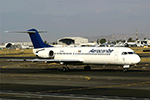
This is Aerocaribe Fokker 100 Fleet Pack with the registrations: XA-JXW, XA-SGE, XA-SHI & XA-TKR All of them with White Colors included. Aerocaribe was an airline founded in Merida, Yucatan, Mexico. Aerocaribe was founded in 1972 as "Aerolineas Bonanza", it started operations on July 12th, 1975, under the name of "Aerocaribe". It was a regional subsidiary of Mexicana Airlines that operated services under the flag of "Mexicana Inter" and shared codes with its parent company. it operated almost 120 flights per day. in 2005 Mexicana decided to rename Aerocaribe as a low cost airline, "MexicanaClick". Aerocaribe was purchased by "Compañia Mexicana de Aviacion". On August 23th, 1990. In 1996 Mexicana became part of the Cintra Group. Its subsidiary Aerocozumel was integrated. Mexicana decided to transfer its fleet of Fokker 100 aircraft to Aerocaribe to change the airline's brand. Its new name is MexicanaClick, And it is an attempt to create a low cost mexican airline, starting operations in July 2005. It had aircraft together with its subsidiary Aerocozumel: FAIRCHILD FOKKER F27 FRIENDSHIP, MCDONNELL DOUGLAS DC-9-14/MCDONNELL DOUGLAS DC- 9-15, BRITTEN-NORMAN ISLANDER, CESSNA 208B CARAVAN, BAE JETSTREAM 31, MCDONNELL DOUGLAS DC-9-31, FOKKER 100. The model is AI Aardvark (AIA) Fokker 100, coming soon more Douglas DC-9-30 registrations and textures, Basepack. This is my website: https://el-mundo-de-los-aviones-ai-traffic.jimdosite.com I hope enjoy it!.
| Filename: | AI_Aerocaribe_AIA_Fokker100_Fleet_Pack.zip |
| License: | Freeware |
| Added: | 7th July 2023, 04:31:37 |
| Downloads: | 78 |
| Author: | Jesús Gibran Soriano Solleiro |
| Size: | 47.15 MB |
| Category: Flight Simulator 2004 - AI Aircraft | |
| AI Aerocaribe AIA Fokker100 Fleet Pack |
|
Images related to this file:
File Description:
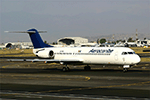
This is Aerocaribe Fokker 100 Fleet Pack with the registrations: XA-JXW, XA-SGE, XA-SHI & XA-TKR All of them with White Colors included. Aerocaribe was an airline founded in Merida, Yucatan, Mexico. Aerocaribe was founded in 1972 as "Aerolineas Bonanza", it started operations on July 12th, 1975, under the name of "Aerocaribe". It was a regional subsidiary of Mexicana Airlines that operated services under the flag of "Mexicana Inter" and shared codes with its parent company. it operated almost 120 flights per day. in 2005 Mexicana decided to rename Aerocaribe as a low cost airline, "MexicanaClick". Aerocaribe was purchased by "Compañia Mexicana de Aviacion". On August 23th, 1990. In 1996 Mexicana became part of the Cintra Group. Its subsidiary Aerocozumel was integrated. Mexicana decided to transfer its fleet of Fokker 100 aircraft to Aerocaribe to change the airline's brand. Its new name is MexicanaClick, And it is an attempt to create a low cost mexican airline, starting operations in July 2005. It had aircraft together with its subsidiary Aerocozumel: FAIRCHILD FOKKER F27 FRIENDSHIP, MCDONNELL DOUGLAS DC-9-14/MCDONNELL DOUGLAS DC- 9-15, BRITTEN-NORMAN ISLANDER, CESSNA 208B CARAVAN, BAE JETSTREAM 31, MCDONNELL DOUGLAS DC-9-31, FOKKER 100. The model is AI Aardvark (AIA) Fokker 100, coming soon more Douglas DC-9-30 registrations and textures, Basepack. This is my website: https://el-mundo-de-los-aviones-ai-traffic.jimdosite.com I hope enjoy it!.
| Filename: | AI_Aerocaribe_AIA_Fokker100_Fleet_Pack.zip |
| License: | Freeware |
| Added: | 7th July 2023, 04:31:51 |
| Downloads: | 54 |
| Author: | Jesús Gibran Soriano Solleiro |
| Size: | 47.15 MB |
| Category: Prepar3D V1-4 - AI Aircraft | |
| AI Aerocaribe AIA Fokker100 Fleet Pack |
|
Images related to this file:
File Description:

This is Aerocaribe Fokker 100 Fleet Pack with the registrations: XA-JXW, XA-SGE, XA-SHI & XA-TKR All of them with White Colors included. Aerocaribe was an airline founded in Merida, Yucatan, Mexico. Aerocaribe was founded in 1972 as "Aerolineas Bonanza", it started operations on July 12th, 1975, under the name of "Aerocaribe". It was a regional subsidiary of Mexicana Airlines that operated services under the flag of "Mexicana Inter" and shared codes with its parent company. it operated almost 120 flights per day. in 2005 Mexicana decided to rename Aerocaribe as a low cost airline, "MexicanaClick". Aerocaribe was purchased by "Compañia Mexicana de Aviacion". On August 23th, 1990. In 1996 Mexicana became part of the Cintra Group. Its subsidiary Aerocozumel was integrated. Mexicana decided to transfer its fleet of Fokker 100 aircraft to Aerocaribe to change the airline's brand. Its new name is MexicanaClick, And it is an attempt to create a low cost mexican airline, starting operations in July 2005. It had aircraft together with its subsidiary Aerocozumel: FAIRCHILD FOKKER F27 FRIENDSHIP, MCDONNELL DOUGLAS DC-9-14/MCDONNELL DOUGLAS DC- 9-15, BRITTEN-NORMAN ISLANDER, CESSNA 208B CARAVAN, BAE JETSTREAM 31, MCDONNELL DOUGLAS DC-9-31, FOKKER 100. The model is AI Aardvark (AIA) Fokker 100, coming soon more Douglas DC-9-30 registrations and textures, Basepack. This is my website: https://el-mundo-de-los-aviones-ai-traffic.jimdosite.com I hope enjoy it!.
| Filename: | AI_Aerocaribe_AIA_Fokker100_Fleet_Pack.zip |
| License: | Freeware |
| Added: | 7th July 2023, 04:32:05 |
| Downloads: | 31 |
| Author: | Jesús Gibran Soriano Solleiro |
| Size: | 47.15 MB |
| Category: Flight Simulator 2004 - Miscellaneous Files | |
| Active Approach - PHNL (Honolulu Intl Honolulu, Hawaii) |
|
File Description:
As most know the Approach and Final (VMC) for AI Traffic in FS9 is a straight in type landing and does not always consider high terrain at airports. This is do to the way that the coding is written in FS9 and it puts limits on IFR arriving aircraft. If you open runways at certain airports the AI Traffic will fly directly through a mountain once it is established on Final for a runway. What you will see with my file is a different type approach used for the way I control AI Traffic in FS9. No longer do the AI Planes use a straight in approach when landing to the west at PHNL. My new AI Aircraft Approach coding for FS9 now uses a base leg approach so AI Traffic does not fly through the mountains. The Honolulu Control Tower will clear all AI Traffic (IFR FP) landing either on 26L and 26R as a straight in landing even though the offset to final is 30 degrees from the runway center line. The Control Tower will instruct the AI Planes landing on either 22L or 22R to fly a left base leg which is greater then a 45 degree offset and then the AI Planes will turn on a short 1.5 mile final. The left base approach to 22L and 22R runways is a 65 degree offset from the runway center line. My testing shows excellent behavior of the FS9 default models, PAI models and the Aardvark planes of all sizes to execute this new type of visual approach that I am now writting code for which supersedes the FS9 default straight in ATC hard code approach. Read the text file for all the default scenery enhancements (plus Jetways) added to PHNL along with a full understanding of how the new Approaches work *** 3rd Party Scenery Designers Special APProach bgl and a FS2004 Default Scenery AFCAD included ***
| Filename: | Active_Approach__PHNL_Honolulu_Intl__Honolulu_Hawa.zip |
| License: | Freeware, limited distribution |
| Added: | 16th March 2005, 04:10:43 |
| Downloads: | 5,604 |
| Author: | Jim Vile |
| Size: | 134.3 KB |
| Category: Prepar3D V1-4 - Utilities | |
| Flightplan Visualizer 1.13 |
|
Images related to this file:
File Description:
Flightplan Visualizer (FV) version 1.13.0. Copyright 2018-2019 by Pelle F. S. Liljendal ([email protected]), all rights reserved.
FV comes with 586 pre-imported Commercial AI flightplans (+380 BizJet flightplans are available as a separate download). However you are able to import additional (AI) flightplans yourself. Once imported these (AI) flightplans can be visualized on a map-view, and the user will be able to search accross all these. Hence you can use the program as inspiration as to which routes to fly. E.g. you can search across all imported flightplans to find all flights in an A321 flying into/out from LDDU, or simply to look for all flights in a Boeing 747-8F.
Simply run the included installer to install the software. The program will be installed into "C:\Program Files (x86)\Flightplan Visualizer" and all datafiles will be installed into: "C:\Users\[UserName]\AppData\Roaming\FlightplanVisualizer". The program comes with a full manual explaining everything, and a 3 page quick manual to get you started. The first 3 times you run the program the quick manual will automatically open. The forum is hosted here: https://forum.aerosoft.com/index.php?/forum/919-flightplan-visualizer/
Version 1.13 Contains the following changes: Flightplans can now be exported in AIFP/TrafficTool-format (the same format that FV is able to import). It means if you have made any changes to a flightplan (e.g. redirected some airports) the flightplan can be exported from FV, and imported into AIFP (AI Flight Planner, by Don Grovestine) where it can be compiled into an AI-traffic bgl-file (traffic "scenery"). A new setting called "Adjust flight-time on airport-redirect" have been added. This setting defaults to "false" (un-checked), however if changed to "true" (checked) the flight-time will be changed if/when departure/destination-airports are changed due to airport-redirections (both automatic and manually). The flight-time is the result of the difference between departure-/destination-time, hence if the flight-time is changed either- or both departure-/destination-time will change as well. The original flight-time is scaled based on the original- and the redirected distance between the departure/destination-airports. When importing/editing flightplans you can now select one or multiple aircraft and delete them. When deleting an aircraft all schedules attached to that aircraft will be deleted as well. One use of this feature could be to remove aircraft you don't have a AI aircraft, prior to exporting the flightplan in AIFP/TT-format, and loading it into AIFP. When importing/editing flightplans a "Similar" button will appear next to the flightplan name if a similar named flightplan exists (e.g. "same name", but different season), or other flighplans exists for the same airline (ICAO). Hoovering the mouse over this button will show the names of these flightplans as a tool-tip, and if you click the button the list will be shown in a window (with some additional information), from where it can be copied to the clipboard if you need to. On the Edit/Import-flightplan form, the Aircraft- and Airport tab-sheets have been swapped, and a new tab-sheet was added to list all routes of the flightplan. For each route the distance is listed along will all aircraft types of the flightplan servicing that route. The "Aircraft" tabsheet of the form to import/edit flightplans now contains a button called: "Fleet report". Pressing this button will generate a report showing the fleet of an airline (based on the flightplan), that is sorted by Aircraft type and registration. For each aircraft it will show a list of all the airports served by that particular aircraft. A "Word-wrap" check-box have been added to the Result-viewer to toggle word-wrap on/off (word-wrap defaults to "on"). In previous versions any changes made in the settings form resulted in all flightplans having to reload (while showing the splash-screen). Changing the path for MakeRunway-files still results in an automatic "reboot" of the program. The combo-box for choosing default direction (outbound/inbound/both) for the leg-search (on reset) have been removed from settings, and it now defaults to "Outbound or Inbound". However in the search legs form you can now save your own preferred "Reset" criteria. When you press the reset-button, it will load this Reset-file (with your preferred reset criteria). If you hold SHIFT while pressing the reset-button (or you have not saved a personal reset-file), it will reset to the default factory-criteria. In the traffic tabsheet of the airport info form there is a combo-box letting you switch between "Selected flightplan" or last-search on main-form" and "All flights to/from this airport". In previous versions it did not perform the search of flights to-/from- the viewed airport until you selected the 2nd item from the combo-box. Now this search is performed in the background as soon as the form is opened, hence choosing the 2nd item in the combo-box is now instantaneous. The "Nearby Airports" tab-sheet in the "Airport Info" form, now have a column listing direction (from the airport to the nearby airports). When listing number of runways and gates (e.g. in the form showing nearby airports, or in the redirection-report), the radius of the largest gate is now included, as there is no need to redirect any 747 traffic to an airport where the largest gate is 23m (a 747 requires a gate with a radius of at least 36m). The frequency-count was removed from the before mentioned listing of runways and gates, to make more room for listing the aircraft serving each airport. The search for airport browse now have a new optional column listing comments (e.g. length of longest rwy and largest gate). The "show" combo-box lets you choose to show comments in stead of "Size/Rank/Traffic" or "Hint-text". Opening the search airport browser from the import/edit flightplan form, will automatically choose to show the comments column, as information regarding rwy length/gate radius can be relevant when redirecting airports. Form "Nearby Airports" now show the GPS-position in the caption of the form. Added runway/gate summary to caption-bar of airport info form, so you no longer need to look at both the runway- and gate- tab-sheet in order to see: number of runways, longest runway, number of gates and largest rate (radius). New check-box added to settings allowing you to include the before mentioned runway/gate info in the airport marker tool-tip on the main map. Region/sub-region added to "Airport Info" form (top/left corner). A new setting (default to disabled) lets you add region/sub-region to the airport marker-hint on the map as well. Added a button to the "airport info" to show the airport at flightradar24 (opens the default browser), and the button on the leg info form to show route the route at flightaware (also using the browser) have been replicated on the route info form. The METAR-/TAF-buttons on the leg info form now shows the raw METAR/TAF-message - as a tool tip - when you hoover the mouse over the buttons. As before, when you press these buttons it will open a window showing the decoded messages. Various minor changes to the leg info form: added info regarding longest runway and largest gate for each airport, and re-positioned some of the fields. Likewise the info copied to the clipboard when you click the appropriate button have been re-ordered as well. Changed flightplan format to accommodate additional information, but the format remains backward compatible. Button added to about-box allowing the user to copy version-info to the clipboard. Managed to "shave off" approx ½ a second during start-up (on my pc). Not a lot but still an improvement :-) Fixed: In the form for importing/editing flightplans the leg-page showed the original distance even if the airports were redirected. Fixed: On leg info form "Dest.Country" and "Dest.Apt" column-order were swapped. Fixed: Tweaked aircraft type detecting to better detect 740-400 and 767-200/300 freighters. In previous versions a few aircrafts were wrongly detected as pax, when they should have been detected as freighter. Data: Airbus 330-800/900 Neo, Boeing 747-400LCF (Dreamlifter), and Embraer 175/190/195-E2 have been added as supported aircraft, and a few additional airlines and airports were added as well. Flightplans: Installer comes with +70 new pre-imported (Summer 2019) flightplans of which some are replacements of obsolete flightplans (from previous installers), and 2 of the "old" flightplans have been marked as defunct, as "Adria Airways" and "Aigle Azur" have filed for bankruptcy and ceased their operations. Flightplans: Among the added flightplans you will find the first flightplan I have made myself, a flightplan for Airbus Transport International covering their 5 Beluga's an 2 Beluga XL's (the latter 2 are stil performing test-flights and have yet to be implemented into their "normal schedule").
| Filename: | Flightplan_Visualizer_113.zip |
| License: | Freeware, limited distribution |
| Added: | 13th October 2019, 17:50:53 |
| Downloads: | 355 |
| Author: | Pelle Liljendal |
| Size: | 30.45 MB |


© 2001-2026 AVSIM Online
All Rights Reserved
Privacy Policy |