
Where Flight Simulation Enthusiasts Gather from Around the World!
AVSIM Library - Search Results

| Category: Flight Simulator 2004 - Panels | |
| Super VC10 Panel Upgrade Part 1 |

|
File Description:
This panel upgrade for David Maltby's Super VC10 incorporates significant major changes. First the Super VC10 has now become a stand alone aircraft within the "DMFS Shared Files" file structure. This allows for many changes that distinguish the Super VC10 from the Standard. Some already present and some ongoing. The main panel is now in widescreen format i.e. "not stretched!" Many hundreds of other changes have also been made some unseen that make significant differences to the performance of the model. For example the Super has a fin tank now modelled along with correct fuel transfer and jettison procedures. The engines have been totally overhauled with new thrust curves so that their performance is as accurate as possible across the power spectrum. A consequence of this is that throttle control is now much more precise. Internal engine sounds have been completely revised and are as close as possible to the sound one would hear from the cockpit. There are in addition numerous new panels that are fully functional such the Oxygen panel. This means that cabin altitude and depressurisation are all potential factors and must be attended to. Though you do have an oxygen mask (so don it if necessary or face the consequences!). There is a tiller for ground manoeuvring. There are just too many changes and additions to list here but they are listed in the documentation. Another important addition is refuelling. Refuelling can only be done from an underwing point. To assist is a dedicated new fuel uplift spreadsheet which incorporates a facsimile of a real Super VC10 load sheet allowing you to change passenger loads etc. Everything is explained in the "Technical and Operational Procedures Manual" pdf file as well as the "VC10 FLYING MANUAL" pdf file which contains all the full checklists not cut down for sim use. With ongoing work the intention is that this will become a "study" simulation.
If you do not already have David Maltby's Super VC10 model then download it from here. http://www.dmflightsim.co.uk/vickers_vc10.htm
Follow his instructions and make sure everything is working as expected before downloading these updates.
| Filename: | Super_VC10_Panel_Upgrade_Part_1.zip |
| License: | Freeware |
| Added: | 16th August 2016, 22:44:37 |
| Downloads: | 789 |
| Author: | Nicholas Weber |
| Size: | 79.51 MB |
| Category: Flight Simulator 2004 - Panels | |
| Super VC10 Panel Upgrade Part 2 |
|
File Description:
This panel upgrade for David Maltby's Super VC10 incorporates significant major changes. First the Super VC10 has now become a stand alone aircraft within the "DMFS Shared Files" file structure. This allows for many changes that distinguish the Super VC10 from the Standard. Some already present and some ongoing. The main panel is now in widescreen format i.e. "not stretched!" Many hundreds of other changes have also been made some unseen that make significant differences to the performance of the model. For example the Super has a fin tank now modelled along with correct fuel transfer and jettison procedures. The engines have been totally overhauled with new thrust curves so that their performance is as accurate as possible across the power spectrum. A consequence of this is that throttle control is now much more precise. Internal engine sounds have been completely revised and are as close as possible to the sound one would hear from the cockpit. There are in addition numerous new panels that are fully functional such the Oxygen panel. This means that cabin altitude and depressurisation are all potential factors and must be attended to. Though you do have an oxygen mask (so don it if necessary or face the consequences!). There is a tiller for ground manoeuvring. There are just too many changes and additions to list here but they are listed in the documentation. Another important addition is refuelling. Refuelling can only be done from an underwing point. To assist is a dedicated new fuel uplift spreadsheet which incorporates a facsimile of a real Super VC10 load sheet allowing you to change passenger loads etc. Everything is explained in the "Technical and Operational Procedures Manual" pdf file as well as the "VC10 FLYING MANUAL" pdf file which contains all the full checklists not cut down for sim use. With ongoing work the intention is that this will become a "study" simulation.
If you do not already have David Maltby's Super VC10 model then download it from here. http://www.dmflightsim.co.uk/vickers_vc10.htm
Follow his instructions and make sure everything is working as expected before downloading these updates.
| Filename: | Super_VC10_Panel_Upgrade_Part_2.zip |
| License: | Freeware |
| Added: | 18th August 2016, 03:55:38 |
| Downloads: | 449 |
| Author: | Nicholas Weber |
| Size: | 138.07 MB |
| Category: Flight Simulator 2004 - Panels | |
| Super VC10 Panel Upgrade Part 3 |
|
File Description:
This panel upgrade for David Maltby's Super VC10 incorporates significant major changes. First the Super VC10 has now become a stand alone aircraft within the "DMFS Shared Files" file structure. This allows for many changes that distinguish the Super VC10 from the Standard. Some already present and some ongoing. The main panel is now in widescreen format i.e. "not stretched!" Many hundreds of other changes have also been made some unseen that make significant differences to the performance of the model. For example the Super has a fin tank now modelled along with correct fuel transfer and jettison procedures. The engines have been totally overhauled with new thrust curves so that their performance is as accurate as possible across the power spectrum. A consequence of this is that throttle control is now much more precise. Internal engine sounds have been completely revised and are as close as possible to the sound one would hear from the cockpit. There are in addition numerous new panels that are fully functional such the Oxygen panel. This means that cabin altitude and depressurisation are all potential factors and must be attended to. Though you do have an oxygen mask (so don it if necessary or face the consequences!). There is a tiller for ground manoeuvring. There are just too many changes and additions to list here but they are listed in the documentation. Another important addition is refuelling. Refuelling can only be done from an underwing point. To assist is a dedicated new fuel uplift spreadsheet which incorporates a facsimile of a real Super VC10 load sheet allowing you to change passenger loads etc. Everything is explained in the "Technical and Operational Procedures Manual" pdf file as well as the "VC10 FLYING MANUAL" pdf file which contains all the full checklists not cut down for sim use. With ongoing work the intention is that this will become a "study" simulation.
If you do not already have David Maltby's Super VC10 model then download it from here. http://www.dmflightsim.co.uk/vickers_vc10.htm
Follow his instructions and make sure everything is working as expected before downloading these updates.
| Filename: | Super_VC10_Panel_Upgrade_Part_3.zip |
| License: | Freeware |
| Added: | 18th August 2016, 03:57:13 |
| Downloads: | 415 |
| Author: | Nicholas Weber |
| Size: | 127.77 MB |
| Category: Flight Simulator 2004 - Panels | |
| Super VC10 Panel Upgrade Part 4 |
|
File Description:
This panel upgrade for David Maltby's Super VC10 incorporates significant major changes. First the Super VC10 has now become a stand alone aircraft within the "DMFS Shared Files" file structure. This allows for many changes that distinguish the Super VC10 from the Standard. Some already present and some ongoing. The main panel is now in widescreen format i.e. "not stretched!" Many hundreds of other changes have also been made some unseen that make significant differences to the performance of the model. For example the Super has a fin tank now modelled along with correct fuel transfer and jettison procedures. The engines have been totally overhauled with new thrust curves so that their performance is as accurate as possible across the power spectrum. A consequence of this is that throttle control is now much more precise. Internal engine sounds have been completely revised and are as close as possible to the sound one would hear from the cockpit. There are in addition numerous new panels that are fully functional such the Oxygen panel. This means that cabin altitude and depressurisation are all potential factors and must be attended to. Though you do have an oxygen mask (so don it if necessary or face the consequences!). There is a tiller for ground manoeuvring. There are just too many changes and additions to list here but they are listed in the documentation. Another important addition is refuelling. Refuelling can only be done from an underwing point. To assist is a dedicated new fuel uplift spreadsheet which incorporates a facsimile of a real Super VC10 load sheet allowing you to change passenger loads etc. Everything is explained in the "Technical and Operational Procedures Manual" pdf file as well as the "VC10 FLYING MANUAL" pdf file which contains all the full checklists not cut down for sim use. With ongoing work the intention is that this will become a "study" simulation.
If you do not already have David Maltby's Super VC10 model then download it from here. http://www.dmflightsim.co.uk/vickers_vc10.htm
Follow his instructions and make sure everything is working as expected before downloading these updates.
| Filename: | Super_VC10_Panel_Upgrade_Part_4.zip |
| License: | Freeware |
| Added: | 19th August 2016, 21:43:08 |
| Downloads: | 346 |
| Author: | Nicholas Weber |
| Size: | 152.39 MB |
| Category: Flight Simulator 2004 - Panels | |
| Super VC10 Panel Upgrade Part 5 |
|
File Description:
This panel upgrade for David Maltby's Super VC10 incorporates significant major changes. First the Super VC10 has now become a stand alone aircraft within the "DMFS Shared Files" file structure. This allows for many changes that distinguish the Super VC10 from the Standard. Some already present and some ongoing. The main panel is now in widescreen format i.e. "not stretched!" Many hundreds of other changes have also been made some unseen that make significant differences to the performance of the model. For example the Super has a fin tank now modelled along with correct fuel transfer and jettison procedures. The engines have been totally overhauled with new thrust curves so that their performance is as accurate as possible across the power spectrum. A consequence of this is that throttle control is now much more precise. Internal engine sounds have been completely revised and are as close as possible to the sound one would hear from the cockpit. There are in addition numerous new panels that are fully functional such the Oxygen panel. This means that cabin altitude and depressurisation are all potential factors and must be attended to. Though you do have an oxygen mask (so don it if necessary or face the consequences!). There is a tiller for ground manoeuvring. There are just too many changes and additions to list here but they are listed in the documentation. Another important addition is refuelling. Refuelling can only be done from an underwing point. To assist is a dedicated new fuel uplift spreadsheet which incorporates a facsimile of a real Super VC10 load sheet allowing you to change passenger loads etc. Everything is explained in the "Technical and Operational Procedures Manual" pdf file as well as the "VC10 FLYING MANUAL" pdf file which contains all the full checklists not cut down for sim use. With ongoing work the intention is that this will become a "study" simulation.
If you do not already have David Maltby's Super VC10 model then download it from here. http://www.dmflightsim.co.uk/vickers_vc10.htm
Follow his instructions and make sure everything is working as expected before downloading these updates.
| Filename: | Super_VC10_Panel_Upgrade_Part_5.zip |
| License: | Freeware |
| Added: | 19th August 2016, 21:51:08 |
| Downloads: | 349 |
| Author: | Nicholas Weber |
| Size: | 121 MB |
| Category: Flight Simulator 2004 - Panels | |
| Super VC10 Panel Upgrade Part 6 |
|
File Description:
This panel upgrade for David Maltby's Super VC10 incorporates significant major changes. First the Super VC10 has now become a stand alone aircraft within the "DMFS Shared Files" file structure. This allows for many changes that distinguish the Super VC10 from the Standard. Some already present and some ongoing. The main panel is now in widescreen format i.e. "not stretched!" Many hundreds of other changes have also been made some unseen that make significant differences to the performance of the model. For example the Super has a fin tank now modelled along with correct fuel transfer and jettison procedures. The engines have been totally overhauled with new thrust curves so that their performance is as accurate as possible across the power spectrum. A consequence of this is that throttle control is now much more precise. Internal engine sounds have been completely revised and are as close as possible to the sound one would hear from the cockpit. There are in addition numerous new panels that are fully functional such the Oxygen panel. This means that cabin altitude and depressurisation are all potential factors and must be attended to. Though you do have an oxygen mask (so don it if necessary or face the consequences!). There is a tiller for ground manoeuvring. There are just too many changes and additions to list here but they are listed in the documentation. Another important addition is refuelling. Refuelling can only be done from an underwing point. To assist is a dedicated new fuel uplift spreadsheet which incorporates a facsimile of a real Super VC10 load sheet allowing you to change passenger loads etc. Everything is explained in the "Technical and Operational Procedures Manual" pdf file as well as the "VC10 FLYING MANUAL" pdf file which contains all the full checklists not cut down for sim use. With ongoing work the intention is that this will become a "study" simulation.
If you do not already have David Maltby's Super VC10 model then download it from here. http://www.dmflightsim.co.uk/vickers_vc10.htm
Follow his instructions and make sure everything is working as expected before downloading these updates.
| Filename: | Super_VC10_Panel_Upgrade_Part_6.zip |
| License: | Freeware |
| Added: | 19th August 2016, 21:57:25 |
| Downloads: | 359 |
| Author: | Nicholas Weber |
| Size: | 145.96 MB |
| Category: Microsoft Flight Simulator (2020) - Utilities | |
| FSTramp v8.84 for MSFS, FSX(-SE), Prepart3D, X-Plane (Win) |
|
Images related to this file:
File Description:

This add-on is an EXE application for Microsoft Flight Simulator and a DLL module for all other simulators. The DLL variant is activated via hotkeys or the simulator menu add-ons or plugins. Window size and layout are configurable for one or more screens. To avoid dazzling, the brightness of the entire application is customizable. Primarily it is a flight management system (FMS) with automatic control from start to landing. This also includes the observance of SID, STAR and Approaches in unmatched quality. The flight plan required for the FMS can be created manually or automatically, interactive changes and additions during the flight are possible. The basis of the flight planner is the 3D world map and the search function for airfields and navigation aids. The FMS by FSTramp relies on the autopilot of the aircraft. In case of incompatibility, the autopilot integrated in FSTramp will be used. This allows FSTramp to control almost all aircraft from airport to airport. The altitude profile of the flight plan, SID, STAR and approach is taken into account. This means that FSTramp extends the often incomplete airport procedures to and from the runway so that they can be flown completely automatically. During the fully automatic flight, the autopilot values ​​for HDG, ALT, VSPEED, SPD and MACH can be manually overridden. This is e.g. useful for being able to react to the instructions of the tower in the final approach without completely stopping the automatic flight. The rotating or north pointing 3D world map with numeric display of the terrain elevation under the mouse arrow is another special feature. It does not need an internet but is synthesized from included height profiles of the globe. The Data of continents, mountains and rivers are included in the setup. Airspaces, Airways, Waypoints and SID, STAR and Approaches are also included in the setup, but can be updated by installing additional AIRAC cycles. Airfields and navigation stations are taken from the simulator. NVIDIA: If the frame rate of the simulator drops sharply about 20 seconds after FSTramp's visibility, the power management of the GPU slows down prematurely. In the NVIDIA Control Panel, change the 'Manage 3D settings - Power management mode' option to 'Adaptive'.
| Filename: | FSTramp_v884_for_MSFS_FSXSE_Prepart3D_XPlane_Win.zip |
| License: | Shareware, time limited |
| Added: | 7th July 2023, 04:35:12 |
| Downloads: | 111 |
| Author: | Helge Schroeder |
| Size: | 358.21 MB |
| Category: Prepar3D V5 - Utilities | |
| FSTramp v8.84 for Prepart3D 2-6, MSFS, FSX(-SE), X-Plane (Win) |
|
Images related to this file:
File Description:
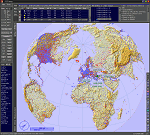
This add-on is an EXE application for Microsoft Flight Simulator and a DLL module for all other simulators. The DLL variant is activated via hotkeys or the simulator menu add-ons or plugins. Window size and layout are configurable for one or more screens. To avoid dazzling, the brightness of the entire application is customizable. Primarily it is a flight management system (FMS) with automatic control from start to landing. This also includes the observance of SID, STAR and Approaches in unmatched quality. The flight plan required for the FMS can be created manually or automatically, interactive changes and additions during the flight are possible. The basis of the flight planner is the 3D world map and the search function for airfields and navigation aids. The FMS by FSTramp relies on the autopilot of the aircraft. In case of incompatibility, the autopilot integrated in FSTramp will be used. This allows FSTramp to control almost all aircraft from airport to airport. The altitude profile of the flight plan, SID, STAR and approach is taken into account. This means that FSTramp extends the often incomplete airport procedures to and from the runway so that they can be flown completely automatically. During the fully automatic flight, the autopilot values ​​for HDG, ALT, VSPEED, SPD and MACH can be manually overridden. This is e.g. useful for being able to react to the instructions of the tower in the final approach without completely stopping the automatic flight. The rotating or north pointing 3D world map with numeric display of the terrain elevation under the mouse arrow is another special feature. It does not need an internet but is synthesized from included height profiles of the globe. The Data of continents, mountains and rivers are included in the setup. Airspaces, Airways, Waypoints and SID, STAR and Approaches are also included in the setup, but can be updated by installing additional AIRAC cycles. Airfields and navigation stations are taken from the simulator. NVIDIA: If the frame rate of the simulator drops sharply about 20 seconds after FSTramp's visibility, the power management of the GPU slows down prematurely. In the NVIDIA Control Panel, change the 'Manage 3D settings - Power management mode' option to 'Adaptive'.
| Filename: | FSTramp_v884_for_Prepart3D_26_MSFS_FSXSE_XPlane_Wi.zip |
| License: | Shareware, time limited |
| Added: | 7th July 2023, 04:35:26 |
| Downloads: | 43 |
| Author: | Helge Schroeder |
| Size: | 358.21 MB |
| Category: Flight Simulator X - Utilities | |
| FSTramp v8.84 for MSFS, FSX(-SE), Prepart3D, X-Plane (Win) |
|
Images related to this file:
File Description:
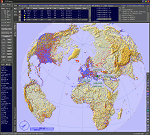
This add-on is an EXE application for Microsoft Flight Simulator and a DLL module for all other simulators. The DLL variant is activated via hotkeys or the simulator menu add-ons or plugins. Window size and layout are configurable for one or more screens. To avoid dazzling, the brightness of the entire application is customizable. Primarily it is a flight management system (FMS) with automatic control from start to landing. This also includes the observance of SID, STAR and Approaches in unmatched quality. The flight plan required for the FMS can be created manually or automatically, interactive changes and additions during the flight are possible. The basis of the flight planner is the 3D world map and the search function for airfields and navigation aids. The FMS by FSTramp relies on the autopilot of the aircraft. In case of incompatibility, the autopilot integrated in FSTramp will be used. This allows FSTramp to control almost all aircraft from airport to airport. The altitude profile of the flight plan, SID, STAR and approach is taken into account. This means that FSTramp extends the often incomplete airport procedures to and from the runway so that they can be flown completely automatically. During the fully automatic flight, the autopilot values ​​for HDG, ALT, VSPEED, SPD and MACH can be manually overridden. This is e.g. useful for being able to react to the instructions of the tower in the final approach without completely stopping the automatic flight. The rotating or north pointing 3D world map with numeric display of the terrain elevation under the mouse arrow is another special feature. It does not need an internet but is synthesized from included height profiles of the globe. The Data of continents, mountains and rivers are included in the setup. Airspaces, Airways, Waypoints and SID, STAR and Approaches are also included in the setup, but can be updated by installing additional AIRAC cycles. Airfields and navigation stations are taken from the simulator. NVIDIA: If the frame rate of the simulator drops sharply about 20 seconds after FSTramp's visibility, the power management of the GPU slows down prematurely. In the NVIDIA Control Panel, change the 'Manage 3D settings - Power management mode' option to 'Adaptive'.
| Filename: | FSTramp_v884_for_MSFS_FSXSE_Prepart3D_XPlane_Win.zip |
| License: | Shareware, time limited |
| Added: | 7th July 2023, 04:35:43 |
| Downloads: | 130 |
| Author: | Helge Schroeder |
| Size: | 358.21 MB |
| Category: Flight Simulator 2004 - Sounds | |
| General Electric CF6-80 - 767v3 - "Matched FDE" |
|
File Description:
General Electric CF6-80 v2 soundpack simulating the engine type fitted on the Boeing 767.
This is a quite major rebuild of the first Boeing 767 GE soundpack I made in February 2005. I've spent a lot of time tweaking and listening to how the the engines spool-up and I think the results are quite pleasing. Soundset is matched with the flight dynamics engine to make flying a lot more enjoyble. Instead of taking off with 100% thrust to really hear the turbofan and letting the speed rocket up to 240 in seconds and then have to decrease the thrust to 30% to not pass 250knots, you now can take-off with 85-90% of thrust, make a very smooth take-off roll and controlled climb. A recommended N1 setting (thrust) is 85-90% for take-off! New features in this set: Matched to use with the Project OpenSky Boeing 767v4 family flight dynamics engine exclusively (this pack might not work correctly with other 767 planes), New spool and turbofan sound for the interior as well as the exterior, New cockpit environment, Cockpit environment can now be turned off when pushing the "Battery on/off" button (for those panels fitted with these), New interior and exterior APU (These sound kicks in when engines are turned off). Please take a look in the readme for possible important info. Created in FS Sound Studio. Enjoy!
| Filename: | General_Electric_CF680___767v3__Matched_FDE.zip |
| License: | Freeware |
| Added: | 13th April 2006, 00:31:46 |
| Downloads: | 9,293 |
| Author: | Steven Persson |
| Size: | 29.93 MB |


© 2001-2026 AVSIM Online
All Rights Reserved
Privacy Policy |