
Where Flight Simulation Enthusiasts Gather from Around the World!
AVSIM Library - Search Results

| Category: Flight Simulator 2004 - Original Aircraft | |
| North American T6_Harvard |

|
Images related to this file:
File Description:
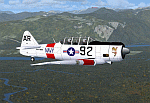
North American T6_Harvard
This aircraft has has been constructed using Gmax v1.2. The aircraft is constructed with as few polygons as possible and with a single texture file to ensure the absolute minimum impact on your framerates. There are two models- each has seven LODs.
The aircraft has had an amazing history with first prototype flying in 1935. To quote from Wikipedia "A total of 15,495 T-6s of all variants were built.During the Korean War and to a lesser extent, the Vietnam war, T-6s were pressed into service as forward air control aircraft. These aircraft were designated T-6 "Mosquito"s.[1] The RAF used the Harvard in Kenya against the Mau Mau in the 1950s where they operated with 20 lb bombs and machine guns against the gangs. Some operations took place at altitudes around 20,000 ft asl. A Harvard was the longest-serving RAF aeroplane, with an example, taken on strength in 1945, still serving in the 1990s (as a chase plane for helicopter test flights - a role the Shorts Tucano's high stall speed was ill-suited for). The T-6G was also used in a light attack or counter insurgency role by France during the Algerian war in special Escadrilles d'Aviation L�������©g�������¨re d'Appui (EALA), armed with machine guns, bombs and rockets. At its peak there were 38 EALA's active. The largest unit was the Groupe d'Aviation L�������©g�������¨re d'Appui 72, which consisted of up to 21 EALAs. Portugal also used ex-French aircraft during the Portuguese Colonial War.
Since the Second World War, the T-6 has been a regular participant at air shows, and was used in many movies. For example, in Tora! Tora! Tora! and The Final Countdown, converted single-seat T-6s painted in Japanese markings represent Mitsubishi Zeroes. The New Zealand Warbirds "Roaring 40s" aerobatic team use ex-Royal New Zealand Air Force Harvards. The Reno National Air Races also has a class specifically for the T-6 during the National Air Races each year."
This GMax model is quite fun to fly as a normal aircraft, but was originally designed specifically to enhance the AI aircraft population.
I would like to especially thank Ray Blake who has kindly made these high quality textures for this package.
A paintkit is being posted as a separate zip file.
| Filename: | North_American_T6_Harvard.zip |
| License: | Freeware, limited distribution |
| Added: | 3rd December 2009, 19:01:27 |
| Downloads: | 1,572 |
| Author: | Mike Cronin - aircraft and paintkit; Ray Blake - textures |
| Size: | 1.78 MB |
| Category: Flight Simulator 2004 - Aircraft Repaints, Textures and Modifications | |
| W91 Smith Mountain Lake Airport in Virginia |
|
File Description:
W91 Smith Mountain Lake Airport near Lynchburg, Virginia (MY soon to be NEW HOME)
This project is nearly ALL RWY12 ... I did use the Lago Scenery enhancer for the
trees.. so if you have LAgo.. the .SE2 is included, but you really don't need it.
But you will need RWY12 with all the latest additions... all freeware and all
available here at avsim.
Instructions... best to unzip to a temp directory... then do the following..
if you use Lago's Scenery Enhancer... place the .SE2 file in (Your flightsim main
folder)\LAGO\FSE\Data. Unziping will create a folder titled "Smith Mountain Lake" .. in that folder is one titled "scenery" Simply place Smith Mountain Lake in (your flightsim main folder)\Addon scenery\ folder then start the simulator.. go to settings, the library.. and - well most all know the drill .... add the folder Spring Mountain Lake then exit.. and restart.. and blamo... it is there... (Hopefully- LOL) ALSO in the scenery folder are two exclude .bgl.. this got rid of the default buildings and an AFCAD .bgl... this modified the airport properity a bit.. just leave all the .bgls where they are in the scenery folder.. all should work well.
oh.. for those who use RWY12 for scenery making... I have included the .XML file.. so you are welcome to add..subtract or change anything you find at Smith Mountain Lake.
if you have any questions or comments.. PLEASE do drop me a line.
Oh.. since I have your attention... a question for YOU... whether you download this
scenery or not.... How in the world does one get rid of that idiot "Flying Tips"
translucant window that appears.. telling you among other things .. your engines are not started... hit control E ... you ever notice how it ONLY appears when you have set up a screen shot and are ready to shoot?????? Write me and PLEASE tell me how to get rid of it.. I remember reading how somewhere, but for the life of me ..can't remember where.
| Filename: | W91_Smith_Mountain_Lake_Airport_in_Virginia.zip |
| License: | Freeware |
| Added: | 18th March 2005, 22:37:05 |
| Downloads: | 330 |
| Author: | Dale Caruso |
| Size: | 563.31 KB |
| Category: Flight Simulator 2004 - Scenery | |
| EPGO Goraszka 2010 - The Airshow Challenge |
|
Images related to this file:
File Description:
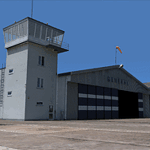
EPGO Goraszka 2010 - The Airshow Challenge is a freeware, extremely detailed scenery of a general aviation airport located 12nm (20km) south-east of Warsaw downtown and Warsaw Frederic Chopin International Airport, Poland. EPGO Goraszka airfield was built in 1994 and currently belongs to a General Aviation company, which offers aero-taxi flights, air transport and special flights (air photo, patrol) and airport services. The airport has a 800m-long runway and a lightened helipad, which can be used by helicopters of up to 5700kg weight. General Aviation's fleet includes Antonov AN-2, PZL-104 Wilga 80, Bell 407 and 427. Since 1996 the International Air Picnic Goraszka is organized every year by the "Polish Eagles" foundation created on initiative of Zbigniew Niemczycki.
The scenery is equipped with an automatic installer. Currently we support a safe, manual way of adding new sceneries to the Scenery Library in Flight Simulator. This is just one thing users need to do for themselves. Detailed instructions will be given during the installation process.
Scenery features:
-Compatible with FS2004 only
-Highest level of accuracy in geographic positioning, modeling and texturing
-Incredibly high quality photoreal textures of all airport buildings. Textures are based on over 300 real world -photographs made for this project.
-Hundreds of 3D objects like tents, exhibitions, airport buildings and surrounding buildings
-Life in the airport: people and cars will enhance your feelings
-AI traffic, animations and effects, designed specifically for FS2004
-Some buildings include interior (control tower)
-High quality aerial photos of the airport surroundings (5 seasons + night) with autogen and water mask
-Ultra high quality aerial photos of the airport (with seasons)
-Plain airport scenery with no airshow objects available too (details in the manual)
-Product includes manual and airport charts in PDF format
EPGO Goraszka 2010 - The Airshow Challenge scenery is compatible with almost every payware add-on, including Ultimate Terrain Eastern Europe and Warsaw Photo Scenery by Simdesign.
Scenery by Drzewiecki Design - www.drzewiecki-design.net
| Filename: | EPGO_Goraszka_2010__The_Airshow_Challenge.zip |
| License: | Freeware |
| Added: | 14th July 2010, 09:49:07 |
| Downloads: | 3,754 |
| Author: | Drzewiecki Design - Stanislaw Drzewiecki, Jakub Paczek |
| Size: | 132.03 MB |
| Category: Flight Simulator X - Aircraft Repaints, Textures and Modifications | |
| Boeing B-17G 91st BG (OR-R) 'Nine O Nine' |
|
Images related to this file:
File Description:
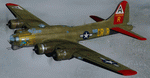
This folder contains a repaint for the A2A WoP2 B-17G in the colors of B-17G-30-BO 'Nine o nine". Nine-O-Nine was a Boeing B-17G-30-BO Flying Fortress heavy bomber, of the 323rd Bomb Squadron, 91st Bomb Group, that completed 140 combat missions during World War II, believed to be the Eighth Air Force record for most missions, without loss to the crews that flew it. The original aircraft, a block 30 B-17G manufactured by Boeing, was nicknamed after the last three digits of her serial number: 42-31909. Nine-0-Nine was added to the USAAF inventory on December 15, 1943, and flown overseas on February 5, 1944. After depot modifications, she was delivered to the 91st BG at RAF Bassingbourn, England, on February 24, 1944, as a replacement aircraft, one of the last B-17s received in factory-applied camouflage paint.
A former navigator of the 91st BG, Marion Havelaar, reported in his history of the group that Nine-O-Nine completed either 126 or 132 consecutive missions without aborting for mechanical reasons, also believed to be a record. M/Sgt. Rollin L. Davis, maintenance line chief of the bomber, received the Bronze Star for his role in achieving the record.
Her first bombing raid was on Augsburg, Germany, on February 25, 1944. She made 18 bombing raids on Berlin. In all she flew 1,129 hours and dropped 562,000 pounds of bombs. She had 21 engine changes, four wing panel changes, 15 main gas tank changes, and 18 changes of Tokyo tanks (long-range fuel tanks).
After the hostilities ceased in Europe, Nine-O-Nine was returned to the United States on June 8, 1945, and was consigned to the RFC facility at Kingman, Arizona on December 7, 1945, and eventually scrapped.
B-17G-85-DL, 44-83575, civil registration N93012, owned and flown by The Collings Foundation, Stow, Massachusetts, flew marked as the historic Nine-O-Nine until its crash on the 2nd of October 2019. Repaint by Jan Kees Blom.
| Filename: | Boeing_B17G_91st_BG_ORR_Nine_O_Nine.zip |
| License: | Freeware |
| Added: | 6th October 2019, 20:39:06 |
| Downloads: | 235 |
| Author: | Jan Kees Blom |
| Size: | 18.73 MB |
| Category: Prepar3D V1-4 - Flight Plans | |
| CargoJet Flight Plans |
|
File Description:
Attached is an Excel Flight Planner including recent (Jan/Feb 2019) scheduled flight plans for CargoJet for use with the CaptainSim 757-III Freighter expansion.
A couple of weeks ago, I made two CargoJet liveries for the CS 757-III Freighter, available at Avsim:
https://library.avsim.net/esearch.php?DLID=&Name=&FileName=&Author=meier&CatID=p3dacrp
To use these files, copy the attached .rt files to your Captain Sim route directory:
*\Lockheed Martin\Prepar3D v4\Captain_Sim\757-III\Routes\
These accompanying route files (60+) DO NOT include any SID or STAR data, nor do they include any performance information (cargo/fuel weights)...I've intentionally tried to keep these files customizable with any ATC program you may be using.
The Excel spreadsheet use should be pretty straight forward (it was designed using MS Excel 2019...you'll need MS Excel 2013 or newer for the macros to work correctly).
The spreadsheet will open to a worksheet containing CargoJet's current, scheduled route network. From this worksheet, simply select a departure location from the buttons on the world map.
Once a departure location is selected, a second "Flight Planning" worksheet will open with a UserForm Box directing you to select an airport destination based upon your selected departure location.
The UserForm box is pre-populated only with current destinations from that departure airport (based upon current CargoJet Jan/Feb 2019 schedules obtained from online flight tracking data).
I've included a weather snapshot download from each of the departure and destination airports into the flight planning worksheet.
I have not yet included enroute weather information...that may come in a "V2" of this flight planner.
As I have not yet included enroute weather information, flight fuel calculations/fuel burn are only approximate for now. Down the road, I may also include calculations for derate temperatures...that will take considerable more work.
I think this Flight Planner is a pretty good version 1 for sharing. In the absence of a website dedicated to a "CargoJet Virtual Airline", I thought this Excel spreadsheet and accompanying flight plans may be of benefit to anyone who might enjoy flying the CS757-III Freighter expansion with CargoJet livery.
Personally, I was fortunate to already have the full compliment of SimAddon airports (Canada wide) which makes for enhanced enjoyment of the CaptainSim 757-III add-on and this flight planning spreadsheet. (That statement wasn't intended as a promotion for people to go out and buy the SimAddons software!!!)
I haven't had a chance to test all the flight plans yet...I'm hoping I haven't made any errors!
Anyhow, I hope this spreadsheet and flight plans can be of benefit to others.
Feedback always appreciated!
Rob
February 15, 2019
| Filename: | CargoJet_Flight_Plans.zip |
| License: | Freeware |
| Added: | 16th February 2019, 22:00:12 |
| Downloads: | 169 |
| Author: | Rob Meier |
| Size: | 1.93 MB |
| Category: Flight Simulator 2004 - Utilities | |
| FlightSim Manager v2.6.1 |
|
File Description:
Compatible with both FS2002 and FS2004
FlightSim Manager is a great tool for managing add-ons to Microsoft Flight Simulator. Using easy to Wizard - FSM can install aircraft, panels, textures and scenery directly from distribution ZIP files you may have downloaded, with proper uninstallation of add-ons. From an easy to use Aircraft editor to add or remove aircraft variants, to an comprehensive Hangar management allows you to manage and configure your add-ons off your live FS installation.
You can now create Virtual Fleets, and enable/disable the complete fleet with ease. For serious pilots, FSM also offers a complete Logbook.
Lan View feature allows you to create virtual cockpits with multiple monitor support, using networked PCs.
With FSM, you can create Texture Sets - i.e.. different Tree Sets, and you can install any set with a single click, capture screenshots from Flight Simulator, Benchmark with log, launch it with Random Splash Screens, and fly from anywhere in the world using an map view.
You can also control Flight Simulator with speech commands using FSM. It also supports auto-saving flight, warning sytem, and custom event sounds.
Finally with a comprehensive Diagnostic Tools and Repository feature, FSM keeps your FS installation clean. Apart from the usual Missing and unused gauges, FSM can also locate Aircraft problems, Missing and unused effects, Scenery Problems with a LandClass File relocate feature - say bye-bye to all the memory leaks.
You can find the latest version from: http://www.ranainside.com/
To provide you - the user with the best Freeware FS-Addon, I need your help... if you have any suggestions, recommendations or problem using this software, please contact me through our Forum at: http://softwares.ranainside.com/forum/
You may not distribute the original archive/setup utility of the program(s) to anyone else, any Bulletin Board System, Portable Media or any web-site unless EXPRESS PERMISSION FROM THE AUTHOR is granted. You may not sell, lease, rent, or include this program or its original archive by any media without EXPRESS PERMISSION FROM THE AUTHOR. You are not required to pay for this program in any way, shape or form, but you are not licensed to distribute this program or its original archive for any financial gain.
| Filename: | FlightSim_Manager_v261.zip |
| License: | Freeware, limited distribution |
| Added: | 15th September 2004, 12:51:52 |
| Downloads: | 5,440 |
| Author: | Rana Hossain |
| Size: | 4.43 MB |
| Category: Flight Simulator 2004 - Scenery | |
| Nome PAOM on the northwestern coast of Alaska |
|
Images related to this file:
File Description:
There are four main northwestern Alaska towns which have good airports and are serviced by Alaska Airlines. From these airports local flights connect to nearby villages, "nearby" in Alaska meaning up to 200 miles away. The northernmost is Barrow. Southwest of Barrow is Kotzebue, then Nome, and the furthest south is Bethel. The town of Nome is south of the Bering Strait on the southern coast of the Seward Peninsula, around 185 miles south of Kotzebue, with a population of about 3,800. It is the town that led to the creation of the most famous dogsledge race in the world, the Iditarod, which is based on the delivery to Nome of diphtheria serum during the blizzard conditions of the winter of 1925. The Nome airport (it currently has no other name) was originally built as the last of the refuelling airfields for planes being ferried to Russia during WW2. It has two runways, aligned 09-27 and 02-20 in FS9 (the wandering magnetic north has recently renamed the magnetic headings) and both of them around 6,000 feet with an ILS on 27. There is a modern airport layout diagram included showing taxiway names etc. Alaska Airlines, ERA, and Bering Air (which is headquartered in Nome), along with the shared cargo terminal for Northern Air Cargo and Everts Air, are all on the southern apron. The northern apron is mainly for GA, along with maintenance facilities, a garage building that also houses a weather bureau, and at the far northern end of runway 02-20 an apron and hanger for the Alaska Air National Guard. All AI aircraft in FS9 much prefer to use a runway that has an ILS and so will continue to use 09-27 even if the wind is from the north or south, right up until it reaches 30+ knots, so for AI realism in FS9 a permanent wind from the west would be the most realistic on a daily basis. There is also a small gravel strip just north of the town and this is included (94Z), as are some old line-of-sight radio communication reflectors on the hills above the town. There is a note about making adjustments to Ultimate Terrain Alaska-Canada regarding both realistic road lighting and also auto-generation.
| Filename: | Nome_PAOM_on_the_northwestern_coast_of_Alaska.zip |
| License: | Freeware, limited distribution |
| Added: | 18th October 2016, 02:38:42 |
| Downloads: | 487 |
| Author: | Roger Wensley |
| Size: | 22.65 MB |
| Category: Flight Simulator 2002 - AFCAD Files | |
| Indianapolis International Airport KIND Single-Layer AFCAD |
|
File Description:
This single-layer AFCAD file, named KINDBB.txt, is an FS2002 facility file for the Indianapolis International Airport in Indianapolis, Indiana. It adds as many gates as possible to the airport. The gates are logically labeled, but may not reflect their real-world equivalent. My goal was to add 'life' to the airport, not recreate an exact replica of the real thing. All runways are available for FS2K2 to select the active. The file ID is KIND and has the following gate distribution: Heavy-1, Medium-1, Small-8, Express-3, & GA-5. I have included Lee Swordy's AF Installer along with this file. It automatically installs it into FS2002. To use the installer, simply click on the file KINDBB.txt and drag it onto the AF Installer icon.
| Filename: | Indianapolis_International_Airport_KIND_SingleLaye.zip |
| License: | Freeware |
| Added: | 15th January 2003, 01:59:59 |
| Downloads: | 608 |
| Author: | Boyd Barker |
| Size: | 54.21 KB |
| Category: Flight Simulator 2002 - AFCAD Files | |
| Savannah International Airport KSAV Single-Layer AFCAD |
|
File Description:
This single-layer AFCAD file, named KSAVBB.txt, is an FS2002 facility file for the Savannah International Airport in Savannah, Georgia. It adds as many gates as possible to the airport. The gates are logically labeled, but may not reflect their real-world equivalent. My goal was to add 'life' to the airport, not recreate an exact replica of the real thing. All runways are available for FS2K2 to select the active. The file ID
is KSAV and has the following gate distribution: Heavy-0, Medium-0, Small-4, Express-4, GA-13. I have included Lee Swordy's AF Installer along with this file. It automatically installs it into FS2002. To use the installer, simply click on the file KSAVBB.txt and drag it onto the AF Installer icon.
| Filename: | Savannah_International_Airport_KSAV_SingleLayer_AF.zip |
| License: | Freeware |
| Added: | 30th December 2002, 15:37:49 |
| Downloads: | 567 |
| Author: | Boyd Barker |
| Size: | 52.13 KB |
| Category: Flight Simulator 2002 - AFCAD Files | |
| Rome Fiumicino International Airport LIRF Single-Layer AFCAD |
|
File Description:
This single-layer AFCAD file, named LIRFBB.txt, is an FS2002 facility file for the Fiumicino International Airport in Rome, Italy. It adds as many gates as possible to the airport. The gates are logically labeled, but may not reflect their real-world equivalent. My goal was to add 'life' to the airport, not recreate an exact replica of the real thing. All runways are available for FS2K2 to select the active. The file ID is LIRF and has the following gate distribution: Heavy-8, Medium-3, Small-24, Express, GA-8. I have included Lee Swordy's AF Installer along with this file. It automatically installs it into FS2002. To use the installer, simply click on the file LIRFBB.txt and drag it onto the AF Installer icon.
| Filename: | Rome_Fiumicino_International_Airport_LIRF_SingleLa.zip |
| License: | Freeware |
| Added: | 30th December 2002, 15:40:00 |
| Downloads: | 1,183 |
| Author: | Boyd Barker |
| Size: | 54.75 KB |


© 2001-2026 AVSIM Online
All Rights Reserved
Privacy Policy |