
Where Flight Simulation Enthusiasts Gather from Around the World!
AVSIM Library - Search Results

| Category: Flight Simulator 2004 - Gauges | |
| Selection Correction gauge |

|
File Description:
Does one of these problems sound familar ??
1. In my multi-engine aircraft, I suddenly find that my throttle controller
only works for Engine-1, and I cannot correct this by typing (default
keys) the keysequence E 1 2 (3 4).
2. In my aircraft that has an Exit-2, I cannot open/close Exit-2 by typing
(default keys) the keysequence Shift-E 2 (instead Exit-1 opens/closes).
If so, adding this invisible gauge to your panel should solve these problems.
Easy to install, and fully documented.
By Rob Barendregt.
| Filename: | Selection_Correction_gauge.zip |
| License: | Freeware, limited distribution |
| Added: | 3rd July 2005, 15:20:56 |
| Downloads: | 8,554 |
| Author: | Rob Barendregt |
| Size: | 6.39 KB |
| Category: Flight Simulator 2004 - Gauges | |
| Heli Trim Gauge |
|
File Description:
This is a basic heli trim gauge, its kinda half of a project im working on (a heli autopilot).
| Filename: | Heli_Trim_Gauge.zip |
| License: | Freeware |
| Added: | 23rd January 2005, 07:37:13 |
| Downloads: | 1,240 |
| Author: | Chris Mineburg |
| Size: | 4.65 KB |
| Category: Flight Simulator 2004 - Gauges | |
| Digital Heading Gauge |
|
File Description:
Digital heading window for any aircraft.
The digital heading window opens in the middle of the cockpit screen but can be resized and dragged to any suitable panel location.
Handy in complex cockpits for a quick heading reference, or in older aircraft cockpits with only conventional compasses available.
| Filename: | Digital_Heading_Gauge.zip |
| License: | Freeware |
| Added: | 21st February 2021, 20:34:40 |
| Downloads: | 66 |
| Author: | Peter Bendl |
| Size: | 1.9 MB |
| Category: Flight Simulator 2004 - Gauges | |
| Tri-Altitude Gauge |
|
File Description:
FS2004 Tri-Altitude Gauge. This analog instrument displays pressure altitude, rates of climb/descent, plus radio altitudes. Altimeter needles have been redesigned so they can be seen and read easier. HG window has been made larger so settings can be made at smaller gauge sizes. Vertical speed range plus/minus 4000 ft. Radio altimeter has non-linear scale so lower altitudes are more precise. Upper limit is 5000 ft. By Glenn Copeland
| Filename: | TriAltitude_Gauge.zip |
| License: | Freeware |
| Added: | 5th December 2005, 13:47:52 |
| Downloads: | 2,515 |
| Author: | Glenn Copeland |
| Size: | 179.93 KB |
| Category: Flight Simulator 2004 - Gauges | |
| Altitude Alerter Gauge |
|
File Description:
FS2004 Gauge: Altitude Alerter with Sound- This small gauge will active both a visual and audible alert with message (English) to remind you when the aircraft climbs/descends through any altitude from 100' to 50,000'. Altitudes can be quickly set to desired value. After activating an alert, gauge switches automatically into STBY mode and awaits next altitude setting. By Glenn Copeland
| Filename: | Altitude_Alerter_Gauge.zip |
| License: | Freeware |
| Added: | 22nd August 2007, 01:47:36 |
| Downloads: | 2,215 |
| Author: | Glenn Copelalnd |
| Size: | 188.78 KB |
| Category: Flight Simulator 2004 - Gauges | |
| Check Gear Gauge |
|
File Description:
FS2004 Gauge- Check Gear Lamp. This is a generic gauge for all types of aircraft. It will issue two alerts; the first is a orange Caution to CHECK GEAR. If wheels are not extended and the aircraft continues with the landing approach, the second alert will then activate. It is a red Warning to CHECK GEAR. Lamps have Push-To-Test function. After takeoff, gauge will automatically enter a Standby mode and will signal that the gear position will be monitored during the next approach and landing.
| Filename: | Check_Gear_Gauge.zip |
| License: | Freeware |
| Added: | 19th February 2006, 06:10:42 |
| Downloads: | 2,324 |
| Author: | Glenn Copeland |
| Size: | 123.78 KB |
| Category: Flight Simulator 2004 - Gauges | |
| Autopilot Override Gauge |
|
File Description:
FS2004 Gauge: Autopilot Override. This small gauge allows the pilot to override the autopilot at any time without first turning it off. The gauge activates automatically when the autopilot is turned on and it begins monitoring the rudder, elevators, and ailerons. When a control signal is detected that would alter the aircraft heading and/or altitude, the gauge disconnects the appropriate autopilot system and signals a visual warning. If corrections from the pilot warrant that both altitude and heading systems be disengaged, the gauge disconnects both functions and switches the autopilot off. This causes the audible AP-disconnect warning to sound and the AP OFF light to flash continuously until the autopilot is re-engaged or the override gauge is turned off.
| Filename: | Autopilot_Override_Gauge.zip |
| License: | Freeware |
| Added: | 20th October 2006, 00:55:43 |
| Downloads: | 1,873 |
| Author: | Glenn Copeland |
| Size: | 365.17 KB |
| Category: Flight Simulator X - Gauges | |
| Flypad Gauge V2.0 |
|
Images related to this file:
File Description:
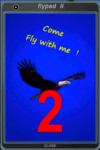
FSX, Flypad Gauge Version 2.0
This gauge has been developed on Win7 for FSX Flight Simulator SP2 or SP1.It should also work with Acceleration, but this is not guaranteed by the author. The gauge is a little extra addon based on the design of a smart phone and provides 9 different displays which are different from all of the standard gauge displays on a regular aircraft panel. It is mainly helpful for the user flying small propeller aircraft, and old timer aircraft.
However, the displays are as well attractive for sim pilots flying modern jet aircraft. Use it as if you just grabbed to your smart phone during a flight and check on the status of your aircraft, or how the terrain awareness situation looks like, how the AI traffic on the radar is, while you proceed with your flight plan. Enjoy the new design of a simple aircraft attitude display during an ILS approach. A new screen for LAT/LON coordination control and distance/bearing calculation has been added to this version in addition with a number of improvements.For credits look at the pdf documentation inside the zip file. By Dietmar Loleit
| Filename: | Flypad_Gauge_V20.zip |
| License: | Freeware |
| Added: | 2nd August 2014, 17:50:45 |
| Downloads: | 779 |
| Author: | Dietmar Loleit |
| Size: | 4 MB |
| Category: Flight Simulator 2004 - Gauges | |
| Autoland gauge v2.1 |
|
File Description:
FS2004 Autoland gauge Version 2.1. Provides full hands-off autoland capability for all airliners. Simple installation. By Martyn Becker, adapted and amended from original XML programming by Nick Pike. File size - 198kB
| Filename: | Autoland_gauge_v21.zip |
| License: | Freeware |
| Added: | 19th April 2008, 13:36:39 |
| Downloads: | 6,654 |
| Author: | Martyn Becker |
| Size: | 197.56 KB |
| Category: Flight Simulator 2004 - Gauges | |
| Afterburner Control gauge |
|
File Description:
This freeware gauge controls an aircraft's Afterburner:
(1): Includes an on/off switch and state-light.
(2): It prevents the Afterburner being activated if throttle < 95%.
(3): Controls a visible effect via the LOGO lights.
(4): Controls an audible Afterburner sound and switch-click sound.
Although it can be used for any aircraft with an Afterburner, the installation
instructions (with examples for two very popular aircraft) assume that
you have my Carrier Operation Package (file rcbco-20.zip) installed for that aircraft.
The README also explains how you can add real Afterburner thrust to your
existing aircraft, using AirEd.
By Rob Barendregt.
| Filename: | Afterburner_Control_gauge.zip |
| License: | Freeware, limited distribution |
| Added: | 20th February 2005, 18:09:57 |
| Downloads: | 4,584 |
| Author: | Rob Barendregt |
| Size: | 65.96 KB |


© 2001-2026 AVSIM Online
All Rights Reserved
Privacy Policy |