
Where Flight Simulation Enthusiasts Gather from Around the World!
AVSIM Library - Search Results

| Category: Flight Simulator X - Aircraft Repaints, Textures and Modifications | |
| Air Berlin Boeing 737 (Variety Package) |

|
Images related to this file:
File Description: The ZIP-file contains different
repaints of Air Berlin for the PMDG 737 NGX, including the Santa Claus Tour (Weihnachtsflieger)
and 35 years logojets. Installation instructions are included in the readme.
PMDG 737-800/900 Base Pack and 600/00 Expansion Pack are required. Accurate
airline options configuration and yoke checklist texture is included. UPDATE
INFO: aircraft configurations files have been updated to match its real world
counterparts. This file contains updated
a/c configs and replaces the following files: pmdg_737ngx_800wl_ber.zip
pmdg_737ngx_800wl_ber1.zip
pmdg_737ngx_800wl_ber2.zip
pmdg_737ngx_800wl_ber3.zip
pmdg_737ngx_800wl_ber4.zip
pmdg_737ngx_800wl_ber5.zip
pmdg_737ngx_800wl_ber6.zip

| Filename: | Air_Berlin_Boeing_737_Variety_Package.zip |
| License: | Freeware, limited distribution |
| Added: | 12th July 2014, 07:58:05 |
| Downloads: | 3,057 |
| Author: | Christian Mohr |
| Size: | 103.02 MB |
| Category: Flight Simulator X - Aircraft Repaints, Textures and Modifications | |
| Modification of the power table for the Continental IO-520-F Cessna CU206G Stationair 6 II de CARENADO. |
|
Images related to this file:
File Description:
New update of flight dynamics settings.
Corrected the indicated speed error (KIAS) vs the true speed (KTAS) according to the data suggested in the pilot's operating manual (POH).
In some cases the position of the center of gravity unladen weight is corrected for a better weight and balance of the airplane.
Actual direct references from Pilot Operations Manual (POH) for specific details, Power,
Nose or pitch position and weight and balance settings, airplane geometry, piston or turbine engine data,
propeller and everything that refers to references, also the real references of the manufacturers of sea engines whatever the specific case.
This model in particular, I am sure that the gauges have a difference error between what the indicator of
manifold pressure and actual airplane reading, similar case to the PA34 Seneca II, the RPM tachometer needle marked 2500 and the
Maus cursor on the tachometer said there were 2200 rpm.
In this modification of the Cessna CU206G Stationair 6 II there is still an error that could not be adjusted to what it says in manual
pilot operation (POH) because it is a gauge error and not an adjustment error in the .air file.
When the error is corrected it will be published together with a new and improved VC.
| Filename: | Modification_of_the_power_table_for_the_Continenta.zip |
| License: | Freeware |
| Added: | 15th April 2020, 18:48:28 |
| Downloads: | 147 |
| Author: | Rafael Ledezma |
| Size: | 642.83 KB |
| Category: Flight Simulator X - AFCAD Files | |
| CYWG - Winnipeg James Armstrong Richardson International Airport / Winnipeg, Manitoba, Canada |
|
Images related to this file:
File Description:
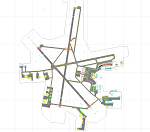
CYWG - Winnipeg James Armstrong Richardson International Airport / Winnipeg, Manitoba, Canada
This airport update was made with the latest version of ADE (Airport Design Editor) and made for FSX as a replacement for the stock (default) airport. I found that most stock airports in FSX lack a decent amount of character and realism and this area in particular was dreadful! The stock airport was rather inaccurate. I've made several additions to the airport which are listed below. All these enchancements are as close to the real airport as I can get with stock library objects. I've used satellite images, terminal photos and maps throughout the whole process so building locations are as accurate as possible. Happy landings in the beautiful Canada!
Features:
*Greatly expanded parking apron
*Brand new main terminal building with its 11 jetways and regional airline parking and parking garage
*Old terminal (soon to be demolished) with construction vehicles
*Hangar and other airport buildings added
*Cargo terminal with parking
*Military cargo area
*Airport vehicles and objects throughout the airport
*Main road in front of airport added with static vehicles
*Airport fire station with fire trucks
*Static de-icing area with vehicles
*Old runway 7/25 which was demolished in the 1990s and FSX inexplicably included has been removed
| Filename: | CYWG__Winnipeg_James_Armstrong_Richardson_Internat.zip |
| License: | Freeware |
| Added: | 24th July 2012, 08:12:46 |
| Downloads: | 2,967 |
| Author: | Jaison Diaz |
| Size: | 163.14 KB |
| Category: Flight Simulator X - AFCAD Files | |
| MTPP - Toussaint Louverture International Airport / Port-au-Prince, Haiti |
|
Images related to this file:
File Description:
MTPP - Toussaint Louverture International Airport / Port-au-Prince, Haiti
This airport update was made with the latest version of ADE (Airport Design Editor) and made for FSX as a replacement for the stock (default) airport. I found that most stock airports in FSX lack a decent amount of character and realism and this area in particular was dreadful! The stock airport was rather inaccurate. I've made several additions to the airport which are listed below. All these enchancements are as close to the real airport as I can get with stock library objects. I've used satellite images, terminal photos and maps throughout the whole process so building locations are as accurate as possible. Happy landings in Haiti!
Features:
*Expanded parking apron
*Seperate parking aprons for GA traffic
*Main terminal building with its 3 jetways
*Cargo area
*Hangars and other airport buildings added
*Airport vehicles and objects throughout the airport
*Corrected runway length and numbering
*Corrected taxiway signs
*Birds near the airport
*More ships and smaller fishing vessels added to the Port-au-Prince bay
*Fishing marina added in the bay
*Main road in front of airport added with static vehicles
*Parking lots with static vehicles
*Vegetation in front of airport
| Filename: | MTPP__Toussaint_Louverture_International_Airport__.zip |
| License: | Freeware |
| Added: | 15th July 2012, 06:44:51 |
| Downloads: | 1,170 |
| Author: | Jaison Diaz |
| Size: | 10.19 KB |
| Category: Flight Simulator X - Scenery | |
| Carrier CVN75_V2 North Sea |
|
File Description:
This is a update version of my scenery DL_CVN75.zip.
Changes in Version 2 of the cenery:
1.The Carrier model is now a private object and no longer part of the standard FSX object lib..
This allows the installation and registration in FSX scenery setting to be done like any
other addon objects.
The registration of the scenery in FSX below " Global, Generic & Vehicle Libraries" is no
longer required !!!!
2.Version 2 has more stuff on deck of the carrier.
3.The Number 75 is more accurate according to the real carrier.
4.The ILS frequencies ( e.g. GS) is more accurat adjusted in relation to the cable zone.
Scenery: Carrier Group North sea. Close to the Island of Sylt The Scenery includes: - The USS Carrier Harry Truman, CVN 75 with full function as an Airport with ILS approach capability.
F18-Fighters and a Navy-Heli on the Carrier. - 2 flying Helicopters over the Carrier. - 4 Navy-Destroyers escorting the Carrier. In addition to the Carrier-Group: - A Oilrig about 30 nm northwest from the Carrier. The Heli-Pat is a landable Platform !! - 2 moving Destroyer based on a "Boats Traffic Plan" which are moving around the group according to the time schedule in the plan.
| Filename: | Carrier_CVN75_V2__North_Sea.zip |
| License: | Freeware |
| Added: | 26th December 2008, 10:44:37 |
| Downloads: | 3,486 |
| Author: | Dietmar Loleit |
| Size: | 4.83 MB |
| Category: Prepar3D V1-4 - Scenery | |
| EDJA Allgäu Memmingen (DE) - V1 |
|
Images related to this file:
File Description:
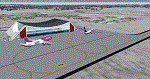
Airport: Allgäu (DE) EDJA V1
Release: January 2018
Simulation: P3D v4.1
This scenery is an update of the stock Airport (ICAO code: EDJA).
"Memmingen Airport (IATA: FMM, ICAO: EDJA), also known as Allgäu-Airport Memmingen, is an international airport in the town of Memmingerberg near Memmingen, in the Swabia region of Germany. It is the smallest of the three commercial airports in Bavaria after Munich Airport and Nuremberg Airport and has the highest altitude of any commercial airport in Germany. It is operated by Allgäu Airport GmbH & Co. KG, a limited partnership of 71 mostly local, medium-sized companies with only minor public shares.
Located about 3.8 km (2.4 mi) from the centre of Memmingen and 110 km (68 mi) from the city centre of Munich, it serves Memmingen and the Allgäu area and also provides a low-cost alternative to Munich Airport and therefore is sometimes referred to as Memmingen/Munich-West Airport or similar by some low-cost airlines, despite the fact that it is 110 kilometres from the centre of Munich. It mostly features flights to European leisure and some metropolitan destinations and handled nearly 1,18 million passengers in 2017."
Source: Wikipedia, the free encyclopedia
Link: https://en.wikipedia.org/wiki/Memmingen_Airport
What to expect?
The entire airport has been updated with correct RWY, Taxiways, APRON's, COMM's (ATIS, GND, TWR), markings and some objects. RWY 24 got it's ILS and go arround information acc. to the charts. The main Terminal is a custom building with custom day and night textures. Also all ground textures are custom made. Other objects INCLUDING the tower are from stock ADE!
In time I will add more custom buildings to further releases of this airport. Currently I have already started to work on the Tower building.
Ground textures will not receive shadows unless you turn "Buildings" receieve shadows to ON!
General:
I'm not a proffessional scenery builder or texture artist but I did try to do my best to update the stock Airport and offer it as freeware to the simming community. I have tested the scenery and did not find any issues with it. GSX services work, AI traffic with Ultimate Traffic Live works, COMM's work, APPR on ILS24 does work, and so on.
Entire work and object placing has been done using a photo overlay image from Google Earth, yet don't expect a photoreal scenery. The used background image has been removed due to Google's copyright policy.
Big thanks to the guys from FS Developer (Don, Arno) who I have kept busy during the birth of the scenery and those who offered the tools to build it (ADE, MCX, Sketchup, Gimp,...).
| Filename: | EDJA_Allgu_Memmingen_DE__V1.zip |
| License: | Freeware |
| Added: | 21st January 2018, 17:07:14 |
| Downloads: | 1,628 |
| Author: | Gerald Krutsch |
| Size: | 19.08 MB |
| Category: Flight Simulator 2004 - AI Flight Plans | |
| JetBlue Airways, Winter 2010 |
|
Images related to this file:
File Description:

Thank you for downloading my first flightplan set in well over two years. While I'm not entirely satisfied with the results of this effort, enough changes in destinations, liveries, and aircraft numbers should be sufficient for those seeking an update to the two year old plans currently available.
The schedule used in the compilation of this flightplan set came directly from Jetblue's desktop schedule. Note: These flightplans do not include any of the charter flights Jetblue is well known for but do include the new routes and frequencies to Jamaica and elsewhere. For painters, here is an opportunity to work on the new Jetblue livery, Blueberries; three of which are currently in the JBU fleet.
JetBlue Airways is an American low-cost airline owned by JetBlue Airways Corporation (NASDAQ: JBLU). The company is headquartered in the Forest Hills neighborhood of the New York City borough of Queens.[2] Its main base is John F. Kennedy International Airport, also in Queens. In 2001, JetBlue began a focus city operation at Long Beach Airport in Long Beach, California, and another at Boston's Logan International Airport, in 2004. It also has focus city operations at Fort Lauderdale, Washington-Dulles and Orlando International Airport. The airline mainly serves destinations in the United States, along with flights to the Caribbean, the Bahamas, Bermuda, Colombia, Costa Rica, Jamaica, and Mexico.
| Filename: | JetBlue_Airways_Winter_2010.zip |
| License: | Freeware |
| Added: | 14th December 2009, 22:49:10 |
| Downloads: | 939 |
| Author: | Mark Lupus |
| Size: | 71.65 KB |
| Category: Flight Simulator 2004 - Aircraft Repaints, Textures and Modifications | |
| KLM 1956-1960, Lockheed L-749A Constellation |
|
Images related to this file:
File Description:
First of all for those who installed the repaint package 'Lockheed L-749A Constellation KLM 1950-1955': I overlooked a mistake in the folder texture.KLM-1955-PHLDP. In this package you will also find a replacement bitmap.
KLM was a major European operator of various models of the Lockheed Constellation and Super Constellation. Out of 48 Connies and Super Connies, 11 were L-749 (8 of them later converted to L-749A) and 9 were L-749A Constellations. The first L-749 entered service with KLM in August 1947, and for some 13 years this and the other L-749(A) Connies served on various medium- and long-haul routes. By the end of the 1950's the career of KLM's (Super) Constellation started to come to an end with the arrival of the Douglas DC-7C and, introducing the airlines' jet-age, the DC-8.
Featured are KLM's PH-LDS 'Soerabaja' (1957 livery), PH-LDE 'Utrecht (1958 livery), PH-LDT 'Tilburg' (1958 livery) and PH-LDK 'Amsterdam' (1959 livery), both without and with "Speedpak" cargo pod. These are textures only. You will require Team 749's (Manfred Jahn & Co) Lockheed L-749 Constellation package (lockheed749.zip). Also required Team 749's Lockheed L-749 Constellation models update (749_models_update.zip). Repaints (based on Manfred Jahn's textures) by Maarten Brouwer.
| Filename: | KLM_19561960_Lockheed_L749A_Constellation.zip |
| License: | Freeware, limited distribution |
| Added: | 9th April 2010, 21:51:03 |
| Downloads: | 623 |
| Author: | Maarten Brouwer |
| Size: | 19.15 MB |
| Category: Flight Simulator 2004 - Scenery | |
| New Night Textures - Newark Liberty Intl (KEWR) |
|
Images related to this file:
File Description:
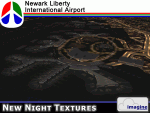
Some time ago, I purchased the Newark Liberty Intl (KEWR) by ImagineSim, but the night textures did not seem realistic. I set out to try to make them more so. This is the result of that work. Many of the scenery's night textures have been updated. The cargo areas for FedEx, UPS and UNITED Cargo now look much more realistic. The Marriott Hotel, the centerpiece of the airport and this scenery, looks considerably more realistic, as well as the terminals and the Continental Hanger and maintenance area. One of the nice unexpected results of this change is the light splash effect around the terminals; it definitely outlines the terminal area well. For those who own this scenery, I hope this enhances your flight experiences in and out of KEWR. For those who do not yet own this, but enjoy or would like to fly in and out of KEWR, it is now considered a legacy product by ImagineSim. As a result, the price was cut considerably and for a few shillings and this update, you'll have a nice addition to the airports in your FS2004 environment. I dedicate this work to all the controllers of VATSIM NYARTCC. I hope this brings more traffic your way. I want to thank ImagineSim for giving me permission to release these textures. See Readme.txt for installation instructions.
| Filename: | New_Night_Textures__Newark_Liberty_Intl_KEWR.zip |
| License: | Freeware, limited distribution |
| Added: | 27th October 2012, 03:48:59 |
| Downloads: | 2,293 |
| Author: | Jeffrey S. Bryner, Imagine Simulation |
| Size: | 1.97 MB |
| Category: Flight Simulator 2004 - Aircraft Repaints, Textures and Modifications | |
| Mega Maldives Airlines B737-800 |
|
Images related to this file:
File Description:
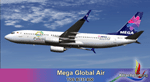
MEGA Maldives Airlines has introduced a Boeing 737-800 aircraft to its fleet as part of its fleet modernization drive.The aircraft is just over 4 years old with 12 business class seats and 156 economy class seats with the latest Boeing Sky interior and new extra fuel saving “split scimitar†winglets. It is part of an overall strategy for the airline to update and re-structure its fleet over the next year. The aircraft will support MEGA’s plans for increased connectivity between the Maldives and short to medium range markets. This includes India and Sri Lanka, with new routes starting within the 4th quarter. MEGA also plans to restart its Kuala Lumpur and Jeddah routes, although these routes will operate primarily on larger 767 aircraft in MEGA’s existing fleet. he new B737 aircraft is wet-leased from Czech operator Travel Services, but will fly in the MEGA Maldives Airlines colours and livery and MEGA Maldives cabin crew will service the flight onboard. This is the third time MEGA has wet-leased an aircraft from Travel Services. Furthermore, in support of the national drive to increase tourism, the aircraft also sports the “Maldives – sunny side of life†logo prominently. Texture only for the TDS Boeing 737-800 model. please visit us on Facebook ktrachosim for more textures and flight plans.
| Filename: | Mega_Maldives_Airlines_B737800.zip |
| License: | Freeware |
| Added: | 9th October 2016, 04:21:41 |
| Downloads: | 350 |
| Author: | Luis Flores | Tenkuu Developers Studio |
| Size: | 9.17 MB |


© 2001-2026 AVSIM Online
All Rights Reserved
Privacy Policy |