
Where Flight Simulation Enthusiasts Gather from Around the World!
AVSIM Library - Search Results

| Category: Prepar3D V1-4 - Scenery | |
| Papua New Guinea - Long island (LSJ) |

|
File Description:
A bush strip and village on a volcano island 75 nm East of Madang (AYMD). Made in v3, OrbX Global and Vector. To check compatibilities, zipdive to see the "instructions" or go to the Long Island post at http://strips.proboards.com/board/3/sceneries where you'll also find about a dozen screenshots.
| Filename: | Papua_New_Guinea___Long_island_LSJ.zip |
| License: | Freeware, limited distribution |
| Added: | 26th February 2017, 07:29:29 |
| Downloads: | 929 |
| Author: | Dominique KLEIN |
| Size: | 8.21 MB |
| Category: Orbiter - Miscellaneous Files | |
| Orbiter .msh File Export / Import Scripts for Gmax |
|
File Description:
Script files for exporting and importing Orbiter .msh from/to gmax. View readme.txt for additional information!
| Filename: | Orbiter_msh_File_Export__Import_Scripts_for_Gmax.zip |
| License: | Freeware |
| Added: | 10th July 2003, 22:40:22 |
| Downloads: | 623 |
| Author: | Alexander Blaß |
| Size: | 7.48 KB |
| Category: Flight Simulator 2004 - Panels | |
| Turboprop Dual Panel V2 |
|
File Description:
Updated Turboprop Dual Panel with gauge popup windows for easier viewing. This panel allows switching from Captain view to First Officer view while still in the cockpit. Originally designed for the Dash8 Q400, this panel is great for transitioning to
jet aircraft while retaining full turboprop functionality. FSnet users now can freely
switch to the other side of the aircraft without affecting the other pilot's view. Just a
quick click on the panel selector switch and you are in the other seat.
| Filename: | Turboprop_Dual_Panel_V2.zip |
| License: | Freeware, limited distribution |
| Added: | 2nd February 2006, 02:54:17 |
| Downloads: | 2,726 |
| Author: | Rick Milne |
| Size: | 592.28 KB |
| Category: Flight Simulator 2004 - Aircraft Repaints, Textures and Modifications | |
| Discover Airlines "Next level entertainment on board" Airbus A320-214 (D-AIUQ) |
|
Images related to this file:
File Description:

This is a repaint of the excellent Project Airbus A320-214 (WL), in Discover Airlines "Next level entertainment on board" livery, D-AIUQ. Model included. The textures are saved in 32 bit format for quality graphics. Shine effect. Wonderful night textures by Adam Hamada. Contains accurate model with details such as: opening passenger and cargo doors, animated pack inlets and outflow valves, all operable control surfaces, detailed flap tracks and slat rails, hydraulics modelled on spoilers, landing gear doors and many more. For updates visit the website of Project Airbus: www.pafs.wf Works in FS9 and FSX.
| Filename: | Discover_Airlines_Next_level_entertainment_on_boar.zip |
| License: | Freeware |
| Added: | 18th June 2024, 12:19:24 |
| Downloads: | 207 |
| Author: | Stefan Bree, Project Airbus |
| Size: | 14.06 MB |
| Category: Flight Simulator X - Aircraft Repaints, Textures and Modifications | |
| AirAsia Airbus A320-216 (QZ8501) |
|
Images related to this file:
File Description:
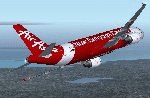
FSX Airbus A320-216 (PK-AXC) operated by Indonesia AirAsia. Indonesia Air Asia Flight 8501 (QZ8501) is a flight that went missing en route to Singapore from Surabaya, Indonesia, on 28 December 2014 with 155 passengers and 7 crew on board. Model by Project Airbus. Repaint by Alan. Assembled by Alan de Jager.
| Filename: | AirAsia_Airbus_A320216_QZ8501.zip |
| License: | Freeware, limited distribution |
| Added: | 29th December 2014, 15:34:56 |
| Downloads: | 927 |
| Author: | Alan de Jager |
| Size: | 50.33 MB |
| Category: Fly! II - Miscellaneous Files | |
| Piper PA-28-161 Warrior II Checklist |
|
File Description:
I created this checklist while taking flight lessons in a Piper Warrior II. I thought it would be nice to share with my fellow Fly!ers for use on ROTW's PA-28-161's. The size is designed to fit on a typical knee-board. File is in Microsoft Word XP format.
| Filename: | Piper_PA28161_Warrior_II_Checklist.zip |
| License: | Freeware |
| Added: | 16th January 2004, 14:08:43 |
| Downloads: | 261 |
| Author: | David Kohl |
| Size: | 9.89 KB |
| Category: Flight Simulator 2004 - Panels | |
| X55 Panel idea |
|
File Description:
Trying to create a panel to deploy the drone X55 A of Mr Katzunori Ito.
I am thinking about miniaturized gauges directly using at ground by special
cameras on board. You can send me messages for explanation (see read-me file for details). The Dookalycraft is company of airlines and design aircraft. Enjoy !
| Filename: | X55_Panel_idea.zip |
| License: | Freeware |
| Added: | 15th April 2007, 15:57:54 |
| Downloads: | 111 |
| Author: | Hassan Doukkali |
| Size: | 594.15 KB |
| Category: Flight Simulator X - Aircraft Repaints, Textures and Modifications | |
| T-34C of the US Army (USAABNSOTBD) at Ft. Bragg, NC in 1988 |
|
File Description:
This is a repaint of Alphasim's excellent T-34C. These textures represent a T-34C of the US Army assigned to the United States Army Airborne & Special Operations Test Board (USAABNSOTBD) at Ft. Bragg, NC in 1988. THESE ARE TEXTURES ONLY! You need the ALPHASIM "T-34C Turbo Mentor" FSX payware package.
| Filename: | T34C_of_the_US_Army_USAABNSOTBD_at_Ft_Bragg_NC_in_.zip |
| License: | Freeware, limited distribution |
| Added: | 9th November 2008, 22:25:36 |
| Downloads: | 253 |
| Author: | Russel R. Smith, Frank Safranek and Alphasim |
| Size: | 1.32 MB |
| Category: Flight Simulator X - Utilities | |
| FS Remote version 1.0 |
|
File Description:
Email: [email protected]
Name: Hans Elzer
Current version 1.0
Version 1.0 contains various little bug fixes plus Fuel management in the Engines dialog
FS-Remote a utility for remotely controlling FSX
The Zip file contains:
* Readme text file
* .NET 2.0 FS-Remote executable
* Configuration file for FS-Remote
* Document file in MSWord format
What you need to run FS-Remote:
* .NET 2.0 or 3.0 installed on the computer where you want to run FS-Remote
* FSUIPC4 (registered) on the computer where you run FSX
* WideClient (FSUIPC4 FSWide remote) if you want to run FS-Remote on a remote computer
It does what the title says FS-Remote controls FSX remotely through FSUIPC.
Just take a look at the (word) document that is contained in the zip file and look at some screen shots.
It can view and control the following items in FSX through FSUIPC:
* Aircraft - Control aircraft switches like Lights, Doors, Pushback, De-Ice and Jetway plus call fuel truck
* Auto Pilot - Control auto pilot switches plus reset altimeter and heading indicator instruments
* Radio - Control radio stack switches and push buttons plus view navigation status information
* Attitude - View attitude information and warnings plus convert and view various items in feet, meter, knots, mph and km/p
* Engines - Control engines auto start and stop plus fuel management
* Weather - not implemented jet (next version)
* Environment - View the local date, time and position environment information
* Date Time - Control and view the flight simulator date and time
* Message - View and send messages to flight simulator message bar
* FPS - View real-time flight simulator frames per second FPS rate
* About - View version information about FS-Remote, FSUIPC4 and FSX
Hope that you like it.
| Filename: | FS_Remote_version_10.zip |
| License: | Freeware |
| Added: | 9th September 2007, 15:26:14 |
| Downloads: | 1,439 |
| Author: | Hans Elzer |
| Size: | 353.2 KB |
| Category: Flight Simulator X - Utilities | |
| FSRemote 2.0 |
|
File Description:
Current version 2.0
Version 2.0 contains a new more graphical interface
Version 1.0 contains various little bug fixes plus Fuel management in the Engines dialog
FS-Remote a utility for remotely controlling FSX
The Zip file contains:
* Readme text file
* .NET 2.0 FS-Remote executable
* Configuration file for FS-Remote
* Document file in MSWord format
What you need to run FS-Remote:
* .NET 2.0 or 3.0 installed on the computer where you want to run FS-Remote
* FSUIPC4 (registered) on the computer where you run FSX
* WideClient (FSUIPC4 FSWide remote) if you want to run FS-Remote on a remote computer
It does what the title says FS-Remote controls FSX remotely through FSUIPC.
Just take a look at the (word) document that is contained in the zip file and look at some screen shots.
It can view and control the following items in FSX through FSUIPC:
* Aircraft - Control aircraft switches like Lights, Doors, Pushback, De-Ice and Jetway plus call fuel truck
* Auto Pilot - Control auto pilot switches plus reset altimeter and heading indicator instruments
* Radio - Control radio stack switches and push buttons plus view navigation status information
* Attitude - View attitude information and warnings plus convert and view various items in feet, meter, knots, mph and km/p
* Engines - Control engines auto start and stop plus fuel management
* Weather - not implemented jet (next version)
* Environment - View the local date, time and position environment information
* Date Time - Control and view the flight simulator date and time
* Message - View and send messages to flight simulator message bar
* FPS - View real-time flight simulator frames per second FPS rate
* About - View version information about FS-Remote, FSUIPC4 and FSX
Hope that you like it.
| Filename: | FSRemote_20.zip |
| License: | Freeware |
| Added: | 9th November 2007, 22:24:52 |
| Downloads: | 1,674 |
| Author: | Hans Elzer |
| Size: | 620.8 KB |


© 2001-2026 AVSIM Online
All Rights Reserved
Privacy Policy |