
Where Flight Simulation Enthusiasts Gather from Around the World!
AVSIM Library - Search Results

| Category: Flight Simulator 2004 - Aircraft Repaints, Textures and Modifications | |
| Red Devils BN.2T Islander Package for AI |

|
File Description:
Repaint and representative AI flightplans for BN.2 Islander G-ORED. The Red Devils, who operate G-ORED, are the parachute display team of the British Army's Parachute Regiment. Requires Henry Tomkiewicz's AI BN2 Islander.
| Filename: | Red_Devils_BN2T_Islander_Package_for_AI.zip |
| License: | Freeware |
| Added: | 26th November 2004, 08:29:27 |
| Downloads: | 607 |
| Author: | Henry Tomkiewicz, Ismet Mustafic & Chris Evans |
| Size: | 91.07 KB |
| Category: Flight Simulator 2002 - Gauges | |
| Real AP V1.1 (Autopilot Upgrade) - Auto Rudder |
|
File Description:
This is the update of my "Real AP V1.0" on "Auto Rudder" function. This gauge adds Auto Rudder System into the default Autopilot Yaw Damper System. Auto Rudder will be automatically engaged when Yaw Damper is engaged. When the Yaw Damper is disengaged, you have control of the rudder pedal!! This gauge simply adds this function to the default Yaw Damper, simulating "Rudder Coordination System" of the Boeing jets.
| Filename: | Real_AP_V11_Autopilot_Upgrade__Auto_Rudder.zip |
| License: | Freeware, limited distribution |
| Added: | 29th August 2002, 21:48:22 |
| Downloads: | 981 |
| Author: | Jun Kawamura |
| Size: | 183.35 KB |
| Category: Flight Simulator 2004 - Gauges | |
| MeatWater FO Altitude Callouts v1.0 |
|
File Description:
I sat down and built a gauge that does just that: it provides altitude callouts from 1.000ft down to ten, however not a computerized voice but a normal voice that sounds as you would hear it over the intercom. Your virtual PNF will make altitude callouts beginning with 1.000ft, then 500, 400...100, 50, 40...10
The callouts will not sound during climbout! The gauge is activated once the aircraft has reached an altitude of 1.500ft AGL.
It can be used with any aircraft!
| Filename: | MeatWater_FO_Altitude_Callouts_v10.zip |
| License: | Freeware |
| Added: | 30th April 2006, 02:14:55 |
| Downloads: | 28,939 |
| Author: | Nick Schreger, MeatWater |
| Size: | 388.09 KB |
| Category: Flight Simulator 2004 - Aircraft Repaints, Textures and Modifications | |
| EMB-120 Mo Sky livery texture fix |
|
File Description:
Updated texture file for the Mo Sky EMB-120. This small file fixes the text on the fuselage to display the airline's lettering properly.
| Filename: | EMB120_Mo_Sky_livery_texture_fix.zip |
| License: | Freeware |
| Added: | 15th June 2006, 04:05:06 |
| Downloads: | 86 |
| Author: | Randy Short / Project Embraer |
| Size: | 159.36 KB |
| Category: Flight Simulator X - Miscellaneous Files | |
| Quality Wings 787 - Additional maps for CANADA |
|
Images related to this file:
File Description:

This package included 10 airport for canada displayed on Qualitywings 787 Navigation Display ND CYVR, CYYC, CYEG, CYWG, CYYZ, CYOW, CYUL, CYHZ, CYYT, CYYJ
| Filename: | Quality_Wings_787__Additional_maps_for_CANADA.zip |
| License: | Freeware |
| Added: | 18th February 2018, 21:05:00 |
| Downloads: | 1,051 |
| Author: | Mohamed Fawzi |
| Size: | 567.28 KB |
| Category: Flight Simulator 2004 - Panels | |
| Boeing 767-400 Panel |
|
File Description:
A reworking of my previous FS9 767-400 panel. This version incorporates the iSG EFIS,EHSI,TCAS,MCU, Smiths FMC and default gauges into a realistic and frame rate friendly all-glass 767-400 2-D panel. THERE IS NO VIRTUAL COCKPIT!! Works nicely with the lovely Project Opensky 767-400. This is a panel configuration file only. You must have BOTH the POSKY 767-400 aircraft AND the payware iSG gauges installed on your computer for this to work. Modifications For FS9 only by Alex Christoff.
| Filename: | Boeing_767400_Panel.zip |
| License: | Freeware |
| Added: | 25th March 2009, 08:35:13 |
| Downloads: | 1,228 |
| Author: | Alex Christoff |
| Size: | 1.1 MB |
| Category: Flight Simulator 2004 - Gauges | |
| DR-2 Flight Calculator |
|
Images related to this file:
File Description:
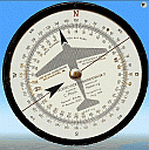
DR-2 flight calculator gauge for Fs2004. Flight calculator ("Dreieckrechner") DR-2 is a powerful calculator to solve most common VFR navigation problems, i.e. solution of Wind Triangle problem, Time, Speed and Distance problem, fuel comsumption calculation etc.
| Filename: | DR2_Flight_Calculator.zip |
| License: | Freeware, limited distribution |
| Added: | 22nd February 2012, 15:56:16 |
| Downloads: | 431 |
| Author: | Alexander Belov |
| Size: | 931.36 KB |
| Category: Flight Simulator 2004 - Sounds | |
| Replacement callout for FPDA Airbus A330/340 Altitude Callout Gauge |
|
File Description:
Replacement sound files for the missing 400ft and 300ft callout's for FPDA's Airbus A330/340 Altitude Callout Gauge. I've also included a bonus file with the "retard" callout which can be used by replacing the 10Ft file. Enjoy!
| Filename: | Replacement_callout_for_FPDA_Airbus_A330340_Altitu.zip |
| License: | Freeware |
| Added: | 2nd March 2006, 15:02:19 |
| Downloads: | 5,340 |
| Author: | J G |
| Size: | 754.96 KB |
| Category: Flight Simulator 2004 - Panels | |
| F111 Panel.V2.0 |
|
File Description:
FS9 Alphasim F-111 Panel Version 2.0
Features for FS9
It includes a updates to the VFR, IFR and virtual cockpit.
Updated cockpits for the FB-111A cockpit with old Avionics package.
I have cleaned up and changed some of the gauge graphics.
I have made improvements to the virtual cockpit cleaning up the graphics, and repositioned some gauges for a better fit to the panel.
Terrain Following Radar.
Traffic Radar presented as Threat Warning Scope.
More realistic afterbunner colors.
Antenna graphics added to FB-111A nose side panels.
New 'Sleepy Time Gal' and 'Spirit of the Seacoast' graphics.
Now with install program.
| Filename: | F111_PanelV20.zip |
| License: | Freeware |
| Added: | 18th February 2007, 19:06:02 |
| Downloads: | 1,511 |
| Author: | Steve Hess |
| Size: | 6.99 MB |
| Category: Flight Simulator 2004 - Gauges | |
| Digital Stop Watch |
|
File Description:
This is a Digital Stopwatch for FS2004 which reads in
Hours:Minutes:Seconds
It has a Start/Stop function and a Reset function.
The output is linked to the Simulator clock variable:
If you pause the simulation the timer pauses.
If you change the simulation rate the timer rate changes accordingly.
If you stop the clock then the display remains visible at the stop time.
If you re-start it continues counting from where you stopped.
(There is no 'lap' function)
Pressing RESET zeros the display and stops the clock.
Created by Jim Cooper of Simshed (www.simshed.co.uk)
| Filename: | Digital_Stop_Watch.zip |
| License: | Freeware, limited distribution |
| Added: | 19th April 2006, 04:14:33 |
| Downloads: | 1,325 |
| Author: | Jim Cooper |
| Size: | 43.13 KB |


© 2001-2026 AVSIM Online
All Rights Reserved
Privacy Policy |